In this tutorial, Yoyao Hsueh demonstrates how SEO professionals can leverage both Google and YouTube autocomplete to uncover distinct audience intents and fill gaps in a topical map. He first shows a manual, incognito‑window method: entering a seed keyword (e.g., "email marketing" or "guitar") in Google and YouTube side‑by‑side, observing that Google suggestions lean toward reading‑oriented queries (definitions, comparisons, job titles) while YouTube suggestions lean toward watching‑oriented queries (tutorials, walkthroughs). By adding modifiers such as "how" or "for", the two lists begin to converge, revealing specific audience segments and sub‑topics that may be missing from a content plan. Hsueh then explains why building a content plan from the bottom up (sorting keywords into buckets) is backwards; instead, the topical anchor (the core subject) should drive research, and autocomplete data should be used to populate sub‑topics. To scale this process, he walks through Flowe’s topical research tool, which automatically pulls live Google and YouTube autocomplete suggestions for every sub‑topic under a defined anchor, groups them, and lets the user select which to keep. The tool also runs AI‑powered search‑gap analysis (using ChatGPT, Google Gemini, etc.) against buyer‑persona prompts to surface additional topics that autocomplete missed. The combined workflow—dual‑source autocomplete, modifier‑driven alignment, Flowe’s bulk extraction, and AI gap filling—produces a comprehensive, up‑to‑date topical map ready for both text and video assets. The video ends with a call‑to‑action to try Flowe and a reminder to regularly compare Google and YouTube autocomplete in incognito mode.
Chapters
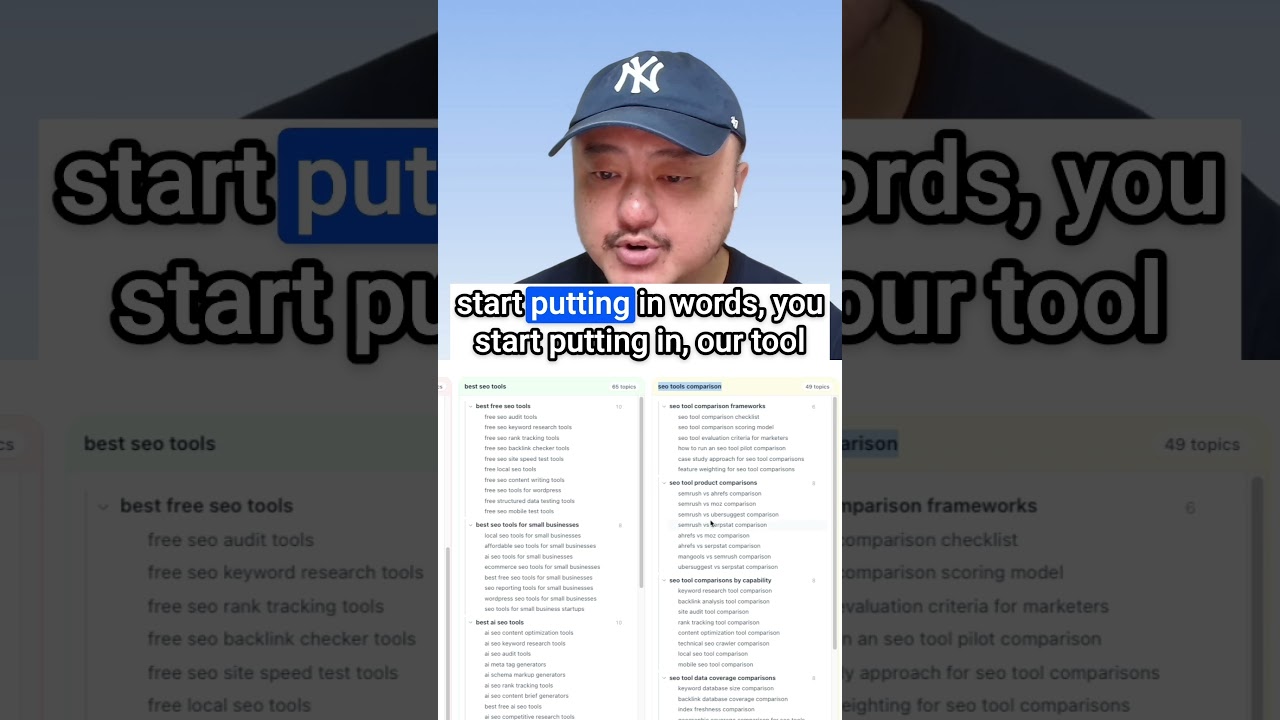
Every SEO uses Google Autocomplete for keyword ideas, but most stop there. There's a second autocomplete source showing you a completely different layer of what your audience wants, and the 2 lists rarely overlap. In this video, I'll show you how to pull from both, read the intent behind each one, and feed it back into your topical map to fill the topic gaps. Let me show you the manual way first. So you can do this with zero tools. Then I'll show you how to do it across your whole map at once at scale. Let's open an incognito window. This matters because your normal browser personalizes autocomplete based on your history. Autocomplete gives you closer to what a stranger sees, which is exactly what you want for research. Let's take a look at the 2 main sources that people go to. So we have Google's autocomplete and then we have YouTube autocomplete. Let's go ahead and type in a keyword here. Let's type in email marketing. You could see the autocomplete here. So we have email marketing platforms, email marketing jobs remote, email marketing tools, specialist, manager, example software templates. Now let's type the same keyword into YouTube. Let's go ahead and just copy paste here. And we could see what it looks like in YouTube. Email marketing for beginners, full course strategy agency 2025, Shopify course design platform for e-commerce, and so on. We have the same email marketing keyword in both. 2 lists. See how little they share. I don't think there's actually any overlap here. Well, email marketing manager. So you can see Google's leaning one direction and YouTube is leaning another direction. And I haven't typed a single modifier to push the results in one way or the other. Let's take a look at another keyword, guitar. Here we have guitar tuner, guitar, guitar chords, tabs, Guitar Hero, center near me. Now let's take a look at YouTube and we can see guitar tuner, lessons for beginners, backing track, type beat, tutorial, songs, tabs. There's a little bit more overlap, but you can see that both lists still go in different directions. Now, the second you add a modifier like how or for, you force the intent and both engines start agreeing with each other. The platform gap closes. Let's take a look at guitar for. So you can start seeing the overlap a little bit more here. You can see guitar for beginners right off the bat. You have guitar for kids. Guitar for dummies, guitar for toddlers. All right. So you start seeing the overlap because you're forcing the search intent here. For this comparison, we're still keeping it to the bare seed, which is guitar and email marketing. So that it gives you a sense of what these 2 platforms give you. They give different directions for intent. And once you know which direction a platform is leaning, That's when you can expand the lists with modifiers like how and for or best versus. That's expansion within one source. And the bare seed is what tells you where the 2 platforms disagree. There are tools that have pulled autocomplete for years, right? This isn't a secret. What's rare is comparing the 2 sources at the root and reading the intent gap between them. And that's the work that you've been doing manually, right? You go into each platform, you put in your seed keywords and you go after the autocomplete. So you've seen the 2 lists disagree. Now let me show you what that disagreement actually means, because that's where things become more useful. Let's go back to our email marketing keyword. Here's where the 2 lists differ. And what they're telling you is that Google Autocomplete, they lean towards queries where people are reading the results, where users are reading definitions, comparisons, looking for jobs and different specs for software. Where YouTube Autocomplete leans towards queries where people want to watch. You have tutorials, walkthroughs for beginners, more step-by-step things. They're learning by watching and listening to someone actually do it. Now, when the same topic shows up strong in both lists, that's not a redundancy. That's the signal that it needs both formats, text and video. So an article for the readers, a video for the watchers. Same topic, 2 assets. Now let's watch the for modifier pattern. So we have email marketing for, and then we have email marketing for. We can see the beginners. We can see the e-commerce, real estate agents, small business. You can see a lot of the overlap here. Every one of these is a specific audience segment that your topical scope might be missing. If your topical map doesn't have a branch for that segment and the demand is real, as we can see in the autocomplete, that's a gap worth filling. Here's what you don't do. Don't take these queries and build a content plan from the bottom up, sorting these keywords into buckets until a strategy appears. That's backwards. Your topical anchor is in this case, email marketing and your scope decide what your site is about. These autocompletes tell you which real subtopics live inside that scope and what each format needs. Your anchor leads and the research fills in the gaps. Doing this by hand, a couple seeds at a time, it's fine for spot checking. But doing it across every topic you want to own would take days or even weeks. Here's how to do it across the whole thing at once at scale. We're in Flowe's topical research now, where I've already defined my core topic here, which is my topical anchor. That's the central subject this brand wants authority on. And it's the scope that I want to own around it. And just as we showed in the Google and YouTube autocompletes, The autocomplete research is grounded by this anchor of SEO tool. It surfaces the real subtopics that live inside that scope. And that's what becomes the topical map. The anchor leads and the research fills in around it. And the map is the output, not the starting point. In topical research, Flowey will pull in the live Google and YouTube autocompletes across every single one of these subtopics in my scope at once grouped together. So instead of one seed at a time in incognito mode, I get the full picture in one pass. So let's take a look. Our topical anchor of SEO tool. I've generated the main topics and we have a few here. And once I click generate subtopic 2 and subtopic 3s, this is where each area will show the real autocomplete suggestions tied to it from both sources, YouTube and Google. And I could see at a glance which areas have rich demand and which are thin. Now I'm the one deciding what makes the cut. So I selected suggestions worth keeping and they flow into the map as subtopics. The tool gives me options and I decide on what to keep. Let me click to generate. So let's give it a moment to generate all the subtopics to each of these main topics and all the subtopics to each of those subtopics. That we're creating 2 levels of subtopics. And as they generate, they will also go through and find the Google autocompletes and the YouTube autocompletes to fill in the gaps that are missed. Let's give it a minute and we'll come back to this when it's done. All right. So the topical research is done. Let's take a look at some of the results and what kind of autocompletes we are getting. So you can see with this view, I'm going to switch views because this is a bit harder to read. We're going to use the silo view. We're going to be able to look at the various main topics up here. So we can take a look at the SEO tools comparison. And this is where I'm sure a lot of you are familiar with the Google autocompletes, where you start putting in words, you start putting in our tool name, and then you add the VS, and then you get all of these autocompletes. A lot of these autocompletes are ones you're not going to get when you put them into AI, like ChatGPT or Claude. These are a lot of different lists that you're only going to get in real time with Google autosuggest and autocomplete. And that's why these tools are so helpful. So here we also have best SEO tools for small businesses. And then under best SEO tools main topic, we have, let me collapse these. We have the various subtopics under them. And these also went through Google autocomplete. So you could see the best SEO tools for the top queries that people are putting in right now in Google and YouTube. So we have best SEO tools for small businesses, best free, best AI SEO, content writers, for e-commerce stores, for YouTube creators, and by audience. And then you have, look at SEO tool use cases. We have Keyword research with SEO tools, site auditing, backlink analysis, content optimization, technical SEO, local SEO, e-commerce SEO. And I just mentioned a second ago that these autocompletes are what will not be surfaced with your AI, through ChatGPT and Claude and Perplexity. But that's where AI now comes in. This is where we can find search gaps with AI because they return synthesized answers from various sources across the web. They are answering the question using the sources that they have versus using training data and trying to come up with all of these subtopics and topics. This is where we have the AI search gaps feature. Go through and find all of the gaps. Let me do a new search. Here's what we do with the search gaps. We've selected buyer personas here. We only have one buyer persona. What they're going to do is they are going to query the different AI search engines that you choose. Here we have ChatGPT, Google Gemini, and Google AI Mode. Let's go with Google AI Mode and find the AI search gaps. Google AI Mode is now generating the queries that matter to your buyer personas based on the detailed persona data points generated during the audience insights phase. They're not generalized, they're specific. So now they've generated the persona prompts. They're selecting the best prompts to use to find the gaps. And then they're asking questions. We're going to be extracting the topics and then matching it against the topical research that we've done here to find the gaps. Let's give it a minute and we will come back. Now we're back. We have the AI search gaps. You can see here the topical authority with SEO tools, content attribution with SEO tools, content ROI reporting. A lot of these are ones ones that just did not come up with our Google autocomplete, because you saw that Google autocomplete, YouTube autocomplete only gave you a certain number of answers. And these are the topics that were covered by our selected AI mode responses. You can see a lot of these are actually important topic modeling, keyword prioritization scoring. Search opportunities, ranking potentials, transactional keywords, comparison keyword research with SEO tools. So a lot of these are really important that only surfaced because we used AI Search as an add-on to find the gaps within the Google autocompletes and YouTube autocompletes. Hmm. So it surfaced 25 different gaps and 62 subtopics. So we can just Add all of them in here. Now they're all added in. You can see topical authority with SEO tools. Let's do a copy of that and find where it is. Here it is. You can see the G's over here represent the AI search gaps. You could see the topical authority with SEO tools and then the ones under it. Content brief workflows, topic modeling, rich snippet opportunities. Same thing. You can see how they find all of the gaps here. And we can expand them all. Let's see where all the other gaps are. Over here. Lots of gaps all around. So that's the whole topical research workflow here within Flowe. That's the workflow that you would do yourself as well. You would start with using your ChatGPTs and ask it, help me create a topical map. For SEO tool as your core topic. It would give you a big list of tools, but all of those topics are based off of its training data, which is old and outdated. And that's where Google autocomplete and YouTube autocomplete come into play because they give you the latest information, the latest queries that people are asking right now. You use those to fill in your AI gaps. Then you use your AI search to fill in the gaps from your Google and YouTube autocompletes. So you're using AI to Google, YouTube, and then again with AI search. Let me leave you with something to do tonight. So you have 2 sources to focus on: Google autocomplete, YouTube autocomplete. Google shows you what people want to read and YouTube shows you what people want to watch. The gap between the two is the demand that most SEOs don't see. Open an incognito window, open up Google and YouTube, put them side by side like I did. It's really easy now in Chrome. Put your main keyword into Google, then put your main keyword into YouTube and compare the two autocomplete lists. Find the ones that, you know, you don't have in your initial research. Find the topic gaps and fill them in with your autocompletes. And if you want to try Flowe's topical research, go ahead and sign up for a free account. Link's in the description. Open up Flowe, start your project by creating your brand foundation and your buyer personas, and then start your topical research. Pull from both sources of Google and YouTube autocompletes. And then pull from AI search to fill in the gaps even more. Subscribe for weekly content strategy and topical authority workflows. See you in the next one.