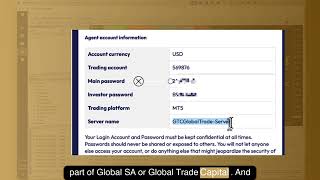
In this instructional video, Alan Solarsh walks viewers through the complete process of linking a broker account to the MetaTrader 5 (MT5) platform running on a virtual private server (VPS). He begins by directing users to locate the activation email that contains the trading account number, main password, investor password, and server name. After logging into the VPS, he shows how to open MT5, pin it to the taskbar, and add the broker’s server address to the MT5 server portal using copy‑paste shortcuts for both Mac and Windows. Viewers then connect an existing account by entering the extracted credentials and completing the wizard. The tutorial explains how to verify a successful connection by checking the green network bar and journal messages in the bottom‑right corner. Alan also covers common issues such as broker server upgrades, missing server listings, and copy‑paste errors that introduce stray spaces, offering troubleshooting steps and a method to select the lowest‑latency server via the Network Scan tool. Throughout, he encourages users to pause the video to perform each step and to seek help in the Discord EA setup group if they encounter problems.
Chapters
This video tutorial explains to you how to connect your broker account to the MetaTrader 5 platform. The first thing that you need to do is you need to go and find the email in your email that says here your agent account is now active. Within this email you have your trading account number, your main password, your investor password, and your— and the, and the server name. So now what we're going to do is we're going to help you to connect your broker account to the MetaTrader 5 on the VPS. The first thing I'd like you to do is, is to log into your VPS. So please pause the video, go and log into your VPS now. Once done, you can come back to this video and resume the video.
The first thing I want you to do is double-click on MetaTrader 5.
The program will open, give it a little bit of time, and then once the program opens, you can pin it to your taskbar for future. So over here, you just right-click and you say Pin to Taskbar. The next step that you need to do is you need to add the server to the MetaTrader 5 server portal. So you need to go back to your email, you need to copy this address over here. I use my shortcut on a Mac, it's Command+C, and on a Windows machine, it's Ctrl+C, then go here, I click in this field and I paste the server, and then I press on the Enter button.
So please pause the video, please go and do those steps now.
Once done, you can come back to this video and resume the video. The next step is to click Next, and then over here it says, yeah, connect to an existing account, and you click that, and then you can enter the details that you got from the email. Command+C again for your trading account, and then you can paste your password, which is your main password, into this field over there. Then you can click on Finish. Please pause the video, go and do those steps now. Once done, you can come back to this video and resume the video.
To understand if you're connected to If you've connected your Forex account to MetaTrader 5, what you need to do is that you need to scroll down here to the right-hand corner to see that there is like little green bars here and it doesn't say 0/0. If it says 0/0, it means that you're probably not connected to the broker. And you can go here to journal and it'll say here invalid account or something to that effect. Now what has come to our attention is that the broker often upgrades their servers. Now we noticed that the server 3 is not coming through over here, so when we click this down, you may not have server 3. So in your email Some of you have got Global SA, some of you have got Server 2, some of you have got Server 1, some of you have got Server 3. Now if your server is not listed here, what you need to do is you just go back here, you click on the back button, and over here you type global and you wait for it to populate. Or you can say find my company. Then you'll get all the different brokers here, okay? And then you'll choose whichever GTC is relevant to you. It says there in your email under the servers what you're part of, whether you're part of Global SA or Global Trade Capital. And then you'll just click on here, click next, and then enter your details as you got them within your email. Or if you're upgrading, or we've, we've upgraded the servers and you have changed your password, then you'll put in your password over there, drop this menu down, click on the relevant server for you, and then click on Finish. Now, if you've deleted the email and you don't know which server it is, it's probably the latest server. So currently we're on Server 3, but later on when you join, maybe there'll be other servers 4, 5, 6, 7. That have been added. So it'll normally be the last one that has been added. So if there's a 7 there, then you're probably server 7. If you have any questions relating to this, please ask on the Discord EA setup group, and then we can help you to correct this issue and help you to get connected, get your account connected, your GTC account connected on the MetaTrader 5 platform. Cool. And then after that, you can click on Finish, and then you should be connected, and you should have these numbers over here. Now, what I recommend is that you connect to the, the server with the lowest latency, which is 2 milliseconds. What you can do is that you, if you don't have that, just click in here, click on Network Scan, then click here again, and then click on the lowest latency and that is the 2.06 milliseconds. Please go and do those steps now. Once done, you can come back to this video and resume the video.
If you have any windows that are open that are blocking your view, please close them now. So over here I've got a little window here, so it's just click on no over there. That is for our administrator. If you do get that message, you can just tell us on Discord that you've gotten a message that one of the applications needs to be updated, and I will send that to our IT department for updates. And then over here, you can click on this over there so that you have now a nice clean view of the MetaTrader 5 portal. To understand if you're connected, you just look in the bottom right-hand corner where it has the green graph and the numbers that seem to be stable at the moment, but when you start trading, those numbers will start to fluctuate. As long as this bar is green and it doesn't say invalid, you now know that you're connected. So that is how you connect your broker account to the MetaTrader 5 platform. If you do get a red graph or it says invalid account, it means that you have copied the information incorrectly. Now sometimes what happens is, is that you overcopy and you maybe leave space here, or when you've pasted it into the account details on the MetaTrader 5 broker platform, you may have entered a space before or after the numbers, or before or after the password. So please make sure that you have done it correctly and that you are connected to the MetaTrader 5 platform. I hope that you enjoyed this video. If you are confused in any way, please ask on the Discord EA setup channel. And one of our administrators will be able to assist you. Thanks, and I'll see you on my next video.