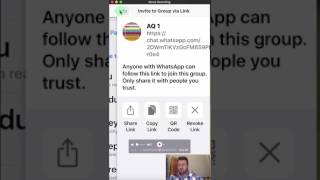
Alan Solarsh shows two ways to add people to a WhatsApp group: admins can tap the plus sign on the group banner and select participants, while non-admins can generate an invite link and share it via email, SMS, WhatsApp, Facebook, or Twitter.
Chapters
Hey, everybody, Alan Solosh here, the passive income guru, and I just wanted to shoot this quick training video on explanation of how to add somebody to the WhatsApp group. So when you're on the group, just click on the banner and once you're on the banner, you can just scroll down the page here. If you're an admin of the group, then the plus sign and add participants will be activated. If you're not an admin of the group, then you'll just click on the invite group via link. Now a new page will open and then you have various different options. Over here you can share the link. Now if you click on Share the link, you've got either you can send them an email, send them an SMS, send them an email, you can send them a WhatsApp, you can Facebook them, Twitter them. Those are your different options. So if you had to send WhatsApp, click on the WhatsApp icon, then a new screen will open and.
Then you can just type in here, let's just.
Do it to Simone. So if I wanted to send it to Simon, then I just click on there and then send and now she's got the link. So if I had to go back to my messages.
Then you'll see there that. There it is. Now, if one clicks on that link, then a new screen opens and if you weren't a member, it will say add to group. Seems that I am a member. It says view group and then it takes me straight to the group, which is quite excellent. So that's how you add somebody to the WhatsApp group. I hope that you found this.
This training tutorial valuable. Please subscribe to my channel. Like this video? Share this video Share it with your team. Show them how they too could also be part of the mentoring group. And have a fantastic day. And have a fantastic passive income day.