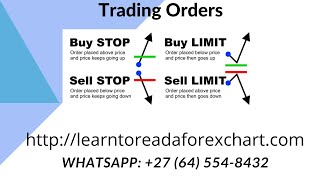
Alan Solarsh walks through MetaTrader 4 order types: buy stop, sell stop, buy limit, sell limit. He shows how to place pending and market orders on the desktop and mobile app using fractals and an 8-period EMA to enter trades at specific prices and manage risk.
Chapters
This video tutorial explains the different orders that you can have on your MetaTrader 4 application. Right. So what I do is I use the buy stop and the sell stop and buy limit sell limit orders so as to protect my account or at certain levels on my, on the chart. For example, when there is a fractal, which I've explained in the two previous videos. So let me explain to you what a buy stop is. So a buy stop is. So let's say that the price is, the trend is north and the price is roundabout here. So when the price gets to your desired level, the green line being your desired price level, the trade will then execute and you will then be in the market. Okay, so it's setting a, it's setting an order at a specific place on the chart. Either which is, which would be above the price. The converse would happen for a sell stop. So in other words, the price is coming down. And then maybe if there's a fractal and you want the, you, you want to be in the trader specific level where the fractal is, you place the sell stop at the level just below the fractal on the chart. And then when the price carries on going down, when it, when the price reaches your desired level a, the trade will be executed. Now let's say you want to get into the trade at a better level than you're at at the moment. So let's say to the chart, right, okay, so let's say the price is here and you want to enter a trade at the 8 exponential moving average. So you're waiting for the price to come down a buy stop at this level here, at the 8 exponential moving average. So when the price goes down, touches the green line and then reverses up, the trade is executed and then you're in the trade. So even if the price carries on going down, if the price carries on going down, the trade is executed. And now you've got that buy trade. All right? The same applies for a sell for a sell limit. The same applies for a sell limit. So let's say you're already short. You want to get in at maybe the 8 exponential moving average. So you wait for the price to retrace back to the 8 exponential moving average. You put your sell limit in place. When the price touches your order, the trade is executed. And then when the price goes further south, that sell trade will then be in a profit. Okay, so I hope that you understand now what the difference is between the different orders. Let me show you now how to get to those orders on MetaTrader 4. So there's two ways of doing it. You can either do it from your from this terminal over here or from this terminal over here. So if you're on this terminal and you're on the specific pair that you want to trade on, you can just click on the trade button in the top right hand corner of the MetaTrader 4 application. So over here you would just click on the trade and then it'll open the trade terminal where you can start placing trades. Now where it says buy Stop, you can drop that down. This is a drop down menu and you have various different options there, there you've got your market execution which means that you can place the trade and when you hit place trade over here, the trade is executed immediately. Or you can place your different your different orders as per what you want. So very simple to understand and to execute on the. Now I prefer to place trades on my phone because I'm on the go all the time. But if you want to place a trade on the, on the terminal you can place a trade by either double clicking on the currency will open up this block over here and then you can say market execution or pending order. If you put pending order then you've got your different orders over here and you can just place your order at your specific lot size and then the price that you want to place your orders for. So very simple to understand, very easy to execute and to place your orders and a fantastic tool to get you to be placing trades at your desired price level. So I use them all the time as you've seen on the, on the groups and I highly recommend that you take advantage of this, of this feature. So I hope that you found this video interesting. Please give me a thumbs up. Please like and subscribe to my channel so that the YouTube algorithm sends you videos that are pertinent to you and the industry that you're in. So hopefully we can start recommending good videos to you and also you'll be alerted when I come out with new videos so that you don't miss another good video that I come out with. So please like subscribe and comment on my videos and I'll see you on my next video.