Understanding localbitcoin platform
A step‑by‑step tutorial by Alan Solarsh explaining how to use LocalBitcoins.com. Covers account setup and verification (email, phone, KYC/FICA), profile controls, two‑factor authentication, wallet basics (addresses, fractional BTC, incoming transactions, auto‑rotating addresses), how to buy and sell via adverts (price, limits, bank selection, trade flow, proof of payment), and an internal transfer demo between accounts.
Chapters
Hello everybody, Alan Solosh here, your passive income guru. Today's tutorial is about understanding the local bitcoins.com platform. There's a lot to cover, so let's jump right in. And once you've verified, you verified your account, you've signed up and then you've gotten an email from local bitcoin, click the link in your email and you verified your account. Log into the platform. And let's start from the right hand side, going to the left hand side. So if you click on this little dial icon, it takes you to a page which shows you your sell orders.
If you have any sell orders. If you had bitcoin and you wanted to sell it on the exchange, this is where you could create your advertisement to sell your bitcoin. These are your closed contracts or the people that you've done deals with in the past, the released contract. This is obviously all the people that have released coins to you or you've released coins to them. And this is your cancelled orders. If you've cancelled an order with somebody or they've cancelled an order with you, this is the tracking over here. If you had coupons, if you wanted to sell or walk around with a, with a ticket coupon offering bitcoin, you could create your coupons over here and just print them as you wish. This little man over here, the top icon basically tells you about your account. Okay, so my account is called Bitcoin Karatbars. I've done my trade volume between 100 and 250 bitcoin. I've done 100 trades with 75 different partners and I've got a hundred percent score, which means that nobody has an issue with me. Everybody that's bought coins from me, I've delivered on time and nobody's complained. And.
So just basically tells you a little bit about your account. 13 people trust me and nobody's blocked me, which is a good thing. So this just gives you an overview of your account. The next icon is your edit profile icon. And this is very, very important. And this is where you control your profile. So the basic information is just very basic. Okay, you get to change your password. Verification is very important, that you verified your account via email. Your phone number is verified and you've uploaded your KYC documents or your FIKA documents. KYC stands for know your client. That's the international standard all over the world in South Africa we use FICA documents. So it would be your id, proof of residence. And so it's your passport or your ID or your driver's license and proof of residence, which is a utility bill or a telephone bill, something that's proving that you live where you say you live. So once that's verified, then your account is verified and you're able to transact, buy coins and sell coins on the platform. Without you verifying your account, you can't do anything. The security.
Is basically the security of your account.
So I've got two Factor authentication security on my phone. So what that means that's just an application on my phone. You download it and basically gives you various different numbers. Okay. Without you having these numbers when you log in, you can't log into your account. So if you lost your phone, you'd have to email local Bitcoin and tell them to remove the GA code from your from your account. As you can see, the numbers change every 30 seconds. And this is a very, very secure way of keeping your account out of the hands of hackers. So I highly recommend that you install two factor authentication onto your phone. There it is. You can disable or enable it. There are lots of videos on YouTube about GA or Google authentication. Just go to YouTube and Google that and learn how to install that on your platforms where it allows, where it allows you to do so. So that's your edit, your profile, your dashboard. I've gone through your dashboard with you. It's just a double feature from there to there. Your wallet basically tells you what's in your wallet. So here is your wallet over here. That's how many Bitcoin I have at the moment I've got 0.02 to the millionth of a Bitcoin. That's how they sell Bitcoin. You can buy a fraction of a Bitcoin, you don't have to buy one Bitcoin at a time. And that's what everybody's afraid of, that they have to spend this huge amount of money to buy one Bitcoin. You can buy a small amount, you can buy whatever you want. 100 rand, 200 rand, thousand rand. Whatever you want to buy, you can buy. So over here is your. What's the amount is in your wallet. This is your wallet address. Now this wallet address changes every two weeks for security reasons. Within local Bitcoin, they do that. So every two weeks you'll come back and you'll see that your wallet has changed. And that's a good, good thing also for security reasons. Here you can see incoming transactions, if there are any incoming transactions, remember that Transactions take between 30 minutes to an hour to process. So if you bought or you sold or you delivered sent coins to a wallet, it would take between 30 minutes to 60 minutes for those coins to leave your wallet and arrive in the receiving person's wallet. The same applies to you, so.
There'S not much else to understand. Over here at the bottom, if you scroll down, you can see all the different transactions that have taken place in my account. So if I wanted to receive funds, I would send this wallet address to the person that wants to send me funds.
And if I wanted to receive funds from somebody, obviously somebody would then send me their receiving wallet and I will then.
Plug that into here, receiving Bitcoin wallet address. So if I'm sending to an address, that's where I would put that address, the receiving address in there. This is the amount of Bitcoins I want to send to the person. This is the description. The description is basically for my reference and just so that I can keep track of what, what I'm buying Bitcoin for. And over here is the amount in your local currency of how many Bitcoin you wanted to send to the person. So let's say you wanted to send in Euros, you'd go up to the top. What's nice about this platform, it works out the exact amount of what the exchange is. So let's say I wanted to send €90. And over here it'll automatically tell you exactly how many euros Bitcoin the equivalent is. The €90 is worth. So €90 is worth it at today's rate, 0.092 etc. Bitcoin, so that's quite handy. And the Same applies to US dollars, etc. So that's the wallet side of it. And account security, we've gone through the account security, that's the GA authentication highly recommend that you install install that. And there's not much more to understand on the local Bitcoin platform. So what I'm going to do is I'm going to do a transaction and show you how easy it is and simple it is to do a transaction between one account and another account. So.
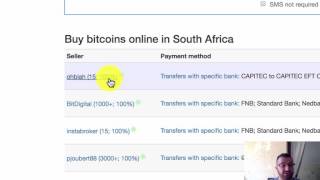
Firstly, before I do that, what I'm going to do is I'm going to show you how to buy Bitcoin. So very, very simple on how to buy Bitcoin. Choose your country at the bottom here. So scroll down to the bottom so it says London uk. I'm definitely not in London uk, so I'm going to change that to the country that I'm in, which is South Africa. And you'll notice that all my amounts here will Change into South African rand. And as you can see on the dashboard, when you click on bar coins, there will be a number of suppliers that you can buy from. Make sure that, that the country.
Reflects the country that you're living in. So I'm living in South Africa, so I've set mine to South Africa. So as you can see, there are lots of different suppliers. So let's understand what each supplier is offering and what all the different numbers represent. So this is the guy's name. His name is Oblar. And he's done 15 trades. He's had a hundred percent success rate with those 15 trades. So there was no problem, nobody complained.
He sold the coins and everything was successful and everybody got their coins. Over here is the different banks that he uses. Okay? So he uses Capitec only. So if you don't bank with Capitec, you will have to wait for him to receive your funds, which could take between two to five working days. Once he's received the funds, he will then release the coins. Nobody's going to release the coins to you with just a proof of payment. Over here, this is the price of his bitcoin, okay? And over here, the limits is the amount of money that he's prepared to accept. So he's prepared to accept payments from 500 rand to 4,559 rand. Now the reason it's R4559 rand is that's the maximum amount of bitcoin that he has in his wallet. And he's not prepared to do any transactions less than R500. So if you wanted Bitcoin to the value of R300, you couldn't use that supplier. You couldn't. You'd have to use this supplier because he's prepared to accept deposits of R250.
As the minimum. And now if you don't bank with Capitec, I highly recommend that you find a supplier that banks with the same bank as you so that they release the coins immediately. As you do the payment, you send them the proof of payment. Then once they have the proof of payment, usually with bank to bank, the transfer is immediate or within, I don't know, 24 hours. I think that's the maximum I've had to wait. And then he will release his coins into your wallet. That's what these numbers represent. And I hope that gives you a better understanding. Right? So if we wanted to buy bitcoin, you just press the buy button, firstly.
And secondly, you choose the amount of rand that you wanted to spend. So let's say you wanted to spend 2,000 rand, then that would be the amount of bitcoin. And let's say you wanted one bitcoin, it would give you the equivalent on the other side. So if you wanted to select the trade or start the trade, you just say send trade request. Now you've opened the trade request. Hi, let's trade. Okay. And you'd wait for him to respond to you. When he's responded to you, then you could proceed in depositing the money into his bank account. And he's banking with these various different banks over here. And this is the reference number that you need to put on the deposit slip once you've done during the transaction. So they can merge the transaction because you don't know how many transactions he's doing in a day. So. So each reference is unique and changes every time you do a transaction. And then after you've made the payment, you just press mark as complete. I haven't done it, so I did not pay. And then obviously you detach the proof of payment over here. Please note that it's only JPEGs and PNGs that it accepts, so no PDFs. And once he's received the funds, he will then release the bitcoin into your wallet and obviously the coins will then reflect in your wallet address. So here it is, he's come back to me, says, hi, Peter Jabe. That's the amount that there are his instructions. It tells you exactly what the story is, what account it is, the branch code. If I'm making a payment via an atm, I need to add extra charges.
And then I go ahead and pay. So I'm going to cancel this trade because I don't need to trade with this guy.
Let's confirm. So as you can see, there's a little speech bubble over here and you can click on all the speech bubbles to get to the different trades. So that was a previous trade I did. This is the trade that we just cancelled and very, very simple and easy to use. I know it's a little bit daunting, a new platform when you come onto it, but once you get the hang of it and you're doing transactions on a regular basis, you'll see that it's very, very simple to use. So let's send a coin to another wallet. So what I'm going to do is, I'm going to. What I'm going to do is I'm going to send coins from.
This account.
To my other account.
Which is this account. So this is the receiving wallet over here, this is where I want my Bitcoin. Go back to the other exchange, paste it in. So I'm going to send from this account.
To my other account and I'm going to send the total amount of bitcoin in that wallet and I'm just going to put there what the account name is. Transfer.
And that's the amount of rand value that I'm about to transfer. And I confirm and it's going to ask me for my.
GA code, which I'll get. Now that's the GA code, which I said changes every time coins are sent. As you can see, the wallet is empty. There's no funds in it. There's the transaction. It says kenobi transfer, internal transaction. Now, when I go to the other wallet, funds will be immediately received. So if I refresh the page, you'll see there, over here, the coin amount did change. And here is the transaction transfer and there's received amount. So it's very, very simple. It's immediate, it's, it's cheap, it's efficient. And this is the new way of banking and I highly recommend that you get used to this way of banking. I use local Bitcoin platform because it's the cheapest platform out there and it's the safest platform out there. Our coins are stored in cold storage, which means that the coins are not actually stored on the Internet. And so if anybody had to hack local bitcoin, the platform itself, my coins are safe and I don't have to worry about anything. So that's how you transfer coins, that's how you buy coins and.
Subscribe to my video. I come up with videos all the time. I don't want you to miss any videos, so subscribe to my channel. At the bottom is my link to sign up for local bitcoins. So just click on the comment section and also, as I say, subscribe to my channel because I don't want you to miss any future videos. So if you've got any issues, please WhatsApp me or email me and I'll help you through any issues that you have. Have a great day.
More from Alan





Double bottom forming - Gold ready for $4000 #trading #technicalanalysis #xauusd





