How to Create Professional Videos using just your iPhone
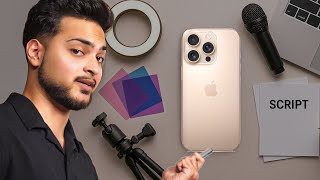
Areeb Mirza shows how to shoot professional videos on an iPhone by mastering lighting, framing, and scripting. No expensive gear needed, just the phone in your pocket and the right technique.
Chapters
Hey guys, welcome back to a brand new video. And in today's video, we're going to be talking about how to just use your iPhone to make good quality footage, good content for your business pretty much right off the bat. So this is to pretty much kind of like tell you that you don't need fancy equipment, you don't need like a $5,000 camera, you don't need to do all of that just to get started on content. All you need is your iPhone, all you need is a mic, a good light, and of course its scripting. That's all you literally need to get started on content, especially for your business. Because this is something I've seen a lot of times is where business owners, especially new ones, they'll go out there, spend $5,000 on a camera, new equipment, set the whole thing up, and then they'll realize that it wasn't really about the equipment. It was more about how to create the content. The actual process, the lack of scripts, the lack of ideas, those were the actual things that were holding them back compared to just like, you know, equipment. So even when it comes to equipment, I'm just going to prove you today with a very simple setup with what you actually need to kind of like execute a set. What we're about to do just at your home and like a white blank space, you can use a few lights. And all the equipment I'm going to leave in the description you can pretty much get from Amazon, everything's going to be under $500, $300 to $500, and that's going to save you a lot of cash right off the bat. So let's get into it. First thing we need to do is I'm going to start this set pretty much from scratch.
So right now, as you can see, it's pretty much dark over there. So let's say in your house, ideally what you do is pretty much turn all of your lights off and you just put a chair in a dark spot so somewhere you can have a little more depth. One thing you don't want to do is like, you don't want to put your chair too close to the wall. So let's say this is a wall. Because if you do that, as you can see a shadow pretty much right now, that's something you want to avoid. So as soon as I go away from the shadow, you can see the shadow becomes a lot softer and it'll disappear the further you go away. So you need that depth a little bit. And of course, as we progress, we're going to add more stuff into the set just to kind of like give it more life. But we're gonna play around with lighting. We're gonna play around with a bunch of stuff. But first what we need to do is get somebody to actually model for us on the set. So let's do that.
So as you can see, now we have our subject, and we didn't have a tripod for the iPhone, so we had to use this very expensive tripod. One thing you wanna do is you wanna make sure that you're not like too wide, you're not too far, you're like just close enough. So if you're using an iPhone, and this is like an iPhone 14, you can just use the 2x button over here, or you can do 3x, but put the camera or the tripod away from you a little bit. So I like doing the 3x because. Oh, 2x. Sorry. Because as you can see, there's. It's just evenly puts her into the whole frame. So there's not much, you know, space on the left side, right side on top of her. It's just enough fairly sit straight.
Do some hand movement. Do some hand movement. So perfect. So as you can see, there's not much headroom on the top. There's just enough for us to put captions over here, do some editing work for the editor to zoom in and out. So we'll have all types of capabilities just by doing this. So what we're going to do now is kind of like play around with lighting and then also add some color lighting and also some props onto the set too. So the one thing what we're doing right now is we only have one light source. So let me turn this off. And you'll see, like it completely goes pitch black. And if you see the actual.
Camera over there, like, it's. It doesn't look good. And some people are just completely fine recording this way. Or they'll just use like some sort of home light, which kind of like completely goes against the whole production style setup. So what I'm going to do is I'm just going to activate this one light. And as you can see, that already makes a big difference. So if I move this light around, you can see, like, it completely changes the whole theme of the video. So notice how just by like a simple swing of my arm, like completely shifts where the light is being directed towards her. So something like this is pretty good because the background is not too dark and she's pretty well lit too. So now what we're going to do is like we're going to add some color behind her. So now if we come back and we just kind of like look at the difference, you'll see that just by adding a key element of those, like it's a completely different video now. So what I'm going to do now is what. What's still not happening properly in this video is like it's a very flat video. We still want to add some sort of depth. So what we're going to do now is like we're going to reduce the lighting on the top. Let's do that.
Perfect. Now just by doing that, it looks better, but I think it can be a lot better. So I'm going to bring that light closer to her a little bit more.
Perfect. That looks way better. As you can see, the subject is evenly lit and this just gives a more of a positive vibe. That's what we're going for. It's positive vibes all around. Try to do some head movement again. Perfect. Now just to kind of like finish this set off, what we need to do is like we just need to add a little more props. So with a blank background such as this, something even as simple as plants would like make a whole difference. So let's bring some plants, some plants in the background.
Does that look good?
There you go. So just by adding some more plants and what we can do now is like we can zoom in a little too. And this is something, of course we can do the edit and just by doing that, do some hand movement again for a little bit. We have kind of like a ready to use video pretty much like right over there. So this is, this is already too good. And honestly have is just like this one light which you can honestly replace with just a ring light at home. This would do the same thing. And I've done this at home with a ring light. So you can do this with a ring light. Don't think you need like a 60 inch softbox for this. Of course, if you can, that's obviously going to be better. But don't do that right now. You can do this exact effect with a ring light and then you can get some like color lights if you want it from Amazon, literally like for 40, 50 bucks and literally achieve the same look. Because all of this is pretty much one light source coming from a 45 degree angle. And then we just have two color lighting hitting on the backdrop. And you can do this from the bottom. You can pretty much hit any color light you want as long as it's hitting the backdrop. And one more key thing to notice over here is like, you can clearly tell the subject is more brighter than the background. And if you do that, I promise you, it's going to make a whole lot of difference whenever you're recording. Because if the background is more brighter than the actual subject, then it's just going to be tangible video. So, yeah, that's how you can pretty much do the whole iPhone recording thingy. It's also very important that you prepare for scripts before you start recording as well. Because of course, while the camera quality and everything is good and editing, all of these things are good. If you don't have the proper scripts to kind of like do that in the first place, then there's no point sitting and recording because you'll just go blank right off the bat. So to make the whole recording process as smooth and also fun as possible, you need to make sure you have the scripts already in play. So let's say you're a business owner who's just starting out. This is where I recommend either you work two hours to three hours on a weekly basis on just your scripts alone, because if you just turn on the camera and try talking to it, you're always going to blank out and it's going to be a very not so fun experience and you're just going to push yourself away from creating content. So have the scripts ready. You can utilize sources like AI Then of course help have AI create a base and then edit that base to kind of like work on a full script for you. So as soon as you have that, of course you can also buy a teleprompter and just read it off of it, or just kind of like memorize line, go line by line and actually just perform it in front of the camera. One thing I would always suggest you do 100% of the time is hire an editor. It doesn't matter what stage of the business you're at, you need to hire an editor. Because this is just one of those things where if you script, record, also edit, and then publish your content as well, you're just going to. You won't have time to do the actual business stuff when you won't have time to, like, you know, do the fulfillment work, whatever you're trying to do. So you'll just be making content. And content is a very high ROI activity. But the whole process of creating content on a repetitive basis week on week becomes a very low, profitable thing to do. Because while the end product is profitable, the process of making that end product profitable isn't doesn't become too profitable if that makes sense. So it's very very very important that you hire the right people to do that for you too just to kind of like get get the entry to barrier of the content. So that being said, hope you enjoyed the video and this is something we do live for business owners as well like help you set up the camera, the lighting, scripting, editing, publishing the content and then also ads as well as something I personally do for businesses. So if you're looking for like a pretty much done for you solution for content and also paid ads to just acquire customer through your social platforms that is exactly what we build for clients. So there's a calendar link right in the description. Just book a call with me and then we'll be in touch on how we can help you best. I'll see you in the next one.