Repurpose some of your horizontal content to vertical. #shorts #filmaking #filmakingtips #trending

2 Aug 2023 · 1 min
0:52

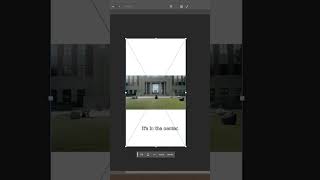
Areeb Mirza demonstrates a concise workflow to convert horizontal (landscape) video into vertical 9:16 format. Key steps: take a screenshot from Premiere Pro (Control+Shift+E), open Photoshop Beta and create a 1080×1920 file, use Generative Fill to extend top/bottom, export the filled layer as a PNG, drag it onto the timeline above the clip, nest layers and add slow-zoom keyframes for motion. The tutorial is short, practical, and software-specific.

Questions this video answers

Control + Shift + E

1080 × 1920 (pixels)

PNG (export as Quick PNG)

Premiere Pro and Photoshop Beta

Chapters

More from Areeb

8:06
youtube.com

You can now edit your Ads & VSL's using GPT Astra 6.

4w ago
14:31
youtube.com

Steal My Local Ad Strategy & Sign 5 New Clients From Instagram

4w ago
18:12
youtube.com

101 On Making Meta Ads Profitable with a Sales Call Funnel

1mo ago
10:09
youtube.com

Build these 4 tools to help your business run more efficiently - GPT Astra 6

1mo ago
20:15
youtube.com

How I Use Claude to Run My 7-Figure Agency

1mo ago
24:29
youtube.com

10 Key Lessons from 8 figure boardroom (Scotland)

1mo ago
1:39
youtube.com

Before you spend Money on Ads. #shorts

1mo ago
youtube.com

You Should Only Post Once a Day on Instagram

4mo ago
youtube.com

Being good in front of the camera will make you 10x more money

4mo ago
youtube.com

Everything I learned from 8 years of live TV production

4mo ago
youtube.com

5 Huge Marketing Mistakes Service Businesses Make

4mo ago
See all content