How to Decrease CPCs & Wasted Ad Spend When Using Smart Bidding (EASY Trick)
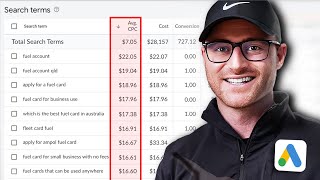
Your Target CPA bid is missing its goal because some search terms are costing $18-$22 with no conversions. The fix: wrap your campaign in a portfolio bid strategy to unlock a maximum bid limit setting, then cap bids at roughly double your target CPC to let the algorithm learn while filtering waste.
Chapters
Okay, check this out. I'm inside of a campaign, and in the last 30 days, it's using target CPA bidding. I hit a $41. This is Australian dollars, $41 cost per acquisition, and the target CPA is 35. So for whatever reason, in this case, Google is not quite hitting my goal. It's $6 off, but the client needs to be at 35. What do I do? Well, first you need to check, is my targeting correct? Is the account structure and campaign structure, ad group structure correct? Am I targeting high relevant, high intent keywords, good ad copy, good landing page, good offer, good pricing? Okay, if all of that looks fine, then in some cases, you need to start moving into some of these more tactical tricks that I'm about to show. And this is a trick that I don't normally yield to unless I have to. And in this case, this is one where I feel like, yeah, let's. Let's test that out. And so in this case, the smart bidding is just not quite getting where I need it to go. Now, I. I've got good volume. So you. I talk to the client. Mr. Client, you had 10, 254 conversions. The last 30 days were $6 off from your target CPA of 35. Are you okay losing volume to get this down to 35? If they say yes, I absolutely don't care about volume. All I care about is getting that target CPA hit. Because who cares if my volume's higher at 41 because I'm unprofitable? Fine, have that conversation, because that is something that's going to happen is you're more than likely going to lose the volume. But what is happening here? Right? Well. Well, Google, for whatever reason, is still bidding quite high. So our average conversion rate is 17%. That means for every six clicks, we get a conversion on average, at least. Within the last 30 days, however, our average CPC has been $7.15. Well, the math doesn't work out. That's why we hit a $41.38 CPA. What average CPC would we need in order to hit 35? Well, you just do the math, right? So you take 35 and you divide that by six. Remember, we're having that. We have an average conversion rate of 17%. So for every six clicks, we're averaging a conversion. So the max I can pay is $5.83 per click to hit a $35 CPA. Okay, so that means I need to bring this average CPC down, but Google's not quite doing that for me. And then If I go into the search terms and some of this is going to be blurred out to keep things confidential here, right? But if I look at some of the search terms, we're paying like $22 CPC, $18 CPC, et cetera, with no conversions there, right? Some of them will have conversions. Let me preface this. You could go down conspiracy land, right, that Google price fixes and some of this is increased due to that possibly, right? I mean, that's a whole nother video topic. But by definition, smart bidding is going to increase the average CPC on searchers that it believes has a high intent of converting. So if your target CPA is 35 and they believed, again, the search term will be probably blocked out. But if they believe this searcher for this search term during this click was showing signals of converting for us, it was willing to pay a high amount to get that click because it still would have been under Our average for $35. Now in this case, we didn't really get that conversion in. In this case though, I think Google's a little too loose right now with some of those clicks and that's why our average CPC is a bit too high for the math to really work out. So what do you do in scenarios like this? Well, you go to tools, you go to budget and bidding. You go to bid strategies. Now you're going to utilize something called a portfolio bid strategy. A portfolio bid strategy normally is you're taking multiple separate campaigns, putting them into one bid strategy. You're lumping it all into one aggregate. However, in this trick, what we're doing is going to take that one campaign and we're going to set up a portfolio bid strategy just on that campaign. Because there's a setting that doesn't exist in the normal standalone campaign settings. That does exist if you utilize the portfolio bid strategy. So I'm going to show you that. So first we're going to set up the name. So what I like to normally do is tc. I give it the tcpa I'm going after in this case, whatever bid strategy going after. So I'm doing 35 and then I'm doing max CPC is what I'm about to tell you here. I don't have the number yet. I'll put X and then I like to date it. So I think it's the 5th and I'll tell you why I date it later. Owner. This will all be blurred out, but this just is making sure it's set under the client's account. Then campaign. I'm targeting just that One campaign. It's the campaign I was showing you that data in target CPA I'm setting to 35. That was exactly what it was set at the campaign level. However, if you go to advanced options right here and you click this button, boom, you get this setting called maximum bid limit. Again, this does not exist in the standalone campaign. It only exists in the portfolio bid strategy. So all we did is took that same campaign, we applied this portfolio bid strategy to it, and now we have the ability to set a maximum bid limit. What does this do? This governs Google from spending too much on clicks. Now you have to be super, super cautious of doing this, right? Our average CPC was in like the seven dollar range, right? And I need it technically to be around $5.80 for the math to work out based off of my conversion rate and then my CPA goal. What I see people do incorrectly here is they come in and they will set the average bid limit so that they'll say is, well, I need it to be 580. So let's just make it 580. That's the max Google can spend. You will kill conversion volume if you do that. That might make sense in your mind, like, oh, we'll get five only pay 580 per click. No, because you're going to have clicks that are going to be under 580 and you're going to have clicks that will be over. Again, we're talking averages. Ideally, what you're trying to do in this scenario, at least in this exact scenario I'm showing you, I'm trying to just weed out some of those way too high average CPCs. And actually this case is not as dramatic as some of the others I've seen in some dramatic cases where Google will pay 10x for a click above the average. So if the average was seven, it was paying $70 for a click. I've seen some insane scenarios like that. This case isn't as bad, but I still, it's a little too loose. And this is why the smart bidding's just not quite hitting our goal. So what I would do in this case, again, I don't want to restrict the breathing room of the machine learning and the smart bidding too much. And so do not make that mistake. Don't come in here and just try to do my calculator math of those averages and, and think that's going to save the day. That would more than likely kill too much conversion volume for you. So we want to preserve the ability for the smart bidding to still operate effectively. But all we're doing is just trying to cut out some of that, what I believe is too high of clicks. Gotta kind of, I gotta tame Google a little bit and bring back some efficiency. So in this case I know I need a 580 average, but I gotta give the breathing room for the smart bidding. I don't want $20 clicks cause those were getting too high. So if my average currently is 7, what I would be willing to do is probably bring this to at least double that and I might even go a little higher. So in that case I probably will go like 14. And so I'm still giving it breathing room, but I'm cutting out some of that fat. And this may not actually solve it. Right, and that's why your naming convention here is important because I am going to, in my tracking sheet I have a video. By the way. It's a simple Google sheet. It's as simple as it gets. You don't even need that note, note, paper and pad. Here's where a lot of people screw up though. They're going to set this up and then they're going to forget about it. They'll just let it run and then they, they won't check it. That is incorrect. You got to treat it like a scientist. So in this case I am setting up max CPC limit 14, September 5th. Well, guess what? I'm going to check this every single day, but I'm going to look a week from now. What happened after a week of running this? Maybe I don't have enough data. Then I'm going to look two weeks from now. Okay, what's going on if I'm still not, if Google's still struggling in that time period to get me closer to this 35, I may go from 14 to 12 or 14 to 10. I don't know, it would depend on the data at that time. But, but make sure this is where a lot of people will screw up. They'll do this, forget about it, forget that it's even running and then just kill themselves with it because it doesn't work. So make sure you set the naming convention up, make sure you remember the date that you set this up and then review the before and after data of making this change. But here's a way to bring some more efficiency back. If greedy, Google is getting greedy or on some of those high average CPC clicks, I hope you got good value there. And especially if you're in the scenario that I just showed you that this account was in, hopefully you can bring some efficiency back and not let Google get a little too greedy there with those high average CPCs and you're able to bring that down. Make the math work to hopefully hit your target CPA when smart bidding is failing you or Target ROAS depending on what goal you're going after. If you are spending money on Google Ads, my team will do a free Google Ads audit. If you qualify in the description of this video there's a link to fill out a quick form. We'll review it. If you qualify, you'll get on a quick call, we'll understand your goals, your account, your frustrations and then our team will do a free audit. Sometimes I'm the one who personally will do them too. We'll review and give you practical advice to better the performance of your Google Ads account. So if you're spending money and you want to get that audit, it is absolutely free from our team. Again, go fill out the simple form in the description below. If not, I will see you on the next video.
More from Austin


Google Ads Negative Keywords: The RIGHT Way to Find and Add Negatives in 2026








