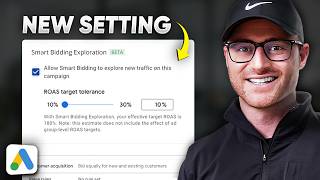
In this tutorial, Austin LeClear explains Google Ads' Smart Bidding Exploration beta, a feature that lets campaigns with a Target ROAS (tROAS) goal explore additional search auctions without permanently lowering the overall ROAS target. The feature works by applying a configurable ROAS tolerance (10‑30%) that temporarily relaxes the tROAS for a subset of auctions, allowing the algorithm to test new keywords and search terms that were previously excluded due to the strict ROAS ceiling. LeClear contrasts this with simply lowering the campaign’s tROAS, which would reduce the goal for all traffic, not just the exploratory portion. He outlines when the feature is appropriate—campaigns that are not budget‑constrained, have moderate impression share, and have plateaued performance—and advises using campaign experiments to split traffic between a control and an exploration variant. He also suggests high‑season scenarios (Black Friday, Cyber Monday, large sales) as prime opportunities to enable exploration when conversion rates are naturally higher. Practical visualizations (bullseye chart) illustrate how the feature expands auction coverage while preserving the core ROAS target. The video concludes with a call to action for viewers to apply the feature in suitable campaigns.
Chapters
Okay, you might have seen now inside of a campaign there is this thing called smart bidding exploration. It is in beta. So I don't know if every account sees this, but most of them do now. And when I first saw it, I, I actually had no idea what the heck it was, so I had to go learn more about it. I know Google has released this within the last few months, I believe, but a lot of times you're like, they release all this stuff. You're like, how is this different from this? And how does this make sense? And this setting is a bit interesting. So I wanted to explain it hopefully in a very simple way, since Google does usually a pretty bad job at explaining these things. This by Google's own support doc, which I will have in the description below if you want to just go to this page. But basically it will increase traffic diversity with Google's AI. Obviously Google will always throw in the AI lingo in there, but basically when you're a campaign, so this is built for campaigns that are already working. Okay, so you, you're, you've been bidding on keywords you're utilizing, usually a troas goal of some sort, and you have consistency within it, right? So Google's got all of this history and it knows the searches or search terms that it will be able to target and, and historically hit your goal. So if you have a target roas goal of 300%, it sort of knows the audiences and searches to, to make that happen, right? Well, the problem is then you end up sort of constrained by this ceiling that you've created with that target ROAS bid. And with that you're going to miss out on potential searches that the AI is afraid to go into those auctions because it doesn't quite know what sort of return it can get for you. And so this setting, it's smartly done, is basically allowing you to, or allowing you to tell Google to go explore additional auctions, but only lower the target roas in those auctions, those exploration auctions. So for example, they, they actually give like a good example here for like a mortgage lender. But here's a pool of keywords. So this query pool without smart bidding exploration, and there's a lot, right, how to buy a home, house lending, will rates go down this year, et cetera. And then there's mortgage 30 years fixed. Well, without the smart bidding exploration, it on the lease on this campaign historically would only be on mortgage in 30 years fixed. Because it knows those terms. Well, it knows it can kind of convert from those and if you run a campaign that's consistently doing well for you, you know, there's like a bread and butter of keywords there that really do well for you, even if you look at it in the search term report. Sure, there might be some variations in the phrasing of people searching those things, but for the most part, you know, these searches equals conversions. Well, Google knows that as well, and it kind of knows the auctions it needs to enter in order to hit your North Star goal of whatever the t ro as bid you have on there. Right. Well, here with exploration on, you're allowing it to go test. These other auctions, you're giving it some headroom to go test because what you're doing is actually lowering your roas goal. So, okay, if I come in here and I hit allow smart bidding to explore new traffic, you, you're allowed to give it this roas target tolerance. So it's 10% to 30%. Right. 10 is going to be conservative. 30 is going to be on the high end. And what this is doing is basically saying to Google, like on this campaign, the troas goes 200%. It's saying, hey, you can use some of the roas headroom here of a tolerance level of 10% in this case and then use some of that to go explore these additional auctions. Now, you will end up with a lower roas. Right, because it's going to use 10% to go explore with. And Google does somewhat of a job of explaining that. Like with smart bidding exploration, your effect at Target ROAS is 180%. This estimate does not include the effect of ad group level roas targets. So make sure if you have different ad group level targets there. You're aware of that now in this campaign it does. This campaign is limited by budget. So it's saying, hey, this won't work with a limited by budget campaign. Talk about that here in a second as to why. But yeah, you have these, you have these target tolerances of 10 to 30%. Right. And so 30 would be the most aggressive 10, 10 being the most conservative. Now you may think, and this is what I did originally too. Well, what's the difference of me just lowering my target roas goal on the campaign? Well, here's the difference. If you came in here and just lowered your target roas goal, would you enter more auctions? Yes. However, you actually have lowered the complete north star of the campaign. Let's say we lowered it to 180% trois goal instead of 200%. What you're telling Google is you want 180 on everything, right? So even the keywords you're historically doing well on go only bid 180 on those two. That's not the point of smart bidding exploration. The point of smart bidding exploration is actually for it to, to give it some headroom to just go explore these other search auctions that it's avoiding because of the ceiling cap of the troas goal. So by using this, you're actually still bidding on 200% t ROAS, in this case on those keywords in search terms that historically have done well. And Google knows, right? So you're still, it's still going after 200% ROAS goal. There you are now just allowing it Depending on a 10%, 20%, 30%, whatever tolerance level you're just now allowing Google to go exploit explore these additional auctions and knowing that it might not hit high roas. Now the idea there is that it can find additional auctions or search terms that will do well and then that now will help increase the amount of auctions you go into in this campaign long term because you've allowed it to go learn it or you've allowed it to go explore and learn. So here's like a very basic visual of this, but I always like to visualize auctions and all of this with like a bullseye chart, right? So a campaign that I have, let's say I have a campaign, I spend $100 per day. Even though I'm giving it $200 per day, it only spends $100 per day. It gets consistent conversions for me and it hits my goal of 200% ROAS, right? And I've got all these keywords I've tested in there, but for the most part it's a very consistent campaign. Well, Google has me dialed in in this sweet spot, right? So this sweet spot, it knows, hey, we can enter these auctions, we can make money here. And it does because then like you end up at the end of the month or a 30 day period and it hits your troas goal. The problem is it doesn't want to venture out in these other rings, right? Because if it goes too far out, it knows it won't hit roas goals because you've created the ceiling. So you've actually capped the amount of auctions you're allowing Google to enter and learn from because you need to go hit this goal. So now with smart bidding exploration, you're giving it headroom, a small percent of headroom to now go enter these other auctions. That you never have would have been in before for Google to go learn from and hopefully be able to generate additional volume in these other auctions, learn from and maybe actually now consistently hit these other search terms and auctions successfully at your true north star of a 200% ROAS or whatever your campaign goal is. Okay, so when would you actually even use this? Well, one, you have to have a campaign that a is not currently limited by budget. Because if you're limited by budget, just increase the budget. You're going to actually increase more auctions just by doing that. So you don't need smart bidding exploration for that. And in fact it gave you this notification or gave me this notification that on a campaign that's limited by budgets, like, hey, this won't work with that. So you have to not be limited by budget already. It's got to be a campaign where you don't have extremely high impression share already. Because then what's the point there either, right? Like if you're getting like super high impression share, there's probably not a whole lot more for it to go explore. So it's got to be like a campaign that you're more than likely sort of capped out. You haven't had too much growth from it in a while, feels plateaued, but it's consistently working for you. It is hitting your campaign goal, your bid goal of whatever that t ro as goal that you set. That is a perfect campaign to test this on because you're constrained essentially by that goal and there is room for more auctions to go explore. This would be a great setting now to go use in a campaign like that. I would recommend doing a campaign experiment so split the traffic between, you know, your current base campaign and then create a campaign experiment where it splits a percent of the traffic over to the same campaign. But now with smart bidding exploration turned on, it's a very safe way of testing it. The other way of using this that I see, again, this is fairly new. I don't have like a ton of testing on it, but Black Friday is coming up, right? This is something I'm going to be testing with Black Friday. So allowing some of these campaigns that fit that criteria before Black Friday, I'm going to give it some tolerance level increases here to allow it to go explore during high converting times like Black Friday, like Cyber Monday, or if you're a business that has a really high season to it, where conversion rates and volume really ramp up, or if you're running a big sale, this would be another way of utilizing this right before that sale or during that sale. Turn this on, let the algorithm go explore, and knowing that you're already going to have higher than average conversion rates during those periods of time due to the fact that you've got a big sale going on, or buyers are just more likely to buy during that specific time frame. There you go. Hopefully that clears up what smart bidding exploration is. If you were confused by it like I was when I originally saw it, hopefully you got great value from this. I'll see you on the next video.