In this instructional video Brad Costanzo walks viewers through the complete workflow for using the Storyselling OS plugin within Claude Cowork (and Claude Code). He begins with an overview of why the plugin is valuable, especially for Claude users, and then shows how to download the zip file from the product access portal, upload it as a plugin in Claude Cowork, and attach a dedicated folder for the plugin to operate in. He explains the distinction between Claude Chat (cloud‑based memory) and Claude Cowork (local folder attachment) and why the latter enables seamless reading and writing of files. The onboarding process is demonstrated: the plugin either imports an existing “About Me” markdown file or conducts an interview to build a personal profile, and similarly creates a style‑guide by ingesting writing samples. Once the profile and style guide are in place, the user can launch the Storyselling plugin to generate new stories, refine existing ones, extract content, or generate story angles. The demo shows selecting an Origin story, providing raw material, and receiving a draft that can be output without bracket labels. All generated files are saved automatically in an “outputs” folder, and a “StoryBank” markdown index is created that logs each story’s metadata (type, audience, platform, CTA, tags, date). Brad highlights how the StoryBank enables querying and recombining past stories. He also demonstrates that on subsequent sessions the plugin remembers the existing profile and style guide, skipping redundant onboarding. Finally, he notes that the plugin currently works only in Claude Cowork/Code, not in Claude Chat or ChatGPT, and invites viewers to reach out with questions.
Chapters
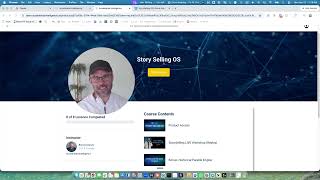
Hey, this is Brad, and I've got a really exciting update for you about the way to use Storyselling OS, especially if you're a Claude user. And if you're not a Claude user right now, if you're just ChatGPT, this may make you want to explore Claude because it makes this thing a lot more useful for you. So right now I'm going to give you a brief overview of what this does, and then I'm going to give you the ability to learn a little bit about Claude, a little bit about Cowork. The way plugins work, and then how to use this. So it'll be in multiple stages. In the notes to this, I will also allow you to skip down to where if you already know how to use Cowork, you can just skip ahead. But for everybody else, let me show you what we've built here. So first of all, inside your access portal here, you're going to come down to product access and you're going to see this update. It says Claude Cowork plugin right here. As I mentioned, it's similar to Skills, but if you're using Claude CoWork or Code, this is the method I recommend and this is the one I personally— now you're gonna follow the instructions to click here to download it. First of all, it'll open up inside my Google Drive and then all you need to do here is click zip extractor or just click this little download button here, right? So just down, you don't even need to extract the zip file. You just download it to your computer and then you're gonna upload it to Claude and I'll show you how in just a moment. You can follow the instructions here. Some people don't follow written instructions as well. I'm one of those people, and that's why I created this video. But let me show you what this allows us to do. So first of all, if you're not familiar with Claude, it works very similar to ChatGPT, right? This is, by the way, you can go to Claude.ai, Claude desktop app for Mac. They have one for Windows, I believe, as well. And you download it. And here I can do Claude Chat. This is the Cowork, and this is Claude Code. I'm not going to get into Claude Code at the moment. So we're going to talk about real quickly the differences between chat and Cowork. Now with normal chat, what you're doing is you're using the memories of— in the cloud for Claude, and anything that it creates, it can create here inside the chat, but then you have to download it or copy paste it elsewhere. So Claude Cowork works a little bit differently. And if you click on here, what this allows it to do is attach You attach a file folder here to what you're working with. And then this allows you to come in and work inside certain folders. And I'll explain the importance of that. So all I have to do is click here and I created a new folder for this called Demo Story Selling. And I click open and I just allow it. All right. Now, currently it is actually looking at multiple folders. I'm going to turn that off. So it's only looking at this folder. Now, the reason that folder is important is because this allows Claude to both read anything that's currently inside that folder or create files in that folder for you so you don't have to copy paste them and download them, or append new writing to existing files in there and keep everything organized. So it basically gives Claude and the AI tool the ability to work with your machine inside this little walled garden. Now I'm going to explain exactly why that's, uh, going to be very powerful for you for a Storyselling app. Um, but this is also just one microcosm of why Claude Cowork has been such a dramatically powerful, uh, AI tool for most of us in the business. So the very first thing we're going to do is you open up Claude Cowork, you come in here, and before we do this, however, you will have needed to install the Storyselling plugin. And the way you're going to do that, and I'll explain what a plugin here is in just a second. but you're gonna come over here to plugins, click the plus button, click create, click upload, and then all you have to do is take that zip file that came through and re-upload it right here, and it's gonna show up in your plugins. Right now, once more, these plugins are only available for, for Claude Cowork and Claude Code, not for the normal Claude Chat. That's important to understand cuz otherwise you won't find it. So let me back up a little bit on what a plugin is. To understand a plugin, you also need to understand skills. So a skill is down here. So for instance, I've got a skill creator, right? If I look at the skill creator, this is one that was, you know, I created this and it is simply a set of instructions that tells Claude what to do. If you've ever used a custom GPT inside like ChatGPT, it's got instructions behind the scenes and then different files behind it. This is the exact same thing. Same, only skills allow you to be activated anywhere. So inside any chat, you can just say, hey, activate Story Selling skill or activate something else. And that's already in here right now, right? I've already given you guys the ability to upload the Story Selling skill into your Claude. But what a plugin is, is a combination of different skills as well as different connectors. So if you want to have a different, like in this case, Story Selling plugin, I've got 6 different skills and I don't have any connectors set up for this because I don't need them to. But this allows it to do multiple things at once. So it's gonna create, and we're gonna get into this, it's gonna create your About Me page, your, this is an extra skill, the Historical Parable Engine. It's gonna create a story bank, it's gonna launch it, it's gonna write, and it's gonna build a style guide for you, right? So there's a lot of things, but you don't need to know about really any of those. You just have to, I'm gonna show you how it works. So this is it in practice. Before I get to that, once more, download the skill from here. That's all you gotta do. Come back over here, download it, come into Claude desktop app, go into the customize field here, click on Cowork, go to customize, click the plus icon, create plugin, upload plugin, and then drop it here. That is all you have to do. So now let's put it into action and see what happens. Okay, so I am going to show you the way this works. First of all, I'm going to do this and I'm going to open this up right here. We have Demo Story Selling. This is the one I just created. All right, so now I'm just going to bring that over here. I just want you to see what happens inside here. So that's why I'm making this a little bit bigger. Okay, so I'm going to say launch Story selling plugin. Okay, that's it. Now, as this does it, what you're gonna see is a couple things. Okay, so the first thing is that this is gonna act differently the very first time you use it than it is subsequently. So the first time is gonna be the longest, but that's cuz it's building your background. So it tells you. This is what we're gonna do. Are you ready to begin? And I say yes. So I realize that in order to make this really useful, you want to have a couple things, or you want the AI to know two things. Number one is an about me file, like tell me about you, your business, your offers, et cetera. And then the next piece is your style guide, like how do you write? So the first thing it's gonna do is build out your personal profile unless you already have it. So let's say you don't have one. It's gonna ask you a series of questions about you, like an interview. It says it takes 5 to 10 minutes. It may take a lot less, however, and then it's gonna learn your writing voice and then start writing stories together. So if you say yes, I'm ready, you move on. And once more, this is just on the onboarding side. It is going to come in here. Okay. I pushed pause cuz it just took a, about 30 seconds, but here's the first thing it tells me is, all right, we want to get your profile started. What way works best for you? If you already have an existing text file or Markdown file that you've already built about you, you can just click here to upload it. You can also paste in a bio or an about page if you've got it, or you can tell it to interview me from scratch. So if you interview me from scratch, it's going to ask 10 or 20 questions just about you, and it's going to help you build a really great profile that you can use here or anywhere else. So now I can choose it here. I can paste this here. Now I've already created one of these, so I'm just going to paste it in in a second. But I also want you to notice something over here on the left-hand side. You will see this new folder just got created inside the main one, Story Selling Plugin. Right now you'll see an outputs folder. So Claude Cowork created these two folders to store everything. So the very first thing I'm going to do, instead of saying interview me, I've already created one of these, so I'm just going to import one. All right, so I'm going to do this. Come on. I click here. I thought it was going to open up a file, or actually I can just paste the file right here, I believe. So now I've already got one over here. I'm just going to come in here. It kind of looks like this, an About Me file. This is very basic at the moment, right? I'm just going to keep it very basic for the moment. I upload this. Um, now if I wanted to put an About Me page. Et cetera, I could do that as well. So for instance, may as well just put both here and click continue. Now you can see it's reading the About Me file. Now it just asked me this. Claude wants to use Firecrawl, scrape from Firecrawl. You may or may not get this. It just means, do you want me to, do you want me to go out and scrape this website here and learn about it? So I said yes. Okay. So it put together some basic information, personal background, vision, vision, and a lot of other things. And now it's saying, okay, that gets me 60% of the way there, but here are a few gaps I need your help on. So let me ask some questions, right? So now it, it gives me a nice little interview. Okay. Now normally I would sit here and fill in all of these pieces of information for it to have the background for me. And then, but I'm gonna skip this. Just for time because I think you understand, and it's going to create a very basic one. Once more, this is just for a demo. I've already done this on my own. Okay, so now it gave me a full profile right here, but I also want you to notice what just happened over here. Automatically, it created a markdown of the exact same things you see, and it just created this file in here, and it is fairly robust even without me answering all those questions. So in the future, Story Selling, the plugin is going to utilize this every single time you go to use it. And you don't have to do this every single time. So I'm like, nope, that's perfect. Move on. Now, one of the things you'll notice is that whenever you're working inside Cowork, it's going to be a little bit slower than working inside the other one because it's just doing a lot more. But you're going to see here what's happening. It usually is about 30 seconds for every one of these little micro answers. Okay, now it's also asking, hey, how should I learn how you write? Do you want to paste in some of your writing samples, drop documents, or interview me? Now once more, I've already got this stuff, so I am only going to come in here and do my brand voice, which looks like this. I'm going to drop this in and click continue. Now once more, you may want to go through the other aspects of this where you either upload your own documents or have it interview you to make it really robust because you only really have to do this one time. Okay, so now it recreated it here, but it also recreated it over here in the style guide, right? Just like this. So now we're good. So that's all you have to do. Your call, tone match test or move straight to writing. Now I'm going to say move straight to writing. And this is one of the important pieces. Is going forward, whoops, whenever you are doing this, all you're gonna have to do is say Launch Stories Selling Plugin and it will already, it'll go into this folder, right? So step 1 is you point it at this folder and then it's gonna come in and it's gonna say, look, I've already gotten an about me page and a style guide page. That's all I need. And so next I'm just gonna get to writing. And so it skips that. So I'm gonna say move straight to writing and it's gonna do exactly What it always does. If you've been using this, you'll be very familiar. Okay, we're back. Asks you what you want to do. Write a new story, refine a story I have, extract from raw material, generates 10 story angles, what story type you want, where will this run, right? So it created this really nice little interface here. So let's just say, what do you want to do? I want to write a new story. This is going to be an Origin story, it'll run. I'm not sure yet. Tell me what the story is about. Drop in the raw material. You can upload it. You don't have to. What action do you want it to drive? Nothing in particular. I'm going to click go. Okay, now it's going to ask me a handful of other questions. Is what origin moment do you want to tell? And I'm just going to pick one here and run with it because I'm just doing this for demo purposes. Okay, so now it created a first draft. I gave it ability to take creative license on it. Okay, I'm not going to read through all this because it doesn't matter. Now it's going to say, if you want, I can give you this without the bracket label so you can copy or publish it directly. I can turn it into a specific platform. I can do whatever you want. And I just said, I will just say, it's good to go, just give me without the bracket labels. Okay, here's the fun part, and we're almost done. So the very first thing it did is it opened it up here. Now I can, I can view this whole thing. I can open it in Google Drive if I want and do whatever I want. But I also want you to pay attention to what it did. In this outputs folder, it created the Markdown file here, right? So now I can copy this, I can take it, I can do whatever I want. It's always in my outputs folder. It'll always be in your outputs folder. Forever until you delete it. And it created another file. This file is like a little mini database called the StoryBank. Now what you're gonna see on the StoryBank is you're gonna see that this is an index of every story you've created. So it's gonna tell you what the file name on your computer is, the type of story it is, who the audience is for, what platform it was built for, if there was a call to action, was there a key insight, and then are there any tags? It's gonna tag them as AI pivot, origin, identity shift, et cetera. And it's going to give the date created. Now, why would this be important? Well, let's imagine you have 100 different stories in here. Well, now you could go into this and remember we are, we have attached Cowork to this main folder and you can say, how many stories have I written that talk about, you know, whatever this was like the, tell me about all the origin stories or tell me about origin stories that talk about how I got into AI, et cetera. And it will bring up. It'll go into your index. It'll say, these are the ones. What do you want to do with them? You can combine them. You can create something new. You can redo it, but now it becomes your story bank. It's all right here on your computer. And this is one of the beautiful parts about Cowork. This is one of the many aspects of Cowork, but let's just say I was starting from scratch and I was coming in here tomorrow to do this. We're going to go new task. And this may already be associated. If not, you come down here. You just choose a different folder. You choose this one, you click open and you say, lunch story selling plugin. Okay. Now watch this because it's already got the about me file and the style guide. It's not gonna go in and recreate those. Notice this, right? Welcome back. What would you like to do? Write a new story from scratch, refine one, extract one, write a, this, so it already knows, hey, I've got this, I don't need to ask it again. Okay, so that's it. This is the new Story Selling plugin for Claude Cowork. The plugins like this do not currently, at the time of this, work inside ChatGPT because ChatGPT has a, you know, operates a little bit differently. But if you are using Claude, this is an amazing way to do it. If you have questions, please reach out and let me know. Thanks a lot. If you like this, tell your friends.