What Does A Fund Manager/Entrepreneur Keep In Their Studio?
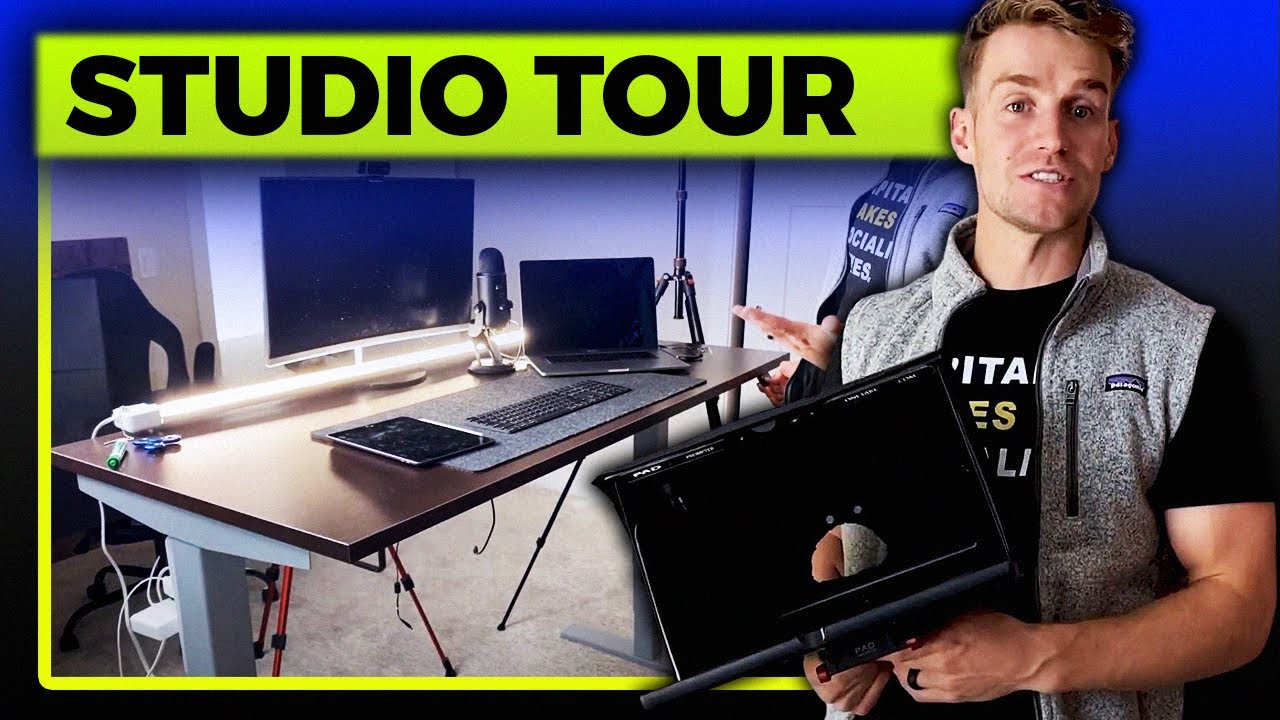
Bridger Pennington tours his home studio for finance videos, showing his Canon EOS R camera, Aputure 300D light, Blue Yeti mic, and other gear. He started under $300 and spent $5-6k total, crediting his brother-in-law Parker Walbeck for guidance on what to buy.
Chapters
Alright, so a lot of people ask me, Bridger, how do you actually film in your studio? I know we talk a lot about funds and how these are going on, so I wanna walk you through our studio setup. This is it, lo and behold. You've probably seen a lot of videos of me sitting right here talking to the camera, teaching you about the inner workings of funds. So let me walk you through each thing in my kit, in my studio, 'cause we get a lot of questions about it. So first up, let's go to the camera gear right here. Okay, so this camera Is an amazing camera. By the way, before, maybe back at me for a second, before I tell you anything on here, Parker Walbeck is my brother-in-law. He's a famous YouTuber, he's got a couple million subscribers. He does very well, teaches all of this stuff. So that's the reason I've been able to figure this stuff out. This is a very, pretty relatively cheap setup. So kudos to Parker, he's incredible about what he's done and taught me. And it's my brother-in-law, so go give him a shout out, go subscribe to his channel. And he's got tons of videos. I'll probably post a link below or above, or maybe pop them on the screen right now of his videos so you guys can go and follow. But I'll show you what I got 'cause we're here, okay? So, here we are first. This is the EOS R, as you can tell right there, EOS R Canon, I love this. This is what Parker recommended me to buy. I was like, alright, I'm in, whatever you want me to buy. So this, pull it out, it's got a touchscreen, autofocus on the eyeball, so when I sit down right here, you can even show another thing, but it will autofocus on my eyeballs. Pretty nice, so it'll follow me, it'll kinda track me around as I move. Touchscreen, it's super nice, has the thing come out. You can actually, almost like AirDrop, you can AirDrop videos and pictures to your phone, which is super nice. In here, that's what we use. On here we have the Sigma fixed 24mm, if you go right there. Sigma fixed 24mm, this is the lens we have. I'll have them pop up on the screen as well so you guys can go check these out. We had to get an adapter as well to attach that, but this is a fixed, it makes it look super wide out. You can just show B-roll of what's going on here. It makes it look really nice on here. We used to have a fixed 55mm or 50mm camera, and you know, cool, but, and then 128GB. 128GB. Right there. Just have this guy really quick and then I just pop this on my computer or whatever and upload it to our video editor. Okay, that is the Canon. Now let's move over. So when I'm here, right, let's talk about, well, now we're on camera here. What else do I film with? Okay, a lot of my videos you guys have seen, I sit here, I'll pull out like the whiteboard. Okay, this is how I do it. I pull out a whiteboard. As you can see, I did this a couple days ago, right? The whiteboard's all dirty. I'll sit it right here and I film from the top. So what I do is I actually take, literally, I just take my iPhone I pop my iPhone right here and pop it onto here and I just hit record. And iPhones, people underestimate iPhones a lot. Parker actually, another shout out to Parker Walbeck, he's got an awesome course and videos on using your iPhone. You can film, they're almost as good as this Canon camera. This Canon camera's like a couple grand. Your iPhone is almost as good as that. So what we got here, this rig, this little iPhone attachment, it kinda adjusts depending on how big your phone is. You got something else? We had to buy this separate as an arm. I'll put a link to Amazon in here. And then this is a tripod. Pretty tall tripod here that I can adjust. That was like $50 on Amazon. Pretty cheap actually tripod. I could've gone more expensive, but I went for the cheap stuff here. Okay, here, so that's film. So I'll film from here, and then I'll film here at the same time, and I just sync up the audios. And so I just have to record once. I just sit here and record, and I record and it films both, and it's super nice. So that's how I've been able to do it. I also have an iPad, This is what I do a lot for my coaching calls. So iPad right here, this is super nice. So if I'm on coaching call, whatever, I'll sit on the iPad and can scribble stuff out and kinda draw, it's super nice. Okay, so come around here, Mace. Let's talk through lighting. So Parker, back to Parker, right? Parker's the king of this. Tommy's at Bridger. Way more important than your cameras is your lights. You could have the best camera in the world, $50,000 camera, if your lights suck, it's gonna look awful. If you got a terrible camera and your lights look good, it usually looks pretty good. We, a lot of stuff here is kinda cheap. The camera we spent a lot of money on, couple grand there. This light we spent a lot. That light right there, that whole setup's like $1,500, something like that. Okay, so I'll show you what's in here on this light. So this is the Aputure 300D. Awesome light. I had to buy this light dome as well to attach onto it. Pretty nice, like right here if you look, you can adjust the light. So you'll see it's like at 40 right now. Oh, there's the cord. I can just twist this and if you look, it gets brighter and brighter and brighter. And then I go back and it gets down and down and down. So depending on the video, we can adjust it. Parker has lighting tutorials. Typically this is my key light, so if you see in our videos, maybe I'll sit right here, I can show ya. You'll see the way I angle it right here. Maybe Mason, if you just come right here, you can kinda see the frame. Sure. So when I'm shooting, I like to have the light hit me here. You can kinda see there's a little bit dark. If you move the light a little more this way, it'll become more harsh. my face more serious, more of a dramatic look. And if it comes right in front, it's more of a flushed out look. So you'll see that on different courses. I think we can run B-roll on that too. On the back, okay, I have backlighting here. This, these are just 2 simple lights I've got. This just lights up my background. These are from Target. These are like $20 nightstand things from Target. You can spend $1,000 on this stuff. I just, I went kind of the— I mean, it gets the job done, right? So— We got 2 of them. They kind of point here. I can change how they, you know, the volume there. Looks pretty good on Zoom calls as well. So I just have 2, I guess 3 lights. So 1, 2, and this one big key light that I use. And then finally, we just added this a little bit ago. This light is awesome. Okay, this light adds this extra brightness and glow to my face when I'm filming. So you'll see, if you look back at our older videos, I didn't have this. We just got this. This guy, I actually got at Home Depot. You can get, we're actually gonna buy another one, a lot nicer one. They're a couple hundred dollars. They can change the color, adjust, all that kind of stuff. But this adds a nice glow look, especially on this camera. I don't know if on the iPhone if it looks good right now. But it adds a nice glow to what's going on here. So we use these lights as well. This is kind of a fill light. That's our key light and our backlight there. Making sense so far? We good? Okay, mics. People ask me about mics. I am probably gonna upgrade to a new mic, but hey, I went just, I think I just believe in getting started. So whatever you got, just start from where you're at. This is the Blue Yeti. Love this mic, it's like $115 from Best Buy. Probably one of the highest rated mics on the planet, I would think. Ton of people use this, ton of podcasters use this, they love it. We've used them for a while and it's awesome. So there's the Blue Yeti, we'll put a link in there as well. I'm an Apple guy, so I love Apple products. I got the wireless keyboard here. I have my computer here. Oh, nice. And the way I kinda set it up, so you'll see, I'll just film like this, but when I wanna do like a Zoom call or like a webinar, I'll actually pull this guy up. You see this screen. Sorry, Mae's kinda popping in there. I'll throw this guy right there. I got the webcam right here. This is a Logitech 920, I believe, right? 1080p. I think it's a 920c Logitech camera. It's a nice, you know, good enough, gets the job done. I'll plug this in, then I can see my whole PowerPoint presentation right here. So I'm talking to the camera, I'm talking to whoever I am, the camera's right here, and it looks away from you, right? A lot of people on Zoom calls, they're like huddled over their camera. This is nice 'cause it's away from me on my desk. It's kinda far away. And then we have this desk here for like Mason. Mason who's filming right now. When I do a live webinar, he's behind the camera helping me, you know, get stuff. Or I'm like, Mason, what's going on? He fixes all the stuff. So we have a desk here just 'cause we do that. So that helps me do that. And then also I love, Just having a nice standing desk. You guys have probably seen this before. This is, we got off of some website. Hopefully I can find the link for it. Super nice though, I like the wood. I like this little, this felt stuff so I can do a standing webinar. I'll probably move this out of the way and then I just stand and do a webinar and move my chair. Backdrop, okay, I know a lot of you guys probably ask me about backdrop. What do I do here? If you can tell, this is fake, okay? This is totally fake. So right here, come look. That is the wall, okay? And you got this board, this is panel board, okay? You can kinda tell I just kinda shifted it, right? So you can tell, these come off. Okay, these are just panels. I lean, I literally lean against the wall. We didn't use wallpaper or whatever. There's tons of expensive stuff you can do here. We just use those. I gotta fix those after. Frick, they're all messed up now. But we can just change this out. So if you look right here, check this out. This is another one. So if you've seen some of our videos or a different backdrop, ta-da, it takes like 5 seconds. We grab this. Oh, that's cool. We go lift them up and there's 3 panels. We just put them against our wall. These are at Home Depot. At least right now, they're like $20 apiece. $20 each for that. Some people are spending hundreds of dollars on a studio. It's pretty simple for us. So we threw these up. I like the brick background. It looks nice. And then just, you know, background stuff to get a little bit of depth. Bookshelf. A lot of good books here actually. Scriptures. Read the scriptures. Book of Mormon. Best book ever written. Other great books and stuff. And I just throw stuff here in the background to make it look— give me a little bit of depth. As you can tell though, I don't sit very close to the background. You can tell I've got, I don't know, a good amount of depth here between myself. And that helps when you're filming. If you have more depth, your camera can blur out the background. It looks a little bit cleaner. This, I wish we had more depth. And I think we're gonna move— we might move to another room or move in, just move our desk more this way. It'll give more depth to the background. The more depth you have, typically— It's better. the better it looks. But I'll put links. Parker Walbeck, again, huge shoutout to him. He's the king of all this stuff. So go check out his videos. I'll put them below of where you can set up a studio for like less than $300, $400. You can see this whole studio, starting out, I started out way simple. It was, I mean, it was probably less than $300 for our entire studio. Now, we've slowly upgraded and got better and better stuff. This is probably altogether, probably about $5,000, $6,000, somewhere in there. And we're still upgrading. Probably, you know, in 6 months from now, our studio will probably be worth $10,000, $15,000, $20,000. When I film at Parker, sometimes I film there, his studio's worth like, $200 grand, so. But you just build up to it, right? And it helps out as well. So that's it for this. Oh, the chair. Mason's pointing at the chair. It's actually, this is a sick chair. I'm happy you brought this up. We've tried a bunch of chairs, as I'm sure you guys have, working. This is, we'll put like, the Amazon link. This is a chiro— we typed in chiropractic chair into Amazon. And these are the type that popped up. I love these chairs. You can sit down. They've kinda got this mesh on the bottom. Ergonomic chairs. What are they called? Ergonomic. Ergonomic chairs. Okay, Mason, pan the camera. Ergonomic chairs. These are awesome because you can adjust back whatever you wanna do and then this headrest changes so you can put your head back like this. And so what I'll do is I'm just working, I'll just chill like this. Gotta move the desk down a little bit. I'll be chilling and I got my keyboard right here so I can just sit just like this and it's so comfortable. It's really cozy. I mean, I can work for hours like this. Super cozy. Instead of like being hunched over, like, you know, working all day. We're entrepreneurs, right? Let's freaking have some fun while we're working. So anyways, I really love these chairs. We probably, I'll probably never go back to like another one of those garbage. Like, I think one of our chairs back here is one of our old ones. Like, that was, it's like a puffy one of those. Anyways, it was worth it for me to get a nice chair. So, 'cause I, you know, we're sitting at a desk for a lot of hours a day. So. Yeah, that's kind of it for us. Sometimes, last thing I'll tell you too, sometimes when we go live, we'll have multiple phones streaming stuff at the same time. So what we'll do is I'll like stream from, like I'll bring like all my team. I'm like, pull out your phone. So we all like hop on a phone. We got Facebook streaming or Google or YouTube. Sometimes you can have apps that link all of them, but sometimes I have to do separate. So we have like a closet full of just stuff over here. Extra tripods so we can hook up a phone on a tripod right there. Extra light if we need it. This is kind of older stuff we've used. And we've just got a bunch of older cameras here. This is a Canon EOS 5D, a little bit older. This is, but we upgraded to the EOS R. Little iPhone holder. And then lastly, I'll say this too. Sorry, I'm actually just seeing stuff as we go. This thing is pretty cool, okay? What is that? This, some of you might actually really like. This is what Parker uses for all of his videos. This is a teleprompter, okay? Super simple teleprompter. So what you do is you set it up, and we got our stuff in the way, but what you'll do is you go get your phone, and there's an app you can download, and you pop it right here, and you can kinda see how it reflects, right? Yeah. You put the camera right here, and so your camera is shooting through, and you can read off of your phone, All the notes you have that you wanna say in your video. So you're looking right at the camera, you're reading off the notes. I, as you can tell, it's in the closet, I don't use this much. I like to just ad-lib and just throw stuff out there. But some of our other videos that are more technical, I will script it out and I'll throw this on here so that we can make sure to say everything exactly right. It's a pretty cool thing, very simple, couple hundred bucks for this, and you know, it's a pretty simple teleprompter. Go Joe Biden on the teleprompter, right? There it is, I think that's the studio. Again, Parker Walbeck's the king of this, so this is me, But I would go look at his stuff. He gives you a lot of other options like a low-tier, mid-tier. I think this is probably a mid-tier studio. He's got high-tier studios that he can walk you through depending on what's your budget. But I would say if you're interested in making videos or content or whatever it is, I would say just get started. Don't let money hold you back. Don't let a nice studio hold you back. If you have a cell phone, an iPhone or something like that, you can prop it up on a tripod, get a little lav mic, and you'll be doing pretty good. So, alright, that's it for me. See you guys in the next episode, bye. Bye.
More from Bridger
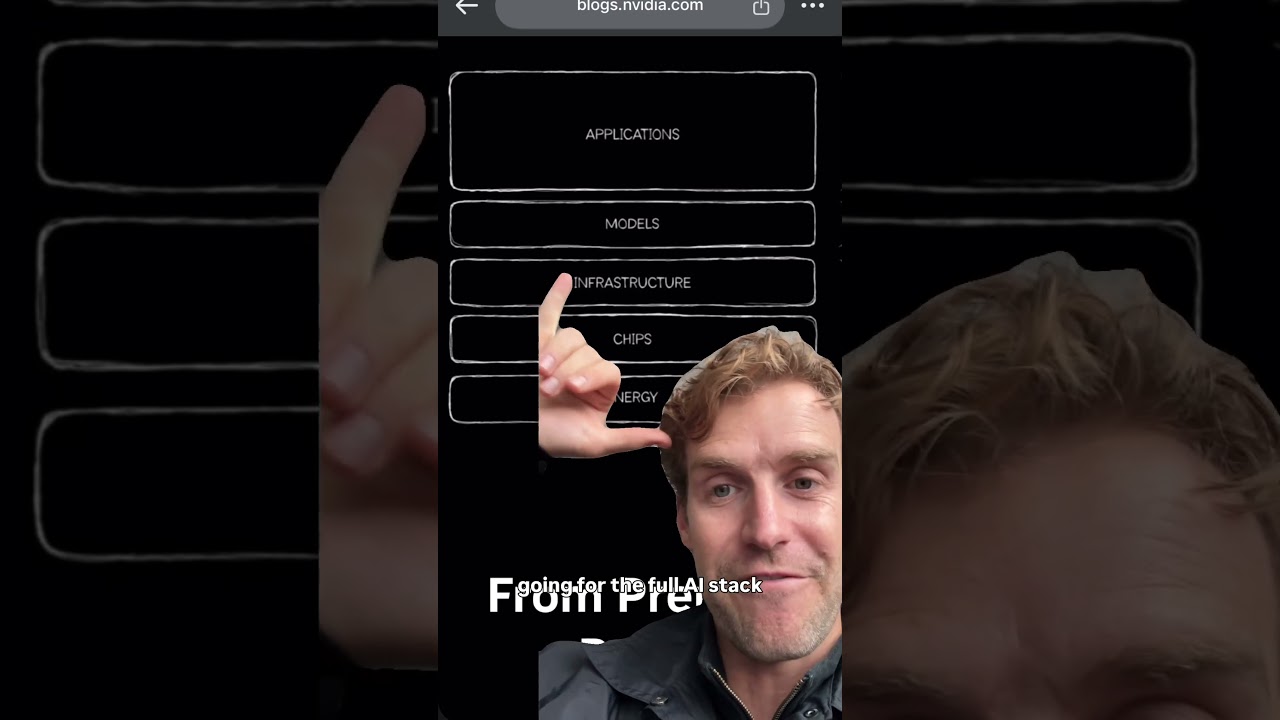
The AI stack is trying to consolidate to a winner take all, do you think it'll stay fractionalized


Before you launch a fund, triple check your fund attorney actually filed everything.




Different view on housing affordability and the fed raising rates not lowering rates