How to Make a Video Resume in Under 20 min
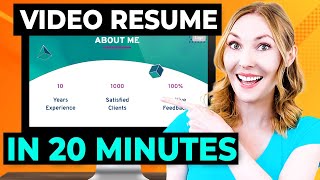
Madeline Mann shows how to build a 60-second video resume using InVideo templates in about 20 minutes. It works best for creative roles and presentation-heavy jobs, not conservative industries. The video walks through customizing templates with your profile, experience, skills, and voiceover, but it's supplemental to a written resume, not a replacement.
Chapters
How do you stand out in the job search? Do something creative and land interviews all.
In about 20 minutes.
Well, you can create a video resume using steps I share with you to make a very sleek, engaging video resume that will only take you about 20 minutes to make and stay to the end because you'll see example video resumes and also get access to those files so that you can edit them for your job search. If you're new here, I'm Madeline Mann. I am a human resources leader and job search strategist who who turns job seekers into job shoppers. You may have seen me in Forbes, Wall Street Journal, ABC News, and more. Subscribe to be reminded to do something.
Good for your career so I have.
Become the foremost expert on video resumes. If you google the term video resume, there is my face and I have the only course on video resumes endorsed.
By the social media behemoth LinkedIn.
Look at all of these incredible success stories. But this video is a bit different because while your video resume is about to look super fancy, this is the easiest and fastest way to make a video resume that I have ever released.
And you don't need to fix your.
Hair because you won't need to be on screen if you don't want to. So I am excited to show you. Let's be clear about what a video resume is. It is a video summary of what makes you an appealing candidate for for a job. You can include snippets of your past accomplishments, highlight your unique talents and overall demonstrate your ability to create a compelling presentation. This is not a replacement for an actual resume. Please don't skimp on writing that and if you need help, I will link a free resume workshop that has thousands of five star reviews. Also, don't leave things off of your resume because you went over them and your video resume. Your actual resume should stand alone and you cannot assume that your video resume.
Will be watched, so leave it all.
On the court when writing your resume. Now I do want to warn you that a video resume isn't always the right choice. It's important to know when to unleash your video resume and when to tuck it away safely in your digital drawer. A video resume can be a great choice when you're aiming to stand out in creative industries. This could be something like media, entertainment, video games, fashion, design, design, so on. Also, think about what kinds of traits and skills they are looking for in your particular role. If you're applying for a job that requires you to dazzle with charisma and charm like sales or public relations, a.
Video resume could be your secret weapon.
If you have a role that requires a lot of presentations and visualization of data and information, this could also be a great move. However, let's rein in our video resume enthusiasm for a moment. There are times when it's best to stick to the good old traditional format and nothing more. If you're applying for a position in a more conservative industry like finance or law, where professionalism is key, a video resume might come across as a tad too flashy. Moreover, if the job application explicitly states anything about not including any photos or videos, essentially anything that would show them what you look like, then leave it out. Those warnings are to often reduce bias in the candidate selection process so that they are not influenced by any aspect of your appearance when making interview selection choices. Some companies have their own strict hiring procedures and you don't want to ruffle any feathers or end up on their most memorable applicants list for all the wrong reasons. So just like a pair of glittery sequin pants, a video resume is best suited for the right occasion. When creating your video resume, I want you to make this 60 seconds or less short form video is so popular these days, so let's make this more of a trailer instead of a feature film. Unless you are a really great video editor, I recommend just using pre made templates to make your video resume so that they look polished and that they only take you a few minutes to make. I recommend using Invideo. I have been using them for years now for work videos or sending special presentations or social media videos and they were so kind to sponsor this video. So let's take a look inside at their templates and we will review a series of different pieces of information and different video resumes and see which ones we can add to your video resume so that it's fully customized to your situation and representing all of those twinkling high notes of your work experience.
We are in Invideo. You can see all these templates which do yourself a favor, use a template. Make it easy on yourself. I'm going to go here and look up video resume and let's take a look at some of these.
My previous videos on video resumes have.
Talked about ways that you can appear.
On screen, but some of these things.
I'm going to show you, you actually.
Don'T have to record yourself, which you.
Might be very relieved right now to hear that.
But one of the things that's great.
About in video is that you can use a lot of stock footage and so I think that that is something.
That if you don't want to appear.
On screen, you know, you can use stock footage like this where it's making your, your information interesting.
But you're not having to create all the content yourself.
You don't have having to have all of these photos and videos of yourself on in video. They do have over 8 million royalty free clips from premium sources like Shutterstock and iStock. I know personally I have my editing software that to use and that has a cost.
And then I had to pay for.
All of the stock footage and access to that separately and I had to pay for the animations separately and the customized templates.
Those were separate costs.
And so in Invideo it's all in one. That's the nice thing is yes, you.
Could do the free version.
But do note, yes you can share.
You know, with people, your friends on.
The Invideo website for them to watch your video.
But if you want to download your.
Video, you can, you will want to upgrade.
And so you get all these templates, you get 6,000 of these bad boys.
And they're fully customizable.
There are thousands of graphic assets such as text boxes, animations, transitions.
I used to pay kind of individually for different packages of different animations. And you don't, you don't have to do that here. And they do have 24. 7 customer support.
I did test this. I think it was just on a.
Random Sunday afternoon I accidentally signed in.
With the wrong account.
I did the Google sign in where I used the wrong email and within.
A couple minutes they had deleted that account helped me out. So I have found that with other video editing platforms it's unheard of to get that kind of response, it takes forever.
So that's been wonderful. Let's go ahead and dive into some examples. We're going to walk through some example video resumes and outline what are some of the things that you can add to your video resume to make it pop. The templates I will be looking through are ones that you can access on Nvidia video and they were nice enough to extend a 25 discount using the code SMM25. Thank you InVideo for passing that along. All right, let's go into this one here. So what I like about this template is you can pop your own face in here, you can put your face in here, you can then remove the background of the image. So I love that, that makes it really easy then in about me. So I like this. It says how much experience he's had, number of satisfied Clients, positive feedback. So you could change this to be anything. It could be your. The university went to and the major there or whatever it is, whatever you want to put here as about me. So. But I like how you can easily put this very clearly about yourself. His latest projects. I think this is great. You could either do images here or you could write text of what they are built. Logo for major conference event. You could write that instead. Here are some testimonials which can be. Even though this is kind of coming off as someone who is more of a freelancer, you could. Instead of saying client testimonials, it could be endorsements just like it is on LinkedIn. You could have that there and then a contact page. Love that. Here's another video resume. Nice. Very clean profile here. I like this idea of having a profile up top where it describes who Michael is because I think that's really important in the job search to make it really obvious you don't want this to be something vague like inspirational, hardworking professional who's really creative. Okay, what. What job are you going for? So I like how it's very clear. I also like how there's these experience here. It really puts the resume in video resume here by including his experience and skills. This is another great thing to add. Okay. And then he finishes up by saying, contact me. Excellent. Now that you've gotten a sense of what a video resume can look like, it can be as simple or as robust as you like. You can put all these different components in. You can use the ones that are interesting to you. So I thought we could walk through the process of building your own video resume. So in this template, we here have James Henderson and here's his title. And so I love this. So there's footage here. But let's say we want to make this about you. So what we could do is I would upload a photo of yourself and then put it in there. So let's see, I'll put this in here and I'll replace it.
Let's make sure that is proper. And then you could change your name, you could change the title. What is your title? Right, so you go here, project coordinator, whatever it is. And then here we have this profile which I really like that you are branding yourself up top of what you do. And so you can really do this whatever style feels right. So one thing I think would be interesting is whatever feels right. So maybe it's not profile, maybe it's about me. Feels a little bit more like your voice. That's great. And Here, you could even customize this to the company. So let's say resourceful project manager who has worked in the toy industry for five years with a dream to work at Mattel. Let's say you're applying to Mattel, right? So that is what you could write there and that's really special that they are hearing from you. If our dream is to work at Mattel, we can then use the images that Invideo gives us so we can put in Mattel. And let's just maybe replace that there. Replace.
And I adjust it to look perfect. There you go. It is that simple to show your love for this company. This next section here is job history, which I think looks really good. Now. Not all of us have a lot of job history. Some of us have a lot of freelance or volunteer work. And so you can even just change this to experience. Know that unpaid experience is still experience. So let's say that you volunteered for the Make a Wish Foundation. You were an event coordinator for them. You could even delete the section here and just even focus on different experience you have. Even if they all were happening at the same time, the years aren't as important. You could put this information here. So I just want to make sure that you know that you can make this your own. These could all be school projects, these could all be side projects. Whatever you want want it to be. Of course, it could also just be your job experience. Really mold this to be your own. Then we go into skills here and this is a really great place to then list them off as you see fit. Add in whatever is what the company is looking for. So let's say they're looking for social media management. Boom. Make sure that they see that here in your skills. Easy peasy. This could also be for anything that you list. I feel like, like let's say you work in the entertainment industry and so maybe shows worked on, so you work in television. So then you could make this a list of the shows you've worked on instead of skills. So just get really creative with different ways that you can share the information that's important. You can move into your accomplishments. I would steal some of your best accomplishments from your resume and put them on here in a very easy to read way. So I like how we can put this here. This kind of gives a a title for it. But we could also do increased sales by 25% and then it's good to pick footage, stock footage that matches what you're talking about. So if we're now talking about sales I would choose different stock footage. So if we want to go over here to videos, let's say phone call. So let's check out this one. Okay. It's a woman answering the phone. That's great. Let's add it, drag her onto here. We'll replace her and then we'll pick the section. I think, I think maybe the section where she is answering the phone is great. And then we'll add her on and look at that. Yes. Then here are some more accomplishments slides that you could do. There's three total here. And even if you wanted to pare this down, you only wanted to do one or two, just delete a few of them. If you want to do more, I would duplicate one of these and add it to the end here and do.
Four or five, whatever it is.
But sometimes it's not important about doing more, sometimes it's just about important about giving the right information. And I like how this one has an award. So if you've won an award, this would be a great place to put that. Then we move into recommendations. We saw this in an earlier video resume that we looked at. And what I love about this is it's really great to not have to brag about yourself, but to have other people brag about you. What I recommend doing is giving people who you've worked with recommendations on LinkedIn. There's a section on LinkedIn them recommendations and then they will often give you a recommendation back. Or you can simply ask them when they've put a recommendation on LinkedIn, they've made that public. So you can very easily then take their photo from LinkedIn, put it into this video and then write some of their recommendation or all of it. Sometimes it's better to just like we have here with Amanda's quote is that it's not too long, so it's easy to read in a video resume. So you can go ahead and change the images here. Maybe you can upload the person who's recommending you and put them in there and add their name. There's no pressure to have multiple recommendations, but it is nice if you can have multiple people saying nice things about you. So here is a screen that says I'd love to explore how I can my skills can contribute to your next project. I wonder here if, if we're going for Mattel, I wonder if we could say your thing here about how excited we are about the opportunity to work at Mattel. What if we say I look forward to. To next steps for the project manager role at Mattel something like that, or any details about why you're excited. And then we can even change the background. Now we can change the background video if we'd like. I search for team meeting. And so we can select one of these and put it here.
You select the segment and we'll go ahead and add it in. And then you can put the contact page at the end here and you can put another photo of yourself, which I think would be really great. I think since in this version we're not having you appear on screen, having some more photos if you would be great. Otherwise you could also just delete this, right?
And just kind of remove it and.
Say, heck, I'm just going to make.
The contact me page.
Simple and easy peasy. Now, the one piece we have not discussed is the audio. So one thing that is easiest is to choose a track here. Now, I recommend using some of the music that they have here. So you can go here and choose it based on the mood or the genre. I might just type in corporate just to see, see what pops up. So we get something kind of neutral, not too dramatic. We want it to sound professional. Let's listen to this one to see if it's a good match.
Hey, I like it.
So let's go ahead and put it in. I'll click the add here. I'm going to delete this audio that's already there and I'll just go ahead and play it to make sure it sounds okay.
Okay, that sounds great.
And then if we want to get really fancy, we could do a voiceover. I think voiceovers in video resumes are great. It's another way for the company to feel a bit like they're getting to know you. Since you may not be appearing on screen, you can have your voiceover be essentially the same types of things you would put on screen. So let's give it a try.
Hi, I'm Madeline Mann and I'm applying for the project coordinator role at Mattel.
Okay. So I think I will shorten this here, shorten this here, and I'm going to go ahead and add this and let's see how this goes.
Hi, I'm Madeline Mann and I'm applying.
For the project coordinator role at Mattel.
Cool. Okay, so you can obviously do so much more here, but this gives you a taste of how you can build out your video resume.
So in video is absolutely incredible.
As you can see. You can sign up using the link in my description as well as you.
Can use the code SMM25 for a 25% discount. Let's walk through all of the different.
Pieces that you could include in your video resume. You could have and about me with stats and different things quantifying you. You could put your top skills. You could list out your education. You could put in different projects including images or simply words. You could put endorsements. You can have a thank you page with contact information. You can put your job history. You can put your profile such as who you are right that first statement at the beginning of who you are. You can also tell the difference steps of an accomplishment tell the story of those accomplishments. I'm very curious to hear which pieces.
You are going to put in your video resume.
And then as a cool bonus, all paid users on Invideo get this in video AI tool where you can put in prompts and it will create a video for you. And I will say even though this tool is so easy, you still will probably want some tips. And so I recommend you go to InVideo's YouTube channel. Make sure you subscribe watch their videos. This gives you a lot of tips on how to best use the tool.
Remember to use code SMM25 for a 25 discount off of InVideo. I'll also link my two other videos on video resumes down below so you can take inspiration from all the different styles of video resumes. Be sure to like this video and subscribe to this channel. You've got this wi fi high five.
More from Clegg

The #1 Skill Gen Z Needs | Simon Sinek + Esther Perel | A Bit of Optimism Podcast


AI Won't Tell You the Full Truth | Arthur Brooks + Simon Sinek | A Bit of Optimism Podcast

How To Make the Best Decision | Arthur Brooks and Simon Sinek | A Bit of Optimism