Standard Operating Procedure Example For Small Business
David Jenyns walks Kane through documenting a gutter-cleaning business's repeat client callback process. The demo shows how to record the task with video, upload it to Vimeo, embed it in SystemHub, and convert it to written steps. The key rule: only document systems that fall inside the Critical Client Flow.
Chapters
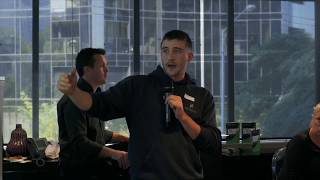
So there the four steps, pre extraction, recording, documenting and then review it. It's really easy. We're going to do an example. I mentioned Kane has come up a couple of times and I've mentioned he works at Portavac, the, the business owner, Dave. Actually I got introduced to Dave through Jamie, through that Mastermind group. And then Dave's like, oh, I want you to do this for my business. Identified Kane as the systems champion who's going to be driving this together. We've been working on the critical client flow, so we picked out the critical client flow for the business. We then did the department's responsibility roles chart. So we figured out who in the business has what knowledge. We then did the systems assign sheet and now we've started recording. And the whole goal here is what Dave wants to do is have us train Kane when he can, then internalize that capability and then later on Kane will be able to go, right, this is the system we need to do. Seek out the right person, work with them, do the extraction, handle the documentation and then that becomes an extremely valuable role within the organization. So it's probably easier, I was thinking if we get Cain to jump up here and we're going to just do a real simple extraction. So we might need the microphone. Charlie's just running up here. So just as I'm getting that set up, I've got a screenshot there. We do the form online, you've got the printed version. Tell us maybe a little bit about the CCF or what you guys do and then talk about where this step fits into the CCF and then that way we can kind of show them the screen.
Alright, so the company I work for, I've been there with them for about two years now. We specialize. Our primary service is the gutter cleaning in the CCF we identified. Well, we've gone through it in the past, me and Dave. What this particular system is for is the repeat customer. So minimizing the cost of, you know, advertising, getting a new client in, using the existing customer and getting them, getting them to book in again. This system we have nothing in place for at the moment, but it's basically a callback or reminder. The client books in, does the job, new client, they go through the ccf, we find out what they, well ideally what they want. So first off it would be like a gutter clean. We're targeting homeowners. We make the call after they've made an inquiry, book them in, they visit, we take payment, generate the roof report, give them another call, see how everything went. And then this is the bit where.
Kane's going to be wearing the GoPro. I'm a little bit excited about that. I don't know if you are, but that's the bit I'm looking forward to.
This little system that we're going to do is the very end thing. So getting that repeat booked in, it's probably something that none of us have documented or I said that we don't have documented. It's the most basic system, very quick and easy. Takes three minutes to do.
Yeah, I'll record this and what I'm going to do, I'm just going to go ahead. I've got screenflow recorded on this or installed on this computer. So I'm just going to let that count down. So usually Kane and I, we chat via Zoom. So we'll have a meeting usually, you know, once a week. We'll know what systems we're extracting. He'll get the right person in the room and then we'll sit down with them and then they basically do the task. They've done the pre extraction form and then this is exactly how it would happen. So do you want to tell us where we are? I think we're in the.
We're in our operating system. This is what we use on a daily basis to assign jobs to field workers. Track everything, book out days. Basically this is the whole, the bible of the business. Just having a quick look here. So I put aside a callback before one that's sort of suitable. I pre checked it. What I'm looking for is has it been done recently?
I might set the context. So at this point, if you imagine the critical client flow, they've got the client, they've done the job, the field worker's gone out, they've generated the report, they've been an existing client at that point in the critical client flow, they then mark it in on the calendar to do a callback in like another six months to basically say, hey, it's time to get your gutters cleaned again. And this is exactly where we're up to now. So Kane's in the software and he'll get the reminder. And again, this is part of the job of the extractor to explain those bits and pieces. But also this fits into the context of the ccf. So all of the previous steps we are in the process of extracting. So we're just identifying just this little piece. So he's in the software looking for the callback note.
So this little piece or first step, I'll run through the system outline. Let's see what we have here. So check if it's been done recently. So what I've done is search for it and it hasn't been done in the last 12 months. Our guy last time recommended 12 months would be ideal. So this is a suitable callback to do. What I'll do is I'll go into the job and check.
So when you say recognize that it was a suitable job, he's put notes inside at the end of a job.
So what I've got here, there's no notes. Generally what we do is put a note in if they have been contacted or they might have some notes there stating that they do not want to be contacted. So the fact that that's not there.
So kind of step number one is locate that we have to do the callback. It's been a bit funny there. Locate that we need to do the callback and then we need to go to the client's sheet to figure out are there any notes there? Yeah, perfect.
So that determines the suitability. Next step would be gathering some information together, looking at the previous job and actually calling the client to book in again.
So how do you look at the previous job?
What we'll do is we'll check some notes here. We've got some fields that we sort of go through when we originally make the job. Sorry, I'm not.
Yeah, the trackpad is sensitive. That's all right.
Okay. So I got here, it was suggested 2 to 250 just based. And we base that on the size of the place, the content.
So you've got notes in there saying how much the job will cost.
So some key factors to go off. And this is what we want to keep in mind when we give them a call. We'll touch base on that previous job. You mentioned that our guy last time recommended this time around 12 months would be a good time to get it done. We'll just reiterate that that's all been said in the report earlier as well. Which is in the ccf.
Yep. And where is the report saved in here.
This one may not have it.
Yes, the report's usually saved in.
So we got a digital report attached here. This is in the completion details. What we can do is have a quick look at the documents attached for it and it's generally attached down the bottom. So there it is, there's a couple of files.
So this is all before you call the client, isn't it? You've not called the client yet?
Not yet. You want to familiarize with yourself, with the job as much as possible. Basically, you want the customer to sort of know that you know their house, you know their property.
Yes, yeah, yeah, yep. So what happens next?
I'll look. So after gathering all those sort of details, previous history, I can see it took us about an hour last time. You started it around here?
Yep.
And finished it at about 9:07, 8:04 arrival. I'll call the customer. I'll just go through these details with them. This is where the selling and this.
Is ideal if we can capture a real live callback. So I've said to Kane, let's get an iPhone, sit it next to the phone next time that you call or whoever does a call. So we can actually then capture the audio, which then can help us get the script or at least the main bullet points.
Okay. So I'd make this call, as I said, discuss these details, basically get them to book in again. And this is where all this sort of gets converted into a new job.
And then we would actually link in this system to the previous system that we created about making a new job. So the final step in the process would be Kane's made the phone call, covers these 5, 10 different points. Client's keen to go ahead. We book them into the calendar. We'd open up the calendar, watch him actually book it into the calendar, and then we could also link then, because we have a system earlier in the CCF of booking the job in for the first time, we would just say, here's how to book in a job. And then you would link to that system and that's pretty much it. Then you'd hit save and then we'd close it. We just stop the recording and then that's done. That's the way I would do an extraction. Thank you. Sometimes it's very easy to over complicate things and build up in your head how difficult it's going to be to explain something. But if you just record it being done, ask questions if stuff ups happen as well, they're ideal. You're not looking for a perfect video. If they make a mistake, that's great. Get them to say what happened? Oh, I accidentally clicked there when I should have clicked here because that'll stop someone else when they watch it in the future. Go, oh, yeah, okay, I know how to solve that problem. That's a pretty frequent thing.
So.
So you just get them to walk through the task. I've done it in screenflow here. The next thing that I would do is then I'd export this video out. So basically what we did is we started off with the pre extraction form. We'd hop on, we'd do that on Zoom. Some things we'd have to do in the field, whatever the next step is inside System Hub or wherever you store your systems, it doesn't really matter. But if you're using System Hub, you basically break up your business into different departments which you've already identified. You would then have the systems underneath those departments. And then the first thing that you do here, repeat client callback. Because we've done this. We actually did this on our last extraction session. I would then upload the video into Vimeo, embed it in here, and then the next step is it actually gets handballed. I don't do the documentation. It gets handballed to one of the team who then go through, watch the video and then build out the documentation. And then this is what gets sent back to the client, basically saying, here we did the task. Here are the steps. You can imagine how your business would get documented that way. I've made it really, really easy. If your business is a collection of systems and we just identified the most important ones, now we've figured out how to capture those so that it's replicatable. Like, this is amazing stuff. Some of you, I can tell you're itching to stand up on your chairs and scream and go, yes, you're awesome, but just keep it inside for the moment. We'll say that towards the end. So the caution here is when you start capturing systems, don't capture systems outside of the critical client flow. The purpose of the critical client flow is to keep you really focused. The rules of the game are you're not allowed to do the documentation for things outside of the critical client flow until the critical client flow is done, because that is how you get paid. Don't get sidetracked making systems on how you take out the trash. We need to make a system for the way that we make money. Focus on that first. Then you can still capture those ideas. And if you really, really, really want to record yourself doing something and then save it into wherever and just leave the video there with no documentation. But the rules of the game are no documentation until your CCF is done.
More from David


Remember me? Subscribe To My Channel For More Free Business Systems Content 📈