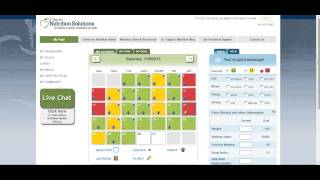
Log your daily habits in Tague Tracker by picking a color each day: green for on track, yellow for partial, red for off track. Takes 30 seconds. Over time, the colors show patterns, like weekends improving after you change a behavior, and your provider can watch the trends on their dashboard.
Chapters
Welcome to the TAEG Tracker. As a benefit of having Dr. Tag as your provider, you will have access to a suite of easy to use tracking tools that will help you get the most out of your program. In this short tutorial, you will learn how to use the My Calendar tracking tool. You can find the My calendar tool under My Tools. Using the calendar daily takes about 30 seconds or less. You can either login to thetagtracker.com which you see here, or you can track right on your iPhone or your Android app. Downloading the Android or the iPhone app is easy. Go to your smartphone app store, search, HealthTrack, install the app and start coloring your day. If you've ever tracked before using a detailed food or exercise log, you know that the benefit of tracking is you're much more aware of how close you are to meeting your goals. You may even find that you feel more in control and more successful when you track. The downside is that tracking can be time intensive and most of us can't maintain this new habit for very long. The My Calendar tool will help you realize the benefits of tracking in a much more simplified, realistic way. The My Calendar tool is designed to help you build awareness around your current lifestyle behavior. These are behaviors that relate to how you eat, move, sleep, manage stress, and more. Using the calendar is simple. Step one is to color your day. To color your day, simply click on the circle next to the color that best represents how closely you met your lifestyle goals. Green for being on track, yellow for being somewhere in the middle, and red for being off track and meeting your healthy living goals on the most basic level. That's it to coloring your day. It seems simple, but it becomes very powerful when used consistently over time. As you color your day consistently over time, patterns will start to jump right off of that My Calendar page. Like in this case for example, where you see a set of red Saturdays and Sundays finally turn to green once that behavior has been identified. Tracking in this way will help you focus your energy where you may need it the most. It will help you motivate you when you are on a green streak, for example. Or it may help you catch slides before you fall too far off track. Most importantly, it's a way for your provider to support you in the most effective way possible. They'll be able to follow your trends and provide you with the support that you need. In addition to coloring your day, you can color your other lifestyle behaviors by clicking on the circle next to either On Track, Fair or Off day. This allows you to see trends around your eating, your movement, your sleep and your stress. You can also track your weight by typing in the text boxes here, walking steps, exercise minutes, sleep, sleep hours, the number of daily meal replacements, as well as the number of daily vitamin doses you've taken. The most important thing to track, however, is your coloring of your day. So if that's all you can do, Remember it takes 30 seconds or less to simply log on daily and track either green, yellow or red. To see your tracking trends over time, go to the MY Dashboard. Here you can see how often you've logged in. You can see your ratio of green to yellow to red, days, your weight tracked over time, and any other metrics graphed out here for quick reference. Your provider will use this dashboard with you during your visits as well. That's the basics of using the MY Calendar tool. Good luck.