In this tutorial, the speaker demonstrates how to use the free, built‑in dictation feature in ChatGPT for stream‑of‑consciousness voice journaling. After logging into a free ChatGPT account (desktop or mobile), the user clicks the “Dictate” button (distinct from the “Use voice” button) to start recording. The interface shows sound‑wave feedback that responds to volume, and the system captures speech even when spoken softly. The tool tolerates long pauses—up to at least 30 seconds or a minute—allowing natural breathing or thinking breaks, and each dictation segment can last up to about ten minutes. Once the user clicks the check‑mark, ChatGPT processes the audio, automatically inserting proper punctuation and capitalization while stripping filler words like “um” and “ah”. The cleaned text can be selected, cut, and pasted into a Google Doc for journaling. The speaker highlights that this free tool is more reliable than typical phone dictation apps, especially regarding pause handling and automatic grammar cleanup, and invites viewers to share additional tips.
Chapters
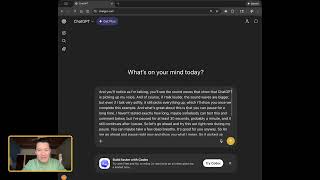
I find it really useful to be able to stream of consciousness, speed my thoughts even with pauses, and have AI faithfully transcribe what I've said, including with some grammar included. So let me go ahead and show you my favorite free tool for doing this. It's actually simply using ChatGPT. You don't need to have a paid account, but you do need to be logged in to a free account to access this. So let me go ahead and show you what I mean. I'm using a desktop, or rather a laptop computer here, but this feature is also available on the ChatGPT mobile app. And I find this dictation to be more faithful and more accurate than using my phone's own dictation built in dictation app. And so let me go and show you. When you are logged into ChatGPT, you'll notice that there are two buttons in the input area. One is use voice. That's not what we want. One is dictate. Again, you have to be logged in to a free account to be able to see the dictate tool. So let me go ahead and show you. I'm going to click on the dictate button now and you'll notice as I'm talking you'll see the sound waves that show that ChatGPT is picking up my voice. And of course if I talk louder, the sound waves are bigger. But even if I talk very softly, it still picks everything up, which I'll show you once we complete this example. And what's great about this is that you can pause for a long time. I haven't tested exactly how long. Maybe somebody can test this and comment below. But I paused for at least 30 seconds, probably a minute, and it still continues after I pause. So let's go ahead and try this out right now. During my pause you can maybe take a few deep breaths. It's good for you. Anyway, so let me go ahead and pause right now and show you what I mean. So it picked up some of my exhaling there as you can see, but it's continuing to, to grab my, my get my voice and my words here. And basically, as far as I've heard, you can dictate just ongoingly like this for up to 10 minutes, which you know, you don't even need that long because you can stream of consciousness journal with your voice for a couple of. And then once you are at a point, you want to just pause for a moment. Okay, watch, do this. Click on the check mark and then it's processing your recording and look, it's right there. See, it's add. It's. It's added grammar, you know, capital, beginning of sentence, comma, period. And it also has taken away the ums and the ahs. I find this to be really useful because if I'm dictating with my voice, my mobile phone's default transcribing app, it doesn't necessarily. It definitely doesn't put in the right grammar, I find. And then it keeps the ums and ahs. So now what I can do is I can select all command A on my Mac keyboard and then cut command X on my Mac keyboard. And then I go to a Google Doc and then I could just paste this in and, you know, this is the journal thus far. And then go back to ChatGPT and I can continue dictating up to 10 minutes per segment, which is enough time to have enough stream of consciousness brainstorming or emotional processing or whatever you're trying to do. And again, you know, I always worry when I'm using my phone's dictation that I have to, you know, I have to worry about pauses because sometimes it. It stops dictating after I pause for a while. But not here. I can pause for longer than any other free dictation tool that I've seen. So I hope that this is useful. And please do comment below if you have any other tips related to this for other people. Thank you.