Six pages from my website, before and after AI
George Kao redesigned six pages of his website using conversational AI, without writing code. The AI automatically updated his course catalog, created visual layouts, added search boxes, and generated copy. He also used AI to surface his non-mainstream marketing ideas from years of blog posts and videos.
Chapters
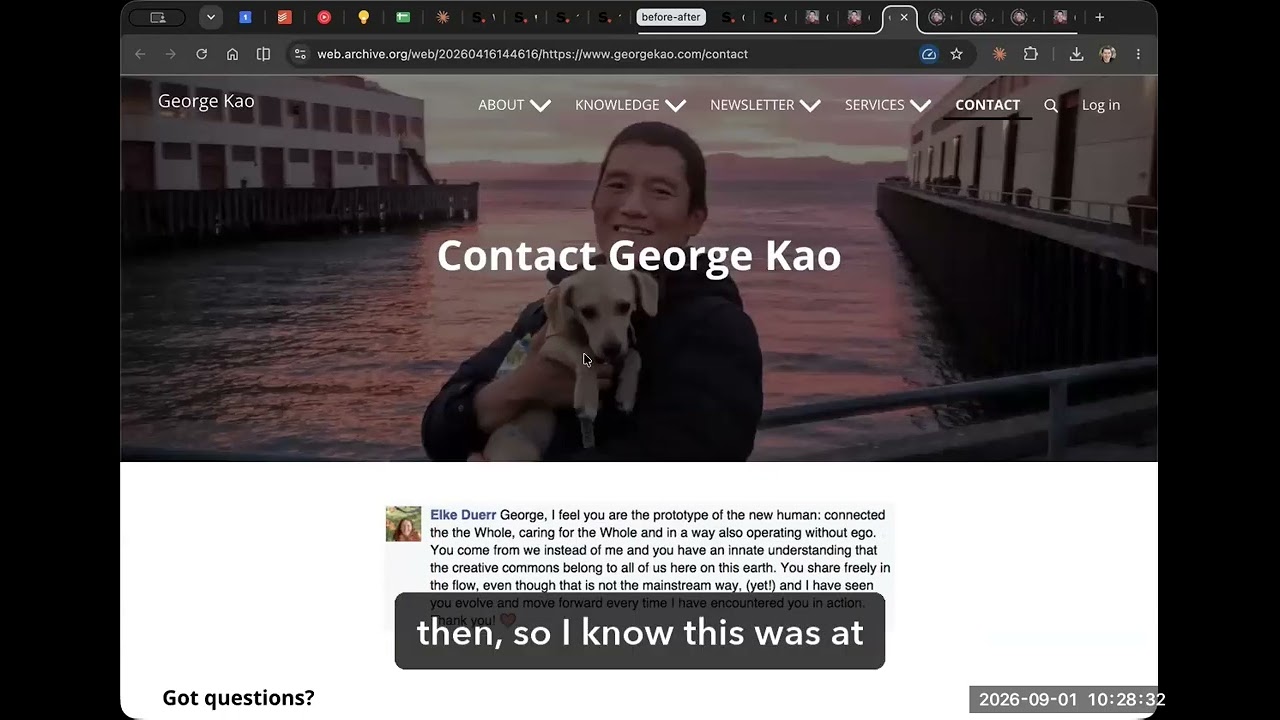
I had to go use the Wayback Machine, the Internet Archive, to find an old version before AI changed this. This was the version in April. You could see April 16th was when they took the snapshot. I'm gonna close this now. And this was my signup page for my email list. Like, if you wanted to join my email, this is The extent of my technical and design capabilities. Okay? I mean, I built an entire business being this cheesy. Well, I'll show you a couple others that are a little bit more designed, but a lot of— this is my website, you know, emails. The most important thing if you're a business is your email subscriber list. And this is how I try to get subscribers. It was kind of sad. And so this was it. Okay? And then I asked my AI to do it, and this is the new version. It's just so much more professional. Okay, it's so much more professional. Right? And even the signup box, again, I didn't design any of this. I just asked my AI, please upgrade it. I, all I'm gonna say is please, you know, read my website and then make an upgraded version of my email opt-in box. And there you have it, you know. A. Or B, okay? Which one feels more professional and credible? All right, let's go to another version here. Again, this was taken in mid-April. This was my— this is like one of the most important pages on my website. This is my sales page bringing people to my course catalog. And look at this, like the font on the backdrop. This is a real photo, thanks to Danielle. Gardner for taking that photo many, many years ago. And I haven't updated it. This was the, you know, this page lasted for like 10, more than 10 years selling my courses. I mean, I did okay, but my goodness, this was how people had to find my courses, had to look through this long series of text and try to figure out which one they want to click on and then go click on it and then read more, et cetera, et cetera. So that was my course catalog page. Now, this is my course catalog page. Again, I just asked AI, please upgrade this. This looks so bad. Please upgrade it however you think my brand is. Go ahead and do it. And so this is what it is. And it always upgrades it. Every time I launch a new course, it knows to automatically upgrade the course catalog page to include the new course, to update the number here. Instead of 22 courses, it'll be, you know, last week it was 21. Now it's 22, right? And even has these buttons. I didn't ask it to create these buttons. It just knew how to do it. It just thought, hey, it'd be a good idea to click here to be able to do that and to jump down, you know, to click here, you know. So this is the new page, right? And it knew to do this. It like said, well, you know, why don't we make it easier for people? You already wrote a blog post years ago, George. Don't you remember that? Let's go and update the blog post about your various courses. And then remember, George, you have your AI. Maybe they could use it to choose it, right? Or jump to a phase. It came up with the phases idea by itself and put the courses in the phases. I'm like, yeah, that makes sense. Because it brought— took the phases out of my guide that I wrote many years ago that I had forgotten to update, right? And so now look at this, it looks so much better, this course catalog. It took the image from the webpage of each course and it set it up like this, right? Phase 2. So it's much more visual, much more interesting to look at. and it came up with all the little mini descriptions itself. And hey, you know, it came up with the section itself. Hey, maybe you should get people to join your announcement. Oh, I think I had that. I think at the very bottom I said, hey, do you wanna know more? Click here, right? And this is now much more visually attractive to say, do you wanna join the announcements list? Go ahead and do that, right? All right, next example. This was my contact page and I have not changed this page for like 12, 15 years, something like that. I had a cute picture of my puppy. This Buddy was a puppy back then. So I know this was at least, you know, 11 years ago that I took this photo and made this page. And it's all I said, I want a picture of my puppy on there. And then, you know, Elka's testimonial from more than a decade ago. And then this was my contact page. Okay. Now my contact page is this. much more, you know, pleasant, polished, like professional, like I look like I actually know what I'm doing, right? Instead of being a beginner. And different ways to contact me, find me around the web. These are the buttons. Let's stay in touch, join the newsletter. Okay, next. This is my About page. I kept this page for more than a decade. Picture of me at Yosemite, I think. And then look at this. This was literally my About page for more than 10 years. Look how narrow the text is. I mean, I like narrow text, but it was too narrow and I didn't know how to change it. I was too lazy to change it. It was just so narrow. I'm like, okay, whatever, it's fine. So this was my About page. Okay, look at this. You couldn't even see this. You couldn't even read this. It was so small. And I didn't— I was like, oh, it's too narrow, but I didn't know how to make it wider. But the image has to fit there. I don't know how. Anyway, a lot I didn't know how to do. technically, even though I was a marketing coach. I was too lazy to change all that. Now my About page, look at this. Now it's not only appropriately narrow, but not too narrow, and the words are big enough, and there are cards to make it look, you know, to quickly communicate information, right? You know, I gave it a whole folder of my photos and it chose some photos for it. And just, I didn't ask it, you know, this is same testimonial but just made, made nicer, right? My mission, values, you know, the testimonials are all much more readable. Um, let me see the, the Jeremy one. See, 2 frameworks, right? It thought, hey, you should tell people about your frameworks, make it look visual, make it look, um, much more, um— how come there's 2 Tomar comments here? Tomar, are you here with me? Are you here on this call? No, Tomar is not here, but I should, I should, I should update that. Da da da da da. Okay. And finally, I want to show you. I asked AI to go through all of my blog posts and all of my courses and pick out the best. I'm sorry. No, that's not true. That was a separate project. I asked AI to, to, to, to do this other thing that I should show you. I asked AI to go through all my blog posts and all of my courses and pick out what were the most distinct ideas that I bring that the mainstream doesn't have. And AI knows the mainstream because AI is trained on the mainstream, obviously, right? AI is trained on mainstream. So it knows that, oh, when you talk about this, that's not usually what I say to people. When ChatGPT says, what is marketing? this is what ChatGPT says. What you say is different in this way or that way. And so I asked AI to go through all my courses, all my blog posts, all my YouTube videos, and come up with this page called georgekao.com/perspectives, which are my most unique perspectives. You know, what my most unique perspectives are that are least mainstream, right? The least mainstream things. So it's pretty cool. It came up with this. You can search the perspectives. Again, AI made all this. I didn't think about making these different categories and making a search box. AI came up with all this on its own. It's pretty amazing. And then finally, I'm pretty proud of this, uh, georgekao.com/bestideas. You might want to go there and check it out. This is, um, I asked my audience what are my best ideas, and then I had AI collect all those responses and create this page. Wait, whoops, sorry. There's 72 of them and you can download it as a document and feed it into your AI to have it talk like me or have it talk from my perspective. So if you wanna, if you want me as your business coach for free or for whatever you're already using with your AI, just download this document, upload it, and then just have a chat with quote unquote me as my AI, right? So this is all, all my webpages. You go to any of them now, they're all designed by AI. They all look so much more, you know, so much more pleasant compared to how, how mine used to look. So much more professional. So, and I did this, I'm very lazy. And so I did this mostly just by talking to it and, and not editing it much after that. So I hope that this inspires you for what's possible now. A lot of people don't realize this is now possible. Again, I did not touch my website creator. This was all just AI. I just interfaced with the AI user interface, AI app, and it did it through in the backend to connect my website. So that's what the rest of this course is about, and I hope that you get to do this as well.