this is IMPORTANT -- how aware are you of cyber security?
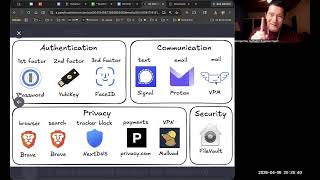
George Kao weighs in on cyber security practices for small businesses and individuals, rejecting most AI-driven recommendations as overkill. He endorses two-factor authentication and VPN on public Wi-Fi, but skips hardware keys, Signal, and privacy browsers, relying instead on phishing vigilance as his main defense.
Chapters
So a question about cybersecurity risks. They are growing, and somebody asked whether or not it's necessary or a good idea to carry cybersecurity, cyber liability insurance. And I'll tell you, I know relatively little about that because I have been very, I guess, anti-insurance for Many years, I, uh, obviously I have my own health insurance, but that's it. Don't have any other insurance. Um, I used to have this insurance, that insurance, but over time I let it go, and I don't have any kind of small business insurance at all. Um, yeah, at all. So that's me. Um, but, uh, I think everyone should of course look into it themselves and make the choice based on their you know, tolerance for risk. But I do want to share with you, and also I have to say, if you talk to AI about whether you need insurance and about risks, AI tends to err on the side of safety and not wanting to bring liability to itself and to its parent company. So it'll almost always go farther in recommending safety type things than I would practically recommend or do myself. So I just know that about AI. And so it's probably gonna say yes if you ask for cyber liability insurance, probably gonna say you've gotta do these 85 different things to protect your business. And, and, and so let me talk you through some of the things that I think are probably important things that I do, et cetera. So one is I don't have insurance, but you got, you can decide whether you do or not. I think they, I think obviously, you know, they, they, they cost money and probably more than I'd like to pay. But let me go ahead and share with you. In fact, this was a list that I just saw today from a, from a, an AI expert that I follow that I, an AI and marketing expert that I follow that I trust. I like his stuff. Name is Oll Lehmann. You might look him up. He's, he's probably active on elsewhere, but definitely on X anyway. And, you know, based on the fact that as of this recording, there's a new Anthropic Claude model coming out called Mythos. They're really good at marketing. They make it sound so mysterious and, you know, powerful, right? And of course, this guy is like, oh, you can no longer be lazy with this. And I'm— this guy does write articles with the help of AI. Of course, he's an AI expert. So I am— I can't— I can't imagine that he didn't with this one and probably AI recommended a lot more than, again, let me go ahead and show you. So let's take a look here. Okay. So of course we all have passwords. We know that two-factor authentication is something I recommend for everybody. I have two-factor authentication. Not a YubiKey. Okay, so here's what the two-factor authentication he's recommending here is a literal hardware device. And to me, I think that's taking it too far. But again, a lot of people don't think it's taking it too far, so obviously that's why it's here. So you may consider a hardware second authentication, but if you don't use a hardware two-factor, the two-factor that you're probably familiar with is when you log into a website, not only do they ask for your password, but then they, text, they say, hey, let, let me text your phone with a 4-digit code and you need to get the phone, get the code, put it in the code, then they'll let you into the website. So that's, that's a common two-factor authentication. And honestly, if everyone just did that with all their accounts that allow two-factor, I would feel much better. And I think that's a very simple and easy way. Everyone everywhere, definitely all your bank accounts, PayPal, Stripe, you know, your website, your, uh, website software, your mailing list software, All of it should be two-factor protected. Again, I don't use a hardware key. I just go with whatever online. A lot of times they have something called the Authenticator app. So it's an app that you can download from Google Android or from iPhone called the Google Authenticator app. The Google Authenticator app. It's the official app from Google. So make sure you look for that, the fact that it's an official app from Google, that then you, you download the app. And it's, it's almost like having a hardware key except it's on your phone. And then you set up anyway, two-factor authentication. Hopefully everyone knows that, but if you don't, you can ask AI about that and have your AI walk you step by step through how to set up two-factor authentication on any website that you have. AI knows all of it. How do you set it up on PayPal? How do you just set it up on, you know, Chase Bank? How do you set, you know, anywhere? AI knows what's, what to, what to walk you through, how to click on it. Third factor authentication, Face ID, you probably are familiar with that. Um, so either it's phone Face ID and then it sends the authentication to your, to your website, to that website or whatever. That's if it's easy, set it up, you know. Um, so yeah, that I would say that. And then communication, uh, basically this guy is recommending that you stop using every other text messaging platform, direct messaging platform, and Except for Signal. Signal is apparently the, the most reliable, safest. Again, I think it's taking it too far. I don't use Signal myself. I have it, but it's, it's, you know, most of the people I communicate with aren't on Signal, so I don't use that. But a lot of like more techie people are on Signal, so that's why he recommends it, because he can still text with all of his friends and colleagues. Email, he recommends ProtonMail. Again, it's, it, it tends to be more secure than Gmail or other things. I think it's taking it too far. I just use Gmail. It's fine in my opinion. And physical mail, a virtual private mailbox, I do think that's a good idea. I have one myself. I, for the longest time, I've always been anxious about sharing my home address, and I think all of us should be. It just, I, to me, like, that was even before two-factor authentication. I never gave away my home address because you know, all a lot of creeps out there, you know, and all, you know, it is, you have to remember this of the general, of, of the worldwide population, there's 1% of them who are psychopaths in any area. There's 1% psychopaths, which is more than we want anyway. So Virtual Private Mailbox is basically a service you set up where it's like a PO box. So, you know, US Post Office PO box is an example of a, But the problem with the PO box is, I don't know if they do it yet, but when I had a PO box, they didn't, they weren't able to scan the mail and send it to me via email what the mail is like. I have to go to the PO box and get it right now. I have a virtual private mailbox. Like if you, if you subscribe to my emails, at the bottom of my emails, there's a, there's a physical address. That's not my home address. That's a virtual private mailbox. You can mail stuff there and they will scan it. I've given them permission to open it. Um, actually, you have— they all— they tell me what mail I get, and then I click on these 3 I want you to open and scan, and these 2 I want you to forward it to my home address, you know. Uh, anyway, so I recommend that you could just look up whatever virtual private mailboxes in your area that, you know, look, look at several services. I use one called physicaladdress.com, but it doesn't matter. You can use— there are many good ones. Privacy, the browser for surfing the web and for search, they recommend Brave browser. It's known to be a very private, more secure one. Again, my wife has switched completely Brave browser for years now. I think it's taking it too far. I just use Google Chrome. I've never been hacked. So I should say that upfront. You might think, well, George, you're kind of, you know, lax with your security. Aren't you at risk? Listen, in 16 years of having a business and being online daily and interacting with, you know, thousands of people every year and having lots of spam and scam emails and digital messages come to me, I have never once been hacked. Not once. Which is really remarkable because I've had multiple clients and colleagues who have got their Facebook accounts hacked, Instagram accounts hacked, YouTube accounts hacked, PayPal accounts hacked. And their website hacked and their email mailing list. I've known people who have had all of these hacked and sometimes multiple, and some people who are quite careful. I have never been hacked. You know why? I'll tell you very simple. I'm really good at noticing when a message is fake. That's all. So if you are wondering if a message is fake and you like really can't tell, please comment below this video and paste the message, and I will tell you whether it's fake or not. Because I'm just, I just, I'm so like used to it, used to people try to scam me and all that stuff. I've never clicked on a message link where I'm like, yeah, that's obviously a scam, spam. It's not real. It's not really from PayPal. It's not really from Bank of America. It's not really from Instagram or Facebook. And most of the people around me, they have been at risk in some way. Even my wife, you know, has anyway. So, so even though she uses Brave browser, she still sometimes almost falls for it. She asks me and I go, no, don't, don't click on that. That's a, that's a scam, right? So, and, and by the way, don't, you don't, you don't have to ask me first. It's gonna take me days, maybe a few weeks to get back to you sometimes. Ask AI, you know, you copy and paste the entire email or direct message into AI. And say, please do a search or tell me if this might be a scam or spam, because AI is better than me at, at knowing whether it is or not. So I highly recommend that. So based on the fact that I don't click on anything, I've never been hacked. That's the way that they hack you. They don't hack you by somehow being super tricky with you just sleeping in your bed and they hack your computer. Unless you clicked on something. You see what I mean? Unless you clicked on something you shouldn't click on, you will never be hacked. I've never been hacked and I'm still not afraid of being hacked. I just don't click on anything because you have to— you always have to give permission, okay, to— and of course you say, well, George, haven't you given permission through Claude to your AI, to your computer? Yeah, okay, so that's somewhat recent that I'm using Claude on the computer now, and Claude, if Claude gets hacked, then then, then we're— many of us are in trouble. But Cloud, of course, being that they are run by techies and they're, you know, anyway, I, I, I, I trust it for now. Uh, if I hear anything, I will, I will change it. But tracker, uh, blocking trackers, NextDNS, I don't know what that is. We can take a look at it. I will send you this article and you could decide yourself, but I don't have this. Okay, private payments, privacy.com, I don't have that. VPN, okay, VPN Okay, this is another one. I, I do recommend this. I do have a VPN account. I use NordVPN, but there are many ones out there— ExpressVPN, there's many ones out there. I use NordVPN because my wife researched it and that's what we decided on. Um, and I do recommend— okay, so this is what I do recommend. I recommend, first of all, if you're at home, you probably don't need VPN unless you are suspicious that somehow your Wi-Fi has been hacked. Which means it be— that your Wi-Fi didn't have good security, and your Wi-Fi had the lowest security, and somehow someone— and you're— you live in a dense neighborhood, and some hacker people live in your neighborhood, and they may have hacked your Wi-Fi. That's possible, actually. Um, I don't live in a dense neighborhood. I don't think people around me are hackers. Uh, but you— if you live in like San Francisco and you're in a dense neighborhood, lots of techies. Some of them are probably hackers and they probably do it for fun, and they'll hack into your Wi-Fi, and then, and then you're in trouble. So then if you are in a dense neighborhood, you should turn on VPN at all times. Otherwise, you don't have to, because VPN does kind of slow down your internet a little bit. Okay, however, whenever I'm traveling, I always use VPN, especially this— I can't believe— and again, I'm, I'm making this video because you know, I, when I say I can't believe, it's because a lot of people don't have the same intuition that I do about this stuff. I can't believe people go to public Wi-Fi and they just use a public Wi-Fi and they're fine with it. I'm like, you have no idea how many hackers are hacking a public Wi-Fi and they're getting into your phone without you clicking on anything. You're getting into your computer without you clicking on anything. So it's like, so whenever you're not home, unless you need VPN at home, Whenever you're outside your home, always use VPN. Even if you're at a friend's house, you don't know if their Wi-Fi is secure. If you're, you're, you're at a colleague, you're, you're a colleague company's house, you don't know if there's a hacker in the company. Use, and especially if you're in a cafe or an airport, come on, or you're wherever else publicly, even though it's a secure Wi-Fi by— no, secure, any hacker can hack through secure. Always use VPN, okay, when you're outside your house. So then that's— I can't believe people don't do that. But now, and now, now you know as well. And if you have been outside without VPN, I don't know, it chance— it could be that your computer has already been hacked and there's some kind of indoor, there's some kind of doorway into your computer. I don't know, right? And you can ask AI how to check, and there's, you know, reliable software checkers, you know, VirusTrack, uh, Tracker checkers, things like that. Okay. And then security file vault. So on your computer, this is a Mac feature, but on the Windows, I'm sure there's the same thing. There's a way to encrypt all your computer files. Again, to me, that's taking it too far cuz it slows down the computer. I don't do it, but if you have your computer being accessed by other people, you share your computer with your partner, with your kids, with your housemate or whatever, then okay, that makes sense to me that you might wanna do that. Okay. So I think that's it. I will let you read. And then there's other things like use a password manager. I don't do that. I think it's, I think it's so silly about password manager actually, to be honest, because I'm like, if someone gets access to your password manager, they have access to your passwords. So I think it's better to have a formula you keep in your head that only you know that allows you to log into whatever website instead of using a password manager, in my opinion, actually. So enable biometrics everywhere. It's up to you, right? You know, anyway, so there's other things here that I think it's overkill. Minimize smart home devices. Maybe I don't, we don't even have, I don't even know. We don't have that. So I don't know. I don't know. I don't use Brave. I use Chrome for everything. Again, this to me is overkill in my opinion. Yes to this one. Yes to this one, right? Yes to this one, especially outside the home. I don't know about that one. I don't know what that is. This sounds, I don't know what that is, but maybe it's good. I don't know. But anyway, I'll let you, I'll send this article, comment it below. So I hope this is helpful.