The #1 AI Content Tool for Small Businesses - Vocable.ai Product Tour
Iman Oubou walks through Vocable AI, a platform for small businesses and creators to plan and publish content at scale. The demo shows a dashboard with 653 planned posts, a briefs-based generation system that pulls from GPT-4, Claude, and Gemini, and a workflow from ideation through approval to publishing.
Questions this video answers
About 653 posts ready to be reviewed, edited, and published.
86 in progress; 57 in review; 47 approved; 21 published.
GPT‑4, Claude Sonet, and Gemini 1.5 Flash.
Briefs (Vocable uses briefs instead of prompts).
Chapters
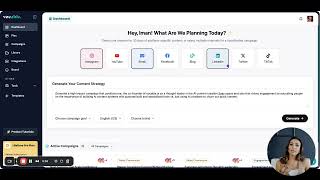
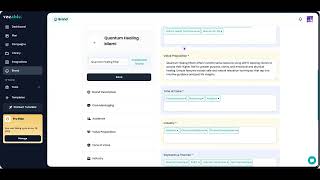
Hello. Hello, everyone. So today I want to give you a quick tour, product tour of the number one AI tool that has helped me and so many other solopreneurs, small business owners, content creators, coaches, scale their content and stay consistent and save hours on a weekly basis when it comes to content creation. So the tool is called Vocable AI. And so today I just wanted to give you a quick, quick product tour of what mine looks like. And as you can see, I am set for life when it comes to content. Okay, so this is what my content plan looks like. I have a lot going on, as you could see, it's almost endless scrolling. I'm basically set for. I have to switch some of the dates, but I'm basically set for a lot of the content for the rest of the year. This is between me and my team, of course. So, as you can see, we have about 653 posts ready to go, ready to be reviewed, edited and then eventually published. Right? So we have about 86 in progress, 57 are in review, 47 have been approved by my team already, and then 21 have already been published onto our channels. So, as you could see, we are quite busy with the content. But the cool thing about this is that Vocable has made it all so easy. We didn't have to lift a single finger. We, when it came to ideating, planning all of this so that you could see here how well organized and planned it is, we didn't do any of that. It was all. The AI did it on its own. So all we had to do was review the AI generated ideas and then click Create Draft and then review the drafts that was generated. So everything else was taken care of and handled by AI. So that was what my plan looks like. Right? So then, as you can see, see also my library of content documents is pretty full, so I have again, a lot to work with. Some of it is also shared with my team and all I have to do is review and edit the pieces and then mark them as approved and we are good to go. So the library makes it very easy to organize all of our content. We also put them in folders to make it easier to sift through. And then under integrations, you're able to integrate your channels. We'll cover that in a little bit. But for now, talk about brand, right? So this is basically the first step that you would have to go through when you sign up for Vocable is to enter your brand and all you have to do is give it your website, if you have one. If not, you can create it through copying and pasting brand details onto the platform. And then once you do that, you have all of your brands stored. As you could see here I have my two brands that I can pick from and I can edit all of this details as I see fit course and it's all always a work in progress. So I can always go back to the topics and you know, add more or add more variety and then that dictates usually the content ideas and posts that the AI comes up with. So pretty straightforward and easy to use. We also have a lot of templates that we use on the go. So this is for, you know, any kind of content or press releases, ad copy, social media posts, different email campaigns that we typically use for our customer journey descriptions. For any product description or podcast description articles, there are different types of articles that we pick from based on the blogs that we create. So it makes it easy to create content on the go without having to constantly be prompting back and forth. So this has basically replaced for me chatgpt because again I don't need to be writing two page long sophisticated prompts in order for me to get any content that's on brand and optimized for specifically content marketing. It's all mapped out for me here this platform and I don't have to leave this platform to prompt any other AI. So the entry editor has a built in AI assistance where if you click on any empty space or white space you have the AI assistance that pops up along with adding new block where you can add any kinds of, you know, image, quote or any type of other content. And the AI assistance, the coolest thing about this is that it allows you to prompt different AI models all within the same platform. For example, generate. So now I will prompt GPT4 and see what the answers or the content output looks like. If I like it I can insert it directly into my article. But let's see what Claude Sonet gives me instead. Okay, so the cloud sonnet looks like it is more concise. What about Gemini 1.5 Flash? So this is great to start seeing, you know, the differences between or the similarities between a lot of the AI models content output. So, so let's say we do like GPT4 as the best content output for now. And so what we will do then is insert this specific paragraph or section directly onto our article by clicking insert. And now you have a bit more added to your piece. So I typically like to play around with the entry editor a little bit more to add that flair to each piece of content and the good news is again, I don't have to subscribe to any other platforms or AI chatbots because I have most of them here. And there will be a few more AI models added to the mix here soon as well. So you're able to prompt different AI models across the platform to keep that diversity. So that's one thing I appreciate about the entry editor here. I also love this scoring system that allows me to continuously strive for a hundred out of 100 score, although I know that's not really realistic in any cases, but having an 80 out of 100 is typically a good place to be. But again, if you are one of those perfectionists that continuously wants to beat the system, then I suggest you continuously work with the scoring system to improve on the content. So the other part that I also love about this entry editor is that it saves all of my versions. So the more edits or of course I create, sometimes I want to go back and restore the older version. Or maybe I say, okay, the first version was better, or if my team is making edits, then I'm also able to follow along here in version control. Unlike, I think what most other AI tools don't offer is to be able to go back to the initial version or at least see the different edits that are made along the way. So that's all accessible here, here through version control. Now let's talk about when you don't want or like the content that was generated the first time around. So as you know, Vocable AI uses briefs instead of prompts, which makes it a lot more sophisticated and easy to use. When you want to make any edits or you want to regenerate another version of the content because you didn't like the first draft, you will do so through the brief, right? So let's say I don't like this title, let's completely change it into something like this, right? And so explore how AI agents, for example. So to regenerate a draft that you didn't like, it's easy to do so just from the brief, right? So you come in here and as you know, Vocable AI uses briefs in order to create content. So instead of a prompt, you use briefs because it takes all of this information here and turns that into a much higher quality content output because of all the details that go into the post idea, instructions or description. So if you want to regenerate your content, just come into again, edit brief from here and you can make some edits in order to really generate something a little bit different from what you initially got. Since you didn't like the first version of the draft, then you might want to make some edits and give it a little bit more instruction as to what you didn't like about the content. So that way the next draft that's to going gets generated is much more accurate and much more in line with what you want. So for here, for example, instead of, let's say instead of ideation tool, I would like to focus on how Vocable's AI powered content system can help. So it's everything, not just ideation can help marketers and content creators overcome the struggle of content creation. So then I will change the topic headline how Vocable is AI. So I will not actually give it a content structure and I'll see what it comes up with with and then for the target audience I will say now I click regenerate and remember this is a LinkedIn post, so it's written in that way. Okay. And there you have it. So now I can again work with it a little bit more to improve on it based on these recommendations and then I will be ready to mark it as approved next once it's been reviewed by me and my team and then we should be ready to go. So, so this is what an entry editor on Vocable looks like. I can also add images, of course, and links as I see fit. We are getting close to the end of this product tour, so we've covered the content planning and the cool things about the entry editor. And I want to also show you one more cool thing here is the campaigns, right? So you're also able to create different campaigns outside of your usual content plan that you have for your brand, right? So that, that means content that you post consistently on blogs or Instagrams or you know, LinkedIn to promote your brand in an ongoing basis. With campaigns, that's typically either a holiday season campaign or product launch. So it refers to a content that has to be clustered together or is basically tied together by specific event, milestone or even topic or channel. Right? So as you can see here, when we launched our product Vocable, I had a whole campaign for that spec, specifically around social channels. I also have set up campaigns for our social media content that is a little bit separate from the long form blog posts that we create and medium articles. So you can use it however you see fit. If you want to use campaigns to get organized with your content channels, that's fine. If you want to use campaigns to create content related to season, seasonal promotions or product launches or milestones, that's also fine. Okay, so back to our dashboard and the next stop on our product tour would be this plus sign here at the bottom, right. That allows you to create more content on demand, right? So let's say you have your plan in place and then inspiration hits, right? So maybe you thought of an idea or you watched a YouTube video, or you went to a conference and you thought of a specific angle or topic that you want to add to your content plan. So I'm talking about one idea, for example. So in that case you would click brief here. So that means you're adding a brief, which is an idea to your content plan. So click on brief, you select your content type. Yet let's say you want to do a podcast episode on that. And let's say here your topic would be. For example, for me, I got inspired to do a talk on the future of agentic AI in content marketing. And of course my target audience is always marketers and entrepreneurs. And then my content goal for this one is education and information. You also get to pick keywords from the suggested ones and then you hit continue. So now based on that one idea, it comes up with a few different content headlines or titles. And so in my case, I picked how a gentic AI shaping the next generation of content marketing. So and then it comes up with the full description. This is kind of like the AI writing its own prompt for you. And that's what a brief is essentially. So it briefs itself on how to create the content for you. I'm pretty happy with the description and the content structure. So now I will add that to my plan. So now it gets added to your content plan at the very top here in a little bit and you can proceed to then create the content from it. As you can see, it's right here. And then if I want to proceed to create the content immediately, then I just click click on create drafts. And now for the podcast episode. It actually gives me the run of show and the podcast description as well as the sample questions to ask if this is an interview or the script, if it's a monologue or a one person podcast. But in my case it's typically a two people conversation. So the episode segments are structured in different ways where it allows for a conversation. It also gives you a run of show and how many minutes to spend on each segment. So there you go. So now we've added one content type and now it's part of my plan. And that was a last minute idea that again you can add to your full content. So next up on the product tour is now adding a document. So we talked about brief and now we're gonna talk about adding a last minute or on demand content using documents. So in this case you can either import a draft that you've been working on, you can freestyle if you just want access to the entry ed, kind of like a Microsoft Word where you can just type up your stuff and use the AI assistants in that entry editor, as we talked about, or like a lot of people do, you can pick a template from our library of different content types and then based on what you're writing, you can enter the information. So here, as you can see, it's, it's not a back and forth prompting, it's not conversational, it's just a plug and play. And that way you're able to create content on demand, on the go, at scale. Okay, so, so last stop on our product tour is campaign, right? So in this case, campaign, you think of it as a, you know, goal driven or milestone driven or maybe channel driven content cluster. So let's say it's a seasonal campaign that you're doing for the holidays, or it's a product launch or a specific milestone or an event that you want to announce. So you want to create content specifically around that milestone. So that means it's content that you're not creating all year long consistently. It's more one off campaigns that you need to execute on across, you know, different stages of your brand for the campaign. It's basically one off content clusters that you need to create across different stages of your company or brand and different times of the year. So this is not content that you're creating consistently around the clock all year long around your brand. Right. So if that makes sense. And so you treat it as just again a prompt here in a way. So you have your campaign name, the target audience, you're creating the content or the campaign for, what your goals are. And then this campaign description is essentially your prompt to the AI. So this is where you really describe what you're looking to achieve with this campaign, why you're creating it. Any other instructions that you want to give the AI to be as accurate as possible goes into your campaign description, right? So think of it as a campaign prompt. Then you pick from the brand selections that you have. So making sure that you are attaching the right brand voice and style to this campaign, you add any additional key messaging that you want to include for this specific campaign, as sometimes it can be different from your brand. And then you have your timeline and of course your content type that you're including in the campaign and the number of content pieces you want included in this campaign and then you hit continue and it basically goes through the same motion of creating the full content plan and then you approve it and there you go. You have your campaign now added into your dashboard and it's a different content plan than your typical content plan you have for all year long. So this is good to also collaborate with on or to collaborate on with different team members and it has its own content library as well so everything is kind of organized in clusters within the campaign. Okay so I think that concludes our main features for this product tour and let me know if there are other specific functionalities or features you want me to cover. But this should give you a very good idea on how to get started with vocable to scale your content to plan ahead and to create on brand content consistently so you never miss a beat. Thank you again for watching.
More from Iman

How I Use AI to create 10x more sales copy for my eCommerce brand #aicontent#aitools
The AI Content Tool I Use to Create 10x more Expert Level Content #aicontent #aitools

Holy Molly! This AI Tool Generated a FULL Content Campaign from Just My Website!

Why this AI content tool is becoming a FAVORITE! #bloggingplatform #aicontent #aitools