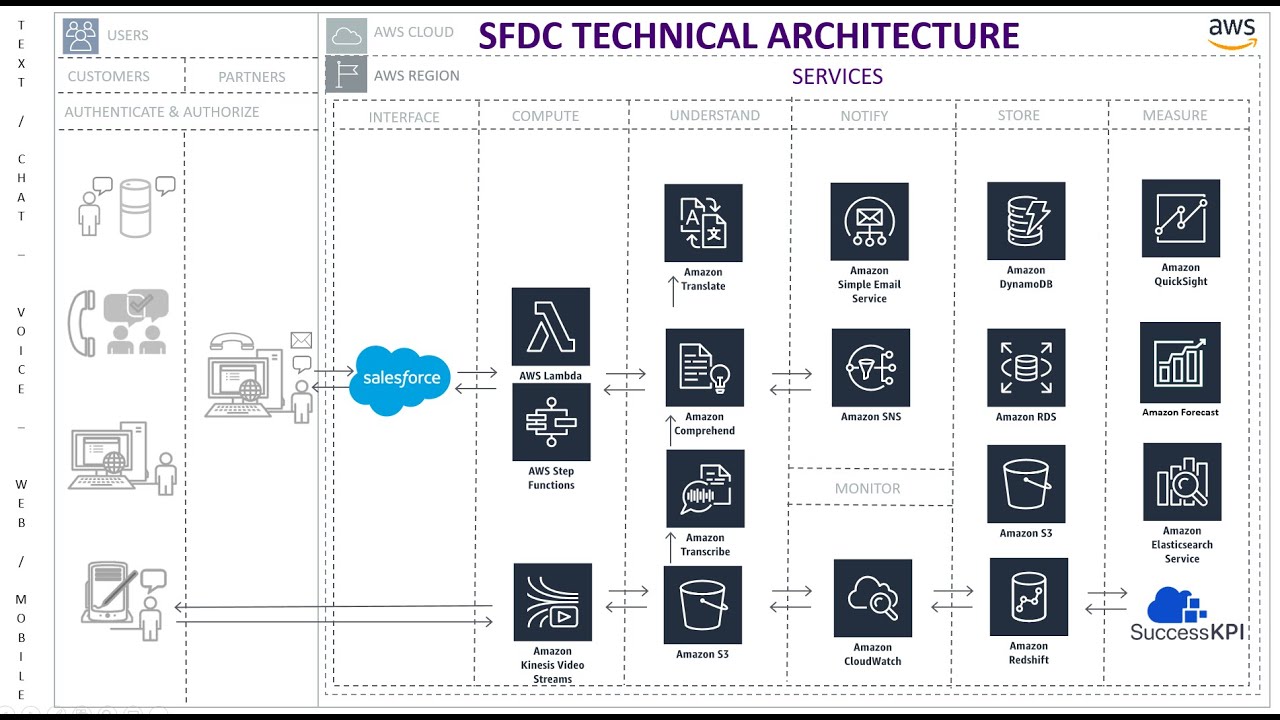
J.C. Novoa walks through a pipeline that analyzes sentiment in Salesforce Email-to-Case. An incoming email triggers a Lambda function that pulls the case and message from Salesforce, stores it in DynamoDB, then sends the text to Amazon Comprehend for sentiment analysis. The results flow to Redshift and connect back to Salesforce via SuccessKPI for reporting.
Chapters
All right, let's take a look at this. So we send an email to a predefined email address that is configured in Salesforce. Email to case configuration is here. So an email is received, a case is created that will go ahead and trigger one of these Lambdas. And process the transcript from the email and do the sentiment analysis. So right now we're going to connect to the Salesforce API, retrieve that case information and the child, in this case is an email. Email message. Once we authenticate and pass the— and we're actually watching all the cases. This is just the first one we did. So now I got the case and email message information from this API. Once the request is triggered, The API will return— the Salesforce API will return the associated message, from address, whether it's incoming or outgoing, and the text body. I'm going to store that into a DynamoDB database, which will then trigger another Lambda function to take this record and send it to— for processing for Amazon Comprehend. It will then return that the message is negative based on the text that was sent. And we're going to then grab this information and dump it into Redshift so that we can access it from within the connectors of SuccessKPI BI layer. So now I've entered this record. I can go into this table that I created in Redshift, return the message ID, and now I have the negative sentiment associated with the message ID. I can then go to Success KPI, look at my dossier where I've linked the Redshift record along with the Salesforce dataset, and I'll show you how these connectors are configured here. So I'm just adding the Salesforce Object Query Language. I, I run a query to return the email messages out of the case. And then I also go and connect it to the Redshift database and, and pull all those records that have been processed for sentiment analysis. Then using those 2 datasets that you see in those here, I can link them by the message ID, and then you'll be able to represent it however you want. That's it. That's the end-to-end email to case sentiment analysis of the message. Hopefully, we can implement this at the product level.