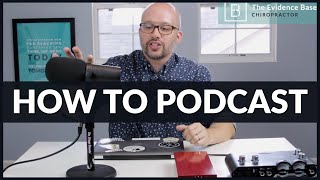
Jeff Langmaid (Evidence Based Chiropractor) explains the minimal gear needed to start a high-quality podcast and walks through his personal rig. He emphasizes that podcasts don't need expensive setups and highlights four key components: computer/DAW (MacBook with GarageBand or Logic X), microphone (Shure SM7B or a USB mic for travel), preamp (Golden Age Pre-73 for the SM7B), and audio interface (Line 6 UX2/UX1). He also describes his weekly release workflow (Monday mornings), distribution (Squarespace, iTunes, Stitcher), and cites reach (over 100,000 downloads and ~2,000 weekly chiropractor listeners).
Questions this video answers
March 31, 2017
Shure SM7B
Golden Age Pre-73
Line 6 UX2 (mentions UX1 as a single-channel alternative)
Logic X (notes GarageBand as a free/simple alternative)
Chapters
Hey, I've had a ton of questions on all of the gear that I use to record the evidence based chiropractor podcast and this is it. Believe it or not, these four items are the key. So it doesn't need to be super crazy. Podcasts are sometimes second fiddle to video because video is just crushing it across all media right now. But I'll tell you, when you can put out podcasts and connect with your audience through audio, it goes a long way. There's just a lot of ton of really influence that you can build, a ton of credibility that you can build for yourself. And there's just a dynamic that you can't get through video when you take the time to put out a podcast. So if you've been listening, you know, I put out over a year every single week, Monday morning evidence based chiropractor podcast, news, marketing, research, all chiropractic in the time it takes to get to your office, if you and I've been thankful to reach over 100,000 downloads with over 2,000 chiropractors listening each and every week, which is crazy. But a lot of questions I've had is how do I get started, what's the tech behind it and what can I use to record a high quality podcast? So number one computer, I have a MacBook Essential component. You can use GarageBand as a program to record within your Apple computer or you can use Logic X. So I use Logic X. I'm just kind of a music geek to a certain degree. So Logic X give me a ton of ability to manipulate the audio, put on some compression and really fine tune exactly the way it sounds. But you don't need to get that deep to get started. The biggest thing that you need is a microphone and the ability for that audio signal to get into your computer. So so you can have something as simple as this and really start a high quality podcast. So the microphone that I use is a Shure SM7B. So this is a this again, it's a little bit upscale. You can start with as simple as a USB microphone. And I have one of those that is great for when I'm on the road when I need to do quick audio or interviews. But when I have the time and flexibility, I love to use this Shure Smart 7B. It's an unbelievable microphone. It's broadcast quality. And the big rumor on this is this is what was used to record Michael Jackson's Thriller record. So it's a great microphone. The only challenge with this is that it sucks a ton of Power. So you need to be able to get the gain up. And the gain is really the volume that it takes to get this microphone to capture audio. And that is why I have this red guy right here. So this is a golden age pre 73 and is this. And basically what that is is a preamp. And this really turns things up and boosts the signal into my SM7B so it sounds loud, clear and distortion free. So that golden age pre 73, again, it's a little bit upscale, but it's a great tool to pump exactly what you need into this 7b. The key of my rig is really cheap and really Easy. It's a UX2 by Line 6. And what this does is you can plug your microphone into this. If you, if you have a microphone that doesn't require as much power, you can get rid of this, plug your microphone into the UX2 and then that goes from a UX with a USB cable directly into your computer. So this line six basically is the interface and it's great. You can have one of these for less than 100 bucks. They even make one that just has one channel UX1. This has two channels which means you can have two microphones going at the same time. So you don't even need this big of a unit. You can get one of these for less than 100 bucks and you are going to get crystal clear audio into your computer. From there. You could use a free program such as GarageBand to make sure that you are getting that audio all aligned and nice and clean and. But to get started podcasting you can go as simple as just getting a USB microphone like the Samsung that I have. Or if you want to know exactly what I use, this is it. I have a Shure SM7B. It's loud, it's awesome, it's clear, does require a little bit of power. That's why we got the golden age pre 73 which is just an unbelievable recording preamp. All that goes directly into this UX2 by line 6. Awesome piece of hardware that transmits that signal directly into my computer which gives me the ability to manipulate things in logic. Send it off to Squarespace, send it off to itunes and Stitcher and arrive on your mobile device every single Monday morning. So if you're podcasting, I would love to know what you are using for your gear or if you have any questions about these pieces, please leave me a comment below. I'll be happy to answer give you my insight into how, what, when and why I use everything you see here, but this is what I use for the Evidence Based Chiropractor podcast. And if you have not started a podcast on your own, it is a great way to reach people, connect with people, and expand your impact in your community. So these are a few of the tools that I use and a few of the tools that you can use to start podcasting today. It.