Next Level Software : Tutorial
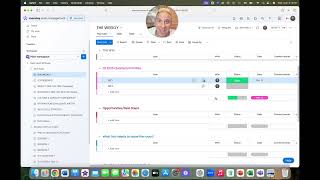
Chris Lambert, founder of Next Level Nonprofit, walks through Monday.com setup for nonprofits. The tutorial covers leadership meetings, accountability tracking, strategy planning, and team management, plus integrations with Google Sheets and Lucidchart.
Hi, I'm Chris Lambert, founder and CEO of Next Level Nonprofit. Welcome to your video tutorial of Next Level Software. By now you know that an organizational operating system is not a software. However, there are numerous software programs out there that are very effective in helping you implement an organizational operating system more seamlessly. We have tested numerous software, including 90io, Bloom, Growth, Asana, many others. We absolutely have fallen in love with Monday.com which is what you're seeing today for a wide variety of reasons. We found it the easiest to use, it is the most customizable, and did I mention it is free 99 for nonprofits for the first 10 licenses and then heavily discounted after that. And no, I do not get any kickbacks for recommending money.com we just truly think it is amazing. It's actually much more comprehensive than what I'm going to show you today. However, I'm only going to focus on the attributes of Monday.com that apply directly to your implementation of Next Level Nonprofit, the Organizational operating system. So this video assumes that you already have set up your Monday account and watch the video that we sent you to show you how to set up an account, how to get your free licenses, and that you've also clicked clicked on the link to install this template that you see before you. And so now here we are. You've installed it and you want to know how to use it. So I'm going to walk you through it. On the left side of your screen, the first thing you're going to see is all the next level nonprofit tools, starting with the weekly and a label above these tools that says NLN Tools. And each of these tools is also categorized as what Monday.com would call a board. As we go down here further, you're going to see a file that says sessions with our coach. These are the boards that you're going to use while you are meeting with your next level nonprofit coach during your sessions. We'll walk through those as well. But we're going to start up here in the upper left with the weekly. All right, the weekly is your weekly executive leadership team meeting that starts on time, ends on time. It's 90 minutes, action packed. And so I know you know how to run a weekly, but I'm going to show you how to do it with Monday.com. it starts with all of your team members inputting their highs and lows before the meeting begins. As you can see, I've input my high. That is I saw the Lions win the super bowl last night in person. Okay. I'm predicting that is going to happen. This is our year, it's got to be it. But you can also notice that I didn't just write down what my high was. I put my image here, I'll take it off and I'll put it back there again. And I'm the who. Okay. And so when we're doing the weekly, all we're doing is reading off our highs and our lows. There's no discussion. This whole time period for this is five minutes. And then we go on to focus time. And focus time, as you know, can be a wide variety of expressions. It could be a prayer, a poem, a meditation, breathing exercises. We have a tool that we use that's just a ball and we don't use it every time, we use it maybe once a month. And this ball has various questions on it. And so we throw it to one another and wherever our right thumb lands on the ball, that's the question we answer. They're very revealing questions. Some of them are really fun and funny and they help us get focused. Alright, so then when you go down to scoreboard review, this is actually going to require you to click on the left side of the screen because of the way that it's set up. I'm not going to explain why, but just know that this is how this one works. You're going to click on scoreboard. And we've plugged in here a an example of a scoreboard that life remodeled actually was measuring how many new students were in programming. And the goal at this time when this scoreboard metric was set was 100 students. New students enrolling that quarter, which broke down to about eight students per week. And so with your scoreboard, whoever's accountable for that scoreboard number, and I don't have that person logged into the system, let's just say it was me in this case. In this case, you would put all the dates for that quarter on the left. I can click on this little box in the upper left and I can now go over to the who and I can make all of them me. And for the sake of this exercise, we're going to assume that right now it's February 14th, okay, in whatever year you imagine. And so all of these numbers have been input before each weekly began. And as you can see that I'm merely ranking the status as either on track or off track for the week. If the number is lower than 8, it automatically goes to off track. I'm going to take this check mark off. By the way, if the number is eight or above, it goes to on track. So let's say we were in February 21st and we do put in eight. Exactly. That is an on track week. You can see here at the bottom that it automatically tallies the total number in this column. And you can see from our header that, that our goal is 100 new students this particular quarter. So let's just say we're now in February 28th and we got another 20 students. Okay, obviously that's an on track week, but now we've surpassed our quarterly goal. Let's say the next week we only have one student. Even though we've passed our goal at this point, it's still an off track week. And as you're going through your scoreboard, all you're doing is reading the metric and stating whether it's on track or or off track. If anything needs to be dropped down to Opportunities Next Steps. You make that known during the meeting and then you put that in the weekly where it says Opportunities Next Steps, which I'm going to show you when we get there after the scoreboard review, is the W3S. W3S means what? Who? What When? All right, who is responsible for this W3? We'll say I am. What is the W3 I wrote in here? And this would have typically happened during the meeting itself. Alright, invite Sam to watch the next level software tutorial video. I'm going to put by when. So I'm going to go to our calendar here and today's date that I'm recording. This is actually July 9, 2025. So let's say I'm going to do that by next Tuesday. I'm just going to click on July 16th. There it is. And when I finish that task, I'm going to mark it as done. That means that this does not even need to come up during the next weekly because if it's done, there's no need to mention it or talk about it. If for some reason it is not done right, then I will just mention during the weekly when I read off this W3, okay, it's not going to get done July 16, everybody. But it's going to get done on July 23. And I would update it. No discussion. Moving on. But this helps us really keep one another accountable to the commitments we we make. And it's clear that we know what done looks like. In this instance. We go to our next category, which is quarterly priorities. So this assumes we're in Q1 2025. Again, this is just a test account. This isn't Actually, what yours will say, you'll update yours with the current quarter and you'll put all the quarterly priorities in here for your executive leadership team in advance of your meeting. And these will not change for the entire quarter. The only thing that will change, and you'll have whoever's accountable for them here. The only thing that will change will be your status. And you only have three options here. It's either on track, off track, or it's done. And when it's done, you have been given a customized cowbell. Now, and for the purpose of you ring that cowbell. It's super loud, it's super obnoxious, which makes it a ton of fun. And we celebrate the completion of that QP. And as we know that success is at least 80% of our QPs get completed each quarter. And actually down here at the bottom, we have a tally of how many are done. It automatically tallies it up for us. And you're only putting in your executive leadership teams QPS in here, not the rest of the organization. We move down then to the meat of the meeting, or vegetables, if that's your flavor. And that's where we talk about opportunities and next steps for 60 minutes. And so it's a great practice to populate the opportunities in advance of your meeting. What are the key issues which we frame as opportunities that you want to discuss as a team? And of course, if during this meeting you uncover any opportunities that you want to discuss, you can write those in there. And at any point, you're going to put yourself as the who. So we'll just call this OP1. Even though I would paint it much more clearly than that, I would describe actually what the opportunity is. I'm going to put myself as the who, and then you're going to decide as a team, what are the first three opportunities you're going to discuss. And the way you do that is you're actually just going to put priority by the three that you want to talk about. And that enables you to very clearly see what are we discussing and what is next on the agenda. Once you're done discussing it, you're just going to hit done. Once you have next steps, and when you come up with next steps, you're going to put your next steps, guess where in your W3s. And so again, radical accountability, clarity, dates, timelines, action orientation. This is a lot of fun. The next category is what info needs to leave the room. And this is where you're going to type in anything that needs to be communicated to other People who were not in the meeting because they're not on the executive leadership team. And so let's just say that inform the fundraising team that we got a new cowbell and what we use it for. For. Okay. And so I'm going to be responsible for that. My job is to tell our fundraising team we got a cowbell. Here's how we're going to use it. We're going to ring it when you hit your qps and I'm going to get that done by the following week. So I'll put that in there. And once it's done, I'm just going to write done again. This is how we know that the information that needs to leave the room actually left the room and it got accomplished. Isn't that amazing? Our last thing that we're doing here is we're grading. How do we do as a team? Today you're going to put all of your executive leadership team members names in here and then you'll put their associated images and then you're grading with a letter grade scale, just like elementary, middle school and high school. A through F. Right now we have only in here A through C. Although sometimes you do might have a D meeting. So make sure you put that in there. But you're going to grade it. Is it an A plus meeting? Was it an A? Was it an A minus? And you have read in the book and your next level nonprofit coach can give you further context on how you determine this grade. But it's very easy to add new labels here. If you wanted to add a D or an F, you just go to edit labels and I'm going to say new label and I'm going to say F. Boom, there it is. And that is now available if I wanted to select it, which that would be a horrendous meeting if it were to happen. And then we have these other categories for long term opportunities, things that maybe are going to take a more significant amount of time to process than you can do in a weekly. We add those here so that we're keeping track of them and we actually do get to them at some point, maybe in another strategic meeting that's set up specifically for discussion around high level strategies. Also for any items that we've already discussed and developed next steps, we like to save those down here. And there's actually a function in Monday.com where you can automate. When you click done, this moves to whichever group on your board that you want it to move to. I'm not going to explain that because There are numerous Monday.com tutorial videos for every function under the sun and I want to make sure I give you the time to be able to explore whatever you want to explore on your own. But just know that it is available. So we've gone through the weekly, we're going to go through next the one on one template. Just very briefly, this is your structure for your meetings with your direct supports. Here's an important function for you to realize. When you download our template and install it, it will be viewable by all of these boards will be viewable by everyone who becomes a member of your Monday.com subscription. All right, in order to make it private, you got to click on these three little dots. You're going to change the type of the board to private. And once you change it to private, you can determine who actually is on this board and who is not by clicking Invite. And you can invite specific people to this one on one. It's probably, it's definitely going to be your direct support and the COO as well. Makes a lot of sense for them to be on this document. And you can decide that with all of these documents. You're also going to want to share several of your boards with your next level nonprofit coach. In order to share a board with people outside of your organization, they don't have to have a Monday.com account. You would we'll do it with the weekly. You got to change the status to shareable. All right. And then once you change it to shareable, we're going to go to the weekly and I'm going to click on invite. I can now invite guests who are not Monday.com users on our organization's account and they can view just the boards that I invite them to. And so it's set up to be pretty self explanatory in that regard. You've got your template here for your quarterly one on ones that take place between you and your direct supports. We've got a template here for the culture and capacity assessment. As you can see, your core values are on the left. You know this by now. You really only want to have three to five core values. Seven would be the absolute maximum, but I highly recommend against that. Less is more. Three to four is ideal. Five can be great as well. But you're going to populate these core value headers with your own core values. And then these three questions on the right stay the same. Does this person understand what the job requires? Are they committed to passionately do everything the job requires? And do they have all the abilities necessary to do the job with excellence. Then you're going to put the names of team members here. This is another board you're probably going to want to make private so that when you are talking about a team member, candidly, you aren't putting that out into the world where everyone can see it. And so as you're going through, these are fictitious names that you see here. Green means most of the time. Yellow means some of the time. Red means usually not. You notice there's no such thing as perfect. Nobody lives core values perfectly. But green means most of the time. And this tool is going to help speed up your decision making around determining if you have the right people in the right seats, where you need to coach team members and what you need to do in the event that someone is not living up to the expectations of the organization. So we're going to go now to the Affirmation Challenge matrix. This is a matrix that is really great to use during your quarterly one on one. I always ask my direct supports, I say, could you please rate me this last 90 days on how I led you when it comes to affirmation and challenge? And so let's just say hypothetically someone were to say, Kris, this last 90 days you did a pretty good job on affirming me. I'm going to give you a 7 out of 10. And notice this goes all the way down to negative 10. So I'm going to give you a positive 7 on affirmation. But Chris, you really didn't challenge me as much as I would expect. You were kind of aloof. And so I'm going to give you a negative two on challenge. And that would literally put us right here in the cozy culture. That's the kind of culture I would have been creating as a leader that quarter. And so you, you now get the picture of how this tool works. It's a great visual and you can learn a lot from your direct supports by using this. Now, this next tool is going to function differently. This one is actually outside of Monday.com because we like to use Google Sheets for next level strategy. This link will not be in your template when you install the Monday.com template. We will send you your own specific link for a template for your next level strategy separately. You will then need to copy it and paste it here in this bubble area. So you will click on this bubble, you will copy and paste in a section right here and it will appear as you see. So here. So I'm gonna now click on this link and you will get a link just like this. This is what your draft template next level strategy will look like. You can see it has Lorem Ipsum here dummy text to populate just so you get an idea of what the spacing and the format looks like of a well produced next level strategy. It has both pages, it's easily editable, it's in the cloud. You can determine whoever you want to have access to it and you'll do that through Google and you don't even need a Google account to do this. And so it's extremely user friendly. Much easier to edit than using a software that's not in the cloud. And so we're going to go to our next tool, which is the function accountability overview. This is our only other tool that is not a Monday.com software integrated tool. We're going to take you out of Monday.com into our favorite org chart builder, which is called Lucidchart. And you will get a specific link for Lucidchart that you'll input in that little bubble. But this is just a testing, you know, chart here. As you can see, this is a pretty impressive team. They have Oprah as their CEO, Ray Kroc as their COO. They've got JLo, the Dalai Lama, Steven Spielberg and Mackenzie Scott. I'd say they're going to be doing pretty well going to the next level and all the other levels after that. But really this is just set up for you to get a start with. What might your structure look like? As you see, the CEO is on the bottom because we're emphasizing servant leadership. Therefore, we don't have direct reports, we have direct supports. That's why they're above us, because our role is to support them becoming the highest and best professional versions of themselves rather than defining our relationship. As you exist to report to me. And so I love this chart. It allows you to build an inverted function and accountability overview. You can easily change the sizes, zoom in and out. You can change the sizes of the text by just highlighting any amount of text you want to highlight going up here to the upper left. And you can see as I scroll over different text sizes, it automatically does it. I'm just going to go back to the way it was. You can add images of people very easily. I've got an image right there. For some reason, I need to arrange that to bring that back to the front. And you also have the ability to change these lines to dotted lines to different colored lines. You can change all the colors of the boxes however you want. You click On a box, you go up to the color. It's super simple. You can undo it just by using the same undo function you would use in Microsoft Word or Microsoft Excel or PowerPoint. And yet this tool is the most customizable, the easiest to use of any org chart builder I have ever seen. And so we are now going to go over to our last board here under the NLN Tools. These are the current videos that we have available for our members. We will be releasing quite a few other educational, informational, inspirational videos. Right now we got videos on how to facilitate the weekly, how to create your scoreboard, creating your 10 year moonshot, and why leading a nonprofit is more complex than leading a business. Expect more and more videos to come out for you in the future. And then briefly, we're just going to walk through the reality that all of these boards down here exist for you when you're working with your coach. And so there's prep for your upcoming sessions. You can see here at all times what is the prep work that I need to do or that our team needs to do before session one, session two, and so on and so forth. And this takes you all the way through the first year. You can easily update this for years 2, 3, 4 and beyond. And then the quarterly rhythm will stay the same into perpetuity. Once you get on the quarterly and your Coach will use this Monday.com your account, you'll give them guest privileges while they're working with you to run through your quarterly. That way everything is going to be written down in one place, easily accessible by whoever you want to see it. And you've already seen all the other cool functions that this can do. You can access your organizational assessment at any time where you can click on this and you can take the organizational assessment, you've already done so, but you can regularly check and see if you want where you're at in real time being able to be ready to go to the next level organizationally in your impact and in your team building. And then the last thing I want to show you is we want to be consistently tracking your organizational numerical growth. We want to know before you begin next level nonprofit, how many people were you serving annually? And then we want to know every year after that, okay, after year one, how many are you serving annually? And so on and so forth. The same thing goes with your annual revenue, including your earned revenue. We don't want to know about in kind, but we do want to know about financial revenue and then the number of FTEs full time equivalent employees as well as your number of volunteers. And again, you'll work this out with your coach. But I hope you're going to have a blast using Monday.com and I can tell you how much it's made an impact on multiple organizations that I've worked with, including the one I used to lead, Life Remodeled, and certainly Next Level Nonprofit uses it every single day. So that said, here's to the future of going to the Next level and all the other levels after that. God bless you.
More from Chris





Next Level Nonprofit with Chris Lambert - Podcast Ep 97 #nonprofitplan #fundraisinggoal