Copilot CRM vs Service Autopilot CRM: Automations & Email builder
Cristian and Mike Andes compare Copilot and Service Autopilot CRMs, focusing on automations and email builders. Copilot includes ChatGPT integration and costs less, while they break down the ease of use and extra features each platform offers.
Chapters
What's up Copilot family? Cristian here with tech support, sales and consulting. We got another comparison video between Copilot and Service Auto. Some of the topics we're going to be talking about is automations as well as kind of an email builder and what that looks like between the two. Mike Andy's here has been using Service Auto for quite a long time. I'm not too familiar myself with the CRM. So we're going to be doing this video together and kind of just going back and forth and giving you guys a little bit of education.
Cool. So automation inside Service Autopilot is probably one of the things that we think is the strongest that they currently have in terms of feature development. And so we've developed lots and lots of different automations inside of Service Autopilot. And so if you go ahead and click Add Automation we can kind of see what their overall workflow looks like in terms of creating automation is a bit of a drag and drop experience. You basically can drag and drop things, you can add a sequence, et cetera. Let me actually bounce back into a real one that we use quite often. I read back here. Give me one second. All right, let's open up one of these bad boys that we ask for occasionally. Let's do courtesy reminder for gate. So this is like an example of an automation that you can build inside a service autopilot that we've used before. And that is just a reminder to people that have a tag on their account to close their to make sure that their gate is open prior to our crew showing up for the day. So it's not locked. So it's like sends an email once mowing service is dispatched, once a tag, if a tag is created on as gate reminder has been added to their profile and all that it's going to do is send them an email like so. So again the whole goal here with Copilot is to be able to take these higher level automations and customizability and really make it where it's a little bit easier to use. So for example, if we look in the the Simple Automations, we're in the sequence automation in a second. But the simple automations would be again very similar in terms of the way that service all power just our goal is to simplify the user interface and so that someone that's brand new and it's very easy. Okay, when is this automation going? You know, what's the name of it? Email me when a visit is complete. Okay, great. When a visit is completed we're going to instantly email the company owner and then you can select your email template and your sub action can be either run another automation or just stop it. So this would be an example of a very simple automation similar to what we just talked about here in terms like one step being able to send out an automation based upon if someone has a tag on their account, if someone has a visit completed one stop kind of very quickly being able to email them or text them. And so you can do this for emailing your employees, you can do it for texting your employees, you can do a push notification for your employees, adding a tag or moving a tag or to the customer facing side of things, text or email the customer. It's very simple even to be able to do this to your employees. That's something that we can't do inside of service all part and that is text or email from an automation to employees. And I hope, I think, I believe down the road they're adding this later on in the year. But for now it's something that we do have inside of Copilot. But what I'm pretty excited about is the fact that we are going to be adding sequence automations which is going to add a whole nother layer of complexity if someone wants to be able to do this. We already have when someone signs up for Copilot, we already have all of these automations baked into their account for just about everything you can possibly think of when invoices are due, when an estimate is accepted for follow up. Well just about everything you can think of is already in here. I think there's about 25 or 30 automations online review requests. There's just an entire plethora that we already give you when you sign up for Copilot. Even the free accounts get this now if you're an enterprise level user of Copilot, you're going to be able to get sequence automations which allows a whole nother layer of customizability because as and if and or statements and this is the way we have the builder. Again our goal here is to make this as simple as possible and for the logic to make as simple as possible you select a trigger. Okay, an estimate is accepted and you say okay, well and I also want it to be based upon if estimate changes are requested so they have an accepted estimate and they want changes that are requesting the estimate. Well I want to make sure I email them right back because or contact them right away because they have an accepted estimate and yet they were asking for changes so that's an important thing that I might want a specific email going to my office reminding them to do something. And what's really cool is you can add additional triggers, you can add additional actions and have and if or statements. So just the layer of complexity you can add here is pretty substantial and really allows you to do it just ideally in a way that's a lot simpler to create instead of what we've seen is a lot of complexity when it comes to a lot of these automations. And something we really struggled to train our franchisees and new users of Service Autopilot on is just making sure it is user friendly for the new beginners.
So, so what if I'm a new business owner and I maybe I can't afford to maybe do at the highest level of service autopilot and be able to have those automations. So what, what, what subscription level will I have access to Automations within Copilot versus Good point.
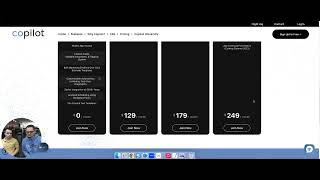
Service Auto that's a good point. So in order to be able to get sequence automations you do need to be the enterprise level user for Copilot however and even our free users get access to these automations which again is probably going to suffice 95% of people. It's larger operations. When we really start to use lots of sequence automations we want very complex ways of tagging and all the rest of it. But still these, these automations here will even work with tagging and other sorts of relatively complex items. It's just a matter of when you want sequence automations and be very detailed. That is going to be reserved for enterprise level users. So if you look at the actual costs for enterprise level user we're looking at 249dol a month. The cost for Pro plus on service autopilot in order to be able to get this is 279amonth just to get access to any of the automations. But furthermore you're going to have to pay to actually have someone build them typically either a certified advisor or they have an accelerate program where it's I think it's like $100 a month to be able to get your automations actually built in. Whereas even for our free users we're Giving you know, 2530 of these automations away for free to everyone that just joins and they can. It's very easy to jump in here and customize them because it's so simple the user interface and if someone really wants to get into the weeds they can by using sequence automations. But honestly I would say for 90 to 95% of users, just what we have pre built inside of Copilot is going to be sufficient and probably do most if not all of the, the, the automations that are built inside of Service Apply. That's based upon what we have seen. But again for those users that are a million plus, they're, they're hardcore users of Automations, you're going to want the sequence Automations and you it would definitely be worth it to get the enterprise level user but for anyone else out there, you know, go ahead and just get the free version and just jump in there, create some Automations and just see how easy it is to be able to customize these and make them your own.
Yeah, communication is what builds relationships. Right. And that's the business that we're in. Since we're on the topic, let's go and go into email builder. Kind of what that looks like in comparison between the two Sierra.
Yeah, again pretty, pretty similar honestly. We actually both use the same plugin which if you wanted to look it up, it's called Be free B E sorry B E E F R E E I O and so we use the exact same builder. So if you're in service all part you're it's going to look very familiar in terms of the overall interface and so right now we have it as version two but we're going to be switching 100% to just this interface very shortly. So I'm going to leave this here for a second, hop over into servers all but you're going to see just how similar these really are. So inside of service Autopilot I can jump down into documents. I can then just show what this might look like in terms from a builder's perspective. So I'm going to go ahead and edit this.
So again you can see it's very, very similar. It's using the exact same plugin. What you're going to see though is the content buttons that they have is only six of them, text, divider button, HTML, etc. Whereas inside Copilot we've made sure that we have literally twice as many options including embedding video, which is huge, especially if you're a user currently of service Autopilot just how much how awesome it is to be able to have the video inside but of the actual builder. Also the other thing that's really, really cool about Copilot we're really excited about is the fact that just right now we're actually launching the ability to be able to use ChatGPT and OpenAI the integration we have with them to be able to write your emails. And literally just within this integration you can write an email and this from here you can literally ask to write newsletters, sales copy price increase letters. Just a plethora of really, really cool stuff that integrates with Copilot. And then without having to change tabs or open up ChatGPT or buy a chat subscription, you're able to do it right from here. And it's all included. We don't charge any extra for this and it's one of the things that we're very passionate about Copilot is we charge for our subscription level but we don't charge a whole bunch of money for like all the little add ons. And that's one of the things that we, we notice inside service autopilot. If you look at the integration side of things and your account and billing and if you want to start adding things onto your pro level subscription, if you want to add in things like what we were just Talking about the SA Connect, that's 70 bucks a month to get your documents and your your automations full users. It's $29, we're 15. These are the type of things that you can see like even the smarts maps integration, we do all of the maps integration stuff included inside the initial price. Same thing with client portal. Like this is a lot of different add ons. Not to say these features are bad, it's just a matter of there's a lot of tack ons at the price of someone's actually comparing prices like this. $249 includes basically all. It does include all of this. Yeah. It gets you your route optimizations, it gets your client portal, it gets you your smart maps integration, it gets your QuickBooks integration and it's literally for less than, than the price of service autopilot. Yeah.
And if you guys want to check out some more info on this, I know we just gave you, you know, all the above on both CRMs but if you want to check this out, go ahead and go to our Copilot University made by Stephen George. It's a lot of in depth information, kind of breaking things down a little bit more. We appreciate you guys watching this video. Hope you enjoyed it. I look forward to helping you guys out in the future.






