A short YouTube video in which Christian (tech support, sales, consulting) compares automation capabilities between Yardbook CRM and Copilot CRM. He states Yardbook currently has few automations (some planned invoice/estimate reminders), while Copilot offers extensive automation starting from the free/solo tier, with customer-specific automations, 60+ default automations, editable triggers/runtimes/actions, and upcoming sequence automations for enterprise users.
What's up Copilot family this is Christian with tech support, sales and consulting. Today we're going to be doing another comparison video between Yardbook CRRM and Copilot CRM. And today's topic is going to be Automations.
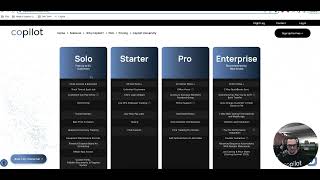
You know that as you increase the size of your company and business, as you increase the value of your services that you're going to be providing, you're going to want to do the same exact thing with the communication with your customers. So taking a look at Yardbook at the highest level at enterprise you see that they really don't have any automations listed. I was googling to do some research and it looks like they're trying to bring in some invoice, automatic invoice reminders. Probably the same thing for estimates but at its current stage right now they don't have a lot of automations, little to none. So we're going to start by kind of just diving into Copilot subscription levels and where do we provide that high level communication? It's from the very beginning at the solo in the free subscription so. So as you can see we have a lot of features that we do allow our free users to have and our automations are literally limited only to your imagination and that's real and I want you guys to see what that looks like. So first we're in a customer's profile. You see Peggy here I'm just going to scroll over to the automations tab on the customer profile and here I can set specific automations just to this customer. I can also.
Have access to my automations from marketing and automations from here you can see Here are your 66.0 default automations that I can turn on, off and on of a button all the different triggers, run times, actions and sub actions. I can edit these from this page as well. This page is specific to the workflow that you're going to be going through for for the majority of your customers. If you wanted to change that specific automations for a customer you could that in their profile like I said but 60 free accessible. Here's your triggers, your runtime. You can create a new automation from scratch if you'd like to. And for our enterprise subscriber level subscribers, those who have maybe a larger business that want to generate maybe some some more communication we provide a sequence automation will be refined and dropped next week. This will allow you to get even more creative.
With with just in depth communication and sequence automating. I look forward to helping you guys out and I hope you enjoyed this video. I'll talk to you guys soon.