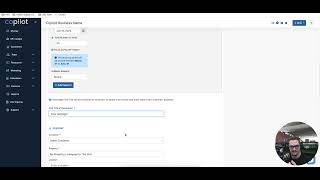
Christian compares creating a recurring visit in Yardbook versus Copilot CRM. Yardbook offers a clean, simple interface for setting bi-weekly visits with equipment and employee assignment. Copilot adds budgeted-hour capacity tracking, off-season scheduling, level billing, packages, and property checklists.
Chapters
What's up Copilot Family? This is Christian from Tech Support, Sales and Consulting. Today we're going to go over a comparison video creating a new visit within Copilot CRM and Yardbook CRM and kind of just talking about the little bit of the small differences in between the two. So we're going to start with Yardbook today and the first thing I want to point out are some of a couple things that I actually really enjoy with Yardbook. One, the interface itself is very simple. Um, it's very clean and definitely user friendly. You look up here at the top, there's a global button to essentially kind of hide and show what you want to see while filling out this information here. Another thing as well is they're kind of advertising some features on the side here that they're adding or maybe things that you weren't aware of with a button to be able to click and learn more about too as well. I think that's a good way to touch base with your users and kind of update them on some of the innovation that you're.
Bringing to your software. So we'll start with them today. We'll go in description. We'll make a reoccurring Visit for both CRMs. Let's go and start with a nice MO as the description. We'll go and add a proper.
Any equipment that we're going to be adding to this visit. It looks like a walk behind mower. Go ahead and set this to reoccurring visit. Let's do a bi weekly for both streams as well. Today we'll go bi weekly on a Monday start time 1:30. And it looks like when you close this off here, what you are visible to is the end date, the duration of which you think that the time or the visit is going to take to complete the equipment that you're using and then the assignments, whoever you are assigning this to employee wise and the details or notes that you want to attach to the actual visit.
Cool. Finish this. Let's go one hour time duration.
Go end date next month. And this is another really cool feature that I think they have as well, products and services. So here you can either kind of text out or write out rather you know what service you were looking for. Or you can go into like a list view. So I'll click here to look in my catalog of my list view of features. I can even add one on the spot and you can see all the different features or not features rather but services and items that you have listed. So we'll go back real quick. We'll go and just type it in because I created a mowing.
Boom. We'll go and assign an employee to this. And there it is. Now we're done. Right. Very simple, very clean cut. Very easy to create a visit. So before going into copilot, there's going to be some massive things within just the organization. The. The actual use of some of these items to better your scheduling and just having your employees in your mind when scheduling visits in the future as well. So some of these features that I'll be going over Copilot in comparison to yardbook, very effective features. Very function features that are very functionable as well. So we're going to go from single to reoccurring visit. This is our budget hour, budgeted hour capacity chart. So this budgeted hour capacity chart essentially takes all your employees and what you have budgeted for their hour capacity. The line here represents that. And even going from a single visit to a recurring visit. You see that it manipulated the chart just a little bit. Right. We're going to go to a bi weekly. We'll service on Monday.
And the bi weekly. You see, they even took that down as well. Right. So before that we were at weekly.
And then we'll go to bi weekly. Yeah.
We'Ll go and add the time.
Perfect. Cool. So now we're going to run into our first very efficient feature on this. And that's just being able to add the number or total number of visits. This is nice to be able to see visibly on your schedule. And another huge one is off season. So everyone within the industry understands how nice it is to be able to apply an off season to a reoccurring schedule. That's a long. That's a long term. Maybe I even want to add multiple seasons to this. I can add a winter and a spring to this. Whatever you'd want to do. Very valuable as a business owner.
Title description. We're going to go.
We'll go mo package today.
Another huge feature that we have here at copilot is being able to separate customer from property, knowing that there are customers that have multiple properties. So in yardbook, it looks like you'll have to essentially create another customer, duplicate the name of the customer with a different address. Right. A different property. Here at copilot, we can list multiple properties under the same customer so you can choose what property you want to service.
We'll go ahead and do rental home number two level billing. So another big feature as well to our creating a new visit is our Level billing. So I previously went in to the financing tab, went into our level billing. I created a level billing specifically to this customer's name. And then when creating visits to this customer, if I know that it's recurring, I can go ahead and add a level billing to this as well. A nice option. You can do this in Yardbook as well. Place a color on this based off of how you want to organize things.
And we're going to run into another huge function. So another feature we have here is the ability to add a package. So depending on your business you have some different, you know, complex services that you want to be able to create into a package. The ability to add a package to your services or just one line. So let's go and add a package. Today we'll do a lawn care package. You can see what that entails. We got a bi weekly lawn care and a landscape cleanup. We'll go and add this package to the customer.
We'll go ahead and finish this up by assigning a crew, adding a tag to this. Adding tags are nice to make sure that you're kind of categorizing visits and customers and what have in services based off of tags. Right. So we'll go package.
Mo.
And then last but not least, any notes go in property checklist and add any photos to this. Right? So we'll go and select a file just to show you why this nice copilot University file on here.
Boom. Just to kind of show you guys you can apply whatever photos you guys would like to do. So and then you create the visit. So between the budgeted hour capacity chart which you'll see in our KPI and our wait list, all areas within the software that you'd like to manage and make sure that you're not putting your, your, your crew force in an overtime or overworking them. The ability to set an off season is huge for those who've been working in the industry and they understand that the ability to attach level billing is also nice to do and the ability to add packages as well. So just some more extended features and functions within creating a visit that I hope you guys find very nice while joining our software. Look forward to helping you guys out. Thanks for watching.