Christian compares email features in Copilot CRM and Yardbook CRM. Yardbook limits bulk messaging and email tracking to paid plans, while Copilot offers templates, HTML editing, image insertion, bulk sending, automations, and document delivery at the free tier.
Chapters
What's up, Copilot family? This is Christian here with tech support, sales and consulting. Today we're going to be doing another comparison video between Copilot and Yardbook and our topic is going to be emailing. So we're going to take a look first at Yardbook and kind of their premium plans and what they provide for emailing. They do some sort of emailing tracking, email tracking, and they do a bulk text and email as well, but it's only at the business and enterprise level. So we're going to start by kind of just checking out what Copilot provides for. Are free users. Free users as well as I don't have access to Yardburg's enterprise level. As you can see here, we provide a lot more than most CRMs for our free subscription level, including automations, emailing, texting at bulk as well, with templates provided as well. So we'll take a look into that. Just to look at what it looks like at the send bulk messages or emails in Yardbook. This is all I have access to. I can just see a visual, um, I can't actually click on anything. But essentially what I would think is you would be able to plug in however many customer names you'd like to, whatever type of email you'd like to send, and then create your message and then send from there. I did some extensive research in YouTube, kind of saw how the formatting is. It's nothing very complex, but if we look over at Copilot, there's a couple of key features that are huge for. For business owners that are maybe growing and wanting to essentially increase the communication level as they grow their business as well. So templates, being able to create email templates based off of your services, we already have a lot of them loaded up here, but you can of course click on the pencil icon and edit them to however, however you'd like add logos, what have you.
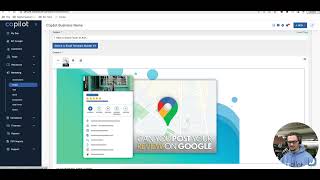
But we have tons of different ones here. So just to see what that looks like, let's go grab positive review response. I click on that, I roll down here, I got visuals I can edit. I can add an HTML code which essentially allows you to attach any video or content that you'd the email. Add an image to the email and being able to shift that position and just change up the formatting via text or the images that you have on your email as well. Here's some of the text that I can also edit as well. And then I would essentially just save it. And then when I want to actually send an email, I go to send email and then I find that within my templates, the customizable one. So it's important to obviously name whatever customizable one that you edited. So that way it's easy to find within your list. But you can see here on the send email list I can essentially create systematic groups based off of how I organize my customers. I can send out invoices, emails, documents, forms and invoices. See the different invoice numbers here. I can click on multiple customers to essentially create a bulk email as well, select the template that I would like to select, choose the subject and then be able to again add links, delete things, underline things, change any formatting, or even add some more content as they're on there as well. So a lot more options here At Copilot, we definitely believe in high level communication via email, text automations, all the above. If you haven't checked out our Copilot University to educate yourself a little bit further on these things, I definitely recommend to do so. It's free to the public. Thank you for watching this video and I look forward to helping you guys out soon.