Facebook Ads Reaching The Wrong People?
Facebook ads often reach the wrong people because the algorithm optimizes for any click, not qualified ones. The presenter walks through campaign setup: pick the right objective, exclude past clickers and followers, narrow geographic targeting by location, remove Audience Network placements, and align your ad copy to attract the right person.
Chapters
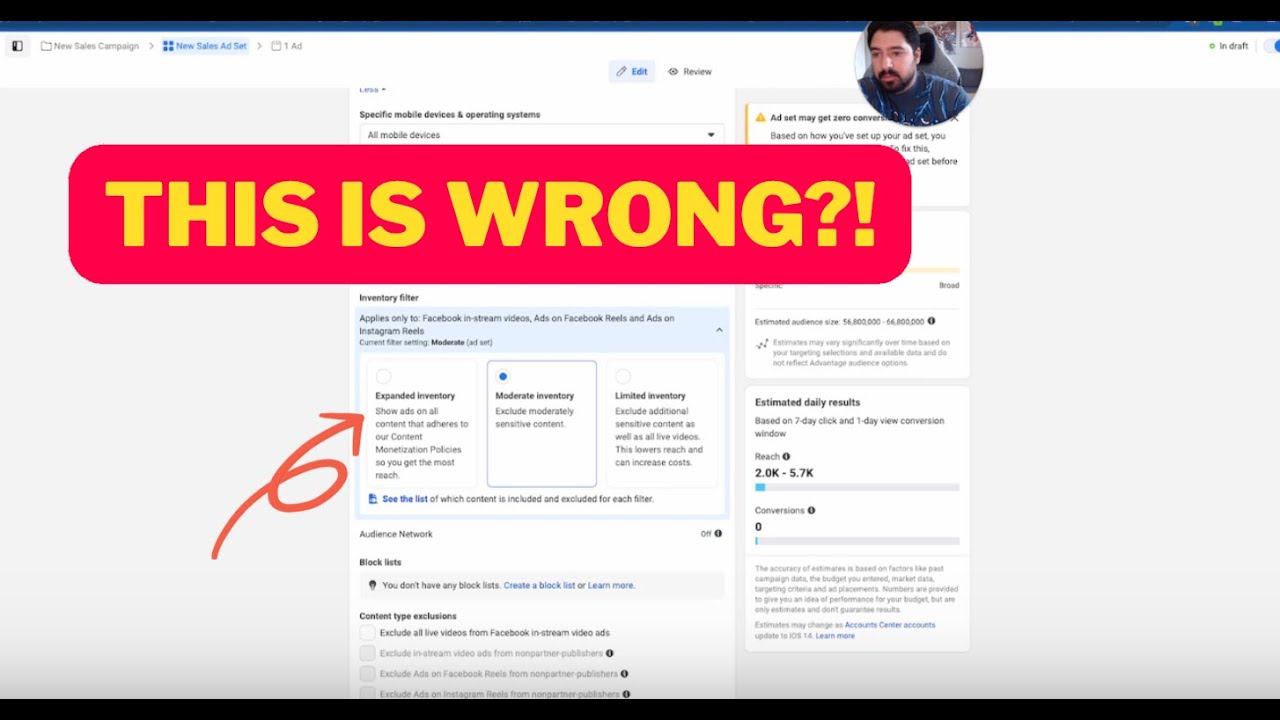
Do you find that Facebook is targeting the wrong people and driving the wrong people into your business? Well, there's a couple reasons why that could be happening, and I want to show you how to remedy it, um, and how to actually get and attract the right kind of clients into your business, not only from Facebook ads but from Google or any kind of paid advertising. So I'm going to go through here and actually create a full campaign from scratch and show you what's the best way to make sure you're attracting the right kind of people into your business. Now, as a quick background, Facebook works off of something called initial conditions, which can be a really, really great thing, and it can also be a really, really bad thing. So basically all it means is when you post an ad for the first time, Facebook's gonna deliver that ad to a certain person. So when you post that ad for the very first time, depending on who sees it and then who clicks it, whenever you get a click, Facebook's like, okay, great, we got a click on this ad from this person. Let's go find more people just like that. The problem with it is if that first person is not a really good fit and Facebook thinks, oh great, this ad is working because we got a click, it's going to go start delivering that to more of the same kind of people like the first person that clicked. And the problem becomes is that you can get stuck in a doom loop where Facebook just keeps delivering your ad to the wrong people over and over and over again. So I'm going to show you some targeting options here. And some really, really good ways to actually set up your ad accounts so you don't run into that problem. Okay, so first things first is the objective. Now, for most people, you're gonna be either optimizing for some kind of a lead or a sale in most cases. Now, if you're some kind of an e-commerce store and you're trying to get sales, optimize for the sale is the most important thing. If you're optimizing for traffic awareness or any of these other things, As an e-commerce store, it's usually a bad idea unless you're doing some kind of like retargeting or engagement first. But it's super important to only be optimizing for the thing that you want because Facebook actually delivers your ad to a completely different kind of person depending on what you're optimizing for. So we'll do sales and we'll just do a manual campaign. And there's a couple of settings that I want you guys to look at, and it all really comes in at the ad set level. To make sure that these kind of things get avoided. So pixel is super important, making sure that it's optimizing for the right thing, kind of like I mentioned previously. And the next thing that I want you to look at is these audience controls down here. So what I would recommend doing, and even here in this audience suggestion, is I'd recommend make a custom audience of the people that are already engaging and in your world, right? So people that are following you, people that maybe have clicked on previous ads, your email list, if you have one, exclude those people. Because what this will do is it'll set up a very fresh set of people that Facebook is going after. And what I've seen happen is a big causation of this kind of doom loop that you can get stuck into is Facebook will deliver your ad to a friend or a family member that's a part of your Facebook profile. And that friend or family member will click it causing a doom loop and just the wrong kind of people will be clicking your ad in most cases, right? So I like to exclude people that are kind of inside of my world, like my stuff, follow me, things like that, especially on these kind of campaigns when I'm trying to kind of get out of that doom loop or even prevent it in the first place. Now, the next thing that's super important is starting to look at locations. A lot of people will go really broad, or so like if you're just targeting the US, they'll just plug in US, or if they can target worldwide, they'll start to put all the different countries. In here, which is not the best thing to do because what I've found is when you separate countries, you get better results and you get better people. When you're making it really broad like this and going multiple countries in one ad set, I've seen this happen more times than not. The other thing that I think is really, really powerful is starting to target by states. So if you know there are certain areas in say Texas and Florida, maybe in New York, wherever certain areas are, right? And you could do this by zip code, by city, just by state. You could go after more affluent or more targeted cities and locations and zip codes based on whatever it is that you're offering, right? Or just more specific to your offer. If you're some kind of a company where you're offering something for like a boat, well, you could probably target all along the coast across the entire US, and you'll probably get better results in most cases than maybe people in like Kansas, right? Obviously there could be like lakes or something like that there that people could go to, but you get the point. This kind of very specific targeting gives Facebook a little bit more parameters while still letting the algorithm do its thing and find the right person for you. So instead of just going broad, sometimes if you found yourself stuck, in that doom loop, try targeting different cities, different locations, different zip codes. It works very, very well. The next thing that I want you to look at is the placement section. So this is something that a lot of people will miss out on and they'll think that, oh, well, if I'm not doing different placements, there's no need to touch this. When in reality, I actually like to get rid of Audience Network and in some cases Messenger, but always usually Audience Network. In this specific case, because once again, this is gonna be delivering your ad to people in your audience network, which isn't always beneficial if you're trying to get out of this kind of doom loop. So that's something really important to pay attention to. Now, underneath the placements, there are a few more advanced settings that are getting rolled out that are really useful, and it can be beneficial testing them out. So try 'em out for yourself. We've seen them work very, very well. The first thing is this brand safety and suitability. And you can actually put an inventory filter on where your ads are actually gonna be delivered, as in like what kind of content people are looking at. So by default it's moderate. You can do limited or you could do expanded. You can click here to see the list of like where these ads could be delivered. But check it out. You could find that switching to something limited is gonna give you an advantage over someone else that just decides to do moderate or just decides to do expanded and so on and so forth. So, Check that out. The other thing, if you're really, really struggling with this kind of a problem, is look at block lists. So you can create or find a block list. And what will happen is you can go here and you can find different audience networks, pages, even URLs that if you don't want people that are looking at these pages or looking at these different URLs, you don't want them to see your ad. This is a really easy way to actually make that happen. So this is something really, really useful that I don't see a lot of people talking about. It can help once again, if you're really stuck in that kind of doom loop, these are some really cool tricks that can help with this. Now, the last thing I wanna mention, and I mentioned this in plenty of my other videos, the core reason as to why you're getting the wrong person is in the ad itself. If you are talking about something in your ad that doesn't align with your target market or that isn't clear enough, That's where you're gonna see the problem. You've gotta make sure your ad is as aligned to your audience as you possibly can. There are metrics that you can look at to kind of determine that, and there are ways that you can craft and create your ad, your primary text, your headline to make sure that you're talking to the right person. So make sure that you pay attention to that as well. Now, I mentioned that there are some metrics that you can look at to actually help with determining what the problem is. There's a completely free cheat sheet that goes through a ton of the different metrics, and there's actually an advanced one here. That goes through all the different metrics that you could possibly need, as well as how to influence them. It's a super useful resource. If you check below in the description, you can join the Predictable Profits Mastermind completely for free, get access to this cheat sheet, see how to use it, watch the different videos on how to influence things. So for example, in this case of getting the right person, you're really gonna be looking at your link click-through rate and potentially your unique outbound click-through rate. There are at least 4 different ways that you can actually influence that here, um, and get the right kind of person in your ads. So check it out, check the description below for access to that group and this cheat sheet completely for free. And if you have any questions, please comment below, and I'm looking forward to seeing you guys in the next video.










