I generated over 100,000 (real) followers on IG with this ads strategy
Nick Korvessis shows how to get Instagram followers for $0.20-$0.50 each using Meta's profile views objective. The strategy uses short reels with bold text and a face, broad targeting, and $5-$10 daily budgets. Test multiple creative angles, track cost per profile visit, and scale what works.
Chapters
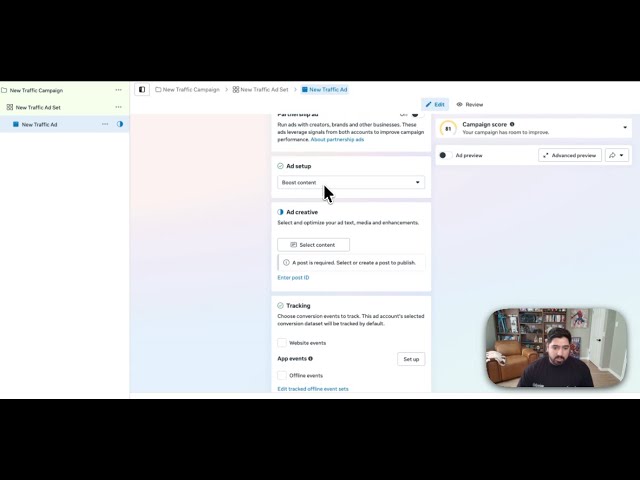
If you want real Instagram followers, not bots, not giveaways, then this is a really simple ad strategy that you can deploy right now in your business that's getting followers as low as 20 cents for some of the partners that we're working with. My name's Nick Korvessis. I've been running paid ads for the past 10 years for some of the biggest companies in the world, biggest coaching consultants, uh, info products, all that kind of good stuff, including myself. And consistently, this has been one of the fastest ways to grow Instagram pages with quality followers. And this doesn't mean that they're gonna be shitty followers. It doesn't mean that after the followers, that's all you should do. This is just one tool in a tool belt of strategies that you should be using inside of your marketing strategy. So what's the core problem and why should you even wanna do this in the first place? Well, organic reach can be inconsistent. Reels might blow up one day and then flop the next, and it's a little bit more difficult to scale organic, whereas ads let you really control the growth. And this is where the strategy can come into play, because even if you're running paid ads elsewhere, this can be a really great addition to really amp up what you're doing with other kinds of ad campaigns. So here's what the strategy looks like as an overview. And then what I'll do is I'll take you behind the scenes in the Ads Manager and show you exactly how to set this thing up. So what you're gonna be doing is we're gonna be running a follower growth campaign using Meta's profile views objective. The idea here is to use a short-form video, something between 5 to 12 seconds with a really simple, very clear call to action that's telling people to follow you for more tips, et cetera, et cetera. Now, the key here is that you're gonna wanna be producing a decent amount of ad variation to get this to really, really work. Not all ads are gonna work well. You need to produce a lot of content with different hooks, bodies, different angles that you're kind of promoting yourself to. To get the right people and to actually get a good cost per follow. The KPIs really that you wanna be aiming for here is anything for a follow less than $2 is good. It's good enough. Anything less than $1.50 is really good. Anything $1 or less is great. And that's ideally where you wanna end up with this, with some niches bringing in follower costs at 50 cents, 20 cents, 30 cents, somewhere around there as well. As far as the targeting goes, you wanna be targeting a broader audience so the algorithm can find cheap but relevant followers. Doesn't mean that you're gonna be going broad, wide open and getting low quality. You can have some interests, but keep them minimal. Now, before I get into the backend and what this all looks like, I just wanna give you 2 really important things around creative and then targeting. So fast-paced native style videos that looks like an actual like native reel is really what you wanna be going for here. Big bold text on the screen, follow for a specific outcome or daily tips for whatever avatar you're focusing on. Show your face or show value within those first few seconds. So it's really relatable and people actually are incentivized to continue to watch and then to follow you and really make that hook of the video the first frame. So that's basically all the background. Let me show you how to set this up. And then as far as budget and scaling, and then what you should be doing consistently to keep these going in your business and continue to see the results. So inside the Ads Manager, uh, we are going to start with creating a new ad and we're going to be doing the traffic objective. We'll hit continue. Manual traffic campaign is fine. And then from here, we'll be doing an ad set budget. I'd recommend just turning off this, like, share some budget with other ad sets. It's useful in other cases, but in this case, for this video, don't touch that. We'll go next here. Then you can name the ad sets whatever you'd like to call them, and the conversion location you're going to choose is Instagram or Facebook. And the performance goal should be set to maximize number of profile visits. From there, choose your objective. Obviously, in this case, we're going to be going with Instagram. As far as a daily budget goes, I'd recommend starting these off between $5 to $10 a day. You don't need to be going crazy on the budget because we're only getting followers for a couple cents to a few dollars. So you only need a couple bucks a day to kind of figure out what's working. So I'd start these off at about $5 a day. As far as the targeting goes, there's a few different ways you can do this, but what I would really recommend is to actually just hit your core demographics but as broad as you possibly can. So choose the age range that makes sense for you, gender, etc., etc. For detailed targeting, just put in a few. You don't want to make this really specific. You want to give the algorithm room to breathe and room to find the right people for you. And you want to make sure that your content obviously is speaking to the correct people. So that's all you need to do there. As far as placements, I always like to check these because even if you choose like Instagram up above, you can see here in this case that it chose Facebook for me, which is annoying. So uncheck Facebook. After that piece, then we will go to the next step here, and then we'll have a new ad. Now, what I would recommend for these follower ads is I would actually make it a piece of content that already exists on your profile. It's just gonna make everything feel a lot smoother and make a little bit more sense to people that are seeing these ads. You can make a specific ad, but once again, I just really recommend to choose an existing ad. So what you'll go ahead and do is you'll do this boost content option. This has actually changed. They changed the language of this. Then you can select any kind of content that you have. So for example, I'll choose my Instagram. I'll wait for this to load just a little bit, and then I'll be able to pick the reel, for example, that I want to boost. So say this is the one that I want to go with, I'll click it, select that, and then it'll load it in. Um, after that point, you're pretty much good to go. You'll go ahead and publish it and then carry on. Now, like I said at the beginning of this video, you want to make sure that you cycle in content consistently to find which actual hooks, bodies, uh, angles, etc., etc., that's really driving the follower cost for you. Because if you don't, things are gonna stagnate out pretty quickly. So you really wanna make sure to really consistently be testing, pour the budget in the ones that are working well, drop the budget quickly where things are not working. And the big KPI that you can really determine and look at to determine if these are working or not is the cost per profile visit. So once these actually get published, I think I've had some previously that I've ran. Yeah, like right here. I don't think I did a ton to these, but that's fine. So like this one here, you can see they're not that much, but 12 profile visits, $2 a visit. That'll never work, right? Even at $2 a visit, even if every single person followed, that's, that's not too great. So not a great example here, but that's what you want to look at. If you're getting profile visits between like 20 to 50 cents or even less than 20 cents, you're in pretty good shape because if 50% of them end up following, you're getting profile views for 50 cents. You're in that dollar per follow range. So just keep that in mind when you're looking at these. Obviously you can look at click-through rate, link click-through rate to kind of guide you on, okay, which hooks are actually grabbing people, which ones are doing a better job at getting people to click through and which ones are not, et cetera, et cetera. So I hope you enjoyed this video. If you did, be sure to like and subscribe. Plenty more Instagram, Facebook advertising tips coming your way. And if you have any questions, you can comment below. I'll reach back out and give you some, some feedback on whatever ad things you're struggling with, and I'll see you in the next video.










