Steal this instagram ads strategy and get more customers
Learn how to run Facebook and Instagram ads that send prospects directly to Messenger for conversations instead of landing pages. Set a daily budget based on your offer price, target 5-8 interests, and use simple ad creatives like text posts or screenshots. The automated message template greets prospects and asks them to reply with a keyword to start the conversation.
Chapters
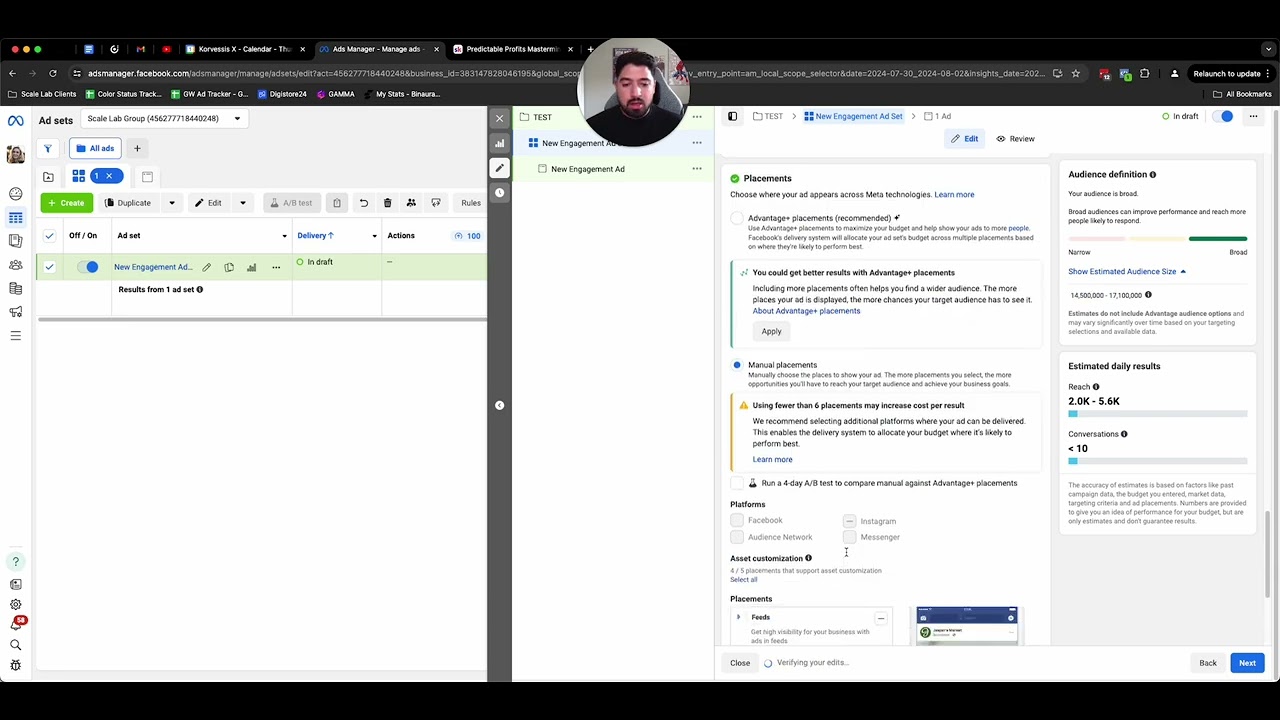
If you wanna create more conversions and get more people into your coaching program, your community, your course, or buy more products, having more conversations with people is one of the easiest ways to do that. And in this video, I wanna show you how you can create more conversations inside of your business through paid ads. So I'm gonna show you the campaign setup, some examples of creatives, what everything should look like, and you can go out there, start to implement this and get more conversations. 'Cause at the end of the day, all conversions do happen in conversation. And this has been a really great strategy that's worked for a ton of business owners that we've worked with, experts, coaches. This is honestly one of the first things we like to do for them because it's so quick, so easy, and you get results very, very fast. So the baseline structure of this strategy is a messaging campaign where you drive people to chat with you in Facebook Messenger or Instagram DM. Both platforms can work really well. I think I have some bias that Facebook or that Instagram works a lot better than Facebook, but I have proven myself wrong many, many times. So it's up to you to test it and see for your industry which one is best. So first things first, we're gonna go ahead and create an engagement campaign. You'll name it whatever you'd like to name it. And then from there, we're going to go and set up the conversion location. So from here, It's gonna be messaging apps. It's going to be a click to message. You'll choose whatever page that you wanna get the messages to. And depending on where you actually want those messages to come in, like I said, Messenger or Instagram, and I have had some people do WhatsApp, test all 3 of these, at least test Messenger and Instagram because I've assumed in the past that Facebook was best or Instagram was best and vice versa. And turns out the other one is way better. So it's always worthwhile to test these things. From here, you're gonna set a daily budget. Now, how I like to think about setting daily budgets for these and what I'm willing to spend is take the price of your offer and you should be willing to spend at least the price of your offer, potentially up to 3 times of that. Now, it depends on the price range. Like if you have a $5,000 offer, I don't think you need to spend $15,000 to figure it out, but you should at least be able or allow yourself to spend up to $4,000 to $5,000 Because you'll break even and you'll get a customer for free, quote unquote, even if that's the first kind of step. Now let's say you had a $50 product. I would be willing to spend anywhere from $100 to $150 to kind of figure it out at first and then scale from there. Totally normal. There's not a problem with it, but there's a little bit of learning, especially if you don't do ads very frequently or if it's your first time doing it. So we'll go ahead and set our budget there. Then we'll go down to the audience section. I'd recommend dropping in a few different interests. I'd recommend anywhere from 5 to 8 different interests or demographics and behaviors. So you can go ahead and choose a couple of those here, make sure they match with your audience, but you want to give the algorithm room to breathe. You don't want to make it too broad. This is actually a quite broad audience, but you also don't want to make it so narrow so where the algorithm doesn't really have any room to go or any legs to run. So you want to keep that in mind. From there, something that I really recommend is double-checking the placements. A lot of the time with these Messenger campaigns or these DM ads, the platform likes to just auto-select everything. So just go in here and if you're doing Instagram only, make sure Instagram's the only one ticked and same with everything else. From there, we're gonna go on and make our ad. Now I'm gonna show a few examples of the creatives that have worked really, really well for us when we're doing these Messenger campaigns. In these DM ads. And let me go ahead and upload a couple of them so you can see what they look like. Okay, so I've got a decent amount of ad creatives in here. Let me walk you through a few of the ones that we have found to work very, very well across hundreds of niches and industries and lots of different kind of spend and just any industry. So the first one that we like to do is I kind of refer to this one as a Twitter-style post. It looks like something that would be posted on Twitter when someone like posts something on Twitter and has a caption underneath it. This looks kind of similar and it's very, very simple. And you'll start to see that the simpler ads on these DM campaigns work way better than the more complex ones. So pretty simple, big headline, couple of benefits or points or pieces of feedback, and then a direct call to action in your DM ads. I know this one doesn't have this example, but I'll show you in the next one. You wanna make sure that you're very, very clear on the call to action. So for example, in most cases for these Messenger campaigns, you wanna say something like DM me start to learn more, and you wanna make it a very specific word so you can track it. And I'll explain that in a minute. So you can do something like this. You can do something like this, which looks like an Apple Notes screenshot. Very similar thing. You use the exact same kind of copy that you would on the Twitter style post. The next one is an ad that I refer to as the blunt post. And it is exactly what it sounds like. It's very blunt, very direct, and there's not much really to it besides just text and calling out the problem that people could potentially be having. So let me, let me go through here and show you guys what that one actually looks like. So here's an example of a blunt post. I'm looking for 5, and then you're gonna insert your target market. So in this case I said coaches, consultants, and course creators. Who want to achieve result, right? And then you can go in there and you can put some kind of risk reversal, or without a common thing that they're doing. So you say without posting a ton on social media, without spending a ton on ads, whatever it is, DM me Attract if you're curious to learn more. This is something that's worked really well for us, works very well for a few other people that we work with. Here's another example. I'm looking for 10 business owners that want more clients on demand. So on and so forth. Pretty basic. Then what you can do is you could take this a step further and turn it into a meme. So we've done this with a lot of people. This is an example of how we've taken something from that blunt post and then turn it into a meme like this. And we've done it with tons of different memes. This is a really, really good example. It's worked very well. And once again, is just make sure you always have some kind of a keyword, whether it's build, start, grow, Attract, whatever it is, just make sure it's a very specific keyword and I'll show you why here in a minute. So we'll just start with this one just so you can kind of see, put in some text and then the call to action. I would always recommend for it to say something like send a message. You can of course use something like learn more and things like that, but I usually like to be clear with what they're actually doing when they click, or else you'll get people that just click the learn more button. They're like, why the heck am I messaging you? It just is a bad experience for everyone. Now, last but not least, a really important piece of this is actually what happens when they click on the send message button. And let me show you what that looks like. All right, so once someone actually clicks on the send message button, Instagram or Facebook is going to prompt you to create a message template. And from here, you really want to set it up like this, where there's a simple greeting and then there's a question that you're prompting them to answer in most cases. So for example, what I like to do is in this first section is I like to call out the person that I wanna work with or my ideal client. So I'll say, hey, if you are a coach, consultant, or course creator that wants more clients, 2024, DM me attract for the details, right? I'm qualifying people again by calling out the people I wanna work with, and I'm giving them that callout again to make sure they DM me that word. Then what I can do is in the question, type in that keyword, 'cause at this point people will either do one of two things. They'll either, or I guess one of 3 things, they'll either leave and won't message you, which is fine because if they've read this and this has pushed them away, great, not a problem. They will either click this send, which will send the word attract. You'll see it in your inbox and you can take it from there. Or they'll see this and they'll just type the word attract as well. So super simple setup, very, very easy. And from there, that's basically it. You're just gonna get people in your inbox. You can have a conversation with them. It's a very easy way to start running ads. You don't have to worry about pixel setup, building a landing page, all that stuff. You just worry about having a conversation with people and pushing them forward to the next step of them working with you. If you want more tips like this and you want me to help review your ads or even help build out a custom ad strategy for you, I've just decided to make the Predictable Profits Mastermind community totally free. So you can pop in here, join for free, Ask questions, have me review your ads, and you will get access to a free resource, the KPI cheat sheet, which shows you which KPIs matter in your ads and how you can influence them. So if you wanna join, the link is below in the description. I hope you enjoyed this video. Go out there and test some ads, and I'll see you in the next one.










