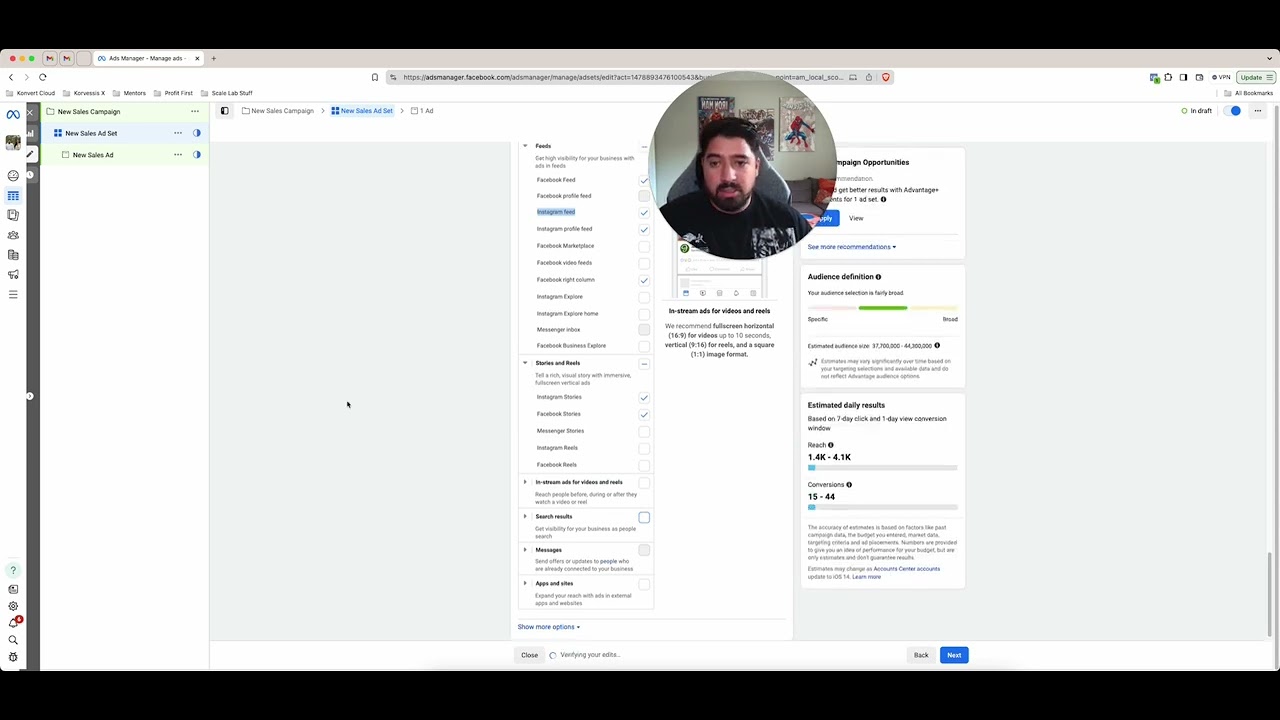
In this tutorial, the presenter walks through a series of straightforward, actionable settings within Facebook Ads Manager that can noticeably reduce cost‑per‑thousand impressions (CPM) and overall cost‑per‑result. He begins with geographic targeting, recommending either ultra‑broad worldwide audiences for e‑commerce or highly specific U.S. states/counties for niche products. He then moves to placement optimization, suggesting the removal of Audience Network, Messenger, Marketplace, Explore, Business Explore, and Reels while keeping feed, profile feed, and Stories, and adjusting right‑column placements based on ad format. Next, he highlights device‑level targeting—choosing iOS or Android only, limiting to Wi‑Fi connections, and even filtering by iOS version—to improve lead quality and lower CPM. Finally, he advises switching from daily to lifetime budgets, which unlocks ad‑scheduling capabilities, allowing advertisers to run ads only during high‑conversion windows. Throughout, he encourages testing these tweaks, offers a free community for feedback, and positions the tactics as easy, low‑effort ways to out‑perform competitors.
Chapters
So I've been getting quite a few questions recently around how can I drop CPMs inside of my paid ads inside of Facebook? And that's exactly what I wanna show in this video. I've done a few other videos in the past, kind of giving some roundabout ways to dropping CPMs, but I wanna show a very easy way and a few just super simple tactical ways that you can jump in the Ads Manager and drop your CPMs if you're running paid ads. So first things first, and it's inside of the targeting section, so the ad set level, Depending on where you're targeting, that's one of the easiest ways to drop those CPMs. So for example, if you're doing e-commerce, try to be as broad as you can and target as many locations as you possibly can. If you can try to go worldwide. So if you're doing some kind of like a digital product, digital course, and you don't mind if people are buying it from Australia, UK, wherever it is, anywhere outside of the US, go ahead and plug in the worldwide metric. And a worldwide targeting option. Easy way to do that is just to go to countries and then select wherever you'd like to target. So if you're okay with everywhere in Europe, everywhere in North America, everywhere in South America, maybe this is totally fine. I think it's a very easy way to just significantly drop your CPMs instead of keeping yourself confined in one spot. Go broad. So that's one way. Another way, which is kind of counterintuitive to what I just mentioned, but I have seen it work very, very well, is target very specific locations. So if you can only target in the US, start plugging in super specific states, right? So for example, you could say Florida, you could do like Texas, you could do California, just do a couple of key states that you know of and that still have a really good wide audience size and give that a shot. I've noticed that if you just do the default setting of US and just like the random country and that's it, it works a lot better. If you just choose a couple of different states and kind of dial in on those specific areas. You could even go deeper and go into specific counties or zip codes, but I found what works best is either going really broad and worldwide, or if you need to stay in the US for whatever reasons, just make sure you pick or try picking very specific states and see if that helps. The next spot to help drop your CPMs is gonna be in the placements area. So here in placements, I think most people will just choose this Advantage Plus automatic placements and kind of just leave it at that. What I'd recommend doing, and is I almost do this as a standard now for any campaigns that I run, is I'll turn off Audience Network, I'll turn off Messenger, and then I'll go through and that's kind of a baseline. So you could just stop there and that in most cases will drop your CPMs. But if you want to take it a step further and really future-proof your ad campaigns, what I would recommend looking at is seeing what you can get rid of here. So I know I find the most results inside of my feed on Facebook and Instagram. Profile feed is also pretty good, but I don't really get much from Marketplace or Explore or Business Explore. Right column, and depending if your ad is a video ad or not, I would either turn that one on or off. If it's a video ad, keep it on. If not, turn it off. Right column also offers very cheap CPMs, but start to choose like these very specific sections here. I would get rid of Reels 'cause they're quite competitive and I've seen really great results just from Story ads. And then you can kind of get rid of these ones. So if you whittle it down and you get a very focused set of placements, I've seen that this is a very easy way to drop your CPMs. So give that a shot as well. Another really great thing that you can look at inside of the ad set area is expand these options underneath the placements and Try to target very specific devices. So I know sometimes people just ignore this and what you could do is go iOS only. You could go Android only. You could do all mobile devices, but then only make sure you target people when they're connected to Wi-Fi. I found that if you're doing like some kind of a coaching offer where you're getting people to book a call and maybe they need to consume more content, doing that when they're connected to Wi-Fi is something that can help quite a bit. And sometimes we've seen better results and better quality of leads from iOS devices and even lower cost per purchases. You could even go a lot deeper here and choose like what level of iOS they're at. So if they're the most recent level only, or just from like 15 to 18 is the max, then you know that you're dealing with people that have like the brand newest iPhones in most cases, or at least from the past few years. Which sometimes can make a pretty big difference. So that is something that you should look at that I would recommend at least testing inside of your ad sets to help drop your CPMs. Now, lastly, a really quick tip is using lifetime budgets instead of using a daily budget. I found that if you set a lifetime budget, it works very similarly to a daily budget. Sometimes if you want it to keep spending, you just gotta refresh that lifetime budget or get that end date out farther. For example, because it'll give you an estimate. So like let's say you want to spend 20 grand within whoops, not 200 grand. Let's say you want to spend 20 grand over this point from August to January. It'll give you an estimate of how much you'll actually be spending every single day. And what's great about that is you can kind of keep an eye on it, make sure that it's running when you want it to, and go from there. Which you can then also do when you set up a lifetime budget campaign, what this basically unlocks for you is ad scheduling. So if you wanted to run ads on a schedule, which you could actually do is say, hey, I only wanna run ads every day, but I only wanna run them from 6:00 PM to midnight and that's it. And then outside of that you can say, okay, well I really wanna run them between like 12:00 and 1:00 and then maybe 6:00 to 7:00 AM. So you could pretty much only be running ads at the very specific times in the viewer's time zone that you only want them to. And I've seen this as a really good trick if you're selling a very specific kind of product, or if you notice that most of your purchases are happening through these timeframes, you could give it more specificity. So it's only targeting here. Now it depends because once again, giving Facebook more free rein and giving it more option as to when to run your ads is usually better, but it's not a bad idea to test that out and basically be better than the competition by trying these smaller tests. So give these things a shot. See if you can drop your CPM. And then if you have more questions, reach out to me below. And the first link in the description is a free group that you can join to get free ad feedback. I'll give you some more guidance on all this kind of stuff, and there's tons of free resources in there. So I'll see you in the next one.