Productivity Apps To Help You Do More! (ListProducer.com)
Paula Rizzo walks through productivity apps designed to help you get more done. The video covers tools available on ListProducer.com that streamline tasks and boost efficiency.
Chapters
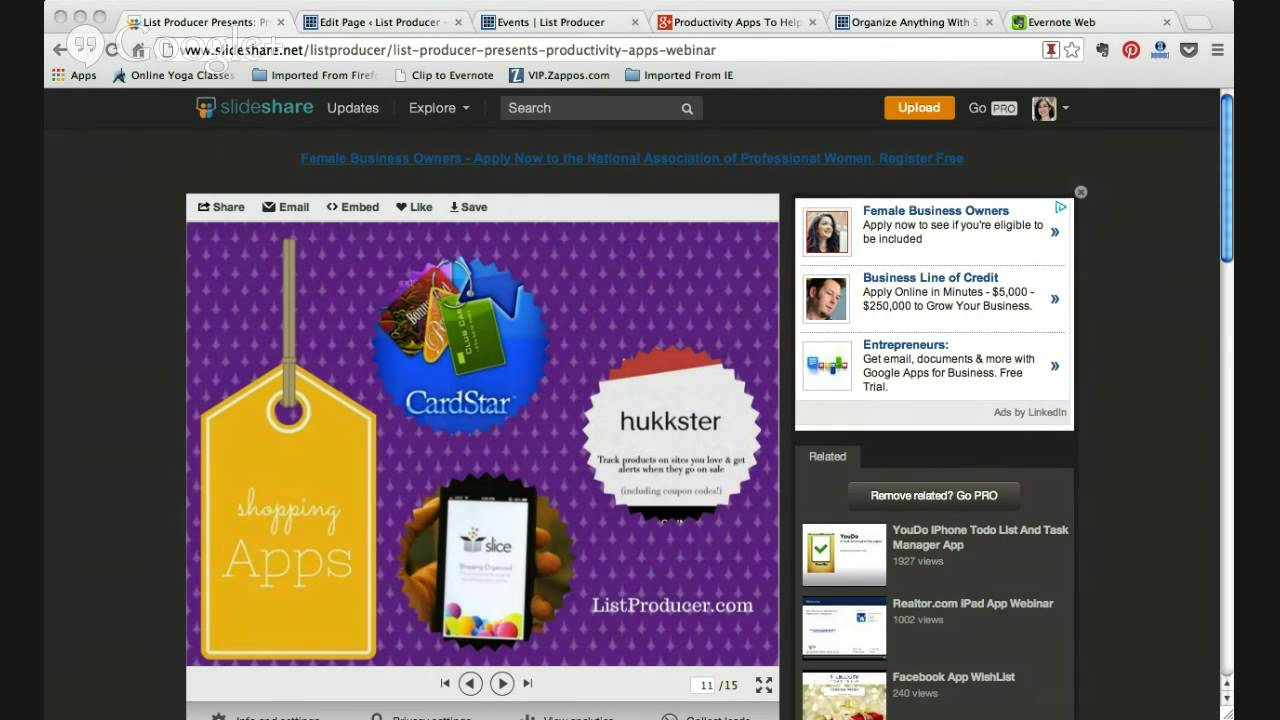
Hello, welcome to my webinar. It is 8 PM, and I am so excited to chat with you guys and tell you all about my favorite apps. I have been a late adapter to apps, I have to say. Not super late, but kind of late. And since I've discovered apps, I've discovered a whole new world, I have to tell you. And I'm really, really excited to talk to you guys about it. And go through some of my slides. I did slides again this time. And, um, let me see if I can go between— there I am. So I just want to say hello, and I'm going to try and go back and forth between my slides again. And if you guys were on my first webinar, you know that didn't exactly work out. So this time I was smart about it, and I have a backup plan. And so the backup plan is that I uploaded all of the slides to slideshare.com. And what I did was, if you are joining me through listproducer.com/events, all of the slides that I'm going to go through today are right underneath the player. So you can just click on it and kind of go along with me as I talk about all my favorite apps. I'm hoping that I'll be able to show them to you as I talk to them, talk about them, but Last time I didn't prove to be the most tech-savvy person, so I needed a little bit of a backup plan. So as I said, I love apps. I find them to be very, very, very useful. And one thing about apps is that they can really, really take your productivity and set you back. They really can. I mean, I'm talking about Facebook, Twitter, all the fun ones. Games, that kind of thing. So you're supposed to be checking your email or in a meeting and you're looking through your Twitter feed or seeing what people put on Instagram. I get it. It's fun, it's fantastic, it's fabulous, but it's kind of a time suck. But there are some apps out there that are really, really beneficial, and I'm going to take you through a whole bunch of them. So let's just get started. It is 8:02 and I want to just get right into it with you guys. The first thing I want to do is see if this works. So I'm going to go and click on this SlideShare. And so you guys should be seeing my little slides. And I hope that you're able to see those and that they're big enough for you to check out. Let me see here. Are you guys seeing my slides? Well, let me— actually, before I do the slides, because I see some of you are still just joining me. But I also want to let you know that this entire thing will be recorded. And so if you have to drop off here or there, or you have to go to sleep, it's past your bedtime, whatever it is, this will be available to you afterwards. So you can always go back. If I talk too fast, if you don't know what I say, you can go back. So if you've signed up for this webinar, it will be sent to you via email. And so you can always refer back to it. Exciting and fabulous. Um, okay, so let me see. The other thing that I wanted to tell you about is that, um, when I do put this on YouTube, because it'll be on YouTube at some time, some point, um, in the bottom will be a whole bunch of links to articles that I've written about a lot of these apps. So I'm kinda gonna touch on the best ones, why I like them, and move on to the next one. But if you want more information, I've written a lot of blogs about all of these topics. So that will be available to you as well. Okay, so I'm going to go ahead and start up with my slides. So I'm hoping that you can see these, and I'm hoping my interns are watching and they can tell me whether or not you're actually seeing my slides. So first off, welcome to my productivity webinar. And why should you be using apps? That's, that's a big one, right? That's a big question for a lot of people. And I find it to be fourfold. Number 1, they're useful. 2, they're easy. They can be easy once you figure them out. Number 3, they're fun. And number 4, for the most part, they're free. There are a lot of apps out there that are very, very, very good that are free. There are some that are not free. And I have paid for apps in the past, but there are so many good free ones that you may not have to pay for them, which I always like. So let's see. I don't know if my slides are working. Okay, that is why you should be doing apps. Number 2, what type of apps do you need? So this is really important for you. I have a lot of apps, and the truth is, is that I probably don't need all the apps that I have, but I'm going to break it down for you guys into a bunch of small, small little bite-sized pieces so you don't have to, you know, download all of these apps, but you should be using some of them at least. So apps for productivity, things like list making or keeping track of your calendar, that kind of thing, you definitely need those. You need apps to keep track of food, shopping, travel. I'm going to talk about that tonight. Outsourcing. One of my favorite things to do is to give my work to other people and have them actually do it. And so I will tell you all about that. Those are a bunch of apps for that. And apps that are fun. You know, you should have fun apps. That should be something else that you're doing. So the other— So that's sort of the gist of what we're going to get into tonight. So I don't know if my slides are working, but if they're not, you know what? I'm just going to keep on going through. So number 1, my most favorite, absolutely you have to have without a doubt, is Evernote. Evernote, I'm going to try and see if I can do a screen share with you guys of my slides for Evernote because I just love Evernote so much. Evernote is basically your second brain. So for me, Evernote is the way that I manage everything. It's the way I remember what I want to buy at the store. It is what I do when I want to do my taxes. It's what I use when I work with my interns. There is so There's so much that you can do with Evernote, it's ridiculous. So let me just see if I can share this with you guys. Looks like I can. Start screen share. I'm working on it. Alright, so you guys should be seeing some little slides there. I realize they're kind of small, but at least you'll see something. You'll see what I'm sort of talking about. So this is Evernote, and Evernote is fantastic. I use Evernote literally on a daily basis, and if you're not using it, if you're afraid of it, I would say you have to just try it. So the deal with Evernote is that it's like a second brain. It's a place for you to remember everything. And if you've used it and you don't like it, I would urge you to try it again because the thing is with Evernote is that you really need to download the desktop— it's not desktop, it's for your browser, right? You download this little browser. It's a little thing for your browser there, and you are able to bookmark things. And that I feel like is the most valuable part of Evernote is to bookmark things as you're on the internet. So as you're going, you can see a recipe that you really love, and you use this little bookmark tool and it sends it right to your Evernote. You can also use it when you're going through your emails, which is really, really useful if you're planning a trip or you want to keep track of any kind of, you know, itineraries or like right now I'm doing a renovation on my apartment and it's hard to keep track of all the stuff that's coming. You know, we have a lot of things that we're ordering and so I'm sending it all to Evernote. And the way you do it is you basically forward it to an Evernote account. And so they— when you get an Evernote account you get an specific email address that you're able then to send it to. So that's how I keep track of that. I keep track of all my taxes, everything I keep in Evernote. And so I just send that Evernote folder right to my accountant, and it's this super easy, most amazing thing that you can ever do. When you plan an event or you plan a trip, you can share your, your actual you can share those notebooks with other people. And so it's great because they can add things to it or you can add things to it and you can see what the other person has done. There's also a business account which I use with my interns quite often and it's a really great tool because if they're writing something or they want to save some kind of article they want me to look at, it can go right into Evernote and we can all see it. So it's really useful, it's really, really nice. So I would say if you're afraid of Evernote, you need to get in there and you need to try it out. You need to get back with it. So that's for me is my most absolute 100% favorite app you're ever going to use, Evernote. So get on board. And I do have a web— I have a blog about why you should give Evernote a second chance if you haven't already. Okay, so these next apps are the ones that I really like for getting stuff done. And like I mentioned in the beginning, it's really hard sometimes when you're trying to get stuff done and your apps get in the way. It's hard, you know? And so I think SpringPad is a really good one. And SpringPad has been, has been sort of compared to Evernote in the past. And I don't really think they're similar. I mean, maybe they are in certain ways, but the thing about SpringPad is that it's, it's very smart. And so by smart, I mean if you add some movies that you want to see into Springpad, it will tell you when that movie is playing, tells you when it comes out, tell you, you know, it's smart like that. If you put a product into Springpad, so let's say you want to, you know, get some things for your kitchen, some little tools or whatever, if you put it into Springpad, it will tell you where those products are available and what the prices are. So wherever Evernote is great for keeping information, so is SpringPad, but SpringPad is a little bit more intuitive where it will tell you a little bit more information. So I definitely like that. And I see a bunch of you have joined us. Thank you for coming. I'm just going through some of my favorite apps. We talked about Evernote and now we're going to SpringPad. And the next one is Dropbox, and I don't know Who isn't using Dropbox? But if you're not, you need to. And the thing about Dropbox is that it's a place to keep your photos, it's a place to keep your documents, anything really that you want to have in, in the cloud. It's a cloud-based system, and I like it because let's say you write something or you have, you know, some photos you want to share or whatever, you have it all in one place and you can always access it. And I think Dropbox is really great for that. You can, you can put, you know, any kind of PDFs or if you're writing a book or you're writing something, you want to have these things on hand at any time, you can get it from your mobile phone and you can just forward it to somebody. You don't have to go back to your actual computer to, you know, access it. So I think that's really useful and really great. So Dropbox is a good one. Another one I really like is called 30/30. And 30/30 is an app that is good if you have trouble focusing, right? And so what it does is you have to put time limits on the things that, that you want to do. So let's say there's 5 tasks that you need to do that day. So 30/30 will make you assign a time to those tasks. So let's say one, you want to write back to emails to people. So you want to go through your emails and you think that it's going to take you 25 minutes. So you write 25 minutes into the app and Write emails, 25 minutes. Then after that you have to write a report and that's probably going to take you about 45 minutes. So you write that in, 45 minutes. So it kind of keeps you on track and it is a timer. And so when that time is up, it urges you to move to the next task whether or not you're finished. Um, and I like it because I think that sometimes people have a warped perception of how long things take them to do. And so I think that something like this really forces you to be able to stay on task at least for that amount of time and be able to really figure out and see if that's something that takes that long or doesn't take that long. You know, you may have allotted 25 minutes for email and it took you an hour. So you know what, be more realistic the next time. Either cut down your time on your emails or a lot that time, right? So that is 30/30. I Done This is a really cute, fun app that I've been using for a very, very long time. And the idea behind it is that you can just write down all the things that you have already done. And so for list makers who love to write down things that were not on their list but that they did and then be able to cross them out, which I love to do, you can do I Done This And it just basically puts all the things that you've done into a list. And you can go back and refer to it any time. So you can say, you know, I didn't feel like I did anything today. And you go back and you see, you know what? You actually did a lot of stuff. So I think it's a fun little app that you can play around with. So working in groups is always, always difficult. And I think Asana is an awesome way to keep track of, of any kind of task that a group is working on. And the thing about Asana is that it was created by the people who created Facebook. So these are super smart techie people and they know what they're doing, right? And so Asana is a task management tool for groups. So I've used it in the past with my interns and we found it to be very, very, very useful. And the way that it works is that basically you can assign different tasks to different people And then anything that you want to talk about regarding that task is encapsulated in that one little task. So instead of writing a zillion emails back and forth and then losing your emails or having to keep track of folders or whatever it is, you have this great management tool to be able to refer back and be like, "Oh, okay, I want to talk about, you know, developing the new recipes," if you're a cookbook author. So where are we on that? And you can see the questions, you can see the links, you can write things here and there, and so you know everything is in in one spot for the person who is dealing with this to be able to see it. And it's nice, I mean not that you're going to be a micromanager, but it's nice to see what's getting done also. So I love Asana for that. Cardmunch is another one of my most favorite apps that I've been using for a very long time and it is powered by LinkedIn, which I think is really, really smart. It's owned by LinkedIn and the thing about Cardmunch is that it's a great place for you to be able to keep track of your cards. So you go, you know, to some kind of work-related conference or you go to some meetings and people are still handing out cards. That's just the way it works in these days still. I mean, there's no more Rolodexes. I realize people have gotten rid of those, but there are still cards. And people give you cards, you put them in your desk and you do nothing with them, right? So the thing that you do with CardMunch is you literally take a photo within the app of the actual card, and so it uploads it into the app and it syncs it with the LinkedIn profile of that person. Amazing! I mean, fabulous. So everything that has to do with that person, their photo, where they worked, where they worked in the past, who you may be LinkedIn with them, all comes into that app, and it's just, it's Awesome. Because how many times do you get a card and you're like, "Eh, I don't know. I don't really remember this person." Or maybe you put a note on it and maybe you remember it, maybe you don't remember it. CardMunch is the way for you to remember everything about any person that you've ever met. You can put notes in there. It's really, really great. So that I definitely love. Asana, CardMunch, use them. Okay, now we're getting to the big stuff. You guys ready? This is a big one, okay? Okay, so IFTTT, IFTTT, IFTTT, it's like gift but it's without the G, IFTTT. If This Then That is the website, okay? So that's what we're looking on the left, IFTTT. Amazing, basically this is for the advanced user, so if you're not there yet, Go easy on this one because it'll just blow your mind. So IFTTT is, is a tool where you can trigger different things. Okay, so I put it next to Pocket. So Pocket is on the right there, if you see Pocket, because I use a trigger using IFTTT and Pocket. I know this sounds like craziness. What am I talking about? Okay, so If This Then That is basically a formula. If this happens, then that happens, right? So you can set up any kind of recipe or formula that you like digitally. It's insane. Okay, like, if it's raining out, you will get a text message telling you to bring an umbrella. Yes, this sort of thing exists. The way that I use it, and I've started with baby steps, and so I only really have one recipe so far, because I'm a little bit like, this works too well, what else can I do with it? What I do is if I favorite something on Twitter, then that post gets put into Pocket. So Pocket is a website, is an app where you can read things later. So you can forward any kind of links that you wanted to read, any kind of, you know, article or blog or whatever can go into Pocket and you can look at it at any point offline, online, you know, when you're in the subway, whatever it is. So the way that I use If This Then That is that I set up a recipe for if I favorite, so I hit the little star on Twitter on a tweet, then it gets sent to Pocket. Because in the past, I favorite things like crazy. I love to favorite things on Twitter. I think I'll look at it later, and I never ever ever do. And the best part about Pocket is that you can access all of that stuff. So if I favorite something on Twitter, it gets sent to Pocket, and I can look at it at any time, and it's not just lost somewhere on Twitter. This is for the advanced user, but I figured I would let you guys know that it exists, and you can use it if you would like. There are tons of recipes and tons of things that you can do with If This Then That. That is just one of them. That's a great idea. There are tons of others. So there you go. Apps for to-do lists. People always ask me what I think about apps for to-do lists, and I really do like some of these apps. For me, I'm still— I can't break my habit of writing down things. You know, even just today as I was leaving work, I write on a Post-it and I stick it on the back of my phone. The, you know, 5 things I need to do when I get home so that I make sure that I remember. I'm not totally there yet with just being digital. I do use Evernote sometimes. I mentioned Evernote earlier. I do use it sometimes to make lists of things that I want to do, or if I go to the store and I want to pick up a couple items, I'll put it in Evernote because it syncs with my phone, it syncs with, you know, whatever I'm using when I'm at work. But these 3 are pretty good as far as to-do list apps go. So Clear. Clear is a beautiful app that many of you may have heard of. It's very, very nice. It's very techy. It's just, it's really, really nice and you should try it. It's beautiful. It is very interactive and if you like that kind of thing, it's going to work for you. But if you don't, it may not work. But I say try it. Wunderlist is simple, and you are able to share your lists. You're able to set up, you know, not appointments, but you're able to set up— oh my God, what is the word that I'm looking for? You're able to set up, you know, alerts, and so that it'll remind you to do X, Y, or Z because you put it in your Wunderlist and you put a, you know, a date stamp on it. So I think that For that, Wunderlist is really awesome. And Carrot is one that I would say I spent the most time on Carrot because it really engaged me and I really thought it was fun. And the thing about Carrot is that there is a character who is associated with this app and he's a bully. And so he kind of is annoying but at the same time he's kind of fun and I sort of like him. So he will bully you into doing your to-do list. He will bother you and ask you why you didn't do X, Y, or Z and if you keep putting stuff on there but not doing it. What's your problem? But if you do things and you cross them off the list, you do get rewarded. So that's nice. So you're able to then get— and the rewards are adorable. They're sort of like— one time I got a little cat. And the next time I got— actually a little cat, like a little drawing of a cat that you have to then feed this cat. It's kind of ridiculous. And then another time you get, depending on how far along you go, how much, how many points you get, then you get to, you get to do more things with the app. So like when you first start, you're not able to like erase things, you're not able to look back and see what other tasks you've done in the past, but as you go through and you check things off, you get points, and then you're able to get more features and get more out of the app itself. So I would say try it. It's engaging, it's fun, it may make you want to do your to-do list so that you can see what the app has in store next. So for that alone, just the curiosity, I think, I think it works. Okay, if you're traveling, these are two of my favorite apps. And the first one is available in a bunch of different cities. New York is one of them, Chicago is another. Those are the only two cities that I've used it in, but it is available in many, many cities. It's called Hallo. Halo, or, or halo. So it's like you're hailing a cab, and basically that's what you're doing. So instead of standing out in the cold, like ridiculous, not getting a cab, you could just go on your smartphone and hail one. It's amazing, and I've used it many, many times and it always works. And so what happens is you— it knows where you are because of GPS, and you hit, you know, get a taxi. It will tell you how long the taxi will be there, what the taxi's license plate number will be, what the taxi's driver will look like— there's usually a photo— and what the person's name is and what their cell phone number is. Yes! Is that not amazing? And that person will show up and they will pick you up and you'll show them your phone and they will turn down other riders. I've had it happen to me. It's amazing. I've been like, "Oh no, no, I'm the one. It's me. I just called you on Hello." And they turn down people waiting in the street. It's amazing. And so I've only waited— the longest I've waited is probably about 8 minutes. And so it doesn't cost money to download it, but you do need to pay through the app. So you need to pay the driver through the app, and I think now they do take a commission, so they do take a little percentage, which is like a dollar or something like that. At that point, you know, if you can't find a cab and you're excited to go home, you don't care about the dollar. The other app that I really like for traveling is TripIt. And TripIt is a way to organize and keep all of your travel information. And you are assigned a special email address where you can send any kind of, you know, itinerary or, you know, whatever it is right to TripIt. And also you link it up through your email, so when you get those confirmations, when you get the, you know, car service confirmation, or you get the flight information, or you get the hotel info, it just automatically knows. I don't know, it's like spying on your email or something, but it uploads it immediately to TripIt, which is just awesome. So everything is in one place. It even maps it out and puts it into like itinerary form for you, so it shows like at 6:30 AM this car will pick you up. And then it will drive XYZ miles, and in, you know, 15 minutes you'll be at the airport, and then this is when your flight leaves, and this is when you need to check in. Like, it basically plots out every single thing that you're going to be doing for that day, and it has maps, you know, of— so if you're in a weird place and you're like, eh, I don't know if this cab driver's going the right way, you can look on this map and it just figures it out for you. So I would suggest using it for any trip that you go on, and it's free, but they also do have another service, it's TripIt Pro, where it will tell you, let's say, if, you know, your flight is delayed or something like that, it will tell you that as well. So that is also very good. A little food for thought. So I have two, well, one for the most part and then another one. So Matchbook is a great app to be able to keep all of your restaurant recommendations and places that you want to go. So living in New York City is wonderful and I love it, but a lot of people come and visit and they ask me, what are the best restaurants in New York City? And there are so many, and sometimes it's hard to remember, or it's hard to tell people, like, where are you going to be? You know, what is your— are you going to be uptown, downtown, are you going to be here, are you going to be there? Because it's hard. You don't want to send people all over the city, so you want to have everything in one spot. So Matchbook is a great place to to do that. So you can keep all of your restaurant favorites in Matchbook, and it links you to Yelp, it links you to some other websites where you can see other people's input about these places. And so you can either put it there as someplace that you love, that you've been a whole bunch of times that you want to remember, or a place that you want to remember and you want to go to. So a place that you would like to go to but haven't been, but if you're in that neighborhood you want to be able to look at your matchbook and say, oh right, we're in Chelsea and I wanted to check out this place, so we should go there. It's amazing for that. Venmo is another app that I really, really like that I use for food, but you can really use it to pay any kind of debt. And Venmo is linked to your bank account, which sounds scary, but it's secure, or so they say. And if you go out to lunch with a friend of yours, you know, and the friend is like, "Oh, I'll pick up the tab, you know, you can owe me." And you're like, "Okay, great, I have no cash on me, so whatever." And you know, you know how that goes. You may never see that money ever again, which is fine if you're good friends, but you know, somebody may be like, "Ugh, that's the one who never pays me back." With Venmo, that never happens. So it is literally linked up to your bank account and you can type in the other person's, you know, you can find them on Venmo, so your friends on Venmo, and then you write, you know, $15 for sushi lunch and it will just pay that person. So you can do that for movie tickets, you can do it for any kind of debts that you owe to somebody else. Venmo is a fantastic way to do that. I use it for food a lot, but you can use it for anything really. And I've never found a problem with it, and I really, really enjoy it and like it. Shopping. This is one that we really— I mean, shopping is just— it's fun, it's great, but at the same time, sometimes it can be overwhelming because you don't remember what you shopped for. You don't— you know, is something coming in the mail? When is it coming? Whatever. So these are a whole bunch of apps that I really love that have to do with shopping to make your shopping more efficient and productive. CardStar number 1 is a great one because it is where all of your loyalty cards will go. And so, you know how you have CVS or Duane Reade, and then you also have whatever, you know, shopping place, food place you have, and you may have one for some kind of shoe store or whatever. You can get rid of all of them. You can just download CardStar, and CardStar is a place where you can keep your Sephora. Like, I have everything in there, and then you just basically go up to the register and show them the app, and they can scan it right off your phone. Instead of having a zillion little things on your keychain, you just have it all on your phone at all times. You don't have to worry about losing them. They're all there. As a side note, my husband thinks that he invented this. So he had this idea for this, for this app when apps first started getting hot, and now he's totally bitter and upset that he didn't actually follow through and invent the app. So there it is, it's fabulous, you should try it. Slice is another app that I really like for shopping, and the way that Slice works is much like TripIt, it taps into your email. So when you get confirmations from Amazon or, you know, Zappos or wherever it is, it will immediately send it to the Slice website or app, and it will tell you when your shipment's coming, if it's sent, where it is, all of those things. If it, you know, if they've sent it to your apartment, if it's there, your house, if it's already made it, if it's delivered. It will keep track of everything that you buy online. And a good feature for Slice is that you can exclude things. So like if you're gonna, you know, buy let's say a flight somewhere You don't need that to be included. You did purchase it, but you don't need to know when that's delivered. It doesn't really make sense, but sometimes Slice does not know the difference. But you can go in and tell it ignore Delta, ignore Amazon, or ignore— like I ignore FreshDirect, which is one that I use to have my food delivered. But I don't need that information. I like it for long-lead things, things like Zappos and Amazon and that kind of thing. Slice is fabulous for. Huckster is another one that I really, really like because it helps you to keep track of sales. So you can download a little bookmark through Huckster. And so you download the bookmark on your browser. And so when you're looking at something, let's say you're at, I don't know, Macy's.com, and you see some fabulous shirt that you love. But eh, it's a little bit expensive. I like it. I don't love it enough to spend that much. You huck it, that's what they call it, huck it. You huck it and you will get notifications when that goes on sale. Amazing, right? I mean, it's great. So I do it a lot if I see something that I think somebody may like as a gift and I'm like, oh, that pocketbook kind of looks like my mom, you know, and so I will huck it and then I will forget about it and in a couple months I may get some kind of email from Huckster saying, hey, remember that thing that you hucked? It's on sale. It's just a good way, a nice way to be able to just look out for you, kinda. Another thing that I didn't mention about Slice is that Slice also keeps track of recalls. So it will see all the things that you have bought, and if there's a recall of any of those items, it will notify you, which is a nice little extra protection. Outsourcing. So outsourcing is one of my favorite things to do ever, because basically you get somebody else to do your work for you, and you can do the things you really love and are good at. Two apps that I really love for outsourcing: number one, TalkTo. I cannot tell you enough about TalkTo. TalkTo is one of the most phenomenal, phenomenal apps that I've ever tried. It may be my favorite. And so the way that it works is that you can talk to any establishment in America, basically. So anywhere that you want to ask a question Let's say you have a question for Home Depot, which is what I've been doing. I've been talking to Home Depot, and I don't want to call because when I call, I get transferred around to a million people. So instead, I use TalkTo, and TalkTo will allow me to ask any question. Do you have XYZ salt or, you know, this kind of shovel in stock? Send, and you can send it to the exact store, you know, the store that's right by your house. And they will get back to you within like 5 minutes. Awesome. You can do it for, let's say you want to get your hair cut, but you don't want to call the salon and you don't have time, or you think of it at 6 in the morning when they're not open. So what you can do is you can go on TalkTo and you can write in to the salon, you find the actual salon name on there, you know, the business name, and you can say, you know, I would love to have a 4 o'clock appointment I want to book with Sheri for a wash, cut, and blow dry. Is that available? And they will write you back and say, yep, we've booked that for you, or no, she's not available till Tuesday, does that work? And they'll do it for you. All through texting, you never have to talk to a person. You can also do, I've done restaurants, so any kind of reservation that you want to do, or if I'm running late, I've done this before, where I will text them and say, hey, I'm running late, can you let the maître d' know I am on my way? Please don't give away my table, and they will do it. And the best thing about TalkTo, it is 100% completely and totally free. The catch is that you only get a certain amount of asks per month, and they have recently updated it so that you do get more of them than you used to, because I was a little irate and upset with them because I ran out of my asks and I tweeted them and apparently they upped it. So thank you very much, TalkTo, appreciate it. I love them, I think that you guys should try it out. It's really fun and it just, it's a good way to not have to talk to anybody and get something off your plate if, you know, it's trivial. Just because you can call the salon doesn't mean that you should call them. Just have someone else do it. It's like an assistant. It's great. Which brings me to Fancy Hands, which is an awesome website an app, but it is a pay app. So you— it's free to download the app, but the service itself is a pay service. So I used to have an account where it was $25 for 5 tasks. And so these tasks are things that should be done within like 20 minutes, let's say. So these are, you know, little things like making reservations or doing any kind of research. So let's say you want to find the best car service to go to the airport. You can give them your destination, you can give them, you know, where your starting point is and tell them, hey, I need to find 5 of the best rated and cheapest car services for this trip. Can you help me? And they will find that for you. Same, I used it a lot when I was planning a trip to Europe last year, and so they did a lot of research for me on different hotels and different restaurants and different places. I think it's fantastic, and I really recommend Fancy Hands. I think that the one tip that I would give with Fancy Hands— and they may have gotten better since I stopped using it— but they— you need to be super specific. You need to tell them exactly what you want, because otherwise you may not get what you need. They're very good about going back and fixing it. Like, if you say, oh, that's not really what I meant, they're good about it, but you shouldn't have to go through that step to begin with. So I would say if you're going to use Fancy Hands, you should definitely be very, very specific. They'll get you what you need, but you need to tell them so you're not kind of like, "Oh, that's not what I wanted. That was a waste of time." So two other apps for outsourcing that I like, 1-1 and TaskRabbit. So 1-1 is based in New York City, and the way that this works is that you can have basically anything delivered to you for like $20. Sometimes they run specials where you can get stuff for free. But if there is a restaurant that you absolutely 100% love— like right now, my husband and I live in the East Village, and there is this amazing pastry shop called Venero's. If you guys are ever in New York and you come to the East Village, Venero's is awesome. So they have— it's an Italian bakery. And Venero's is one of the few things that we will miss when we leave the East Village. And we're moving, we're moving, and we will not have access to Venero's anymore. It's kind of far from where we're going to live. But I can dial up 1-1 on my phone and just say, hey, I would love to have a dozen cannolis delivered to me right now. And they will do that. They'll deliver booze. They'll deliver whatever it is you want. You know, you have a craving for something that's not near you. Only in New York can you do this kind of thing, where someone will go and get it for you. But you know what? It's great for planning. Events and things, like if you can't go and physically pick up the stuff, they will do it for you. Which brings me to TaskRabbit, which is really awesome. I love TaskRabbit. I've been an early adopter from the very beginning. I really believe in what they do. I think that their service is phenomenal. So this is how it works. There are all of these TaskRabbits that work for TaskRabbit, and these are people who are vetted by the company who do services for different people. So the services can be anything like going to IKEA and picking things up for you, going to Lowe's, picking up some tiles, coming to your apartment and cleaning your bathroom, coming to your house and cooking you dinner, going to visit your elderly grandmother, or sending somebody a telegram. Your best friend has a birthday and you want to send them a cake. But you can't go do it because you're working. So this person will bring the cake to your friend's office and surprise them. And the way that it works is that you put in whatever task it is that you want, and the TaskRabbits bid on it. So you can see everything about the TaskRabbit. You can see what other tasks they've done in the past, what kind of ratings they've gotten. And they will, you know, let's say somebody says, "Oh, I'll do that for $50." And another person says, "I'll do it for $250 or $100 or whatever it is." They can't see what they're, you know, what they're bidding, but you can see all the bids and then you can decide if you want them or if you don't want them. And so the difference between TaskRabbit and something like Fancy Hands is that TaskRabbit will do physical tasks, so they will come to your apartment and they will put together your IKEA furniture. Someone from Fancy Hands will not do that. They will make phone calls to find somebody who will put together your IKEA furniture, but they will not physically do it for you. So that's the difference difference between the two. So one is sort of like research-based, task-based, virtual, and then TaskRabbit is more so hands-on, but you can also get people to do virtual tasks through TaskRabbit as well. I had someone do, do some work on my website through TaskRabbit, somebody I found because I couldn't figure out how to do it. They did it for me. So there are a lot of things that you can, that you can really do with TaskRabbit. You know, I recently had a problem with Lowe's doing this construction in my apartment where they wanted $125 to send 12 tiles that I needed. And it wasn't very far. It was coming from Brooklyn to New York City, to Manhattan. And I was like, mind blown. I cannot believe that you want $125 for me to put this on a flatbed truck. I will just send someone from TaskRabbit to go pick it up. And I got a lot of great offers to do it. Thankfully I talked Lowe's into doing it for free, but you can, you know, you can use that kind of service if you need it. So those are two that I really love. This one, this is the last one I'm going to do on slides and then I'll take some questions if you guys have any questions, but Fast Customer is like a dream come true. If you hate talking to customer service You need to get FastCustomer. FastCustomer is a website, or is an app where you can basically dial up any major company and it will go through the whole tree business for you. And instead of you waiting on hold for a zillion hours, you just put in, you know, Delta, or you put in Bank of America, or you put in, you know, what, IKEA, whatever it is. And you will never wait on hold again. Fast Customer lets you skip the line and lets— and you can do other stuff, right? So your phone is kind of like, you know, dialing this stuff and you're doing something else, and Fast Customer will just do it for you. And a couple minutes before, like when you're right at the edge, maybe 2 minutes before somebody actually answering, Fast Customer will call your phone back and you will basically just be connected with a real person and not have to waste all that time and energy doing it. And I just, I think it's brilliant. It's, it has worked for me most of the time that I've tried it. There's only been one or two times where they'll say, hey, we can't get anybody, sorry, and kind of hang up on you, which is really irritating. But sometimes what I do, which is a little trick which I'm sure they don't love, but I will use Fast Customer and also call on the phone and see who gets through faster. And it depends, it's been, it's been a tie. Like there's been times when it's Fast Customer, there's been times when it's me or whatever, but I feel like then I'm taking up 2 places in line, and so my, my, you know, my odds are even better that I'll get to the front of the line faster. And then this is my last slide for you, but the secret of getting ahead is getting started. So if you're afraid of any of these apps, I would urge you not to be. Because it's, you know, it's fun and they're meant to be a supplement to your life. And so I feel like you should definitely go ahead and try to, you know, use these apps and do what you can with them. So I don't know if you guys have any questions, but if you do, I'd be happy to take them. There should be, if you're following me on Google+, there should be a section for you to be able to ask questions on the side. There's like a little Q&A app on the side, and I would be happy to do that for you. But otherwise, that's it. Those are my slides, and I was happy to be able to come and chat with you guys. I don't know why I can't get my face back on the camera, but I'm trying. I just can't do it. Let's see, maybe if I get rid of all this. So that is really— the secret to apps is really just trying it. And so there I am. So the secret to apps is trying it. And I know it's kind of annoying, and sometimes it's like a waste of your time or a waste of your money, but a lot of the apps that I just told you about are free. And so you can just try them. If you don't like them, get rid of them. Just delete them. But every app that you try, I would give it a chance. So a lot of those to-do apps, I would give at least 2 weeks and really try to make it part of my everyday life. Really say, okay, this is the one app I'm going to put it on the bottom, on the dock at the bottom of my iPhone or whatever, and really try and use it. Because the problem with it is that if you dip in and out of different apps here and there, it's not going to be really that useful for you. So you really need to make it something that you're using every single day and making it a part of your process for it to work for you. So if you guys have any questions, I'm happy to answer them. Otherwise, that's it. That's what I got for you. So I hope you enjoyed the webinar, and I will be hopefully hosting a couple more of these for you guys. I want to do another one on outsourcing. Because I believe that outsourcing is really the way to get your life back, to be able to give people things to do that you don't necessarily want to do. But you know, you could do it if you wanted to, but why do it? I could be doing other things. And so I'm going to work on that for you, and I hope to see you all soon. And if you have any questions or you know, you want to get back to me or you have a question about some of the apps that I mentioned today, you want to see the slides, any of that, just reach out to me. It's Paula at ListProducer.com. The website is ListProducer.com, and, you know, we do upload some great content throughout the week, and I hope that you check us out. So thank you for joining me. I know that it's hard to get away on a Wednesday evening, so if you're joining me live or you're joining me, you know, after the fact, happy to have you. So thank you guys. Have a good night.