How To Get Started On LinkedIn
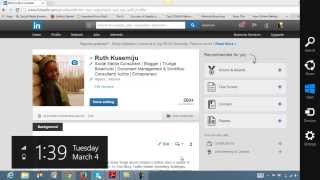
Ruth Kusemiju walks through building a complete LinkedIn profile from scratch. A 100% complete profile matters for credibility. She covers photo, headline, summary, experience, specialties, recommendations, and groups, then gives a 7-step checklist to get started.
Chapters
Hi there, I'm Ruthie. My real full name actually is Ruth Cush, but my friends call me Ruthie Cush. You can call me that too. And today I'm really, really excited to start this training videos with all my LinkedIn lovers and basically anybody that has a social media platform and wants to know how to build their businesses online. And so today I decided that I'm going to just go through with you some of the basics of how to get started on LinkedIn. And I know most of you out there have LinkedIn accounts that you use to connect with your colleagues, your old school classmates, your teachers, your prospects, your clients, and basically everyone and everywhere. It's good, it's really, really good. But if you want to take your business to the next level, whatever it is you do, whatever skill you are into, and you want to use the LinkedIn platform to do that, I'm going to show you in the next— so videos to come, how to do all this step-by-step process. So today we're just going to start with LinkedIn, how to get started. Now, one thing about LinkedIn, it's the largest professional social network online today with an astounding over 2 million subscribers and a targeted audience of business professionals. So if you are a business professional and you don't have a powerful presence on LinkedIn, you are undoubtedly missing valuable information and opportunities to grow. Connect and grow your business. So basically, one of the first steps you need to do is to know how to have a complete 100% LinkedIn profile. Now, you would leverage on the power of LinkedIn by building a sound, solid, professional profile and presence. So as a professional, you You want to ask yourself, how do you stand out from the crowd on LinkedIn? How do you differentiate yourself from the millions of professional users out there? And what would make your profile visitors want to learn more about you and your business to ultimately connect with you? So the very first step would be that you would have to establish a foundation, which is your profile, in order to begin building your influence. To begin generating introductions and referrals and covering valuable business opportunities. So I'm just going to show you a picture of my profile, how it looks like. LinkedIn actually suggests that having a completed profile provides you with a 40% greater chance for networking success. And it's even easier if you would have 100% complete profile, definitely you can see how much more successful that would be for you. So this is my LinkedIn profile page and this is how it looks like. As you can see, basically your header, it's your name or your company name, whatever it is you have, and you make it bold and Next line to it are basically all about me, what I do. I'm a social media consultant, a blogger, a True Age activist, and so on and so forth. So basically, whatever skill it is that you have to do or what you're into, you put it out there. And see the way I just did it with the lines? Yeah, I'll show you. Like that. Yeah, so this way, so every, every keyword you put stands out there, unique, unique. And you could also edit the country you're in and the industry also that you're in. When you're done with that, Next step you go to would be your background profile, and basically you give a summary of keywords that you have here. Like, being into social media marketing, I talked about what I do with social media, how I share topics on how to utilize social media, LinkedIn, Twitter, Facebook for your business, and I also post regular videos as well as other social media platforms. And if you like to learn more, go to www. Then also in the other aspects of my business, I do that. Just give a little summary. And if you have a video, you could upload a video file, or it's a text file. And if you have a link to any website, or you could also add that link there and it's connected straight away. Okay, the next step would be your experience, basically, um, in whatever business you're in. I've been a social media manager for the past 2 years now, and also document management consultant for the past 2 years, online generating consultant for the past 3 years, software development for the past 8 years. And it goes on and on and on like that. And whatever publications that you've had, whatever books that you've done, You could put that all in there. If it's a book that's hosted online, you could just give a little summary and then create the link to that. And if it's something that's offline, you just give them a little summary on how they can contact you to get more copies. And also the skills that you are into, if it's blogging, if it's entrepreneurship, if it's web marketing, if it's marketing. With business strategy. Basically, you list out the various skills and endorsements that people that have watched your trend of things, how you've done online, they begin to recommend you, endorse you rather, for different skills. And back here you can see I've had different endorsements for entrepreneurship, for blogging, for online marketing. For web marketing, WordPress, social media, SMO management, Australian, so, so, so, so many more. Also, projects that you've worked on, stuff like that. So basically, the projects I've worked on, my education, and both past and present, and also, um, yeah, interests, the interests that I have, basically Filling your profile, filling your profile to 100%, what it does is that it's the most effective way to showcase all of who you are through your talents, your background, your experiences, your passion, and areas of expertise. In addition, a completed profile, it's going to make you appear to be a more competent user in the network. So yeah, that's it. Any questions you have? So basically, your LinkedIn profile may be the first stop for a new introduction. So with a solid foundation with your LinkedIn profile, you will be well positioned for the next phase where you can grow your influence and build your business. Okay, all right, so, um, now I'm just gonna like run through a checklist of how to achieve a powerful and complete profile. Number 1 is that you need to upload a professional image, professional picture. This is the best opportunity to make a great first impression. And it's essential to attracting customers. Now you can look at my face, I'm smiling, and just imagine if I had a very awful picture there. I'm sure most of you would not connect with me immediately. And the next thing you need to do is to create a compelling headline. Now, the compelling headline. Now you basically have only 120 characters You basically have only 120 characters and, uh, at the top of your profile to describe what you do to the world and grab their attention. So basically, use brief, descriptive, compelling keywords so that the right professionals on LinkedIn can discover you. Like, I used social media consultant, blogger, true intro. You look for the keywords that best describe what you do so you can grab your audience's attention. Now, the third thing you need to do is you need to list out your current position and at least two past positions. You can see down here, my experiences, current position, and two past positions. You should use descriptive keywords. That you quoted in your headline. When I'm talking about that, it's not— these are descriptive keywords that I quoted in my headline, and you would use those keywords to describe for each position. As you can see, I have the social media consultant here, and so if you check down here, it's a social media manager, and I also have the document down there. Use that same keyword also in here. Now, the next step, which is the fourth step, you would complete the summary section of your profile, which is here. Now, this is your chance to really describe who you are and how you help people. Now, I recommend that you write your summary in third person, otherwise you would be using the letter I quite a bit, which sometimes can be off-putting. So it would be best if you write your summary in third person. The next step would be— which is the fifth step— would be to complete the Specialties section of your profile. So the Specialties section of your Your profile would be down. Now, what you would do here is that you would use customer-focused keywords. These are terms that help show up on the search results on LinkedIn. These are the specialties section. This is the specialties section and this is the experience section. These are the terms that will help you show up in the search results within LinkedIn. Now thinking about these keywords, brainstorm on a lot of words and phrases that people in the market you're trying to target search for, so that when they call for these keywords on LinkedIn, it's your profile, your background, your experiences, your service offering that pops up. The 6th step would be you need to give recommendations first. Now, as you can see here, I have a couple of recommendations from, a couple of recommendations from Recommendations on software project that I worked on. Now, request for recommendations to be able to put it up on your profile. Now, the best way to receive recommendations is that you need to first give them. Now, you need to at least— you need at least 3 recommendations in order for LinkedIn to label your profile has been 100% complete. And my profile is 100% complete, and I can show you that. Let's see, alright, try and open the page. If your profile was not 100% complete, on this page here, you would not have, you would see like a circle that shows you is a bit that shows you— you see a circle that shows you that your profile is maybe like 90% complete, or it's about 100% complete, or it's 70% complete, or 30% complete. But once your profile is 100% complete, that circle goes. And the next step would be to complete the interests and the groups and associations section. So basically, whatever interests you have, you just put it up. Let's see, that would be down right here. Interests, uh, interests. Yeah, so now each of these These terms will be hyperlinked and will take you to other users in the network that share this interest. So let's say I'm looking for someone that shares a blogging interest. So when I click on blogging, it opens up to other people that are bloggers. That have blogging as an interest. So you can see, that's me there on the 4th, 5th, yeah, 4th and 5th. Okay, so that's— I'm just gonna run through the 7 checklist steps for how to create a powerful LinkedIn profile. One would be to upload a professional image. Two would be to create a compelling headline. Three would be to list your current position and at least two past positions. Four would be to complete the summary aspect, summary section of your profile. Five would be to also complete the specialties, fantastic. Experience section of your profile. 6 will be to give recommendations first, and 7 will be to complete the interest section of your profile. Alright, so I'm considering whether to take this next step with you guys or to end the video here. On second thoughts, I would, uh, I think I'll stop there. And so for the next video, make sure you practice out what I just told you now, how to get started on LinkedIn with your profile. And if you have any questions, if you have any comments, any observations, and you know what, you just need to shoot me an email at info@roosecoachingvideos.com. Okay, I'm just going to type that out for you. Um, let's see, shoot me an email info@pushnature.com or Amit Ashwath, um, or you could find me on LinkedIn and send me a message, or drop your comments off on the video and I'll I'll get back to you next week. So have fun, guys, and I hope to see your LinkedIn profiles become a great success with these beginning steps. So I'll see you next time for more on LinkedIn. Have fun. Goodbye.
More from Ruth




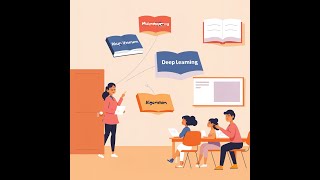
Day 14 Write Record Challenge - 5 AI Terms You Need to Know (Without the Confusion)



Day 11 WriteRecord Challenge - 3 Ways to Stay Productive & Efficient with AI Tools

Day 10 - Write Record Challenge - 4 Ways to Build a Digital Ecosystem for Your Business That Works
Day 9 WriteRecord Challenge - 3 AI Automation Hacks That Save You 10+ Hours a Week