The Value Of Adding Connections Using LinkedIn
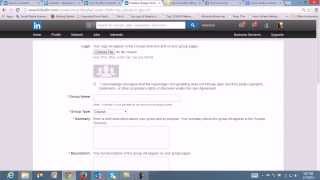
Ruth Kusemiju shows how to grow your LinkedIn network for visibility and leads. A larger first-, second-, and third-degree network improves search rankings. She covers importing contacts, joining industry groups, and creating your own group with SEO-friendly naming.
Chapters
Hi everyone, it's good to be back again, and today we're going to be talking about the value of adding connections using LinkedIn. I'm going to talk to you about the importance of why you should always add connections on your LinkedIn platform, and I will be showing you the difference between an open networker and an exclusive networker on LinkedIn. Now the thing is that you want to connect with everybody everyone on LinkedIn, whether they're competition or not. And because when people search for keywords, when they use keywords to search, or they search by skills, they— you would tend to show much, much higher in the search engine when you have more connections. But if you have less connections, you may not even show up at all on some pages because you might not be connected to anyone either on your first level or your second level or your third level. So what's important is that you need to keep on adding and adding connections. Now, if you and I are connected, if you and I are connected, our number will definitely go up significantly on the search engines. So my theory here is that you want to connect with everyone. Alright, okay, so I do believe that most of us right now on this video would know how to add connections on LinkedIn. And well, for those of you that really don't, might not know, I will just show you on the screen how it is to add connections. Alright, so you go to Network and you click on Add Connections, right? And now, okay, the page is trying to open up. So you can actually import your contacts or invite people to join you on LinkedIn. Now you could invite them from your Yahoo Mail, Gmail, Outlook, Hotmail, or any other email platforms that you use. And you continue the process on from there. And even if you have contacts on your phone, if you're using LinkedIn on your phone, you have contacts on your phone, you can import your contacts from your phone into to join you on LinkedIn. So that's one way by which you can add connections on LinkedIn or import contacts. And I can show you mine. I have over 500, well, 500+ connections actually in total. That will make it about, let's see, have over 1,000 people in my LinkedIn connection. And so you could search for these people, well, you could add connections. And just another way you could also add connections, well, the contacts and also alumni. Now, if you go to a particular school or work in a particular place, you could actually search for people based on your country. If you're from Nigeria like I am, you could look for people that maybe attended Okay, like I went to the University of Lagos, so I'm looking for people that attended the University of Lagos between 2003 and 2007. And it shows me, okay, in Nigeria we have 8,212. They work in Unilag, some work in Globacom, PwC, GT Bank, and UBA. What they do, the different things. And this way you can either change the school or to redefine the search. And if I find out that the Some of these people, I do not have them in my contacts list.
I add them.
So that's another way that you can actually add connections. All right, so if you— basically, I'm just gonna say that if you want more opportunities, more leads for whatever business it is that you're doing, you need to add and have more connections. All right, okay, so the next thing I'm gonna be showing you is how to build your database on LinkedIn. Now I've showed you already how to connect with people on LinkedIn, either by importing the contacts or by searching for the alumni or via your email. Now, okay, there's one more thing I just like to mention. If you're having a free account on LinkedIn, it's not really mandatory that you have a paid account, except if you have maybe other business solutions that you would like to make readily available and open to the public, you can decide to have a paid account. Now, the paid account definitely gives you more mileage, so to speak, but with a free account you can actually build your network. I know that LinkedIn has a 3,000-person limit on friends that you can request for. So if you hit your 3,000 limit of friends, you can't send any more requests, and you can receive up to about 40,000 requests as connections. So, um, how do you get people to reach out to you and add you as connections? This is my way of telling you how to build your database on LinkedIn. Now, um, there are a couple of things that you can do. You can add it to your email signature. Every time you send a mail, it will be there, you know, connect with me on LinkedIn. You can also add it to your website. I'm going to open my website for you. Add it to your website.
Okay, hold on. Let's see.
You can add it to your website. Here's my website, and you could see down below—
okay, the page is trying to refresh—
but you can see down below here that I've got share buttons on LinkedIn. Okay, that join my LinkedIn network.
Okay, let's see. Okay, there it goes.
Okay, yeah, join my LinkedIn network. And you could also post it on Facebook. You could post it up once a month that, okay, people join my LinkedIn network, or you could say something like, oh, are we connected on LinkedIn? Or go ahead, if not, go ahead and add me and put the link there. So that way you build your database on LinkedIn because you're using the different social media platforms to bring bring in the connections. You could even use Twitter, post it on Twitter, on your blog. Now this is going to help you get more people to reach out to you and to add you. And so start posting articles, and when you post these articles, you post them on— when you post these articles, you post them on, let's see, okay, Yeah, before you post articles, you post them on your blog, you post them on your LinkedIn profile, and you start sharing them, tweeting them out. So when people retweet you and go to these links that you've posted out, they see the articles that you've shared and some of them connect with you on LinkedIn. So this actually would help you get another 20 to 40 connections every week or every month. Now it's it's not a sprint, this is a marathon. You are not trying to get like 1,000 people in the first day, but over time you get more and more people. I started LinkedIn about, actually for quite some time, but it's until I really got to sit down and understand that this is a website basically social networking website, and I had to bring the best out of me in there. That's when my connection started to grow. And there's also an online course I took on getting started on LinkedIn, and it totally, totally revolutionized the way I looked at LinkedIn. It got me connecting with more more people, I was able to grow my network and it's been one hell of a ride since, I have to say that. Okay, and let's see. So basically over time you get more and more people. Now it's important to do all these things to grow your network using the various social media platforms, your blogs, because every lead you get on LinkedIn can be thousands of dollars, thousands of naira, thousands of whatever currency you use to you, depending on if you're a service or software or product company or coach or consultant. Now every lead you don't know, now every lead you don't know how many, how many, what I mean is that okay, if you don't know a particular lead, you don't know how much that lead can generate to you up the line or down the line. So don't take for granted people that connect with you on LinkedIn. If you really want to build, you really want to build value with them as they come. So these are just some ways to grow your database on LinkedIn to get connections. All right, another way I want to talk to you about is researching the LinkedIn groups. Okay, now one thing about groups is that groups are the most powerful thing about LinkedIn. And they, let's see, here we go. They allow you to get your message out there, to get more customers, to get more leads, more sales, more exposure. Actually makes you the authority that you are in your industry. So it's actually the LinkedIn groups that help you really, really grow your business. Now, okay, let's see. The thing about researching groups, you want to think about what your industry is. Now, okay, I'm going to use myself as an example. I'm in the social media, the online marketing industry, social media, online marketing industry. So when I start doing research on LinkedIn groups, I would, uh, research for, uh, social media.
See, I'll search for social here.
And basically every group that I see, um, LinkedIn with social media—
let's see, groups, let's go to groups, down to groups.
Maybe what we should do, let's do this.
All right, um, let's do it this way.
Searching for groups, alright, and let's see social media, alright, there would be definitely, so we actually have 15,927 social media LinkedIn groups and it's pretty, pretty large, so you want to research on the groups you your groups based on your industry that are on LinkedIn and join as many as possible in your industry. If you're working local or regional, you can search for that. You can join all the regional groups in whatever industry you're in so that you can reach a larger audience. Now, let's see, basically researching these different groups is going to help you drive more traffic, which I will talk about in another video. Later on. Okay, so that's about it. And okay, and let's see, so you might begin to wonder, okay, what if I have a special group I'm creating and I want to create my own group, like have my own group and invite people to like join the group and become members and contribute, bring in ideas and different stuff. Yeah, I'm going to show you how you can actually create your group on LinkedIn.
Okay, here we go, here we go, here we go.
Alright, so let's say our interests are groups. Alright, so the importance of having a group is that when you go to Google, for instance, The importance of having your group on LinkedIn is that when you go to Google, for instance, and I type in, um, social media network, if I say social media network, social media network, and click enter Okay, or maybe let me, let me, let me do it this way.
If I say, okay, let's look for, let's see, social media marketing network, social media marketing network.
Alright, basically the importance of having your own group, joining LinkedIn groups is that the amount of connections you have in that group, the larger and larger it becomes, it ranks higher on search engines. So if I'm looking to join a social media marketing group and I type that in, it pulls it up. So you should think about how to optimize your LinkedIn group for Google so that people outside LinkedIn can actually find your group and join. So, um, one thing about creating a group is that your group name is the is very, very important because you want to think about what people are searching for in Google to find information about your industry. You don't want your group name to be the name of your company. You want it to be a network, a group, an association, a community, a place where people connect and get valuable information and resources that only you can provide. Making you the authority, the leader in that community. That way they'll come back to you for more and more information. They'll open your group emails, they'll look to hire you for consulting or buy your goods or services. So let's say you are a real estate agent, for instance, and you want to create a group for your city or for your town or for your state. And if you are targeting young professionals, then you call your group or maybe Young Professionals of Lagos State Network, and then you will be attracting audience in that particular state, whatever, but whatever city or state you're in, that's what you do. And if you're creating a group for a specific industry, maybe you are creating for the network marketing industry, you would create the network marketing industry network. So you make a group or community or network around that audience you want to attract. Just make sure that you title the group the keywords that people are researching for so that when they search on Google, it's your group that comes up. So the summary basically is that you want to have the keywords for your audience your audience again in a very short sentence so that you can copy and paste the same thing and add it as your description on LinkedIn. But I will talk more and more about that. So I want to show you how to create a group on LinkedIn. Now, as you can see here, let me go back. Now, from interests, I, uh, went to groups, uh, then from groups, I clicked on create a group. Right, okay, and, um, let's see. Now you choose the logo you want to do, then, uh, you give the, yeah, the group name. Now LinkedIn is not allowed to be used in your group name. And you choose the group type. Now it could be, I know, like a corporate group, a conference group, a networking group, basically whatever you want. And you give a summary of your group, a description, website if you have the email of the owner of the group, then you could make your access automatic and people have automatic access to join the group, or they need to request to join the group. Depends. And, uh, well, you link your website, add your email, select auto-join. Sometimes it's good to make, uh, make it auto-join so that people don't have to go go through, uh, that way people join without you having to go through them and accept them. That way it will be more, more viral. You could add a Twitter announcement. Uh, it's best to always create an open group. That way people can come in and comment, and it helps drive traffic even if they're not a member of your group. You can also create a members-only group. Yeah, that's the crazy open group. You create a members- only group, then only members can comment and connect. Well, you can change that later, but once you create that group, just know that the name of the group is quite important. People want to join a community. That's how you create the group, and that's how you're going to set it up. So make sure you do this right, and because you never know who's going to find you. So create your group and see on the groups of Facebook. Okay, and I'm looking at whether to continue on telling you guys about groups or to stop and go on further and show you how to automate growing your group to generate a list. So I'm thinking, thinking, thinking, maybe I would just go on. Take you guys basically through it all. Here's a list of the groups I'm in.
Social media, social media professional bloggers, uh, the art of networking.
All right, now, uh, let's see. Actually, thinking of it all, I think actually we've covered everything, the value of adding connections. So if you guys have any questions for me or any, uh, yeah, any comments, any questions, any observations, and you'd like me to put you through on how to grow your LinkedIn profile, well, basically build up your connections so that you can add value on a daily basis, feel free to hit me up. And you could send me a— you can contact me on my website, brucescushionmedia.com, and you go to the Contact Me page. Go to the Contact Me page and send me a message. I'll get back to you as soon as possible. Or you could shoot me an email. You could shoot me an email at info@dr.
You can send me an email at info@whiskershimiji.com and I will see you guys there and then.
Have fun, you guys, and it was really, really, really great talking to you about the value of adding connections on LinkedIn. So I want you to go out there and practice what I've taught you guys. And if you have any questions, feel free. Alright, so I'll see you guys again next time for more adventures on LinkedIn. Have fun. Bye.
More from Ruth






Day 14 Write Record Challenge - 5 AI Terms You Need to Know (Without the Confusion)


Day 11 WriteRecord Challenge - 3 Ways to Stay Productive & Efficient with AI Tools

Day 10 - Write Record Challenge - 4 Ways to Build a Digital Ecosystem for Your Business That Works
Day 9 WriteRecord Challenge - 3 AI Automation Hacks That Save You 10+ Hours a Week