SEO Inside ClickFunnels: Optimize Every Page, Product & Funnel
Learn to optimize ClickFunnels pages, products, and funnels for search engines. Use keyword-rich titles and URLs instead of generic ones, control which pages Google indexes, and add verification tags to let Google track your funnel's performance.
Chapters
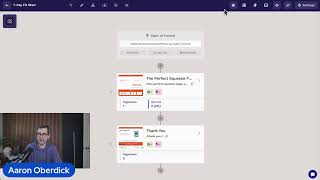
Foreign Boom. All right, we are live. Let's see. There we go. There we go. We got a few people joining us, so we are live. Let me make sure we're good. Perfect. All right, so as you can see, it's just me for today. So Dante's out. So it's just going to be me, you, and we're going to be talking about SEO. So that's really what I want to talk about today is going to be SEO we, where you can make some changes inside of your clickfunnels workspace to optimize for it. Of course, now, I'm gonna assume most people know what SEO stands for, but if you don't, it essentially just means search engine optimization. But more importantly, what that's meaning is it's the process of improving your website to increase visibility in search engine for relevant unpaid, organic search results. Now, of course, you can run paid ads directly to your website, but of course that's going to stop the moment you stop paying. Now, SEO driven traffic, on the other hand, that's going to be free. It's going to be able to compound and it works for you around the clock. Now, you can have endless funnels, but if they are not optimized for SEO, no one is going to find your offers. Seriously, even one single optimized funnel is going to be able to generate leads and sales for you indefinitely. So the goal of this training is to again dive into where you can make some changes to anything to better your SEO results. So let me go ahead and jump straight into the platform here. Awesome. And I'm in my workspace and the first place that I want to talk about SEO and what we can adjust is going to be up here in the products. So let me head over to my products and for training Tuesdays, we've talked about this FitLife Performance hoodie. We've gone over this in pretty intricate detail. So let's go ahead and hop into the same product. Now I'm going to scroll down and I'm going to find my SEO and sharing section. So this is really what I want to focus on today. And the first thing I want to talk about is going to be this little eye right here. So if I tap on that, it's going to just give me a little blurb about SEO. So this is just relevant information that I should know. And even better, if I click on this, it's going to open up Omni and show us our AI assistant. And Omni is going to fully explain what these SEO settings do. And it's even going to give me a little section for each of the sections in here. So let me tap here and it's going to open up. I have title, I have my description, my current URL path, as well as an image. And I can see the direct associated information right here. So of course your title, that should just clearly describe the product with a natural keyword. So just try to avoid using the product name if it's super vague. So this is fitlife Performance Hoodie. This works completely fine. Now the description, right, this is going to show up under your link when someone's looking at Google search results. So this is really important. If you've ever googled something or just searched up something and you've seen a little blurb underneath the title, this is exactly where I can change that out. So if you want to adjust this to anything, of course you can do that here. The current path is also super relevant because you want to make sure that this fits the title in some way, shape or form. Now what I see a big mistake happening is someone gets straight onto clickfunnels and they immediately start adding tons of products because they might have hundreds of products or hundreds of offers, whatever it may be. And to really just save tons of time, they might name this product one, right? So if I do that, you can see that that URL is available. But I'm now losing out on my SEO efforts because Google doesn't know what product one or product 18 is. It just knows. It's just taking keyword relevancy. So it's really important that we make sure that the path is going to be something similar to the title or exactly the same as the title, as you can see that I just did there. And then the last thing is going to be an image. Now this is pulling directly from my product images. So I've already went in here previously to just make sure all of this is working beforehand. But it would pull this gray hoodie directly in if someone shares your link. So you can come in and you can actually override that and you can see that I changed it out to the green specific hoodie. But what I like to call out here is when people share your links on social media or anything relevant like that, typically it's going to auto populate with that title, with that description and a image of source. Now what I like to do is I encourage people to, whatever your product is, whatever it's relevant for, maybe change this up. So rather than have the actual product image here, what I might do is I might Come in here and change this out to a lifestyle image of someone actually wearing the hoodie. And that way it looks a little bit more appealing and engaging on social media. Then they click on the link, they come to my product page and they see all of these product images rather than that lifestyle images. But it just gives a little bit of variety and mixture to change it up. So I like to just talk about that in a general sense. But overall, for your product settings, this is exactly where you're going to change everything SEO related. Now let's take one step back, let's zoom out a little bit and I'm going to go back to my main page. I'm not going to save anything here and I'm going to go into my funnel because of course we're adding our products inside of funnels. But funnel pages also have SEO results. So let's go into just a random funnel here. Let's go with this seven day fit start. All right, here I am in my funnel and if I go up to my settings, you're not going to see any direct SEO results, right? So I'm going to X out of this because the SEO results live in each of the pages, not the overarching funnel. So I'm going to click these three little dots here on this first page and this will be able to allow me to open up my settings to this specific funnel page, right? And I can see here the first page of this funnel, right? The the perfect squeeze page. I have my URL, but now I have my SEO title, I have an SEO description and I have this index in search engine button as well as a sharing image. So I'm going to work my way from the bottom to the top this time around that sharing image button, same exact relevancy, right? So if someone selects an image here, whatever I pick, and then someone shares the link to this specific funnel page, that image is going to be directly associated with that share link. Now this index and search engine toggle is also really important to understand because this is encouraged to turn on when you have a page that you want to be found on Google or Yahoo or whatever search engine you're using, right? So typically you would want maybe an opt in page to be indexed. Subsequently you probably don't want the thank you page indexed because you don't want people coming to your thank you page directly. Right? You want them come first to the opt in page, then they sign up and organically they get to the thank you page. So typically your thought process is should this or do I want a customer or a stranger come to my funnel to this specific page. If the answer is yes, then you probably want to toggle this on. If the answer is no, because there might be some sort of gatekeeped content and you want them to opt in first, you probably do not want to toggle this on. So just a good note to take there. And then SEO Description and SEO Title, same exact relevant information as the product. You just want to make sure that you have some keywords in here. That way when someone goes to Google and types those keywords in you, you are ranking some way shape or form. All right, and then that is the second part. Now the third part I want to touch on is going to be back in the overall funnel settings. So if I tap on here, like I mentioned, there's no direct SEO places like SEO Title, SEO Description and the sharing image here. But there is an option for me to add code. So I can put a head code in, I can put a footer code in here. And this is really where more of the advanced SEO setup is going to live, right? I can drop a Google Search Console code in here and this will start tracking all the relevant information. Now, if you're unfamiliar with what Google Search Console is, it's basically just letting Google know that your funnel exists and it shows what keywords people are going to use to find you and it's going to flag any indexing issues. Basically, it's just going to give you better relevant information to what people are searching and how they're finding your funnel. So this is just kind of that third and final mark of SEO that you want to take advantage of inside of ClickFunnels. So to just recap very quickly, the first option was through your Direct Product settings, you can go to your SEO and sharing options. You can change out the title description, the sharing image, as well as the URL path. Then a little bit of a step back, you want to go into your funnel settings and then you want to select a specific funnel page. You can go into the settings there and of course you can adjust the SEO here. And then last kind of a step back even further is the entire funnel. I'm going to go up to my settings and I'm going to drop some Google Search Console code into the head code here. So that's really a recap of what I wanted to talk about. SEO in three separate areas here in ClickFunnels and how you can optimize for it. Now, with that being said, I'm at about 10 minutes here so drop us in the chat what you would like to learn next. Right? If you guys have a burning question about click funnels, it can be as specific or it can be as broad as you want. But what we're doing is we're taking questions and someone asked, hey, I have all these SEO options, but I don't truly understand it. So can you teach SEO just from a broad perspective? And that's exactly why we did this today. So if you guys can of course let us know what you want to learn, we are more than happy to cater trainings to that. So with all that being said, I want to say thank you so much for attending today's training Tuesday, and we will see you next week. Thanks everybody.
More from Todd

How to Set Up and Send Your First Newsletter In Daily Draft | Coaching Corner #044








