Floyi Walkthrough: Topical Maps & Topical Authority Made Simple

Yoyao Hsueh walks through Flowe, an AI platform that builds topical maps and content strategies from scratch. It scrapes your brand details, generates buyer personas, clusters keywords by intent, maps out a hierarchy to avoid cannibalization, and produces a full content plan with titles, slugs, and briefs in hours instead of weeks.
Chapters
Hey, welcome to the Flowe YouTube channel. In this video, we're going to walk through the complete Flowe strategy workflow. Search engines are smarter and your audiences too. So is your content strategy keeping up? With Flowe's proactive approach, you're always going to be one step ahead, whether you're a big agency or a small one, or you just run a brand or you're in the marketing department of a brand and you need a content strategy. This is where Flowe really excels. So let's get started with the brand foundation. This is where we're going to set the brand's mission, values, core principles, everything. And it's going to drive the audience insights, buyer personas, topical research, topical map, everything down the line. So first thing we need to do is figure out what is your brand? You have a couple options here. You can manually input information about your brand and our AI agents will generate the full brand identity, or you can just simply input a couple URLs or one URL. And what we'll do is we'll take this example from New York Chiropractic Center. We'll input it here and then we'll make any internal notes. Test project for video demo.
Okay.
And these are internal notes, so they never get seen anywhere. What is going on here now is the agents are scraping the page and reading everything on that page to find out more information about the brand. And we're going to generate the full brand identity for it. All right.
Almost done.
Great. So we have our brand name, our website URL. We have our mission statement, our vision, our tagline, live pain-free and active lives in Manhattan. Great. Core values, market position, key competitors, unique selling position, brand personality. Brand personality is key. If you ever need to change any, you can always edit here, edit any of these. You can always add— let's cancel. We can always regenerate the brand. If you're not happy with something, you can always regenerate everything and just give it more notes about what you want out of it. But let's move on to buyer personas. So buyer personas is really key here. Let's generate up to 3. Let's do affluent market because we are in Manhattan. We generate buyer personas and these will really drive your topical research later on because these are the key people that we are targeting with our content, with the topics that we are researching. So what's going on now is. It's analyzing your brand foundation that we just created. Then it's going to create some buyer personas, your ideal customer profiles, your ICPs, and generating the best potential clients for New York Chiropractic Center. Okay, here we go. Now we have 3 here. So we did put affluent market. So all 3 of these makeover. $200,000 annually. So we have a tech founder CEO. We have a retired corporate attorney.
Great.
We have a senior portfolio manager. Yes. Every one of these high-stress occupations as well with more pain points. So you're able to see chronic degenerative back and hip pain. You can see their goals in life, their pain points, their values, their fears. Where they get their information, objections, and quotes that they say. I prefer a clinic that treats patients like neighbors, discreet, punctual, and seriously competent. You can see how these are important personas to have when you start your topical research, which we're going to do right now. So here we have our site information again, and you can adjust it if anything doesn't seem right. If you don't need to cover holistic services, for example, right? You can edit that. You can edit your target audience again, if you want. You can edit and they will all reflect, they'll all tie back into your original brand foundation and your audience insights. Here we can select key buyer personas that we want. Let's say. We want all 3. Then we can define our core topic here. Let's click the edit button. We'll say chiropractic care. See keywords. Let's say we have these here and holistic services. We don't want the and.
Okay.
Then all we need to do, and it does a little save there. We can generate main topics by themselves first, or we can generate main topics and subtopics too. So this is where we get to see how far down the rabbit hole you want to go with your topics and your subtopics, because you don't really need to go that deep a lot of times, right? If you go too deep, a lot of times you're just repeating yourself. So let's, we'll take a look and see how deep we really need to go here. This just takes a second because it goes through your core topics and your seed keywords and generates a lot of the main topics that your buyer personas and your brand really align with. All right, here we go. So we have chiropractic care, chiropractic services in Manhattan, because it knows based off of our brand foundation that we offer services in Manhattan. So we have our service pages here. We have our multi-location clinics, appointment types, new patient expectations and billing and all that. We have physical therapy, sports rehabilitation, massage therapy, pain management, holistic services.
Great.
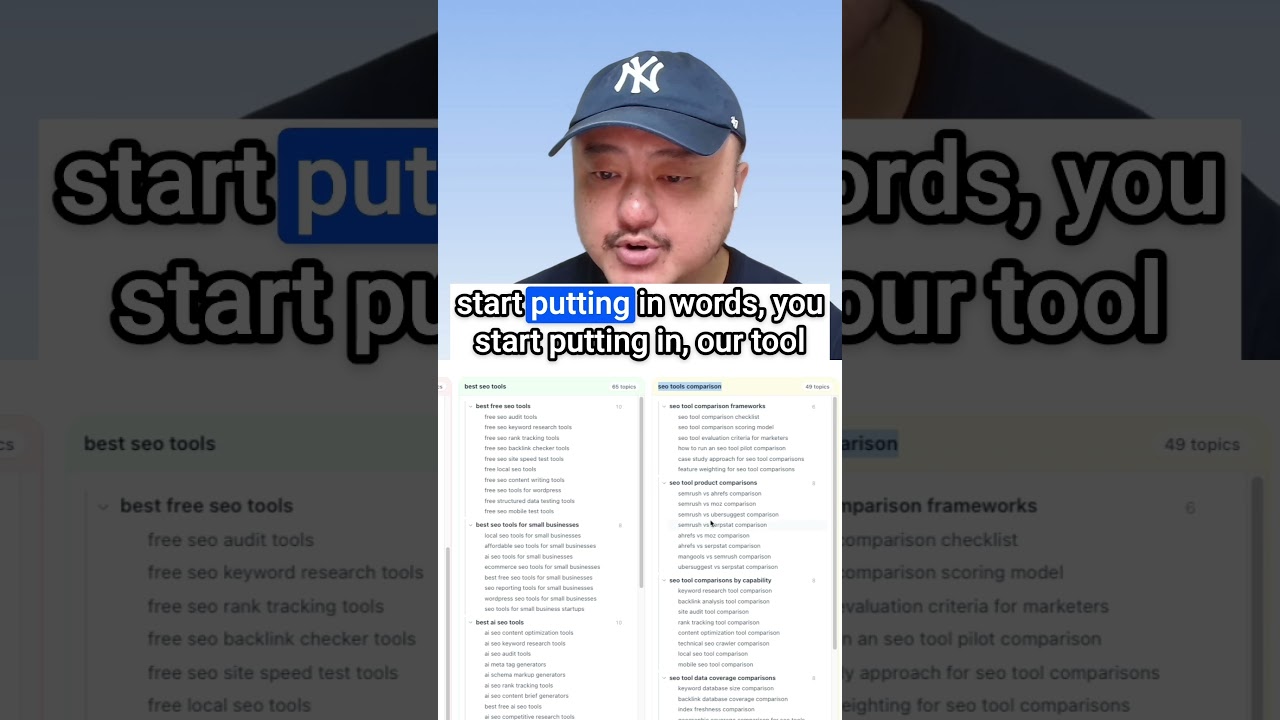
Now let's say you don't want any of them. We don't need a lot of them. We just want to focus on chiropractic care, and this will just save us some time in this demo. So let's go ahead and delete the others. So now we have only chiropractic care and chiropractic services in Manhattan. Then we can generate the next level of subtopics after these, or we can generate subtopic 3 and 4 together. And this will take a little bit more time because it goes through each of these subtopics, analyzes what compares it to the other data, to the other topics that we have so that it finds the best location for certain subtopics. And then also makes sure that we don't have duplicate topics and subtopics elsewhere. And if you want more control and you want to save a little bit more credits and you don't want to go through every single one, you can always edit and remove each one like we did before. So here we go. We have a lot more topics here. Let's say benefits of chiropractic care. You can see all the benefits here. We'll do a copy and highlight. Find. So you can see all these benefits and each of these benefits also have subtopics under them. So under short-term pain relief, we have how chiropractic adjustments relieve acute low back pain. And you can see all of them have a few subtopics under each one. This one has 4 subtopics and a little bit more right now. This is already a great start to go ahead and start clustering and creating your topical map. You'll see that we have 422 keywords essentially here that we're going to scrape the SERPs next and cluster. But if you do want to go a little bit deeper with any of them, because you think, oh, it's still a little bit broad. I want a little bit more information. What we can do is. Go ahead and click on generate keywords. And whether you want commercial keywords, generative intent keywords, informational keywords, or all 3 types here, you can go through the hierarchy for them and then select what you want. So let's say I want spinal manipulation and therapeutic exercise programs. And I want info, commercial, and generative intent keywords. So that process of selecting your topics that you generate keywords for will save you a lot of credits. This is where we get started here. Let's scroll to the top. Here we go. The spinal manipulation. Look, you get more keywords here. What is it? Benefits and risks of spinal manipulation versus physical therapy. So creating a personalized plan, the low back pain, creating a personalized 8-week therapeutic exercise plan. So these are really good now, especially with AI search engines. And optimizing for them, the generative intent keywords are great. Once you're happy with all your topics and keywords, go ahead and click let's start clustering. And there's a little confirmation here because once you start clustering, the topics are locked. You can choose your location here. So we're going to choose New York, New York. SERP similarity, we'll say 30% or 40%. And then just click fetch SERPs and cluster. So what this is going to do is it's going to go through, fetch all the SERPs for every single keyword, and then it will cluster them according to your SERP similarity overlap. And this will help prevent keyword cannibalization and focus it in on the search intent, the user intent of each of these keywords and topics. So we have, let's see, 434 keywords, 298 clusters. And theoretically, this would be the number of content pieces you would also create for the website potentially. Right? You have to filter through and see whether or not it's actually relevant to you. For example, the high velocity, low amplitude chiropractic adjustment, you may not really need to create a piece of content around it, depending on how deep you go into your chiropractic blog.
Okay.
So now we have all these keywords and you can just click and you could click load more, load all. To show the rest of the keywords. Once you're done clustering, you can also see the similarity here. You can click it to see which results were matching, right? And then you can also see, let's say chiropractic care. One site ranked number 1 here, Cleveland Clinic ranked number 1 for chiropractic care benefits. They ranked 2nd here for the term chiropractic care. And you could see how the top 10 benefits of going to a chiropractor here is number 9 for chiropractic care. And then for the benefits keyword, it's number 5.
Okay.
So once you click start topical hierarchy and we start creating our topical map, we also give you the confirmation to confirm because once you get started on the next stage, You can't go back and change your clusters, change your topics, because then your topics, your topical map gets corrupted and you're not able to reorganize it completely. So once you get to this stage, you can generate your topical hierarchy. So it's taking all those topics, all the clusters, and organizing them hierarchically. To make it a logical path for algorithms and AI search engine bots and large language models to understand how your site is organized and how topics are organized. So this is basically your topical map. Let's collapse this. We have different views here. We have a topical map view where you get all your main topics and subtopics and keywords here. You can always click here to see the SERPs. If it's a SERP similarity of 1, that means the subtopic 4 and the keyword are the same. So here is one with a SERP overlap of 30%. If you have more than one main topic and a lot of keywords, You're going to have pagination here so you can click through and see the different main topics. Our main topic of chiropractic care is here. Our main topic of chiropractic services in Manhattan are here.
Okay.
So see, let's see, coding and billing for virtual chiropractic visits. So chiropractic insurance and billing. Then we can also look at the content plan. Now, the subtopic 4s are all the ones that we are potentially creating pieces of content for.
Okay.
So what we can do is when you look at both, you can see the content title, search intent, buyer's journey, content type is snippets all here. And if you're happy with the topical map, that's all you need. Then you can go ahead and click download the Excel. If you want to go through the SERPs and have our agents generate content titles, search intent, buyer's journeys, and meta description snippets, generate URL slugs for you, analyze the SERPs for you. All you need to do is click the generate content info button. And this will take some time because it goes through— we had nearly 300 topics here. So it'll go through each one of those individually. And it will look at the SERPs. It'll analyze all the pieces of content, the titles, and create a suggested content title, suggested search intent, what kind of content you should be creating, what stage of the buyer's journey that topic is related to. So this will take a little bit of time and we will come back to it. And we're almost done.
All right.
Let's see everything. Okay. So we have our topics, our content title. We have informational awareness, comprehensive guide here. We have our snippets. We have our SERP competitors who are top SERP competitors, analysis of the SERPs and how fresh the content is.
Okay.
So let's check the other tab here with chiropractic care.
Okay.
So we have our appointment, our athlete sports injury assessment, how chiropractors assess sports injuries in athletes. We have our informational consideration, buyer's journey stage, comprehensive guide, meta description. Then we have our competitors that are showing up, the analysis of the SERPs and the freshness of the contents.
Okay.
So it shows you everything you need. You know, it saves you hours, days, weeks of work. I don't know how much time this used to take me. Say you had 300 keywords or topics you had to research and look at the SERPs for, right? And this did it in about 10 minutes. Next thing you do, create generating URL slugs. So this will go through the 2 main topic silos and organize them And generate URL slugs for them. It'll use hard URLs as well. So you'll have your subfolders. So it's a lot cleaner, a lot more logical. And for users, it's a lot easier to look at the hierarchy and go back and forward if they need to go to different pages. This will take a few minutes. We'll let this run and we'll come back.
Okay.
And we're back. Let's check out the URL slugs.
Here we go.
Chiropractic care. We could nudge that a little bit wider. Chiropractic care. And we could see all the chiropractic care in this silo.
All right.
It looks good. We have our neck pains as well. So we can see, let's organize these. So a lot of these, why are they empty? It's because these are the keywords under the cluster head term.
Okay.
So if we organize by the clusters again, let's go down to one of the keywords with a lot of clusters.
Here we go.
Chiropractic care risks. So what I just did is the highlight, and you can see all the keywords here under chiropractic care. So we have our risks. Cervical chiropractic adjustments are serious but rare complications, risks, nervous system injury, increased neck pain. So these are all the keywords that overlap and belong under the chiropractic care risks. And they're all one article. You could change your cluster head term, but you know, the agents are already selecting the best head term or the best representative keyword for this topic.
Okay.
So you will notice that the information, the content information, the URL slugs is only here for the main keyword. All right. Which is this here where it matches. Let's go back. Now, here are the 2 views again. If you don't need to see your content plan, you just want to see the topical map. You can see your content plan. Okay. Then you can export everything. You can also download it as a markdown file. Downloading it as a markdown file is if you want to create your mind maps out of them, you can use XMind or MindNode. We have videos on that as well on our YouTube channel. And if you want to, you can always download the Excel file. Edit your hierarchy, make edits to it, and upload it back. Uploading it back up onto Flowee, and then you can go and generate your content information and your URL slugs. If you upload new keywords, it'll give you a little message and say that certain keywords are missing SERP data. So it'll give you the option to fetch new SERP data. In order to generate content information, the content titles and the SERP analysis, you need to have SERP data. Right? So it will give you that option to fetch the SERP data, and then you'll be able to generate all the content information. And if any of the topics ever fail during content info generation or URL slug generation, it will still fill in the rest. And then it will give you a little retry the failed ones. And that's pretty much it. That is from brand to topical map. Now, to help you with creating content briefs and getting more insights into SERPs, we have our SERP Insights. Putting in your search query, chiropractic risks, you can get the SERPs and analyze all the top competitors, or you can do the same thing over here with the content brief generator.
Okay.
You can generate a new one and it does the same thing as SERP Insights. And it's just wrapped into here if you want to create your content brief as well.
Okay.
And from here, let's load one here from a past demo so you could see what it's like. You can select the competitors that you want to compare yourself against when you are creating your content brief. Then you'll see how well this piece of content does in answering the target search query. You can see this one's an 8 out of 10. You can see a summary of it, key takeaways, the point of view of the article, the tone of voice, everything. And you'll see the headers here. You'll see the information about the page. No schema was found. If you see the full content, we have a couple of different views here. If the HTML sometimes doesn't show as well. You can just select markdown view. It's a lot cleaner. You can see all the links, the internal links they have, the external links they have, the images and videos if they have any.
Okay.
So from here you select the competitors that you want to, you know, analyze and use potential information for to help with your content. You can select your brand project that you have. And we had, New York chiropractic center. So we load that. Then we select your target audience, your buyer personas that you want to write this article for. And we do limit it to 2 target audiences because this piece of content should be targeted, right? If you select 10 different buyer personas, all that does is dilute your content and make it more generic. You want to target it to certain personas. So from here, then you can add internal links, external links that you want to add in. You can add in certain keywords that you want in the content brief. The content brief agents will go through and select the important keywords and entities from all your selected competitors. And it'll add them into your content brief automatically. But if you have certain ones that, you know, you want, and they could be more technical or they could just be your brand name, it will already put in your brand name because your brand information is already given in this step earlier. So you can add in whatever extra things you want. This is one keyword at a time, or you could add multiple ones. And then you can always review the generated outline. Before it actually creates the brief. So if you want to add certain sections or you want to remove certain sections, you can always do that. And we have videos on creating content briefs and everything. Same thing with the AERS Analyzer here, where this analyzes AI search engines and their results. You can put in the search query here. You can select your brand and then it will start the analysis. It'll analyze all the search engines like AI Overviews, AI Mode, ChatGPT, OpenAI's web search, the Claude web search, Gemini with grounding, Perplexity. And basically it'll give you a content blueprint. It'll give you keywords to target all based on the AI search engines. And we have videos for those as well. And one more thing. For example, we have 3 different chiropractic centers here, and let's say that is your agency's specialty. If you ever want to copy and duplicate projects, because let's say you have New York Chiropractic Center, but then you have another client that is called Manhattan Chiro. Center, and it's basically the same chiropractic center, except they have a different brand and different little things, right? So you can see here, we have 3 different chiropractic centers here. And if you want to ever duplicate brands, you can. For example, if you want to create a smaller topical map, because this first topical map for New York chiropractic center. Got too big and you want to create a small one, you can always create duplicate copy and you can copy the brand foundation, audience insights, and topical research here. Let's say smaller topical map. You're basically duplicating the first 3 stages. See, where's 2? So you don't need to spend more time and credits and everything recreating the brand foundation, the buyer personas. And let's say we just want chiropractic care, right? You select all and you'll have to go through and deselect the chiropractic care and only have the chiropractic services. And then you'll just have to delete them individually one at a time. Or if you don't want any of them, you can always just go ahead and click regenerate and it'll give you a warning that, you know, it will overwrite all the existing data, which is fine because we want to create something different here. Right. But we want the same brand and we want the same buyer personas.
Okay.
So give it a second. All right, here we go.
Same thing.
And then from here, You could just select, okay, I want to focus on physical therapy. So select all, deselect the physical therapy and delete all the other rows. And then you're done. You generate more subtopics based off of physical therapy, and then you have your physical therapy. Or you could redefine your core topic here as physical therapy and redefine, you know, a lot of different areas here where you could put back pain, neck pain, post-surgery, sports, physical therapy. So you can do a lot here with that duplicate function and creating smaller maps. And I would really suggest you do that. I'd really suggest that you create smaller maps because they're a lot easier to manage than the really big ones, right? So you can say this one is And these are all just internal notes. They're not used for any of your generations throughout the strategy flow. So you can say this is focused on physical therapy. You can see what stage it's on. You can see the website, all the information.
All right.
And that is Flowy in a nutshell, from brand to topical maps to content briefs and AI search engine analysis. This is how you stay proactive in your content strategy for your brand and build the foundation for your future content.
More from Yoyao


How to Run a Complete Content Audit on Your Topical Map (Rankings + AI Search)