How to Build a Topical Map That Covers Google AND AI Search

Yoyao Hsueh shows how to build a topical map in Flowe that works for both Google and AI search, starting with brand foundations and buyer personas instead of generic keywords. The workflow generates topics from autocomplete and AI-search gaps, clusters them by search intent, creates a four-level hierarchy, and produces content briefs and internal-link suggestions. He walks through a senior-dog-food brand example and flags three places builders typically get stuck: overly broad niches, confusing topical research with keyword research, and over-trusting raw clustering output.
Chapters
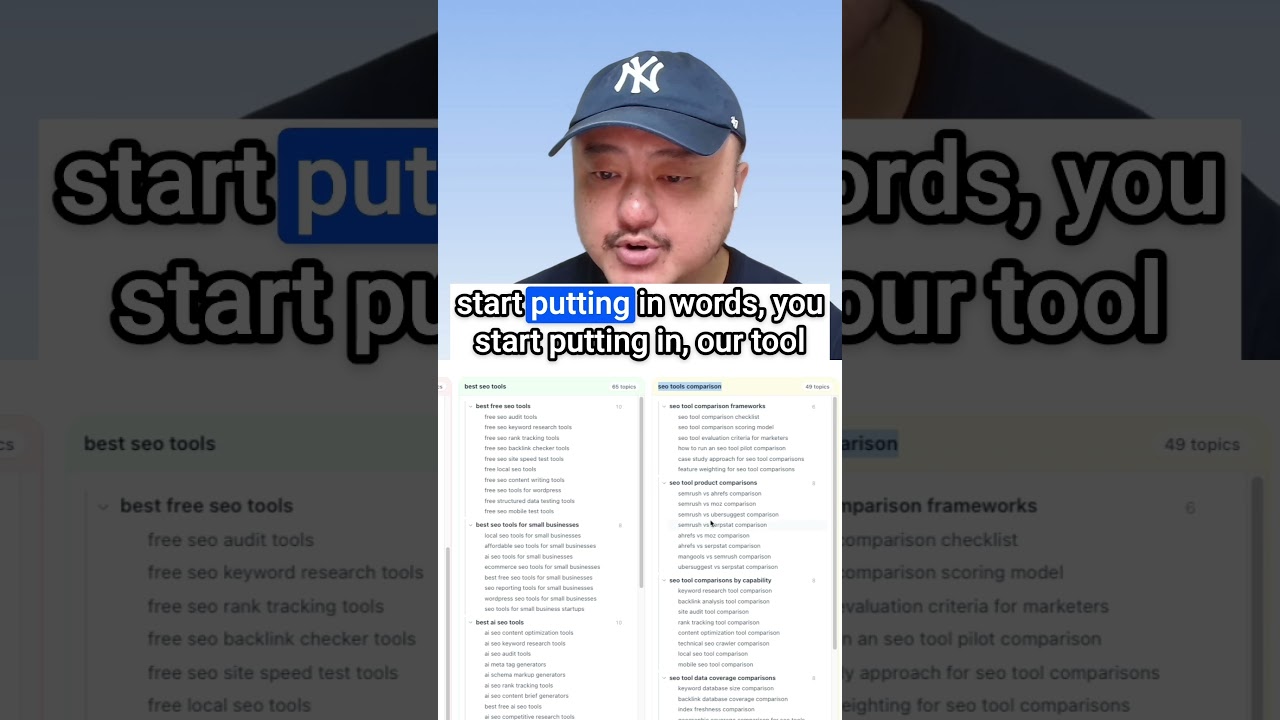
The first topical map you build is the hardest. You're looking at a blank page, a list of keywords, and no idea how to turn it into a content strategy. In this video, I'll build a complete topical map for a real niche in about 20 minutes. And I'll show you the 3 places where most first maps get stuck before they ever get finished. Let's go. These are examples of the topical maps I used to create for clients with my team. Each one took days, sometimes weeks. Now I'll see people selling ready-to-go topical map templates by niche. Plumbing company? Here's a generic plumbing topical map. HVAC? Yep. Got you covered. Personal injury law? Grab this one. That's not how topical authority works. Niches overlap, but every brand inside a niche is different. Every buyer persona is different. And the topics that matter to your brand and your audience are different from the topics that matter to your competitors. Even when you're selling the same thing, a senior dog brand for retired empty nesters in the suburbs has a different topical map than a senior dog brand for working professionals in the city. Same niche, different audiences, different maps. That's why every map I've ever built starts from scratch. Here's where we're going to start. Not with keywords, not with a template, but with the brand and the buyer personas. I set this brand foundation up before recording. Takes a couple of minutes in Flowe if you generate it from your brand's homepage or about page or both. What's here is everything that's unique about your brand and what makes it different from all the other competitors in your niche. So you have your brand identity, your positioning, where in the marketplace you are, your key competitors, your unique selling proposition. We have your content guide, your governance terminology rules. Here's your brand voice that's used throughout all your content briefs and content drafts. Here's your visual style for images, the knowledge base. You can upload all sorts of documents that you have with research and product information. And here we have buyer personas. So we can learn everything about your target audience. We have their goals, their pain points, their values, the fears, where they source their information, the questions that they have. Now I'm not going to deep dive too far into these tabs today because this video is about the map itself. But I still wanted you to see them so that you understand that everything you build downstream will inherit all this information. The brand, the buyer personas, the research, the clustering, topical map, your content briefs, your article drafts, everything. They all filter through your brand context. And without it, you get a generic topical map that could work for any brand in your niche. And now you never stand out from your competitors. Now with it, you get a topical map that specifically targets your audience and positions your brand. Okay. Now let's go ahead and start building a topical map with your topical research. So here's all the previous information about your brand, your site, your buyer personas, your target audience. And here we fill out your core topic. Now your brand's core topic is senior dog food. But what I'm going to do here is just put in dog food, very generic. Now I'm going to come down, generate your main topics. So here's what we get back. Senior dog nutrition guide, best food for senior dogs, choosing senior dog meal plans, senior dog food, senior dog diets, and senior dog food. Now you can see that even though our core topic is generalized with dog food, you can see that all the main topics are relevant to our brand and our personas focusing on senior dogs. Next step, we'll start generating the next 2 levels, subtopic 2s and subtopic 3s. But for this, I want to add senior back into the core topic just because we're generating lots of topics here at once. All right. So we are generating our ST2 and ST3s together. Now what this does is it gives us the topic universe for our brand. Every topic that matters, hierarchically organized informational topics, commercial topics, comparison topics, audience-specific personas will also be grounded in 2 live sources, Google autocomplete and YouTube autocomplete. So the output reflects what people are actually searching right now in Google search engine and YouTube search engine. So let's wait for a second and we'll come right back. All right. So we got our subtopic 2s and subtopic 3s back. Now you could start seeing all of the subtopics here. Under nutrition guide, we have physiological changes, essential nutrients, managing weight. Under managing weight, we have calculating senior dog calorie needs, safe weight loss plans. We have lots more subtopics, meal timing for senior dogs, portioning for senior dogs. So a lot of these, we start really getting into the Google autocompletes and YouTube autocompletes. But you can start seeing some of the patterns here, like senior dog food for dental sensitivity, sensitive stomachs here. If you were to put it in here, we have senior dog food already for, add for, and we start seeing a lot of these, right? We have the sensitive stomach here, weight gain, weight loss. We're covering a lot of the topics now that people are searching for in Google and YouTube, 2 of the most popular places where people are searching. But there's a 3rd place now where people are asking questions about senior dog food and senior dog nutrition. And that's with AI assistants like ChatGPT, Gemini. AI mode. People are typing longer, more conversational questions, more personalized questions. And these AI assistants are returning personalized responses covering topics that are relevant to specific people and their situations. And that leaves an open loop. And what we want to do is we want to close that loop. And we have that now with AI Search Gaps. Here's how it works. We click the AI search gaps button. I select one of our personas. Let's say Linda Carlson is good. The office manager. We pick which engines we want to query. Let's just say AI mode for now. And now it's generating prompts that are specific to your selected persona. Then it's going to select the best prompts from there that are relevant to to the brand and products and our topical map. Then it's going to push all of those prompts to the selected search engines, in our case, AI Mode. Then it's going to take all those responses and extract all the topics out of them. And then it's going to fill in the gaps in our topical research. So it takes a few minutes depending on the response time. All right, now we get our results back. Let's see. 23 gaps were found with 40 subtopics under them. What it's doing now is it's suggesting all of these gap topics, hydration needs, digestible protein, muscle condition scores, all of these. So you could see what levels they're suggesting as well. Fresh senior dog food, and it would go under senior dog meal plans. It was mentioned 4 times as well. And then you have these 3 subtopics, fresh versus fresh frozen, fresh senior dog food benefits. Lots of key topics that were missed initially with our autocomplete. So you can see all of the topics that are already covered. And then we have not relevant topics. If we want to add them all, We can just click the add button. If you want to deselect any, you can select them all. All the topics are now automatically added into your topical research, into the correct locations for each of these topics. So you could see where each of these topics, subtopics are under, under protein requirements. And this is directly under senior dog nutrition guide as a second level. Close out of that and we can see— oops. So we can see all of these little green badges here, which are the AI search gap topics. Okay. Let me reorder this. We can see where all these little gaps were that we added in additional subtopics that were added with our AI search gaps. Now your topical research is grounded in how people search on Google and on YouTube. And we're also grounded in how people also ask questions in AI search. And these are personalized questions as well. You can do all 3 AI search platforms. You could do just one. And they're all filtered through our brand foundation and buyer personas for our brand, Pup Prep. Let me also give you real quick a couple other views. So we have a silo view. And there's also an outline view depending on what you prefer. Each of these are a main topic and all the subtopics under them. And then this lays it out like a tree so you can expand the whole tree. I prefer the silo just because it's easier to scroll left and right. And then I can scroll up and down through each of these. And you can see fresh senior dog food here. I get the gently cooked, fresh versus fresh frozen, fresh senior dog food. And I don't think I covered it earlier during brand foundation, but you may be wondering why we have fresh frozen senior food. If you come back to brand foundation, you'll notice that our brand Pup Prep, what we do is we deliver Vet-informed fresh frozen meals engineered specifically for the physiological needs of senior dogs. Our food supports kidney health, joint comfort, dental sensitivity. And that's why you saw the dental sensitivity and other sensitivity topics. And we had our healthy weight and we had our weight topics as well. After you're done with topical research and you have all your topics, we have 380 here. We could go even deeper with subtopic 4s and keywords, but I think we're actually pretty good with a lot of these. Let's go ahead and our next step is to cluster. We'll want to confirm that we do want to start clustering because our topical research will be locked. What we don't want to do is cluster all our topics and then go back and change our topical research. And then now your clustering results are invalid. And you'd have to do it all over again. Now, the goal here with SERP-based clustering isn't just to group keywords together. We want to group keywords together based on SERP similarity and search intent. That's the key distinction. Think about this. You might have 2 different keywords. Let's say best dog food for senior dogs. And then you might have another keyword that's dog food brands for senior dogs. They're different phrases, different keywords, but when you put them into the SERPs, you end up with 70, 80% SERP overlap. And that's when you would cluster them together because they're showing the same SERPs and the same search intent. You would write one article covering both of those keywords. If you were to write 2 separate articles, one could rank at number 5, one could rank at number 11, but if you combine them into one piece, You might get into the top 3 because you're not letting your 2 pieces of content compete against each other and cannibalizing their opportunity. Let's go ahead and start clustering. We have country, United States, language, location. We can choose a specific city if we want. SERP similarity percentage, 30, 20, 40%. We can change it any way we want. What I usually like to do now is I like to go 30% and see what we get from there. You can always recluster at 40% more tightly later on. Our clustering is finished now. We can start seeing that a lot of these were coming under the cluster head term of best food for senior dogs. We could see best soft food, best wet food, best senior dog food for large breeds. This is where SERP clustering handles, I'd say usually about 80% of the search queries pretty well automatically, but there'll always be nuances to niches. So I would say you would still need a human review of these clusters to ensure that we're not missing out on any of the nuances. Maybe some of these individual keywords should actually be an article by itself. We may see best senior dog food for large breeds. Let's click on the eye and let's see how much overlap there actually is. There's exactly 3 overlaps. And we can see that in the best senior dog food for large breeds, a lot of them are product pages though. We could see one specific article here. And now this is where we have the best dog food for senior dogs. Let's see. Large breed senior dog food is a Reddit discussion. This is an article. It looks like 3 matches, 30% similarity. And this is where we may want to say, okay, now our clusters are pretty loose. We're getting to a point where a lot of these larger clusters, some of these keywords should be an article by themselves. We can increase the SERP similarity to 40% and Just simply recluster using the same SERPs. So while that's going, you could see here, there are 238 unique clusters. And now we could see that the 238 unique clusters turned into 295. And we can see a much smaller cluster of best food for senior dogs. Now the best food for senior dogs only includes these. Everything looks good. We can see all of the additional clusters. Let's go ahead and move on. This is where we start finalizing our topical map. First step here is to click the generate hierarchy here, and it'll organize all the clusters and topics into 4 different levels. Now that the hierarchy is done, we can take a quick look. We have our spreadsheet view, our table view, and we also have our silo And outline views as well. Again, I like the silo view. It's easy to scroll left and right with the different columns, with the different main topics. It's easy to see how many topics are in each of these main topic silos. Once your hierarchy is done, you can generate your URL slugs here. And for the URL slugs, you can always choose a prefix. If you have a blog, a resources, learn something. You can always choose a custom. I think for ours, we will use resources for our brand. Let's go ahead and generate our URL slugs. So now it's generating the URL slugs for each of the unique topic clusters. All right. So now we have our URL slugs here. Oh, I didn't save. I didn't save the resources when I changed it. So none of the URL slugs got the resources prefix. That's fine. We can still always export and re-upload if we really want the resources prefix. But let's just keep moving on to the next step of topical authority. Now, this is where we start really executing on the topical map. So here, before we get into the topical authority component and the planner and the scorecard and everything, we need a baseline for our brand. We have Pup Prep. We can add any aliases that we have. You can see here Coke as an example in the placeholder. The full name is Coca-Cola, but people just say Coke. For Pup Prep, we probably don't have a short name for it, but But we might have misspellings. We might have it like that with a space in the middle. There might be just one P in the middle as a misspelling. From here, we can also choose which additional AI search platforms we want to track with all of our unique topics. We can also choose our locale. These are the same settings as what was in the SERP clustering. For this demo brand, we're not going to track AI search because it's not a real brand, but we can always save our settings. And then to get your baseline, you click the calculate now button to calculate your topical authority. And as that's calculating, you can watch this demo to see how everything fits together. Once the fetches and analysis finishes, every topic in your planner now in your topical map is ready for content briefs, content drafts, Google SERP rankings, AI search visibility tracking. Competitor comparisons individually per topic, internal link suggestions, and anchor text. Everything is there for you once the SERPs are fetched and everything is calculated. So we will come back. The SERP fetches and the calculations are all done. Now we can take a look and see our scoreboard. Here we have 0% for everything, obviously, because it's a demo brand. But you can start seeing our top competitors. Facebook shows up for a lot of them. PetMD, government sites. We have Reddit, VCA Hospitals, Cornell, FreshPet Chewy. A lot of the top ones. We can see our AI overviews. We have our top 10, top 20, how many URLs are showing up. Topical authority scores for all the different domains. We have the presence, how much of our topical map is this domain ranking for in the top 20? So you could see Facebook with 200 URLs covering almost 65% of our topical map. That's insane. You can see Facebook is mentioned 4 times. There are 69 citations for Facebook. You can see all the different topics, all the different URLs that are showing up. So all the different Facebook groups, lots of groups, lots of individual posts. From there, we can head into our planner. And this is where all of our individual topics in the planner now are ready for content briefs, content drafts, the SERP ranking tracking, AI overviews, AI mode, Gemini. ChatGPT visibility, mentions, and citations. Then we have our funnel stage, middle of the funnel, top of the funnel, our search intent, how important each of these topics are to our brand and our target audience. So you can see all of our topics are here. For each of these, you can click on the eye icon. We can get into our content briefs here. Article drafts, the content snapshot and search intents. If you had done it in the previous stage in topical map, we can see our people also ask questions. And then we can see our suggested outgoing internal links. So we can see the related topics and how relevant they are to this related topic. Related topics are on the same level as our current topic of best food for senior dogs. Subtopics are the level below. Then we can see our incoming link anchors, which were the keywords that were in our cluster. If you don't have enough anchors here, you can always generate more anchors with AI or add your own. So that's the whole workflow. We go from brand to audience, our buyer personas. Then we have our topical research, our SERP clustering, and our topical map. With the 4-level hierarchy, we have our URL slugs. Then we have our planner where we can execute and generate content briefs and article drafts. And then we also have publishing as well. So from start to finish with Flowe, we're under 30 minutes. Manually, a topical map could take a few days to a couple of weeks, all depending on the niche. Before you go off and build your first map. Let me tell you the 3 places where most TMU students stall. First one, starting with a niche that's too broad. You think fitness is narrow, but it's not. It's a universe. A generic fitness map covers everyone, which means it serves nobody. The fix is to add at least one qualifier to your niche. Try beginner fitness for men or postpartum fitness for runners. Or mobility fitness for office workers. Qualifiers force you to commit to a specific audience. And when you commit to a specific audience, the map you build serves someone real. If your niche fits within one word, you haven't picked a niche yet. You picked a category. Second one, confusing topical research with keyword research. Topical research maps the market for your brand and your audience. Keyword research targets individual pages. Those are 2 different jobs. If you start with keyword research, pulling search volumes from a keyword tool and building your plan from that spreadsheet, you're locked into page-level thinking. You end up with a pile of individual keywords that potentially rank and don't connect to each other. So no topical authority, no compounding effect. The fix is to do topical research first. Build a market-level map, then drop keyword research into each topic to figure out which pages rank for what. Topics are the structure. Keywords are the targets inside that structure. Get that order wrong and the whole map collapses. Third one, use the clustering output verbatim. Like I mentioned earlier, SERP similarity clusters about 80% of search queries pretty well. The other 20% needs your human review judgment. Every industry has nuances, subtle intent differences, branded terms, regional variations. Clustering algorithms miss those. So if you publish based on the raw clustering output, 2 things happen. You miss the nuances that matter to your specific niche, and you end up with keyword cannibalization because the search algorithm didn't catch the overlap. The fix is to budget 30 minutes to review the clusters manually before you finalize the map. It's the highest ROI 30 minutes in the whole workflow. Skip it and you ship a map that's 80% right and 20% broken. Quick recap. Start with the brand and buyer personas, not keywords. Brand and audience are the filters that make everything downstream specific. Then topical research for the market view, then SERP-based clustering for the intent groupings. Then finalize the map in whichever view works for you. Then hand off to the Authority Planner for content briefs and drafts. You'll be able to start your first brief in 30 to 60 minutes in Flowe. Compare that to 60 to over 120 hours manually. Here's what I want you to do tonight. Pick a narrow niche. That you know well, add a qualifier to it, then open Flowe and start with your brand foundation. And if you get stuck choosing a niche, drop your niche in the comments below, and I'll let you know if it's narrow enough to map. Subscribe for more topical authority workflows, and I'll see you in the next one.
More from Yoyao


How to Run a Complete Content Audit on Your Topical Map (Rankings + AI Search)