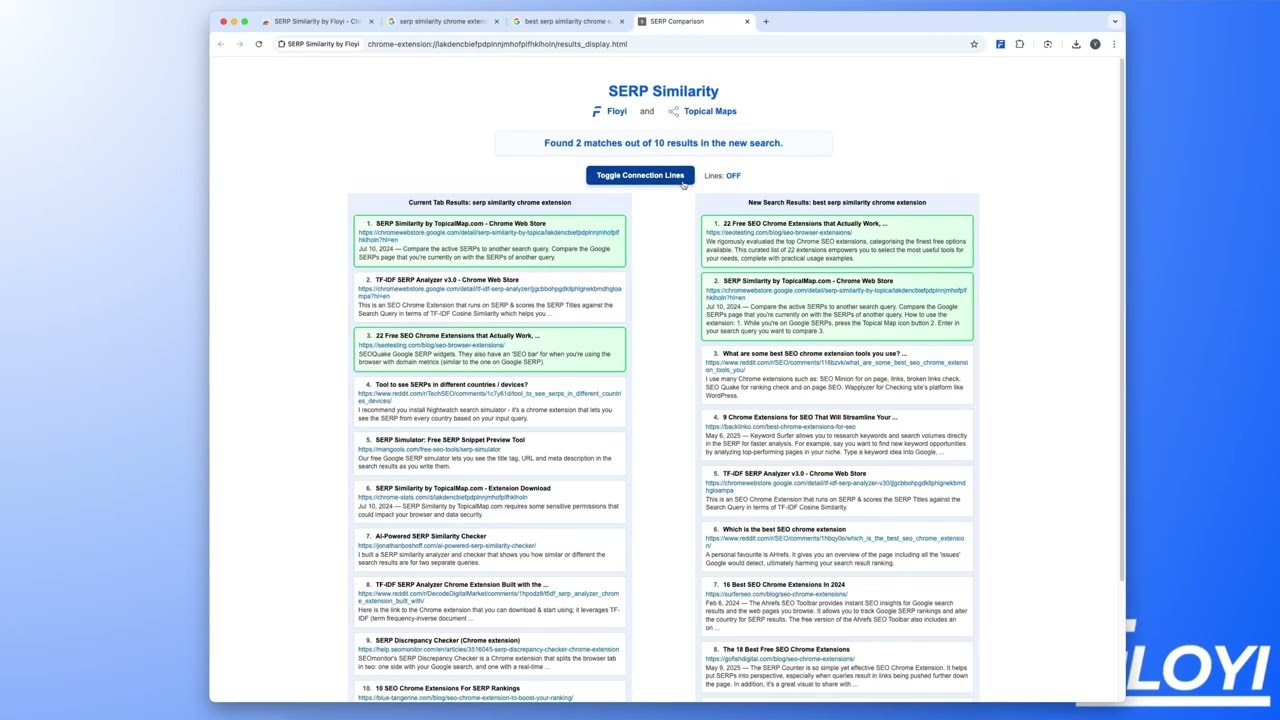
Flowey's SERP Similarity Chrome extension lets you compare two Google search results side by side and see how many results overlap. Enter two queries, click compare, and the tool shows matching entries with visual connection lines you can toggle on or off.
Chapters
The SERP Similarity tool by Flowey lets you see the SERP overlap in the search results in seconds. You can see exactly how any of the 2 Google search results pages compares. All right, so say you are searching SERP Similarity Chrome extension because you're looking for this exact tool, and you can see that the extension is so fresh Google hasn't updated their SERPs yet. It still says SERP Similarity by topicalmap.com. So here it is. Click your little F icon after you've installed it, add in the search query, and we'll just add a best here to make it slightly different. Click let's compare. And now you could see it's fetching the search results. So now that it's stopped, you can see, okay, we found 2 matches out of 10 results in the new search. Number 1 result for SERP similarity by topicalmap.com. Is number 2 when you add the best in front of it. Now, when you close the popup, you lose this exact search. So what we have now is you have the option of clicking show in new tab. Now you have a nice tab you can refer to at any time. You can also toggle the connection lines on and off. And another cool thing is So you're running this and it should say 7 out of, 7 out of 11 for the same exact term. Okay. Now say you want to run a different search. You can just go ahead, add the new search term in there and click let's compare. Best SERP similarity tool. So you could continue seeing all these and you just click show new tab whenever you want. And that's it. Super simple tool to let you compare 2 different search results quickly and easily.