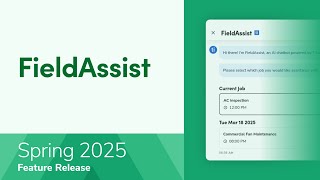
A short instructional overview of FieldAssist — an AI-powered, mobile-first assistant in the ServiceTitan mobile app (early access) that helps technicians quickly find job-related information, streamlines workflows, and improves service speed and customer experience. The content explains enabling permissions in Office, basic navigation on mobile, supported modules (ServiceTitan info now; troubleshooting and equipment coming later), and feedback options.
Lets take a look at an overview of how to get quick answers with Field Assist in the Service Titan mobile app. Powered by Titan Intelligence, FieldAssist is a mobile first AI assistant that helps technicians find answers while on the job. Field Assist boosts efficiency by providing instant access to answers, reducing time spent searching for information and enabling faster job completion. With real time AI driven support, FieldAssist streamlines workflows, helping technicians solve problems quickly and increasing overall job output. By streamlining workflows and speeding up service times, FieldAssist helps technicians deliver higher quality service, leading to better customer experiences and stronger relationships. The feature is currently in early access. To enable Field Assist for your company, please contact fieldassistservicetitan.com once it is enabled for your company, simply grant technicians permission from the Office. No further configuration is required on either the Office or mobile platforms. To grant the permission, go to Settings. In the side panel, go to People and select Technicians. Click Edit. For the technician whose permissions you want to update, go to Permissions tab and under Assist Platform section, check the Enable Field Assist for technician permission. Make sure to save the changes. Now that the permission is enabled, let's see how Field Assist looks on mobile Field Assist is only available on mobile. To use Field Assist in the Service Titan mobile app, open a current job and tap Launch Field Assist. Since Field Assist can only address questions about jobs assigned for today and the next 24 hours, here you will see all current and upcoming jobs tap the job you want assistance with. There are three information in ServiceTitan, troubleshooting and equipment information. Currently only the information in Service Titan module is available. Troubleshooting and equipment information modules are coming later this year. Select the module, answer the questions presented by Field Assist, answering yes or no or selecting one of the presented options. In ServiceTitan's information module, FieldAssist provides details such as customer and location information, current and future jobs, installed equipment, job history, and more. For example, we want to take a look at customer information. Specify what exactly you want to know about the customer, for example how many open estimates the customer has. You can also type in your question when you're finished, tap back to return to the mobile app. If you have feedback on Field Assist answers, tap thumbs up or thumbs down to categorize and comment. The team reviews all feedback and will reach out to you if we need additional information or can provide an immediate solution. Now that you know how to use Field assist in the ServiceTitan mobile app, please see our other learning resources for more information.