Maximizing Your Three-Day Trial Experience with Our AI Tool
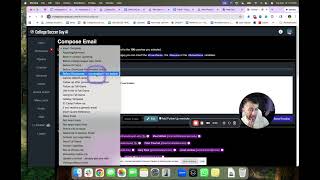
Zev walks through a three-day trial of an AI recruiting platform. You pick schools and majors, generate personalized coach emails (capped at 100 daily), tag messages as genuine or generic, attach highlight videos, and track responses in a pipeline view. After the trial, you can buy a service package or contact Zev to discuss options.
Chapters
Hi everyone, welcome to your 3-day trial. If you're watching this, you're going to get the most out of this tool, so I just want to show you how it works super quick so you can start using it right away. As a reminder, you have 3 days. If you end up liking it, the idea is that you would book a call with us and we can give you full access and explain what that looks like. So the first thing I want to show you is this robot. This robot's awesome. We're going to come back to it in a minute. It does take us a couple seconds to respond, but let's say you said, can you please "Write me a fall template email to UCLA." And we'll come back to this in a second, and it will do a pretty damn good job. So we'll come back to that in a minute. Now, while that's sending it, it's probably already done now, but just to show you how the system works, the way you're gonna wanna start this is to have an idea of what schools you wanna email. So you can type in the schools here. If I may, these are the current majors that we have listed. These are schools that of course have these majors, but these are also schools that I recommend for our students and that are quote unquote realistic. Yours will be a random list 'cause you don't work with us, but if you work with us, we'll create more of a custom list for you. But if I was you, these are the majors we currently have. If you're outside of these majors, then at this point we're not ready for you, but we will be in the future. So let's just say we want to do business. Then what you should do is select the division. To give you an idea, if you select Division II. This is every single school with Division II in business that I would recommend for my clients. This is not necessarily every single Division II school in the country, and we do that because we customize it per each student. So for you, we're not customizing it for you, but I just wanted to give you clarification. If you sent, if you wanted to send an email to all of these schools who have business, you click Select All, click Write Email. Now just to give you an idea, this goes to 100 coaches. Not 100 schools, 'cause every coach has 4 people. You can only send 100 emails a day, otherwise you'll get sent to spam. So you go, dear hashtag, you type in the hashtag coach, hashtag genuine. Now this is the clever part. When you do the genuine, when you're in this section and you've clicked select all, you're gonna click write genuine. And you wanna say something genuine for your dream schools. You don't have to send this to everybody, but definitely your dream schools. So let's just say Adams State was your dream school, just as an example, and you don't know what to say to Adams State, you can ask the robot. So here's a great, thing. This explains that based off of my template, see, I'm Zev, it says, I remind you that USTA is a reach school. So it's giving you advice. Here's how to create connections because you got to write something genuine. And then once you give me those details, I can help you offer, write a personalized email for you. So that's how cool the AI is. So let's just say, can you help me write an email to Adams State? No, Adams State, let's start that. "It is my first email to them." Okay, so the AI will get to work on that. But just for simple purposes to make things go a little faster, we're gonna just, I'm gonna help you, right? I'm gonna say, "I really enjoyed watching your team this season." And the way you would find something genuine is you would go look it up, of course. Maybe you have a friend, a teammate you can add in here. So you could say, "My teammate Sarah actually committed to your program last year." You wanna spend time on the genuine. It is worth it, trust me. Now here's the cool part about my system is once you write it in once, you're gonna click, I'm gonna put it in here just so I can show you the example, you're gonna click save. Give it a second, it doesn't take that long, but it'll take a minute. Then you're gonna go back here to coaches. You're gonna select all, right? These are to the schools that we wanna send a message to. Happen to be in the girls section. You can just as well do the boys. Click Write Email. Now, you'll see here it says you can't send more than 100 emails. That's on purpose. We don't want you to get in trouble. So you clear, select all, click Write Emails. Now, the next thing is, see how this one is green? This is green because we wrote something genuine for them, which is very, very important. 'Cause we want to write something genuine, not for every school, but for many of the schools. So we wrote something genuine to this person, because we knew something genuine. So you don't have to do it for everybody, but you wanna do it for quite a few. The reason we say this is because you'll get much, much better responses. So anyways, let's just do boys as another example. You're gonna click on Select All, you click Write Genuine, say something genuine, then go back to Coaches, click Write Emails, then see how it's green? That means you wrote something genuine for that coach only. So then when you do the hashtag genuine and you click Preview, it will show the genuine thing. But remember, that only will go to this coach. It will not go to every other coach. That's why it says green here. Okay, now click on a template. I have very, very specific templates. That's why there's so many of them. So maybe you wanna send a holiday Christmas note, right? Maybe you wanna send, which I happen to be making this video around Christmas. Let's send, it was before a showcase and you have emailed them before. It's a little bit different. And this is the most important part. This question is super key. And of course you have to fill it in and fix what you wanna fix. So you can fix it as you wish. You can fix whatever you want. Then what you do, you have to add your video. How do you add your video? You're gonna go here to the video section, and I already added mine, but you would add yours. All you have to do is put your name, put YouTube link. You don't have to worry about the thumbnail. It will automatically do it for you, so don't worry about it. Then what you do is you go to video, main video, and this is my video that I have currently. So when I go back to the writing of the emails, right? I'm gonna insert my video and then you can insert your template. You should do it in the opposite order though. So insert your template first. Let's say it's before showcase, or let's choose before showcase. Then what you wanna do is insert your main video. You can also insert your highlight video if you want to, like whatever, whatever you wish you wanna do, that is what you obviously wanna insert your video. So we go main video and your main video will pop up right here. The secret to this is when you click on it, it will prompt the coaches for a question. Please send more, we liked your video, da da da da da da da. The reason this is so important is you're gonna press send, boom, send. It's gonna go to all these coaches. You can only do that once a day, so you get 3 days in your case 'cause you're on trial, you get 3 days to do that. Then what you're gonna do is you're gonna go to the pipeline. This is where you're gonna keep track of all your emails that you receive, and the system will help you do it automatically. Was it genuine, did you already email them, where do you stand with them. Make sure when you click on write the email, you click this button, add follow-up reminder. You have to click it because then anytime nobody responds to you, you'll get a reminder that they didn't respond to you so you can keep track of it. Now this is your personal inbox, your actual inbox, meaning it's the inbox that I personally use. Like I could respond to this person who emailed me today by clicking reply. So this is your real inbox. Whenever you receive an email from a college coach, you need to click the star and mark if it was genuine, if it was generic. If you're not sure if it was genuine or generic, just ask the robot. Copy and paste the email to the robot, and the robot will tell you if it was genuine or generic. Then click the star button. You can call it genuine, type in the school's name, tell the coach of the two, click save. When you do that, you will then go to pipeline. This will keep track of everything, if it was genuine or if it was generic, so you know who to follow up with and all that stuff. You will also we recommend if this, let's say this email here said to us, here's the email, hi, thanks for submitting. Let's say it also said I have a camp on June 14th or whatever it is. Then, oops, I just clicked my schedule. That's how you know the email is real. Let's say it said here I have a camp on June 17th. When you click the star here, I want you to put the camp is on June 17th so you remember it, so you don't forget, 'cause otherwise it's really easy to forget. Which is why we built that. So then when you come to this section, it will tell you the camps. And then remember how I said in the video they can click on a button? So here, look, who opened the video? Tom Serratore from TCU opened the video on this date. Did they click any buttons? They did not, but we know they opened it. This coach, Danny Kirkland, said, "Please send more video to our staff." They didn't even have to respond to the email. That's great news. Now automatically we can follow up with an email from them and go, "I know you wanted me to send you more video. Here you go." and it will keep track of all the videos. And that is the system. Pretty damn cool, right? The biggest thing is there's a very good chance that, hopefully anyways, obviously I'm giving you access to this, so then you maybe wanna work with us. If you don't wanna work with us, then that's okay too. But if you do wanna work with us, then what you're gonna do is you're gonna email me at zev, I'll type it out for you so you see it here, zevshift@collegesoccerguys.com. You'll have the op— I'm gonna give you a link actually after your trial is over, But if you wanna email me sooner, you just email this and say, "Hey Zev, I was on trial with your AI and I wanna get on a call." 'Cause maybe you want more help, maybe this was confusing. We do offer multiple packages. One package is just the AI and nothing else. If you are really quick at using the trial, you can actually submit your videos to be edited. So your trial's only 3 days, so odds are I won't be able to finish the edit. But I might be able to get through half of it depending on how much video you send us. So if you click on these links, you can actually send us your video. So if you have a Trace account, you can connect it to us. If your error, if like let's say you submit a video to us, you can submit your highlight video for fixing, a full game video. If you wanna know how to edit yourself, just click on these links and I'll send you tutorials on how to edit things yourself. So this system is a really all-in-one, you know, amazing tool. That's why I made this long video for you. Okay, thank you for watching the entire thing. You are ready to go. And like I said, if you have any email questions, just email me and I'll talk to you soon. Or DM me on Instagram. You can DM me. Um, I'll try and respond, but I get a lot of DMs, so it'd be better if you emailed me. Okay, talk soon.