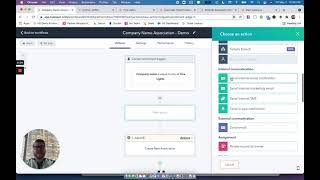
This is a YouTube video titled "associ8 App Demo | CRM/Sales Hub App Accelerator 2021" created in June 2021. The content is a detailed product demonstration explaining how the Associate app integrates with HubSpot's CRM platform to automate associations between records without coding. The speaker walks through various use cases and features of the app, illustrating how it can simplify and enhance workflow automation within HubSpot.
Welcome to Associate. With this app, we wanted to build something that was incredibly powerful, but also easy to use. Keeping in line with HubSpot's mission for their CRM platform, we were inspired by something like the Humble Brick, a tool that you can use to build a simple wall or even something as big as a skyscraper. Associate lets you create automated associations between records inside of HubSpot using dynamic lookups between tables, all without a single line of code. That sounds complicated, but we make it really easy. Let me show you how Associate lives right inside of your workflows tool and sits alongside all the tools that you know and use and love every single day. Associate has three properties. The first is the search value. This is going to be either a hard coded value that you type in, or you can use a token from whichever object is in your workflow. In this example, it'll be a contact token. Then you'll select an associated object type. This will be the object that you want to associate the first record to. It'll show both standard objects as well as custom objects that are unique to the portal that you're working in. Finally, we'll have the associated object property. This will show you both standard and custom fields that are associated on you to your associated object type. In this example, we're going to show you how you can use Associate to change which company a contact is linked to. We'll do this by searching the contact company name for the contact enrolled in this workflow against the company object searching the name field. The issue that this solves is that contacts, when they come in with certain domains, standard HubSpot functionality is going to link them to a company. In this case, Connor Jeffress is a Gmail domain and he's linked to the Google company. However, we also know that his company name is Five Lights. By using Associate and turning on this workflow, we'll be able to see how we can use Associate to automatically associate Connor to the company of our choice. Let's go ahead and turn it on. Once Associate runs, you'll be able to see in the history that Connor was enrolled. When we look at Connor's contact record and we refresh it, we'll see that Connor's now associated to the Five Lights company. Similarly, on the Five Lights company, we'll see that Connor's now associated here too. You can use Associate for more complex functionality. So in this example, we're going to take a ticket that has an order number property and we're going to search all the deals in our system for a deal that has an order number that matches this ticket order number. Once they're associated we can do really cool things. We can automatically check whether or not the associated deal was processed more than 30 days ago and if it was, we can send an automated email to this customer telling them that they're out of the return window and automatically close their ticket. Or if it's within the return window we can assign the ticket up. You can also use Associate to build really complex solutions. In this example we're taking a custom object we're using for referrals. We're searching for a contact based off of the contact ID on the referral object and we're searching for an email of the contact that referred them. This then allows us to see this referral object linked to multiple contacts in our portal, all being automatically linked via Associate. Using this app you can build all sorts of incredible workflows or automate simple things in your day to day. Happy building.