Beyond Personalization | HubSpot Admins HUG | November 7, 2023
This is a YouTube video titled "Beyond Personalization | HubSpot Admins HUG | November 7, 2023" featuring a detailed presentation and discussion led by Brian Saraki and Deanna. The content focuses on advanced personalization techniques using HubSpot tokens, including practical demos on dynamic hyperlinks, image customization, URL parameters, and AI integration for personalized messaging. The session includes a Q&A segment addressing audience questions about personalization strategies and data quality. The presentation is technical and educational, aimed at HubSpot users and administrators interested in enhancing their marketing and sales automation workflows.
And we're live. All right, thanks everyone for coming out to the HubSpot admins hug. Super excited to talk about beyond personalization here. Brian, take it away.
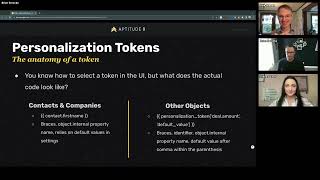
Awesome. Kyle, thank you so much for having us. Deanna, thank you again for the opportunity. And everybody around the world, I really appreciate the time that you're spending here with us going through some personalization and some advanced ways you can use HubSpot tokens in places other than just, you know, hi, first name and signing off with a contact owner name. So I'm, I'm excited. I'm excited to share this with you. And first, before we get started. Well, first I'll get my screen share going. We'll. We'll do that first and then we'll get into it here. Awesome. So we should see that cover slide first. I want to give a major shout out to Ryan Gunn and Jordan Michalitis at Apptodate, who were pretty instrumental in putting today's presentation together for you and some of the demos that we have cooked up. So I want to give them a huge shout out first and then want to get into it today. So I really appreciate you being here, going through this with us. Obviously, you know, Kyle, Indiana, but a little bit about myself. My name is Brian Saraki and I'm a solutions consultant here at Aptitude 8. I'm a massive data nerd. Much as I would imagine everyone who's attending. This is also so you. We are all amongst our fellow community here. I'm a former HubSpot agency owner, used to run a platinum solutions partner agency for quite a while actually, which was acquired last year. And so I was fortunate enough to get the opportunity this year to join the Aptitude 8 crew, which I'm over the moon about, which is really cool. I'm a dad. I've got two young kids, five and two, so I'm kind of going through the thick of it right now, but they're great. I'm so fortunate that we get to have that opportunity. And then I also like playing golf. I'm not a great golfer. I'm like more of a beers and bogeys guy. So if you're a golfer out there, that's. That's the main thing that I love to do. And then I would definitely say that if I had one more meal on earth, it would probably be sushi. I don't know why, but sushi just does it for me. And I'm also, I'm located outside of San Diego in California here in the US So a little bit About Me would love to connect with you on LinkedIn, obviously. So please reach out a little bit about Aptitude 8. Aptitude 8 is an elite HubSpot Solutions partner and we've got experience across Rev Ops, Marketing Ops, web ops, AIOps and solutions architecture. So I think we're really focused on finding ways that we can help clients and help HubSpot customers implement and integrate and optimize and extend the way in which they're using HubSpot and the way in which HubSpot is either centered into or plugs into their tech stack. So, you know, it's I think we really focus on taking a consultative approach and being a really truly trusted consulting partner for our clients and focusing on delivering technical solutions, making sure that we are meeting our clients where they are and helping them meet their customers where they are. So want to get into what we're talking about today. There's a lot baked into this presentation. Ryan and Jordan did a really great job of putting together some really helpful and valuable stuff for you. I've got a few demos I want to go through today with you, so I'm going to kind of fly through it a little bit. If there are any questions, please utilize that Q and A upvote questions that you want to talk about. I'm going to leave some room for questions at the end, or at least that's my hope. But today we're going to talk about what a Token is in HubSpot and kind of the anatomy of it, which is important in terms of thinking about how you're using them elsewhere. Then we'll talk about, you know, you've got your typical uses, but how can we get more from using a HubSpot token? We'll talk about how we can build them into hyperlinks and what you can do with that, how you can customize images and kind of use dynamic HTML to serve things based on a token that you're storing for an object. Then we'll get into how you can use them as URL parameters. There's a couple of use cases I've had come up with clients in the past that I wanted to share with you today. We'll talk about that and then we'll get into some thinking about how you can customize large chunks of text that I got a little exciting announcement for you surrounding AI at the end here. That's it. I would say we do have a lot of demos and I'm going to be clicking into a portal, a couple portals today, but this is meant to inspire you this is meant to get your wheels turning, kind of get your brain turning about how you can use tokens in your own use cases for your own business, or if you're a partner agency or partner consulting firm, then how you can use that for your clients. So by no means are these demos exact things that you should go get done or you should go start building into your portal, but really meant to try and motivate you to think about how you can use tokens differently or maybe use them in ways that you haven't really thought of in the past. So before we get into that anatomy of what a token is, why are we even thinking about personalization? And what does it really mean for personalization to have an impact on, on your business? And so ultimately we're fostering better connection, right? Connection with leads or prospects or customers. Those people are looking for personalized experiences. We've got McKinsey, a McKinsey report from 2021 that says that 78% of those customers or consumers are converting at higher rates. And so personalization is having actual material impact on the way in which businesses are operating and the results that they're getting then from there. We're also, I think one of the cool things and one of the demos that we have today is about inputting more accurate data and trying to make it easier for your HubSpot users, your sales reps, your SDRs or BDRs, your AES, your ops people to get directly to property that they need to update on an individual object, not hoping that they know exactly how to navigate the ui, because obviously user adoption is always, it's always a little bit of hit or miss sometimes. Sometimes. So that being said, let's jump into what a token looks like. So obviously we all know, and I would imagine that most of us are pretty adept HubSpot users, we all know how to select the token in the ui, right click the personalized piece, use a little modal window to select the token, select an object, select a token. But what does that code actually look like? And so on the contacts and companies front, obviously we have some settings in the portal that allow you to define default values. So when you actually are using a token for a contact or a company object, you really only have to consider those opening curly braces identifying the object itself. So contact or company using a period or dot there and then followed by directly followed by the internal name of that property, right? And then closing it, obviously with some curly braces, that's going to rely on using the default values that you Set for those in the portal settings to fall back on if that value is not known or that token misfires in some way. For other objects. I mean, you can also use them for contacts and companies. But in terms of other objects, the default anatomy that you're going to see are those opening braces again, followed by the word personalizationtoken. Excuse me. Then we've got some parentheses. We identify the token that we're looking for within a single quote there. In this example, we've got the deal object and the amount from the deal, and then we have a comma, and then we identify the default value in a separate set of single quotes. We close that parentheses and then close the braces. This is important to know because when you're using this token in certain areas of HubSpot, and you'll see that in the demos today, sometimes it's helpful to use this anatomy in this code to define a different default value, maybe for that specific use case than what you've got for contacts and companies. Or if you're using it for a different object, say it's another standard object or even another custom object that you have. You would want to define what that default value is so it doesn't break the experience.
I'm going to hop in here real quick. I'm already learning stuff from you. This is things I did not know about HubSpot. Just one more time on the other objects. Personalization token, that you actually write those words.
Personalization token, you actually write those words. It looks like this and a good differentiation. I know we probably have a lot of international users. When you write it, you have to write it using American English. So you have to use personalization with a Z, the letter Z as in zebra. Instead of say, I know a lot of maybe like UK English or other areas around the world, use an S instead of a Z. If you use an S, the token won't render. So you will need to make sure that you're using a Z and use the American English. You can't blame me for that. You can blame some product person at HubSpot.
I'll take your blame.
Yeah, you can blame Kyle. Kyle doesn't really need the blame. But anyway, a good thing to note there is that you, you want to make sure you're using the Z in personalization if you're using this, this approach for inserting a token somewhere. So any other questions? Are we good to keep going?
No, I just want to make sure that was, that was clarified because like default value, you're going to Actually put in what you want the default value to be. Right?
You're going to put. Yeah. So what you see within a single quote here is going to be the actual default value that's going to appear if say like amount was unknown for this particular deal, that default value that you put within the code is going to be what appears in its place in that personalization tokens place. So this is helpful. You will need to do this for objects that don't have those default values in portal settings. Right. Contacts and companies have that, but you don't have those for other standard objects or custom objects. And then if you have, if you are using it for contact or company, but you want to define a different default value in this particular place, then you would want to use this type of, this type of notation here. And we'll talk about it too when we get into a demo here in a minute.
Cool, you can go on. I just want to make sure everyone was clear on parts of that were hard coded in and which parts were.
Yeah, yeah, fair enough. So we all know typical uses, right? You can pull up a personalization token in an email template or use it on a landing page. This is kind of your bread and butter personalization that I think a lot of people are probably implementing and experiencing right now. And this is great. There's no reason you shouldn't do this. There's no reason you have to change your workflow currently to use a different type of personalization code or anything like that. So please continue. But here today we really want to talk about extending beyond just the typical use case that you would see or that you would, you would find users doing in your portal. And so before we get into those demos and talking about how you can apply them, I do want to back up and first pose a few questions for you to consider. How and where are you using them? How are you going to use this token? What context are you using it within? It's going to be really important to consider that. Does it even make sense for your use case to put a personalization token in right now? I think that's more of a strategic question that you want to think about at the beginning rather than just getting excited about using personalization and start plugging it into everywhere. Really be considerate about how you are deciding to implement or apply this to that and think not only just about how you are technically doing it, but then what is that? That end user, that end, the person that's going to receive this particular asset content, go through this experience, what are they going to experience what's their, you know, kind of empathize a little with them and understand how are they going to receive this, what does it mean for them to get this type of token. So, and then always consider the fallback default value. If you're using a, if you're using a token in a place where there might not be a value known for that particular object or record, then what are you putting there as a default value that will not break the experience and we'll keep it continuous. Right. So really important to think about those two first and have clear answers to these first before you go to implement a token opportunity here. So let's get into it. So one of the use cases that we've had in the past or that has come up in the past is how can we use personalization tokens in hyperlinks? Right. There are a lot of opportunities here for you to customize the link that you're using, whether it's a destination link for somewhere or the way in which you're using links for reporting. That can be really helpful. So I think one of the use cases you want to think about providing a direct link to somewhere, finding a way to streamline your workflows and your emails that you're building and using a dynamic link instead of having to build an individual email and individual if, then branch for this one particular use case or this one particular data point. And then how are we concentrating data input that time when there has to be manual data input in your portal? How are you concentrating that for better accuracy and follow through better adoption from that end user who has to go and actually make that change? We'll get into some demos here. This first one here is, let's say that you are collecting a form and that form is asking this property interest area and you want to send that particular person who filled out that form a relevant webinar that you've pre recorded. That's already going. Right. So instead of I could, I'm sure you can already see the, the workflow in your mind enrollment trigger says they filled out that form, then I've got some event branching and their interest area is this. Send this email. If their interest area is this and this email and we don't want to do any of that because that's going to take a lot of time, it's gonna be a lot of asset build doesn't make a lot of sense. And we can utilize a personalization token here using this interest area property to be able to dynamically change that URL based on what they submitted in the form. So we're going to create an enumeration property that we're going to plug into our form, and that's going to be this interest area property here. If you guys need me to punch in here, if this is too small, let me know and I can also zoom in on the screen share. But what you can see here is we've got this interest area.
People are saying, yes, please zoom in.
You got it. I'll do that. You let me know if it's still too small. We've got this interest area property here in the form. This is an enumeration property, dropdown property. And we've got all these values in here for what type of, say, service or interest that they're into. You can see that the internal value here is all lowercase value. And these are going to actually operate as URL slugs in a dynamic link that we're going to be sending later. We don't really need to use a workflow to set anything or anything like that. As soon as that contact fills this form out and selects this interest area, then what we're going to do is we're going to build a workflow. It's going to automate an email to that particular contact. When we send this email here, we're going to send this email. We'll jump into the email itself and you can notice in the what in the workflow we don't have, we're not branching on interest area. We're not, you know, we didn't build five different webinar recommendation emails to be different for that interest area specifically that they selected. Instead, we've got a very simple workflow. And this has got. We put a smart module up here so you can change text, right, based on, you know, maybe they selected marketing. But here you can see on the button, we're actually using a personalization token to point this contact to a relevant landing page for a webinar that's relevant to the interest area that they selected. Of course, this means that you would want to have a landing page set for the value that's in that form or a URL slug that would match. But here we don't have to do a whole lot more than use a personalization token in here. And then as we go to go ahead and preview this, we'll pull up our test contact. Here we go ahead and preview this. Here we can see that our smart rule fired and changed the opening text. And then here, when we click on this, we can see that this particular contact selected RevOps is in the, in the form. And so now we take them to the RevOps landing page where they can highlight, they can submit this webinar landing page. Now, this is a demo page, obviously, so please disregard what you see on the page itself. But the idea being here that we're using a dynamic personalization token to make that URL dynamic and we can find a way to streamline the way in which we're building things in HubSpot and, and make them, but also provide a relevant experience to that particular contact. So I've got a second one for you. This one actually just came up not too recently, but. Or, I'm sorry, came up recently, we had a client who needed to, for whatever reason, they had a specific requirement for a rep to manually update a particular property when a record hits a certain milestone or hits a for that in their use case, it was a deal in a deal stage. And so as soon as it hits a deal in the deal stage, we couldn't automate setting a particular property, but we needed this, the rep to manually enter some data. Now, instead of asking, just linking the rep directly to the record page itself and then waiting for them to click on the view all properties search for the property itself and then updated appropriately, which is a few different steps, a few different clicks. What we can do is we can actually take the object that's enrolled in a workflow, we can swap the record ID with a personalization token, and we can send that rep directly to that property on that record itself. So here what we're going to do is we're just going to take the object that's enrolled and we're going to build a workflow that says, hey, when, for example, here the contact owner is known, we're going to send a new internal email notification to the contact owner. And let's say the contact owner in this case needs to check the interest area property. So now what we're going to do is we're going to say, hey, you've been assigned this new contact, please update that property here. And you can see that the URL here is linking to is linking to that particular record object in HubSpot. Then it uses the record ID to pull the record, the ID of the object that's the record that's enrolled in here. And then we're appending this properties search with a particular property that we want them to update. And so when we think about how this is happening, that contact owner is going to get an email notification that's going to say, hey, go update this property. And that link which is right here is going to take that particular sales rep or whoever it is, contact owner directly to my demo, contact record directly to that property that I need to update to be able to go ahead and update it. So no longer am I waiting for a rep to get here. Understand how to navigate this page, view all properties, go search for interest area, you can take them directly to it and it's going to help you streamline data manual data input. Now, obviously this is happening on an individual record basis, so you want to consider that. But you know, this use case came up and I want to make sure that we shared with it, shared it with you guys because this is something that we've seen happen in the past and can be really helpful to help drill down into a specific, specific property on a specific record.
Uh, so Amanda says her life is forever changed and my sales reps are going to hate me.
Use it with caution, I would say. But, but yeah, it's, it's been helpful to streamline things so that, you know, you think about the way in which your users are adopting and how you are trying to from an operations perspective, how you're thinking about how can you reduce the number of clicks, make the experience better and ultimately, you know, make sure that people are actually following through with what needs to happen. So this is a cool option for you to consider. Let's get into customizing images here. Excuse me. So one of the cool things with personalization tokens is so long as you, you are storing appropriate HTML, you're storing a URL potentially for an image in a property somewhere, you can actually recall that within HTML, anywhere that HTML is being used within HubSpot. And so you can dynamically change image content based on a particular property and you can personalize that outreach at scale. You think you're running, you know, think about running an ABM campaign and being able to personalize a landing page experience for a particular prospect with their company logo and their company name. This is a super easy way to do that just using a personalization token. And so here what we did is we created a company logo. So in that, in that case, we're going to create a company logo property. Right now this is living on a contact object, but you could very easily do this on the company record itself too. And I mentioned that because a lot of lead enrichment or say like enrichment platforms, tools that people are using might even provide this for you. Right? That might be one of the, the data points that they Pull from an enrichment standpoint and you could actually map that directly to your company object property so you wouldn't have to go and manually source these if you needed to. But so we're going to go ahead and store that on. We'll store that URL right of that logo here. We'll just go ahead and copy that to show you that's a valid URL here. Right. We got a logo for the volume company here and we're going to use that as a source URL in inside of. Excuse me. Oh man, I'm working on getting over a cold too. So we're going to use that inside of a landing page to personalize the landing page experience here. So obviously you can see we've got our company name here. We've got a couple different things that we could personalize. But this company logo piece here, let me punch in for you guys again, this company logo piece. If we go and we go ahead and look at the source code, you can see that the source code includes an image and if you know HTML, an image that's got a source, that is this company logo. Now you can see we're using contact here, but we are using that full personalization underscore token because we want to recall the company logo from the contacts record. But if that doesn't exist then, then we're just going to go ahead and show this default value, which is this default logo that we've got set up in here. So we wanted to make sure that the experience was not going to break, that they weren't going to see something like this experience if we didn't have a value for them. And so if we go and preview this page and we go and we preview it as our contact, then we're going to see our company logo personalized for the company, the contact, the company that they work at. And now here this is. You can fill it out here with further information as you need to. Cool. Way to dynamically change images. Now don't think about this is just only in landing pages. You can obviously put an HTML module into emails if you're building custom quotes or you have a custom quote template, then you can also do this on your quotes too. So let's jump into URL parameters. I think this is a really fun one. There are a couple of ways in which I wanted to share with you some ideas here. So both based on use cases we've had from past clients. So in using personalization tokens, sometimes you can use them to create customized reporting based on data that you have in HubSpot. And think about this in terms of passing data that you have in HubSpot to maybe a third party tool like Google Analytics or somewhere else that is capturing UTM data and maybe doesn't have a direct integration with HubSpot. Or you need to find a way to get your HubSpot data into this particular system that has the ability to capture that stuff. So we're going to talk about that. And then I also want to chat with you about automating meeting links form submissions. Since meeting links don't have the ability to hide fields in, in the form, right? So if you add a custom form, a custom field to the form, you can't really hide that much the way you can in the regular form editor. But using a personalization token in a particular link, you can actually pass a value to that form, that form field, and then auto submit that form. Make the experience better for people that are booking meetings with you. So for example, this use case here, we had a, I had a past client who wanted to memorialize the life cycle stage a particular contact was in when they submitted a high value form, right? A form that was going to graduate them to MQL or SAL or something like that. But they wanted to know what was the lifecycle stage that they had at the moment they submitted the form before they got changed to MQL or SAL or something else. So that's kind of the use case. So what you could do here is you could say you're building a link. Oh man, I'm trying. Sorry guys. Say you've got this email that you're going to send out, right? And we, we now have a Rev Ops webinar that we want to share and we want people to send this out here. What we can do this link, instead of sending it just To a regular URL, to one of your HubSpot pages, you choose it to a URL and then you can append here, for those of you familiar with UTM parameters, you append it by putting it after a question mark and at the end of the URL string. And so here we're sending people to our RevOps webinar landing page, but we're passing the contacts lifecycle stage as the UTM content parameter. And so we can know that when we look at form submissions on this webinar landing page, anything that contains a UTM content form submission that contains a particular lifecycle stage, we'll be able to report on that or segment contacts on that, or see that in maybe form conversion events in Google Analytics too. So what we can do is we can pass that. So for example, this contact, this brianolume.com this contact has submitted that free trial form and you can see now that they are a marketing qualified lead after submitting that form. But you can see when they originally submitted it that the UTM content that came through was lead. So now we're going to be able to use this to segment and refine and report later on. Excuse me. And we'll be able to then pass this information over to anywhere that we wanted to. So this is going to tell you say, hey, when people are submitting this form, are we getting more leads that are submitting this form? Are we getting more subscribers that are submitting this form? Are we getting more people that don't have a life cycle stage or they're coming straight through free trial sign up Helpful for you to be able to drill down into what's happening from a conversion standpoint. Oh, oh no. We'll jump back. We'll jump back. Okay. Also thinking about URL parameters and thinking about that meetings link piece. When you are creating a meetings link, you obviously can pre populate fields and you can auto submit them when they're known. But what happens when you have say a custom field in your form? And here's a sample meetings link. Oh, I'm gonna get some water. One second.
As a person who is also getting over a cough, I feel for you. I was so excited just mute myself and not have to talk today and.
Now I feel bad. Oh man. I apologize everybody. I promise I'm not trying to cough in your ear, but we'll get back to it here. I want to make sure we leave time for questions. So let's say that we added a custom field for product interest to this meetings link form. Obviously there's no way for us to make this hidden right? Say we wanted like pass a value for this or something like that and we don't necessarily want to leave it on there for the contact to have to fill out, but we do know that we want to pre populate the fields with known values and we want to auto submit the form. Now if we are sending a link out to a contact in our database, we know our first name, we know the last name, we know their email address. Maybe we don't know product interest, but we don't want to have to ask them to select the time on the meetings link and then also go select the product interest when we know we're sending out a campaign about A particular product. Right. And this works well from a sequence perspective too. If SDRs are say like or AES are sending out a note specifically for a certain type of value, this is one use case. But so we've got our meetings link set up here and what we're going to do is we're going to insert that link into an email. So here we want to discuss our GC1000 series product. And so please book a meeting with me to learn more about this GC1000. So now you can see this meetings link is not just a meetings link from the drop down here, but it's a URL that's using a personalization token. And here what we're doing is we're actually passing all of the fields that are in the meetings link form. We're passing that into the form itself on the meetings like you probably see where I'm going here. But we've got our meetings link right here. Then we've got our first name that we're filling in, we're filling in our last name, we're filling in the email and then here's that, here's that product interest field that's sitting in the form and we're going to pre populate it with the GC1000 series product, right? And so when we go ahead and we look at this particular contact, I'm going to use myself as an oops as an example. So we're pre, we're previewing this as a contact. I'm going to an sdr, I'm going to send this to this contact to talk about the GC1000. I'm going to go ahead and link them to my my calendar link. I'm going to choose a thing and you can see I didn't get taken to the form to fill out my product interest because that was already passed using this personalization token that's up here in the URL string. Now we didn't have to require that prospect to make an extra selection. We didn't have a way to set it as a default value. We set it as a default value using the parameter that we passed in the URL. Now when we go over to just got my email that I got a meeting booked with me. But when we go to that example contact here, we can see here that their product interest was set to GC 1000 series and they just submitted this form. Obviously there's no properties updated because I've done this a couple times to test it. But we get this updated here based on that form submission makes it easier for your prospects or your leads to fill out a meetings link if you are directing them to a specific type of, type of product or some type of value that you want to pass and make it, quote unquote, hidden, even though you can't do that within meetings like itself. All right, let's move forward to the last demo I have for you. Today is a cool one. This is about creating customized text and this is actually leveraging AI. Before I get into that, I'm going to take a sip of water so I don't cough your ear off. Hang on one moment. Okay, thank you so much. So I'm sure a lot of you are AI users, probably use Chat GPT. And so one of the things that we've been experimenting with and what we've been building is a way to dynamically craft messages for deeper personalization. Find ways in which you can use tokens, use data that you know in your CRM or in HubSpot to actually prompt an AI. So your prompt becomes a dynamic thing that's relevant for each individual contact or record that you're enrolling that you're. You're firing a prompt with. So the cool thing here is you can use data that you know and personalizations you know to then prompt GPT to generate unique messages that are specific to that particular contact or that particular record. And you can leverage things like interaction history, everything that you know about, say, a contact, and everything that HubSpot captures by default, as that contact generates activity and that activity is stored on the record, you can use that to prompt AI. One of the cool things you probably see here is I'll show you a demo today. The screenshot is of something that Aptituded8 has built. It's a workflow extension that we've built that prompts AI. It's called Generate, and it helps us and our clients gain some efficiency through using the power of AI. And so I think it's really cool. It allows you to prompt CHAT gbt and then you can have chatgpt generate a response and store that from the action output in the workflow, store that directly into a property that then you can recall as a personalization token elsewhere. So you're kind of, I guess it's kind of like Inception using personalization tokens to create another potential personalization token, which I hadn't really thought about until right now. But cool thing, cool thing to share with everybody, and I think I have Ryan Gunn's blessing to do this. But Generate is actually a Workflow extension that up to two date is making is working to make available in the App Marketplace by the end of the year. So not only is this something that we've been using at app to date and using for our clients to be able to run these prompts into Chat GPT directly within workflow extensions in HubSpot, but I believe that's going to be something that's going to be coming forthcoming to the wider public, to the wider HubSpot ecosystem in the future. So. Oh, thanks, Ryan. I'm pretty sure. Okay, so let's get into those examples. How can we use that? Right? And so let's say that you are a workout company or say you're a company that offers personalized workout plans, but you don't want to, you want to be able to do that at scale and you want to be able to leverage Chat GBT to do that. Some of you might have seen Ryan Gunn's example of this on LinkedIn, but what you can do is you can create a form for your potential contacts or clients to fill out. It's got some details in here about what they want for their workout plan, and they can go ahead and submit that. And then you can use AI to generate AI workflow action to say when they've submitted that, you can send them a quick response. But then here you can get into prompting ChatGPT using the Generate Workflow extension to prompt ChatGPT to create a personalized workout plan based on all the data, everything that that contact gave you in the form. And so here you can see that we've put a prompt together and we've been able to insert contact tokens to make that prompt relevant to this specific contact that's enrolled in the workflow. Then we can take that output and we can take the prompt output that comes out of this action and, and we can set it into a, you know, custom multiline text field, personalized workout brand. And so here, this, this is one of the cool things that I think is, is that this allows you to, to deliver personalized experiences at scale, right? And in, I think we've got a, you know, there can be a piece here where you can get someone to internally review that first. And let's say that that has been reviewed and approved. As soon as that does, then it can fire off the personalized workout plan. Otherwise it can wait up to one day before it goes out to the, to the contact itself. And so here you can see that email that you see here is a very simple email. It's not listing anything other than here's your workout plan and then here's that personalization token that is, that is filled by the prompt output from the AI. And so if we go ahead and take a look at this workflow or this email here with our test contact, we can see that Ryan filled out the the form and a day later he gets a personalized workout plan based on what he said in his in the form or his, his goals. And you can see that a human didn't have to build any of this. We were able to use data that was captured within a HubSpot form, turn it into a dynamic prompt for AI, have AI build the workout plan. You can obviously put a step in there for a human to review it and it gets sent out. So really cool, really cool use case, really cool application of being able to pull AI into a HubSpot workflow and then store that in a personalization token and make your personalization token that much more powerful. Final example I have for you here is let's say that you're sending out a sequence and you want to personalize the sales email intro. I think a lot of SDRs and BDRs know that, you know, a relevant personalized intro is going to be better received once you get somebody to open that email. And so here what you can do is you can create a text property for actual multi line text here that's personal sales email intro. And then from there we can do this very similar thing here where we're going to build a workflow that says hey, if they're in a sequence and they got, they just got enrolled in a sequence, then let's prompt chat GPT to say that they, you know, have GPT pretended it's an SDR that's reaching out. We're going to put some details about the sequence itself and what we need out of it. But then we want to personalize it with the company that they work at, maybe the size of the company in the particular industry where the contact came from and the last page that they saw on the website. Maybe we have information about their LinkedIn bio. And so we can put some LinkedIn stuff in here and we can have chat GBT essentially be your SDR assistant who writes you a personalized email intro that you can plug directly into your sequence email template. We've got that. We are going to store that output into our custom property and then we're going to jump into our sales email or sorry, our sequence email template. We're going to see here that well you can see here that I've got the personalization token directly in here. This is the personalization token that was submitted or filled out by our prompt from AI. So cool way to personalize it at scale and allow you to get some relevant information into your sequence without your sdr, BDR or AE needing to do a bunch of manual research to find ways to. To make that, that particular email unique to that contact or lead that you're sending. So overall, I would say as you are getting into using or thinking about implementing personalization, like, I would encourage you to experiment. A lot of the stuff that we covered today and a lot of the stuff that, that I've had success with at personalization before has really only come from failing in the past. And a lot of the demos and a lot of the things that we put together in the deck today are built on failures from the past. So want to help you learn from different ways in which things have been broken in the past and we've learned how to fix them. So, you know, I think the motto that I like to carry is, as we think about personalization is you got to get in there, you got to break it to build it. Don't get paralyzed by, you know, trying to make sure your personalization is perfect. Do consider those questions that we talked about, how it's going to be used and what the default the fallback value is going to be. But make sure that you're getting in and actually using it, testing it out, build it in a sandbox, make sure that things are. Are you ironing out how you want to put it in there? Because I think one of the cool things is that you get to. You really get personalization at scale using some of these things. So long as you are just, you know, you're trying, you're trying new things, trying to find a way to make it happen. That being said, I'm gonna. I wanted to leave some time for Q and A. It looks like we have a little bit. So what can I answer for you guys? Or is there anything I can answer?
Yeah. So everybody, if you want to head over to the Q A panel, up voting is back. Hooray. So we will work through questions for most upvotes to least upvotes. While you all are working on that, Brian, let me just say this is. You did great. I learned things about HubSpot today, which doesn't often happen to me. So I really appreciate you being here. I really appreciate you sharing all this expertise and we definitely have some questions for you. So if you're. If your voice can hold out, just.
Yeah. I'm so sorry for coughing so much. No, no, I'm, I, I would love to answer some stuff and I promise I'll do my best to not cough while I work.
I'm going to do my best not to cough while I'm asking the questions to you. So we'll make quite a team. Valerie asks, is there the. No, not going to make it. Is there the possibility to use if then conditions for token default values?
If then conditions for token default values? I'm not aware of a way to do that. I don't like saying no as an answer, but I'm not sure that you can dynamically change the default value of a token.
Valerie, I think we'd love to hear more about your use case here. And I mean the 12 of you who upvoted this also, because the idea of the default value is that if there is no value, that's what you're going to display. And in that case, in that regard it's not really personalization. I guess it's just sort of a placeholder.
But yeah, yeah, it would be helpful to know. I think like the idea is that your personalization token is the piece that is leveraging your if then logic and providing whatever value you need based on your if then logic. So I think the default piece is kind of you get one default value to define per that instance of your personalization token use. But if there's maybe something more that we can explore, please hit me up on LinkedIn, find me or something like that and we can, we can talk about a little bit more.
Great. Jessica asks, how necessary is a clean and complete database to ensure the right messages go out.
Oh, Jessica, you asked the million dollar question. It is paramount. Personalization tokens are only as good as the data that they are leveraging and that they are serving. So if you're, if your CRM is a mess, if you don't have date graded governance and you have values that are all over the place, and this goes back to that. Like consider, consider how you're using it and why you're using it. What shape is my data in to be able to. That's going to be a really important piece to consider first. And if you want to get started with personalization, but you know that there's data problems, data cleanliness problems that you got to think about. I would encourage you to first focus on those before you start implementing a lot of personalization. Because again, personalization is just a tool, is just an arrow in your quiver that you can use, it's only going to be as good as the data that you put into it. Just like reporting. Right. So we want to make sure we're putting good in so that we get good out.
On a related note, Willem asks any advice for building in fail safes, Especially in marketing emails, it's not always convenient to see the email that the recipient received with the properties populated. I would expand that to include what happens in a lot of these advanced use cases. If, if there's a null value, like if you're doing an image or something like that.
So more so going back to is that more of a data quality or data.
I think just.
Because the default value is going to be the experience that that personalization token is going to drop back to something doesn't work. Now if you have old data in your CRM and there is a value that exists for that particular property that you're trying to recall in the token, then it's going to recall that value. So if, if the data that's in there is not accurate, is not appropriate, then there's really no fail safe that you can put in place to make sure that that you know, do a data check first before you that token fires. So really it goes back to like how what kind of governance do you have over the data in the CRM? How clean and up to date is that data? And goes back to again your use case. Why are you implementing this token? Does it make sense in this case, are all of my company logo URLs super old or did we move them to a different folder in the file manager and now they're actually all broken? Something you would want to check first before you actually go and implement that personalization. And as you're doing it, I encourage you to test and test and test before you fire off that token in that email or do something like that?
I guess also as you're building properties to make these things happen, thinking about what the default value should be if you're doing a dynamic URL, maybe the default value could take people to your homepage so they don't 404 or something. Or if you're doing images dynamically, maybe you know, some placeholder image of the right size or your own logo or something is is the right thing to put there.
Yeah, like the demo we had where we were sending people to a relevant webinar landing page. If a webinar landing page doesn't exist for that slug, or if somebody does not answer that particular property in the form, then we want to make sure that we've got a default value in there that's going to fall back to say, like the homepage or to a general webinars list landing page. Something that again, thinking about what is that, that experience when that value doesn't exist or that token won't fire then or won't recall a value from the, from a property, where are you sending them in that case? Right. And then you could also, I mean, you could even get more granular and say, like, oh, well, if I don't have landing pages set up for every single one of those slugs, but I'm showing all of them in the form, maybe I need some 301 redirects for now to cover the ones that I'm not I don't have landing pages for. And I'm going to send them all to over here. Right. So some more like technical considerations based on how you're configuring it and like, specific to the use case that you're trying to implement the token.
Cool. Eileen asks, Can HubSpot tokens be used outside of landing pages, like on our HubSpot Connected WordPress site?
Ooh, I'm not aware of them being able to be used outside of the HubSpot platform. So I don't. I think in that sense you could still recall stuff in say, like your WordPress site or other systems, but you'd want to do so from an integration perspective and not so much using a personalization token. So you could think about, you know, if you are firing a WordPress page or loading a WordPress page, but you're dynamically pulling something from, from HubSpot, you know, outside of it being, say, like a form, I don't know that you can really use a token in a WordPress page. I'm going to look into that. I don't think so. I'm like 98 sure that you can't do that. But now I've got, I got my wheels turning about the tracking script and what's possible with the tracking script. Yeah, somebody could probably check me on that in the chat. Like somebody might know more than I do, but I'm like 98 sure that you cannot do that.
That matches my intuitions too. But I think the official advice here, Eileen, is go break it to build it.
There you go.
See what happens.
Yeah, I mean, I'm not sure that. I'm not sure that the tracking code is going to pull the personalization token code that we saw. Right. The braces and Everything like that's pretty specific to HubSpot. So I think in that case, if you're trying to load, trying to load content or data or something dynamically on a, on a third party page based on data that's known in HubSpot, you're probably more so talking about an integration and making sure you're mapping properties to that, that third party platform that you're, you're using.
Okay, we have more questions, but we have maybe. Okay, we'll try one last one. Let's see. So Chad asks, can you speak to using CRM properties at the CMS Hub website page landing page level for personalization. Aren't there some sort of limitations around using data from the CRM on a public page?
I'll be honest, I'm probably not going to have a great answer here. I don't do a lot with CMS Hub pages and being able to recall those within CMS Hub pages. Like if you have a website on a website page, my understanding would be that that personalization token would still fire on that page and load on that page regardless. Obviously you can't store sensitive data in HubSpot in certain ways, but I don't know that there's anything that would prevent you. I just don't have enough experience building CMS pages themselves so I probably want to take that offline and get back to what was the person's name?
I already moved on from that.
Oh well, find me on LinkedIn and send me a message. Let's talk about it and let's test it because I don't. Chad, my intuition says that there's no, there shouldn't be a limitation for CMS pages. But depending on the type of CMS pages you're building, maybe there is. I. I say maybe we can dive into that a little bit more and shoot me a message about it and we'll, we'll see what we can do.
Cool. Well, we are just about at time here. Thanks again so much. Sounds like LinkedIn is your preferred place for people to find you. Is that right?
Yeah, I mean they can also send me an email. I realize I don't think I put my email in, in here. You can find me LinkedIn just Brian Saraki or my email is, is just B and then my last name S e r o c k dash e aptitude8.com so you can drop me an email there. I'll put it in the chat too. Oh yeah, appreciate you Deanna. Already on it. So yeah, that's it. And then if there's anything that Aptitude8 can help you with implementations, integrations, finding ways to optimize or extend HubSpot. We're here for you. Reach out to us. We'd love to help.
Amazing. We are right at the hour. Thanks everyone for being here again and we'll get this recording sent out as soon as we can. Brian, thank you so much and I hope everyone has a great Tuesday.
Thanks Brian. Thank you everyone.
Bye.










