Business Units | Admin HUG | March 28, 2023
Jake Leonard from HubSpot walks through the Business Units feature in Marketing Hub Enterprise, showing how to set it up and what it does. The session covers use cases, limitations, and what's coming in 2023, with live demos and Q&A from administrators.
Go.
All right, welcome to this session on business units here at the HubSpot admin hug. Super excited to have Jake Leonard here. Jake, take it away.
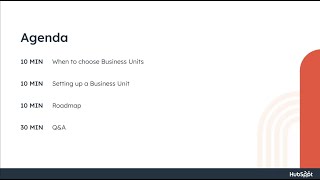
Yeah, thanks for having me and good to be able to talk to you all about business units before we dive in. Wanted to do a quick intro on me. So I am a product lead here at HubSpot. Joined HubSpot back in 2018 and spent about two years working in the email space. Did things like lists and contact properties for hard bounce contacts, reply tracking in email, things like that. So spent about two years working in the email space as a product manager and then in early 2021 moved over into business units to help with the basically launch and release of that product then and continue to kind of work in the kind of admin user setup, permissions or configuration space. So business units per permissions, users and teams. So you know, I know this session is focused on business units, but at the Q and A. Happy to, happy to handle questions there as well. I live in the Boston area with my wife and I love skiing in the. In the Patriots as a New Englander, Fun fact, I've been bit by a venomous snake and broken a bone in every major limb of my body for the last like four, four years or so. Knock on wood. I have been injury free, but I spent a good portion of my life being very injury prone. And yeah, I have a fluffy dog named Kimba who I showed on camera a second ago. I will say she is loud and she makes her presence felt and she will be getting picked up from daycare so she will, she will bark and interrupt the presentation at some point. So fair warning to you all. Yeah. So what are we, what are we going to cover today? So first we're going to talk about when to choose business units. Who is it a good fit for and try to demystify some of that. Just is business unit something I should be thinking about for me at my company versus some potential other options. You should go. The second part, I'm going to go into setting up a business unit and I'm going to do a live, highly unscripted demo. So I wanted to make it as raw and real as possible. So I kind of know that the tools I'm going to go through, but I do not have it very, very worked out. So I wanted you all to kind of experience exactly the steps that you would go through in a non kind of traditional, really scripted demo format. And then the last part, I wanted to kind of share some insight about what we're working on with business units through 2023 to give you a sense of the direction the product's going, the pace it's going, just to inform you all and then also maybe hear some feedback on that roadmap. And then I am going to also spend as much time as possible during Q and A. And I want to say throughout this presentation I've told Kyle and Indiana they can interrupt me at any point. I do not have a script. I am just kind of following rough talking points. So I'm totally happy to answer any questions as they come in. So yeah, let's get started. When to choose Business units. So let's first start with just who does business units target today? So business Units is a marketing hub enterprise only add on. So as such it is an add on that is targeting marketing in our marketing Personas. And it is really it's a good fit for those marketing teams who cover multiple brands or orgs. I kind of threw the orgs in parentheses there because I know like multiple brands doesn't always look the exact same way. You know, it could be distinct product lines or distinct services. There's a lot of kind of variations of that. But it's those kind of teams that cover multiple brands, multiple orgs who want a centralized marketing CRM. And I'll get into the kind of benefits of why you might want a centralized marketing CRM and those might become more apparent to you. But that's kind of our aim is to be a good fit for those companies that they can have the kind of top level organization and management of those brands in a single HubSpot account. Sean, I have the answer to your question and a little bit in the roadmap. So we'll hold that one. When to choose Business units, domains or multiple accounts. Those are kind of the different flavors that you can kind of choose if you're like kind of a multi org business. So let's dive in. Like, you know, when should you go to business units versus the domain limit increase, add on or multiple accounts. So the kind of lowest functionality and also lowest priced add on is the additional domains add on. And so that is a CMS or marketing hub enterprise add on. Actually with CMS Enterprise I believe you get 10 domains in CMS Enterprise. Don't quote me on that, but I'm pretty sure that's right. And that basically just involves getting a domain limit increase on the number of brand domains you can have in a single hub. So why might you want to just do the additional domains limit or the domain limit Increase you want to host brand content on separate domains. All those brands are kind of working under the same ownership and you're primarily maybe using CMS or website tools or it's really not critical for you to have that top level delineation of brand assets, reporting or contacts within your portal. But if some of those things are important in especially that kind of like top level delineation, or you're like a heavy marketing email user, you might want to start thinking about business units. And so I kind of think about the difference between the domains. Limit, increase add on to the business units. Add on is kind of just a Pokemon upgrade of sorts. So business units was what we kind of evolved the original add on to become. And it is like I said, a marketing hub enterprise add on that allows you to market manage multiple brands from within a single HubSpot account. So kind of key differentiator there versus going multiple accounts. I would say that the main reason a customer customers typically land at business units is I have distinct product lines, I have distinct brands and I need to have separate emails for each of those. And I need those emails to be distinct all the way down to the subscription subscription types and subscription preferences for the contacts we're emailing. So if I send an email to Jake from Toyota, I want Jake to be able to go in and manage his preferences and unsubscribe from any of the Toyota subscription types. And when he clicks unsubscribe from all, he is unsubscribing from Toyota, but he is not doing anything to his subscriptions that are for Lexus, let's say. And so it's that complete isolation of your kind of emails, your email preferences from within one account. Another reason you might really consider business units is if cross sell or upsell of your contacts is really important. And the reason is by having that centralized CRM you can gain the insight on your contacts across those brands and look for opportunities to arm your sales with to kind of inform your marketing efforts to kind of get that upsell and cross sell. And that's really where you see a lot of the benefits of that kind of single centralized CRM. Another reason is if you want to have a lot of reusability of any of your assets, your marketing campaigns, your workflows, your lists, and there's a lot of opportunities for repeatability. That's another great reason to choose business units. So yeah, those are kind of the, I would say the top reasons to consider business units. But there is a consideration of I definitely take all those boxes but what about multi account core business units? So you definitely want to choose multi account over business units. If you start running into really stringent legal or compliance restrictions between brands and what I basically often say is like it's basically firewalls. If you need firewalls between let's say your sales team from business unit A and your sales team from business unit B and they, and they maybe have some amount of contact overlap, but you need that end to end data isolation between those. You might want to start thinking about multi accounts as a alternative solution there. And I kind of noted there kind of contact data shouldn't be shared between the brands. You can't have any data leakage between those. The other like most obvious one is if you're a company that has the need to kind of host data in different geographic regions. Because business units is, is in a single account, we can't have like a business unit in North America and a business unit in like our EU data center. Business units have to be within one data center. And so if you're wanting to do that, that's a very obvious, you know, go multi account. The independently owned companies. The reason I kind of put that one in is because if you have distinct marketing teams, distinct sales teams, distinct service teams, business units start to become a little bit like less of an ideal concept just because you know, you're trying to provide that level operations, they're not going to have a separation. The operations are probably pretty distinct if they're independently owned companies. And so I think that the basically benefits of business units would start to be, you know, not as beneficial from the downsides of being able to provide that end to end isolation of those end to independently owned companies. The other one is marketing operations. So what I mean by that is if you need distinct sets of properties per brand, if you need the ability to have a life cycle stage per business unit, if you need contact engagement properties per business unit, that's not supported in business units, it probably never will be. And so if you need like distinct operational data per brand, that's another good reason to start thinking about multiple account. So those are some of the kind of considerations and things I would be thinking about if I was looking at business units, kind of who we're targeting, kind of customer that we're going after. So yeah, let's get into actually let's take a look at what it looks like. Kyle, Diana, anything yet you want me to answer?
I think you can keep going.
Okay, so let's dive into setting up a business unit and I'll kind of also talk about two concepts that I frequently get a lot of questions on. How does the account Business Unit work? Business Unit deletion. And then I'm going to quickly run through an example customer implementation. And again that will be really, really high level but just kind of a recommendation about what to think about if you're maybe multi geo, multi brand and setups that I've seen be be most successful. So yeah, let's dive into creating a business unit. So I'll show you Business Unit creation, setting up your website, domains and email subscriptions types by Business Unit. And what I want you all to walk away with from this is Business Units is incredibly easy to set up. It was funny when we first launched Business Units I was the product manager. I was sitting there, I was like can't wait for a customer to get through it. But it took like two weeks before the first customer actually got through the creation process. And it was, it was then that I realized oh like people think that Business Units is going to take a huge amount of time to set up. And I get it right, it's like kind of an expensive add on. You kind of think about it, it's going to change the entire behavior of your account. And so it took, it took me a while to realize okay, it's not. Customers don't understand how actually easy it is to get started and get running with Business Units. So that's kind of the message I want you all to walk away with here in the demo. So I'm going into a hub today that has the Business Units add on buhub demo. And I don't have any Business units set up in this hub today. So where I'm first going to navigate is into the settings area. So I'm in settings along the left hand nav in Account Setup. There's a business Unit tab here, so I'll click into that. This is the kind of main splash screen which is some initial information and I'll go ahead and continue into Business Units. You'll notice that you have a first current view. This is the account Business unit. And I'll talk about kind of the behavior of the account Business Unit in a second. But let's go ahead and create our first business unit. I'm going to go ahead and call this one Demo Spot and I'll go ahead and hit create and I now have Business Unit Demo Spot. You'll notice I have two. So if you buy one Business Unit you're basically now have two within your account. You have Your original account Business unit and you have Demo Spot. The first thing you'll do in kind of initial setup is start looking at things like your brand settings and so you can manage your brand kits by Business unit. We can do different integrations by Business Unit. And note that the only one we support today is Zoom and so Zoom is the only one that we have multiple instances that you can basically group by business unit and different cookie policies by business Unit and you can link out to there and do the easy setup. But the one that I wanted to demo today is website. I'm going to do a little teaser really quick. I know this isn't the roadmap section. We're working on the ability to do users and teams by Business unit. This isn't an alpha, it's in development. Just happened to be in this in this hub, but wanted to kind of show you that we're kind of moving in the direction of being able to group users and teams into business units to do some amount of permissioning there. So in development coming soon to a hub near you. So let's jump into the website. So this is kind of the first place you'll start. We'll go ahead and launch out into domains and URLs. I'll go into the Business Unit account here. So this is the Buhug demo account. When you first turn on Business units, all your existing settings, assets and data exist within your account Business unit and you can start basically moving things across. So I'm going to go ahead and take this Demo Spot. Brandon, change Business Unit. Boom. Boom, done. And now all of my connected domains that correspond to the Demo Spot brand domain have been moved over. Easy as that. I'm now going to move over into marketing. Specifically from an account configuration standpoint, the thing you're going to be working on here is the email subscription types. And that's the part that I'm going to demo today. And you can see I don't have any right now configured for Demo Spot, but I do have a few configured for my main account Business unit. So let's go ahead and jump in there. So again, when you first turn on business units, everything exists within the account Business unit and you can start moving things into or creating new things for that new business unit. So in this case I'll go ahead and go actions move to Business Unit, Demo Spot and boom. My now have my email subscription types grouped by business unit and that's basically it. That's the account configuration that goes into setting up a business unit. Super easy super straightforward. And then that setup will now start dictating behavior in the app. So let's dive into a few examples. I'm going to kind of highlight the marketing email example. So you can see I have an initial email here. Again, because I just turned on business units, any of my existing data will belong to that account business unit. Now I can go in and create an email. During the email creation, I'll choose which business unit it belongs to. Belongs to Demo Spot Boom. Email created. Choose a template. I'm off and running. And the kind of key behavior here that we're looking at is the subscription types kind of highlighted right here. You can see that the only subscription type I can select for this Demo Spot email is the Demo Spot marketing subscription type. And what this will do is basically as I send that email out, kind of connecting it back to the subscriptions configuration, when that email lands in a contacts inbox and they go to manage their subscriptions, it will pop them onto a subscriptions page that will say Demo Spot and they'll be able to unsubscribe from the subscription types that are relevant to Demo Spot. They would not see the other business unit subscription types if they clicked unsubscribe from all. Unsubscribing from all would unsubscribe them only from Demo Spot and not any other business units. So yeah, that's how the email behavior works. And you can see basically I have all of my data on the indexing page labeled by business unit. I can filter through and see the emails that are relevant to Demo Spot or the real email emails that are relevant to this business unit. If I go into my reporting, my reporting is now filtered by business unit. And that is true for both the health and analyze tab. I don't have any data here, so I can't show it. And then let's also go look at a fun behavior of forms. So if I go into forms, you can see my existing forms grouped by the account business unit. I'm going to go ahead and create a new form. Going to do Demo Spot boom start and I'm just going to skip all of these steps and hit publish. Great. And then I'm back to all forms. No tourists for me. And yeah, so here's my Demo Spot form. I'm going to go ahead and view my form. View form. Really quick kind of jumping back into here. What you'll see is I have two contexts created today. This is a brand new hub, so there's no data in it. I'm going to Go ahead and submit this form again. This is a demo spot form and we're going to hope that HubSpot and Jake's demo works well today I'm going to go ahead and submit this form and as that goes through, hypothetically what we should see is a new contact created waiting patiently that will say Jake Leonard and it's automatically labeled for the correct business unit. So just example behavior of how things work in app and I can go through and take my existing contacts and start labeling them by business unit as well. That property for contacts is available across workflows and lists to kind of label your data. So a lot of times when someone, someone's kind of setting up a lot of configurate their business units within their account, they'll go into workflows and they'll start, you know, flows that say contact added from this source labeled by this business unit X, Y or Z. You can kind of imagine that you all know HubSpot potentially better than me. But yeah, that was a quick run through of business units.
We're getting a couple questions here about contacts being attached to multiple bus. Is that that allowed and if so, what happens?
Nothing right there. Just did it. Business. Yeah, contacts can belong to business multiple business units. And then I'm just going to riff for a little bit. Basically the idea here is that a contact can belong to multiple business units. When we introduce permissioning. If I said Kyle is only in demo spot, Kyle could see then the contact Jake Leonard and Maria here but he would not see Brian. And if I belong to the bu hug demo business unit I could see Brian Halligan and Jake Leonard as my two ones there. So yes, contacts can be multi labeled per business unit.
Cool. And then a question that came in when you were first setting up the business unit. Is there a limit to how many business units you can create?
So business units is a like.
Per.
Like per business unit that you purchase is how many business units you get. And so you can purchase up to 100 business units. And so that's the limit today. Yeah. And so right now I think this hub has 10. So if I went through and I created 10, I would hit that 10 limit.
Cool. I think that's good. We, we've, we've a few different people have mentioned Salesforce integration and how that works with business units, but that's something. Maybe we'll circle back to that at the end.
I don't know. Yeah, I can answer that one quickly. It comes up quite a bit. So I think it comes up in two contexts like if you know I'm using HubSpot for my marketing and I have like a Salesforce integration bringing in contacts. I believe I haven't done this myself but my, my understanding is that you can basically in the sync between the two, you can just write to the business unit property on the contacts during import and you might just need to do a property match of some sort in that salesforce sync. The limitation that exists today and that often gets asked with business units is if you have multiple Salesforce instances and you want to connect three salesforces to one HubSpot, can you do that with business units? And the answer is no. The only integration that we support multiple of is Zoom today. But that one is definitely one that has come up quite a bit. I'm seeing a lot of road mapping questions. Yeah, I think definitely get, definitely get there. Yeah, I'm going to move on and just keep, keep going here. I wanted to kind of highlight the behavior of two things. One is Account business unit. So I kept mentioning the account business unit in this demo. The Account Business unit was the Buhug demo account. And basically that is like the first business unit that is created when you business units is added to your hub and the name is pulled from the account defaults account name. Here a note, today you cannot change that name. We are working on the ability to change that name. So you might be able to actually rename that that within business units. But just a note, that name is today pulled from the account name and can't be changed. As I kind of mentioned in the presentation, any existing or unleveled data and settings in a number of circumstances is automatically grouped into the account business unit and you can move it into the correct business unit. Kind of showed that with contacts, showed that with brand domains, I showed that with subscriptions data some existing data can't be moved. So so existing forms or existing emails can't be moved from the account business unit into a new business unit. The reason from that just being completely transparent is that there are just reporting limitations. You know, when you send an email, you know you send an email to a million contacts. Let's say there is so much data that gets generated below that email that is basically not impossible for us to say let's relabel all that data per business unit. And so there's just, there are some really, really hard technical challenges to like move have the ability to move forms and email data across business units. So I wanted to just mention that because I know it's a pain point it's not one that we took lightly. It was kind of a hard decision and we kind of poked at different ways of making that easier. That was why we introduced kind of the clone across business units, but wanted to just kind of be transparent. I know that's painful. We've thought about ways to improve it, but it is kind of one of those like potentially unsolvable technical challenges for us. The other thing I wanted to mention is that business units or this business unit, the account business unit, can't be deleted. And outside of those differences, you know where the name comes from. The existing or unlabeled data belonging to the account business unit. It is basically just the business unit like any other business unit that you create in your account. So that's the account business unit, how it behaves and how to think about it as an admin setting it up. The other one I want to talk about is business unit deletion. Again, what we're aiming for here with business units is simplicity and giving you that kind of high level brand separation. And that goes on all the way to business unit deletion. You know, why you deleting a business unit, Maybe you're doing a brand merge. I've run into a lot of customers who are, you know, they've acquired a new company, they want that company to exist for two years separately with the intention of solely combining operations. This is designed to intentionally be very easy to do. And so it's as easy as going into business units. You go into the business unit, you want to delete actions and delete and all you do is type the name there and delete it. Any existing data, assets or settings are not deleted. They are moved into the account business unit. And that's kind of the biggest question that we always get is like, what's going to happen to my business unit data when I delete the business unit? It is just moved into the account business unit and it will exist there. And then the other question that often comes up is what happens with the subscription data. So if I were to delete that business unit, the subscription types are moved into the account business unit. Opt outs to those subscription types are kept. So if Kyle was opted out of Demo Spot Marketing and we deleted the Demo Spot business unit, Kyle would still be opted out of the Demo Spot marketing subscription type. However, if Kyle was unsubscribed from that business unit, that business unit unsubscribed from all is not converted to an account business unit. Opt out unsubscribes from all are isolated per business unit. And that is the one thing that I would say hey, make sure you, you know, if you're deleting a business unit, merging things, look at those contacts that are unsubscribed from all from a business unit. And if you need to keep those whole as you kind of delete the business unit and move it over, make sure you're kind of capturing those contacts that are opted out from all and make sure you're, you're kind of doing that via like an opt out list or something like that. So yeah, just wanted to highlight the subscriptions behavior there. Yeah, that's business unit deletion. And the other thing that I often get asked is, you know, I'm a multi brand, multi geo company, what's the right way to think about how to use business units? I would say business units as I kind of shared at the beginning is something that's oriented around top level brand distinction. And so that should be mostly the starting point. And so if you kind of wanted these companies this is kind of the configuration about how things could interact between so business unit A, you know, brand, product line, whatever. And then you have your marketing teams and then eventually a marketing team could exist in multiple business units. And so what you could imagine is you're saying hey business unit A and then I want to limit the access of the data within business unit A so that just the North American, the marketing team sees the, the data and assets and stuff that's relevant to them. So this would be kind of a configuration there and how to think about it. There are customers that use business units for multi geo. It's not specifically designed for that. And so there are some limitations except especially around brand domain separation that kind of make it a little bit more complicated. But you know, like I said it's mainly a way to kind of distinguish top level brand or product line product lines within an overall account.
Perhaps related to that. Jake, a question we got kind of near the beginning is about data centers for multi geo. So I know EU users are required to think about where their data is stored. That to me feels like probably not a business unit solution, more a multi account solution.
Yep, I think that's right. Okay, so I see see Michael asking about business units 101. I definitely have the curse of knowledge from business units now working on it for two and a half years. So I tried to give the 101 for it. I, I would say if you want another supplemental training I'm going to call out this new academy lesson that Just, just went live from Kara. Kara's great. She put together a wonderful academy lesson there. So I think maybe Kyler or dn, if one of you can share it in the chat, gonna point you there for some additional supplemental learning. I think that would be a great way to kind of reinforce everything that was kind of shared. She goes quite, quite a bit deeper than I did. So yeah, I am going to now dive into what is planned for 2023 with business units and I think this is, you know, kind of goes without saying but you know, do you need to kind of say it? This is a forward looking statement. These statements and the things I'm going to share are not intended to be a promise or guarantee of future availability. Just trying to be transparent about the things that I'm working on with the product development team and the things that we're hoping to deliver. Plans are great, but as we probably all know, plans change quite substantially. So this is a statement as of today about what we're working on and we assume no obligation for anything that I'm sharing here. But just wanting to be transparent and open with kind of what we're working on and get really into the nitty gritty about what I see as important based on all the conversations I've had with customers. So for the roadmap for 2023 there's kind of three main work streams. The first one is the CRM and platform tools kind of more broadly adopt business unit support. And so I want to call out the screenshot I'm sharing here. What you're seeing here is the sub account navigation there where you click on kind of your account name. What you can see here is a business unit picker. At the beginning she would bark. She is now interrupting. I'm going to go ahead and pause for a second as promised.
Just a note to everyone while we're paused here. If we have a Q and A tab, we'll be circling back to that here after this section. You can and also upvote questions that are already there and we'll work through them most upvotes to least upvotes. So hopefully that's helpful to everyone.
Thank you Kyle for filling the silence. I appreciate it. Yeah. So as I was saying so today and I'm just going to go back into my account basically today business unit exists at the app level. If I'm creating an email I'm creating, I'm choosing which business unit belongs to then navigating into the analyze tab, I'm choosing which business unit data I want to look at. We want to elevate the concept of a business unit to be a higher level sub account like concept where you're choosing the business unit that you're working in and you're choosing that context at the top level. And what that's going to do is that's going to do things like dictate, you know what data you're looking at. When you go to the contacts page it will kind of, you know, filter down to only the context of that business unit. It will dictate when you're going through the create email flow will automatically choose that business unit. It's going to also be kind of tied in with permissions. So again Kyle, sorry to pick on you but like let's say Kyle only belongs to Lexus. Kyle will only be able to ever see Lexus within here and now his whole account. The tools that support business units are automatically filtered by business unit and you're limiting the data that Kyle can create as well to only be relevant to Lexis. So this kind of first step here with the nav bar is one of the steps that I'm most excited about. It is really kind of leveling up the business unit add on. The second one is we're going to continue to go across marketing hub features and tools and adding business unit support. And then the third one, subscriptions view enhancements. Someone asked basically about, you know, some subscriptions work with customized preference pages. I'll speak to that when I get into the specifics there. But yeah, we know subscriptions is important for business units customers. So we have a few things that we're working on in that world as well. What you will see from these three work streams that there's no call outs to any sales or service hub features or tools. That is a specific omission for this year. We're not focused on business units and extending that into the sales and service hub features. So to get even more fine grained in terms of how that roadmap looks, these are the platform tools that are supported today in our plans for extending them. I'm just going to go through really quick in Top level Nav. I demoed that, I showed that what's planned there, we're planning on adding business unit permissioning lists and workflows. I included it here in the platform tools but it basically came up because we were like, we know marketers love lists, they love building lists workflows. It's so core to them. So those were ones that came up as kind of key marketing hub features. That we wanted to make sure that we had planned for to add support. And on the CRM side the plan is to extend that kind of property to companies, deals, tickets and custom objects. Theoretically it is easy enough for us to add it to products, quotes, activities and forecasts, but we are just taking it slow, taking it one step at a time. So it's possible that those are in but I wanted to not promise them. So those are the things that are supported on platform tools and CRM. And I know that I said I wasn't promising at the beginning, so me saying not promising there does not imply a promise. And these are the features that we're planning on the marketing hub side, these are this is what's already supported today. We're planning on adding in ads and social support and then we are not planning to do anything with the file manager or CTAs. And then on the subscription side I want to get really granular here because I get a lot of questions. So subscription types of business unit I demoed that talked about how unsubscribed or opt out from all our business unit isolated and we have a dedicated subscription page per business unit. So what that means is when a contact clicks manage subscriptions it pops them out into a dedicated page per business unit that only contains subscription types per business unit. However, this page can't be customized. It is a default HubSpot template and so the one there that says custom subscription pages that is work that we are doing this year. But I want to note it's in our 2023 plan. I don't think it's going to be delivered this year. We're starting work probably in the in Q3 Q4 time frame. It's actually a larger work item and so it's not likely to be delivered until 2024. But I wanted you all to know it is top of mind. We've heard your feedback. We are looking at how we can get it addressed. Good news Resubscription so we have four resubscriptions in I think it's a private beta. I don't actually I'm not the PM that owns that but we do have a private beta for resubscription by business unit reach out to your CS rep and you should be able to get request access for that one. So that one is already in alpha or private beta. I forget which one. But yeah, two kind of notable ones on the subscription side double opt out and sales email subscriptions not in plan for 2023. So yes that is the roadmap for 2023. I said that I would give 30 minutes, but only have 20. So I'll do my best to get, get through as many as possible.
Yeah, so we're gonna head over to the Q A tab now. Like I said, I will sort them by upvotes as I serve them up to Jake here. So everyone, if you want to look, look through the questions that are there and upvote your favorite ones. That'd be helpful. Jake, the first question is, is there a way to segment email stats reporting per BU so a new unit does not adversely affect averages across the group of companies?
Yes, I think I demoed that one.
Yeah.
Just briefly. So yes. Yeah, there's the business unit. Reporting is broken out by business unit in the analytics in the health account. I didn't know if you're maybe talking about some of our internal kind of tools there or if it's like dedicated IP per business unit. I'd say we don't have dedicated IP per business unit, but that one has come up quite a bit. Something we might do in the future, just not on the 2023 plan.
Cool. I worked with BU before and I had a hard time managing the lifecycle stage as it is a shared property. I wish you can discuss about it as it was a nightmare. So life cycle stage is one you called out specifically at the beginning is that's when you need multiple accounts, huh?
Yeah, I think, you know, it's so trying to figure out best way. So you know, I'm not a political person, so I'm not gonna give you all a political answer. I'm just gonna give you the raw truth. So it is, it is extremely challenging, nigh impossible for us to basically support every single default property that we have to have multiple per business unit. It is possible we might support like a single property to have multiple instances per business unit where you could have like a life cycle stage for Lexus, a life cycle stage per Subaru, lifecycle stage for X, Y or Z. The issue is that there's a lot of downstream tools that rely on lifecycle stage. You know, default reports, things like that. So it's like the rollout and subsequent like linkages are just really challenging. And we also can't ever support all, all default properties. And so it's one of those like product decisions that is like it's tough to know exactly kind of where to go there. And so we're, we're still evaluating kind of best path there. I definitely have heard the feedback on lifecycle stage. I Know that one's kind of the most painful. I have heard of customers doing a workaround where they will create their own custom property to manage lifecycle stage and then feed that into their kind of contact views or lists or reports or workflows. So I've heard of companies being successful just kind of doing their own custom one there. So that's something to consider if you are running into issues with a high amount of contact overlap and needing distinct lifecycle stages per.
And what could possibly be wrong with having three different lifecycle stage properties? Great.
Thank you.
Business units only affect Marketing Hub but if you want to cross sell upsell, wouldn't having business units affect Sales Hub be helpful?
Yeah, I don't disagree with that feedback. It was a consideration that we we thought about whether to go down the road of Sales hub support for business units this year. Like I said at the beginning, we decided to just focus on kind of the marketing marketer use case across sell an upsell for marketers and that's why we just did not we decided actively not to do Sales Hub. That that is not a statement forever I would expect. Again go go back to the statement on future facing statements. It's not a promise. I would expect us to in future years add business unit support to sales and service hub tools. Cause I've definitely heard it for them, you know from feedback from customers with it. So I agree with you. You know it's just sequencing the workout at an appropriate pace.
The first thing I learned in this session, day one of your very first slides, you said business units is an add on specifically for Marketing Hub enterprise. I. I did not realize that. I thought it was if you sort of like custom objects, if you have.
Any enterprise you can add on business units.
But understanding that it's tied to Marketing Hub makes all this make sense to me in a way that it didn't before. And so I as long as that packaging remains I think it no one.
Can fault you for that.
We have units who have different privacy policies. Do business units let you easily host different policies and email footers? Customizing the email footer is partly a setting. Already an email footer pick your office location and business units let you pick the different preference center. But what about the consent and privacy policy text?
No. I think so. Yeah. Like you said you have different email footers, you have different cookie policies. But some of the consent options like you know you can't have different double opt in settings per business unit or things like that. So I think the answer is no. Today on that one. Okay.
Will there ever be an option to have business units by subdomains? We have an overarching umbrella brand domain with multiple brand subdomains.
Yeah, great question. This one is another piece of feedback that has come up a ton. We almost had that one in scope for this year but did not add it. I think that that one I would imagine is on the roadmap at some point in the future, in the next like year and a half, two years. But not. It's currently not on. On the 2023 plan. So yeah, I definitely in. In like when I mentioned the product line ones oftentimes, you know when it's like a product line versus a multiple brand. Yeah, I've seen a lot of those where they want to delineate at the sub sub domain level.
If a contact belongs to multiple business units, will all of their sales activities, calls, email notes for one business unit be visible to the other business units or can those be viewable permission based.
On teams so that is a question that comes up a lot just broadly in the realm of permissions. We are investigating today how to add activity timeline permissions. So if Kyle and I worked on or Deanna and Kyle worked on separate sales teams in those sales teams maybe had the same contact and you're both emailing them. How do I make sure that Kyle can't see Deanna's emails on that contact record or any activity that they've had a call that they've logged? Notes, stuff like that. That's what that question is referencing. So I think that we will eventually add activity timeline permissioning so that you can say Kyle can't access activity that's not relevant to him or his team, but that is not there today. And I think that would be one where if you're trying to implement HubSpot today and that's an absolute requirement, that's kind of the firewalls thing I talked about in the beginning. You're probably going to want to start with multi account. Cool.
It is my understanding that you can clone items from one business unit to another. Is there a way to mass those select and clone copy to a business unit or is it one at a time? The intent is to use the formatting and content to simply revise content to be customized for the business unit content.
I don't know about mass select. I haven't done that. I think it's just one at a time with the clone feature. I don't think that there's. I don't think this ability to mass clone over Business unit.
Yeah.
Or yeah, clone. Clone the entire business. Yeah, that's interesting. Kind of like speed, the account setup, business unit setup experience. Like I want all of these like templates or these. Yeah, no, we haven't, haven't investigated that, but it's come up in other contexts so it's definitely interesting. Interesting feedback. No response today, but yeah, no, I appreciate that feedback.
It makes me imagine almost like the process for creating a sandbox where you're like, yes, I want the workflows and.
The emails and this and this and.
That, but not these ones.
And then yeah, totally. And it comes up in another context too, which is like, you know, multiple accounts. Like I've, I'm bringing in a new business or I'm starting a new thing and they do have the different firewalls. I want to clone this entire hub and have that be kind of a jump off point for setting up that, that new business entity I'm bringing in. So that, that one I've definitely heard, but I hadn't heard it in the context of business entity units.
How do business units work with sales pipelines? Eg, assign a sales pipeline to one business unit. How would you manage this?
So not a thing, right? Not. Not a thing. Yeah. Yeah, I think that I haven't, I haven't played with sales pipelines in a hot second, but I imagine you can maybe do some filter criteria based on the contacts, business unit property or something like that. Yeah. Oh, interesting. Yeah, I haven't played, I haven't specifically played around with it, but I imagine you could maybe use the contact property.
Yeah, that'd be a fun thing to play around with. I'm not gonna take a stand.
I ramble live.
But I, yeah, I think things could be maybe done. If I'm a franchiser with like 200 stores, what would be the best way to set up HubSpot? I thought BU would be the best choice, but the limit of 100 doesn't help.
Yeah, franchises is a tricky one, not gonna lie. I would say franchises is a better fit for probably either multi account or leveraging teams. I think you can probably provide a degree of isolation within the tool based on teams to do, to do franchises. So it would just, I, you know, not knowing kind of the requirements, I, I would probably look at, you know, single account with teams as the way to separate the franchises or do multi account per. Per franchise makes sense.
I'm thinking of like, you know, McDonald's or Subway or even like Ace Hardware or one of those. Like, I think the branding would probably stay pretty much the same site to site.
Exactly.
So I wonder if if like teams.
And.
Field level permissions and stuff would be the thing.
Exactly, exactly.
We've got just a few minutes left here. I'll keep asking these questions. Deanna, do you want to drop the survey into the chat so people can give us some feedback? Keep an eye on the general chat pane there, friends. We would love to get your feedback on this session and any requests you have for future sessions of the HubSpot admins Hug. That link is now in the chat. I'll keep working through the Q and A till we run out of time. What happens if a contact is owned by multiple BU's? So I feel like we did that one live. Is there anything else you want to say about that?
Nope. Contact can belong to multiple business units. Theoretically that would mean that, I mean business units doesn't have permissions today, but if it were to layer in permissions, you know, if a user or team was assigned that business unit, they'd be. They'd have access to that contact. I could see kind of going back to the timeline permissions, I could see us getting to a point where we do have like business unit associated timeline activities. So like you can only see timeline activity associated with users or teams assigned to that, the same business unit as you and not other business units or something like that. That world is still kind of very much in the being fleshed out mode. So yeah, that's the only thing I'd add.
Can you explain where you go to create different branding per unit?
Yeah, that is from the main business unit page you click. I can just probably, I can probably just share again. Yeah, just share. Why not? Alright, so from your main page here go to business units manage brand kits and I can go ahead and go into demo spot and create a brand kit and from here I can start putting in logos and colors and themes that are unique to that business unit and then that will kind of inform kind of color picker icon favorites and things like that when you're actually creating content across across the tool.
Cool. I think we'll make this next question our last one. We need a way to assign a contact owner per business unit so that meetings associated to one or the other bu would get booked with the correct owner. Is this planned or is there another workaround?
Yeah, good question. That one's top of mind for me. With, with contact ownership and kind of implicit, we assign permissions based on contact ownership. For those of you who kind of aren't, don't Understand that question. Basically the way permissions works with contacts today is you assign a single owner and then a user can have owned only or team only. And a team owned permission means that you have access to contacts that assigned to you or are owned by anyone on your team. The issue with that is because there's only a single owner kind of dictates a lot of subsequent behavior. Yeah, I don't have a good answer for you today, but I don't know who left that question. I would love to get like a community forum going on customers that struggle with like this single owner contact permissioning and just understand the different workarounds and pain points that exist with that. So, you know, you can probably find me on LinkedIn or something like that, but I would love to get a community forum going and chat more about the different pain points associated with single contact ownership because I think we could probably be doing something a little bit, a little bit better there.
Great. Yeah. So everyone, if you're not familiar with ideas.HubSpot.com that's a forum where you can suggest ideas to HubSpot. You can find your idea suggested by someone else and upvote it. And the product teams really are very good at monitoring those and building things based on what's happening there. For Jake and others to be able to see what your current workaround is like, what you are trying to accomplish, it helps them make sure that the tools are built to actually meet your needs. Definitely recommend checking that out then. Jake, you anticipated my next question for you? Sounds like maybe LinkedIn is your preferred platform for people to connect with you. Is that accurate?
If. Yeah, friends. Yeah, you know, if people want to be friends. Yeah, definitely. You can reach out to me on LinkedIn. Happy to connect. I'm happy to kind of share my email. I don't know what the best way to do that is. I would say like, again, I'm a resource for like hearing feedback things are struggling about. Just don't use me for like support questions and things like that. You know, we have our channels for that. But I love connecting with you all and hearing about, hearing about your struggles with HubSpot. So what? Love to to.
There are about 30 unanswered questions in the Q and A right now. So if you want to drop an email address or your LinkedIn or whatever into the chat, I, I think you would get a lot of uptake on that offer.
Okay. Yeah, here's my email.
I have those unanswered questions in a.
Doc for you, Jake, so no worries. For sure. Yeah. Grab my email. You can shoot me an email. Happy to connect with you all and listen to feedback or different struggles that you all have. Whoever left the question on the contact owner, ownership one definitely would love to connect with you and maybe get that community forum going and I'll jump in there and maybe we can see what other people are struggling with. Yeah. So reach out to me. Great talk to you.
Well, thank you so much, Jake, for being here. Thanks everyone for showing up. This is a big event. This is a good one. And I'm going to go ahead and end the recording and shut it down. But everyone have a great day.










