Capacity Limits and Skill Based Routing in the Conversations Inbox | Admin HUG | March 8, 2023
Jen and Bianca walk through HubSpot's new capacity limits and skill-based routing features for live chat agents in Service Hub. They demo how to set agent capacity, assign conversations based on skills, and explain what's coming next on the roadmap.
It works. Okay, we're recording. Awesome. Everything's going so well. Thanks everyone for being here. This is an event of the HubSpot admins user group. I'm super excited to have Jen and Bianca here today to talk about some hot off the press service Hub happenings that are really going to change the way you think about this suite of tools. Without further ado, Jen, are you starting? Should I hand it over to you first? Oh, sorry. Quickly. Q and A is turned on. We'll be monitoring the chat too. As you have questions, just share them. Q and A is kind of for. We'll circle around to those at the end. If you have in the moment thoughts, put them in the chat and we'll be monitoring those and answering them as we find the space to do so. Now you can go, Jen.
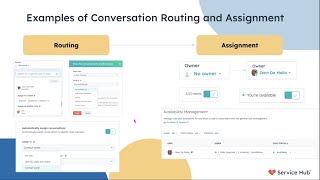
Sorry. Oh, Kyle's sneaking in here. All of the above, maybe. Awesome. Look at you guys. I see you all honing in on the fact that it says to build enhanced routing in number three. And you're not wrong. But to Kyle's point too, we touch a little bit of everything else too. When you think about routing an assignment, that's across channels. When you think about a help desk, that's the marriage of tickets and inbox, that means ticket routing. We. Which we are also involved in. So yes, it's number three, but technically it's all three. Awesome. So let's talk about what routing and assignment is. Today we saw what our goals are. We saw the North Star. We're going to take a step back and just talk about where we are now and how we're working to meet those goals that we saw a minute ago. So when we think about routing, we think about it as two separate pieces. We first think about routing and then we think about assignment. So if you think about routing as the rules that dictate where a conversation goes, this could be based on an inbox. This could be based on a specific set of seated users or teams. This is where I say, okay, these people can take a conversation that looks like this. The assignment side is looking at that group of people and saying, okay, who becomes the owner of this conversation in an assignment? That can be based on availability, that can be based on rotation. We have things that are automatic assignments, which means it goes through an ingenuity. So let's talk about where we're going in 2023. So Service Hub's goals in 2023 are really focused on delivering efficiency and connection across your customers, your agents and our. One of the first things we're driving towards is a better agent experience with a new help desk. This is a ticket centric workspace that is a wonderful marriage between tickets and inbox and with the intention to have faster resolution times of your customer issues because your agents are just much more efficient in that space. Another piece that we are focused on this year is delivering more native channel offerings within Service Hub so you can meet your customers where they are. And then finally we believe we grow better together and that includes with our platform. And so to meet the demands of our larger SMBs and our folks that have larger service teams, we're looking to partner with automation and the CRM to deliver more sophisticated use cases sms. Sorry, I'm having fun with chat now. So my question to y', all, we're going to see who drank their coffee this morning, who's awake, who's kicking, who's in the afternoon slump, who's in the mid morning coffee break like Bianca. Where do you think routing fits into this? If we were to say help desk is one, channels is two, and automation is three, where do you all think routing plays? Where do we belong? Automation number three. Oh, Kyle's sneaking in here. All of the above maybe. Awesome. Look at you guys. I see you all honing in on the fact that it says to build enhanced routing in number three. And you're not wrong. But to Kyle's point too, we touch a little bit of everything else too. When you think about routing and assignment, that's across channels. When you think about a help desk, that's the marriage of tickets and inbox that means ticket routing, which we are also involved in. So yes, it's number three, but technically it's all three. Awesome. Let's talk about what routing and assignment is. Today we saw what our goals are. We saw the North Star. We're going to take a step back and just talk about where we are now and how we're working to meet those goals that are that we saw a minute ago. So when we think about routing, we think about it as two separate pieces. We first think about routing and then we think about assignment. So if you think about routing as the rules that dictate where a conversation goes, this could be based on an inbox. This could be based on a specific set of seated users or teams. This is where I say, okay, these people can take a conversation that looks like this. The assignment side is looking at that group of people and saying, okay, who becomes the owner of this conversation in an assignment? That can be based on availability. That can be based on rotation, we have things that are automatic assignments, which means it goes through an engine and we decide or there's direct assignment, which is one to one. And that's kind of how we think about our world. We've got the routing rules that say where it goes and we got the assignment that says who it goes to and does the actual assigning. So how this looks in the product is again with the routing side we see where we can change an owner and we can change that owner either based on teams or users or a couple different other facets. And then on the assignment side we see that magical moment where we go from no owner to. To an owner assigned to a conversation. Again, that can be based on seats and availability sometimes depends on the channel. And so we also tend to lump availability management in with assignment because generally folks use availability management to decide if someone is eligible for assignment or not. So if I flip an agent to unavailable, then they shouldn't be getting any assignments. If I flip an agent to available, then I expect them to be getting assigned. So we're going to take a little pause here. Anybody have any questions about that? Does that help provide some clarity around routing and assignment? It tends to be a very backend thing that happens. Not, you know, you don't see it happening on the screen. So we wanted to just kind of create some transparency around how we define it, how we think about it, how we break it down ourselves when we talk about it. Awesome. I'm gonna take a minute, take a drink. If you have questions, feel free to ask them in the chat. We're about to pivot into. What's 2023 look like?
Everyone likes the slides.
We told you Huge. Thanks to Bianca. Bianca keeps my head from going like this into nice concise little drawings. Is beautiful. Awesome. Okay, so let's talk about.
Sorry, one question just came in from Winkey here. Right now there is no way to assign based on users availability.
Correct.
For example, we have intern only works on Monday through Wednesday.
So there is no way to assign based on a user's business hours, which is kind of what I would equate that question to. You can assign based on availability. So like if you're trying to do a direct assignment, when you open an owner dropdown, you'll see that there's a green dot or a gray dot showing you that that user is either available or unavailable. But specific to being able to say, my intern is here these days a week and they work these hours and that's the only time I want them to be Flipped to available. That's not currently a capability in the product. It is something we are actively talking about within like a couple of our groups actually. So not yet is how I answer that. Awesome. Okay, so let's talk about what's coming for our group. And so going back to that kind of routing and assignment set of buckets, we are focused in improving both sides of that equation. So for routing, we want to start looking at skill based routing where we can match the customer's need to an agent with a skill. And so that's really helping get to the right agent at the right time. For the first time, fewer reassigns, fewer times that that customer is waiting to get an answer. And then on the assignment side, we're really focusing on helping customers manage agent workloads through capacity limits. So saying an agent can only take so much of live chat, for example, so that their agents don't get overwhelmed and the customers again, waiting a long time to hear back. So we're going to go deep dive into each one of these. We're going to do a live demo of capacity limits. As you can see, the beta is coming next week. We're super excited about that. So let's go ahead and get into that. Cool. So what is now available in Q1? I don't know if y' all have noticed the owner and the move to another inbox pages changed a little bit. This is kind of our first foray into new and improved routing features that we're putting out there. So we called this seamless conversation handoff. The idea here is we want to make it easier for reassignments to happen without having to go and ask, you know, another team, who on your team is available? Who can I get to? And instead just making it super easy for that agent that needs to reassign to do that. So as you can see, we've got a search function so folks who have lots of agents inside of their inbox can now quickly search for a team or an agent that they want to reassign that conversation to instead of doing, you know, the forever scroll that we all love. And then in the move to another inbox that used to be just toss it over the fence as unassigned and. And now you're able to have a couple different assignment selections as well as leave a comment. So the folks who get it on the other side understand and have some context to the conversation. So Cassimiro, you're asking if the conversation reassigned would also reassign the ticket too? We do have if the ticket's created as part of the conversation, we have usually the ticket owner set to inherit the contact or, sorry, set to inherit the conversation owner. So in general, those will sync. There are situations where they get a little bit out of sync. And with Help Desk, that's where we're really starting to close that gap much more. But it should generally sink in that way. So, Callie, great question. This is also something that's solved within Help Desk, where we're really looking to better sync ticket and conversation owners together. As part of the work that we did with conversation handoff, we didn't look to make any improvements to that kind of ticket. Owner is changed, make the conversation owner change, make sure they're always syncing together. That was not part of the conversation handoff work. That's more part of what we're doing with Help Desk. And so for now, if you were to reassign. Sorry, if you were to assign the ticket, it is unlikely that that will roll down to the conversation. Awesome. Cool. Okay. We're going to keep on moving. Feel free to ask more questions in the chat and the next time we pause, we'll go through those as well. Wonderful. So what's coming soon? Very soon. Like next week. I'm super excited. Can you tell? So, like I said, improvements to assignment. We're delivering global capacity limits for live chat agents. So the idea here count. All live chat agents will have a specific capacity that they can have for live chats. So if my capacity is four, my agents can take up to four live chats and then no more live chats will be automatically assigned to them. They are still able to directly assign either to each other or across inboxes. We didn't want to close that down in case there are some ways that you do your business. You still have that flexibility to do direct assignment. It's only in the automatic assignment of new conversation comes in. That agent that is at capacity will not be assigned that conversation. So, as you can see, we've got private beta coming up. I'm going to do a live demo of that. And then we have public beta coming in April, and then we'll have our go live in May. And this is available for our service hub, Enterprise Group. It does have seats required. All routing. All automatic routing needs seats. We can't route to unseated users unless it's direct assignment. So this follows the same seated pattern you see of all the other routing. There's nothing new or different here, but we just want to call out the. You do require a Seat. Awesome. Okay, we're gonna demo. I have a recording because we all know live demos are very dangerous, but we're gonna do it. Who's ready? Awesome. I went too far. Make this small. There we go. We're going for these guys back here. Doot to doot. Anyone who has tested conversations know you end up talking to yourself a lot. So that's what those three windows are. Alrighty, so as you can see, we're on account defaults and I'm under user defaults. So under the user default screen there's a new section called capacity limits. The toggle is off. So if you're concerned about being a service hub, enterprise customer and this just automatically turning on for you one day in May, don't worry, it's automatically off to start so you can toggle it on. And you'll see that we have a default here of three. So that means when an agent has taken three active live chats, the fourth one will not route to them automatically. For purposes of the demo, I'm going to set this down to two so that I don't have to make four or five conversations come in. Alright, so we've set that to two, that sync to all the users we have in our portal that are in the inbox. So the next thing we're going to do is go into the inbox and I just have a super clean one. So there's nothing here, it's all empty. I'm the only agent here and available in this inbox. So what you'll see is everything will start to get assigned to me and then it will no longer be assigned to me when I'm at capacity. Awesome. So we'll start a little conversation here. We'll say, hello, number one, this is our first conversation and you'll see that comes in that is automatically assigned to me sometimes, I promise, not the corner of the code that we own. There we go. Alrighty. So that's conversation number one that is active in part of what I'm doing doing as an agent. Here's hello number two. Conversation number two coming in and being assigned to me. This is all the automatic routing of that inbox. It's set to assign to my team. What you'll notice is now that I have two, which was our capacity limit, I have my little green dot for availability has flipped to a yellow triangle letting me know that I'm at capacity. And I have this tool tip here that tells me I'm at capacity. Okay, so when that third conversation comes in, oops, number Three, we're at capacity. Oops. That does not get assigned to me. That gets pushed into the unassigned because there's no other available agents in this inbox right now. I can still come and take this conversation. I can directly assign it to me if I need to, even though I am at max capacity. Again, this is a way to let you have flexibility. We didn't want to lock that down at first blush. Now I am the owner of three different conversations. If I go and try and kick this out to the team, it's going to come back as unassigned because I'm not available, but at max capacity. So, again, I can grab this one. Come over here to my assigns. Here we go. And so as I start to close these conversations, I'll close one. All right, that one's closed. If I go and assign this, I don't know if Sophie's on. She's gonna love it. There we go. I'm now no longer at capacity because my number of chats went to one. And so that's. That's the demo. That's how it works. That's. That will be for private beta, for public beta. Let's come back over here.
Jen, there was a question in the chat just about reporting. And yes, we will eventually be reporting on capacity limits, but. But we're still thinking about that right now, right?
Yeah, we haven't figured out how to make that visible outside of what we've shown today. But again, this is the beta. This is our first foray. And so as we continue to build into capacity, that will be the next piece that we look at. So Callie is asking a great question. Once an agent is under capacity to do any of those unassigned chats, come back in and get automatically assigned at this point, no. That would be something that we would look to do in the future, in a future release. But at this point, those conversations go into unassigned and do not get automatically assigned once agents come out of capacity.
Melinda also asked if the assigned contact owner is the main owner of the overall contact record or the ticket owner. So the answer is we look at the ticket owner, we do not look at the contact owner, the ticket owner, or conversation owner.
Correct? Yeah. So it'll set the conversation owner. And again, if you have your inbox set up to have tickets inherent conversation owner, then the. The conversation owner will become the ticket owner. Do we miss any other question? Nice, Kyle. Yeah. Sophie's like, what? Okay, cool. So the private beta is going to have exactly what we saw today. The Public beta is going to have a little bit more functionality. One piece of that, ironically, Sophie, is the PM for mobile is that the capacity indicator will also show on mobile. So if your agents are out in the field, they will know that they are at max capacity and will no longer have live chats routed to them. And then they can again close or unassign work through those chats to get their capacity limit back to normal. The other piece that we're going to be introducing in public beta as well is some chat launcher behaviors around max capacity. So very similar to the away behaviors, we're going to allow folks that when their agents in their inbox are full fully at capacity, we can either have the chat launcher do nothing, which means it just stays on the page, nothing different. We can show a busy message. So similar to the away message, we can say, hey, we're experiencing high volumes. You know, know that there's going to be a little bit more time before an agent can respond to you. And then the third option is we can also hide the chat launcher so your chat goes away from your page. Again, this mirrors the away behavior. I will also say that during that time when we have this chat launcher behavior available in public beta, if you have both an away situation and a max capacity situation, the away situation wins. So if you're one of those folks today who, when your agents get a certain amount of chats, you have them flip themselves to away, you can still do that. And then know that if all agents are flipped to away because they're working through quite a few of these chats, that the chat widget is going to act like the away behavior, even though they're also at max capacity. It gets like really fun really fast. But the folks who use that feature probably understand what I mean. Cool. Alrighty. And then our go live is in May. Like I said before, we'll have it available for all service hub enterprise groups. It will not be toggled on by default, so you'll need to go and turn it on for yourselves. If you're worried about it disrupting your business operations by automatically turning on, you don't need to worry about that. It's not going to do that. Okay, wonderful. So, yeah, if you'd like to join the beta, please talk to your csm. We would love to recruit a bunch of folks and hear the feedback around this. Okay, let's see. I'm just going to see if there's a few more questions. It looks like we have a question around effect reporting for average time to close by rep for reassigning conversations. So that's a situation that happens today. We there's nothing new or different. The fact about being at max capacity for like if I'm the owner of a conversation and I reassign it, that shouldn't change anything about that. And then is there a method to show how many conversations are reassigned? I don't believe so, but that's also probably my own ignorance in that area.
Bill, is this in regards to reporting? Because I think there might. I don't. Yeah. In reporting I'm not 100% sure if there is a reassigned component. Yeah. Oh, there's Cassie to report on.
Yeah, so Cassie says not right now, but it sounds like a great idea and a great report to add to be honest. It's one of the metrics we're also looking for as we introduce new routing rules. We want to see how many percent reassigns happen on the end of that routing rule to judge if they're being successful or not. So as we go down that path, if there's a way that we can even just surface that element in reporting, I think that's something that we will look to do. Yeah, I hear you, Bill. All right, so let's see. Winky. You know, Winky. We aren't the PMs for WhatsApp, so I'm not sure but maybe we can take that, that question to our group that owns the WhatsApp integration and better understand some of that. So sorry, we're not able to answer that one here. Cool. All right. So you may be asking yourselves, although we didn't ask ourselves in chat, but now we will. That's great that I can set capacity limits at the account level but I have a couple reps who are new who I only want to take one live chat and I have a couple other reps who are just knocking out of the park rock stars and they can take like four or five. So three is great, but it's not really what I need. I need a user based capacity limit that is coming in Q3 so you'll be able to set at the user level individual capacity limits. Awesome. Feel excited about that. Yes, we love it. We love it. Great. That is all for me. Bianca is going to talk us through skill based routing which I'm hoping you guys are also as equally excited about.
Awesome. Thanks so much, Jen. I'm going to continue this excitement train. As you all know already, 2023 is going to be a very impactful year for routing and we have been doing A lot of research and explorations on a feature that I believe will highly improve your quality of the quality of the conversations between your customers and your agents. Next slide please Jen. In Q3 of this year.
There we go.
In Q3 of this year we will have a beta product for the enterprise customers that's skill based routing. Our MVP or our first release will focus on skill based routing based on email conversations and based on language and region. But this will eventually scale in our future milestones. What this means is that admins can build routing rules on email channels that are connected to Inbox and then match the contact or conversation property to a skill that's on a user that's attached to a user. How will this work? Well, we're at a point where the team is exploring different options and we will actually start doing a series of usability tests which by the way, if you are interested please get in touch with your CSMS as well and we will love to hear your feedback on this. For today I will share a few wireframes that will give us a sense that will give you all a sense of how skills based routing will work at a high level. As mentioned, our beta for MVP will be by the end of Q3 and we plan to also go live with full feature by end of Q4. So get excited. Just a reminder, skill based routing will be available for Service, Hub, Enterprise and as Jen mentioned, like all other routing tools, seats are required to use this feature. Next slide please. But first, why now and why are we building skill based routing and why does it matter? So besides hearing from you folks that this feature will actually really help your processes, we also identified that there are limitations and pains from our current routing experience. So what we know for a fact though is that with skills based routing customers, the benefits are that customers will be routed to the right agent for mvp, supporting their region and speaking their language. When conversation comes in from a certain email that's from a certain region and the customer who emailed has a specific language, you can now route that conversation to an agent that can answer that's from the same region and speaks the same language. So that's like the our beta product. That's really exciting. I know it's going to improve.
The.
Quality of the rep performance, but this will eventually scale to different properties as well. Other benefits include that routing from a channel will not only route to one inbox but to multiple inbox. That's really exciting as well. Another one is that with the proper skill based routing rules in place, just overall team Performance will improve and things like faster time to respond to first response and time to resolve will improve just because the conversation or the ticket is meeting the right agent the first time. So there are a lot of benefits really. And that's just to name a few. Super, super cool stuff. Next slide please. So how will Skillsmith routing work? And a friendly reminder, these are just wireframes. So not everything is super set in stone and this could change. But there are four easy steps. The first step is to add the skill to an agent's record page. So for exist for this example we I'm in the record page of one of my team members. You know I. I add a language, French because they are from the EMEA region and I add within the region field I add the EMEA region. So this is something that you just kind of type in. Next slide please. The second step is to build the routing rules within a centralized routing page. So you just have to within that centralized routing page you just have to find the email that's connected to a certain inbox and then you add the routing rules to that email. Next slide please. The third step is to just now build those rules using conditions by choosing conditions that are related to the contact. That's like the if statement and then the then statement is where you choose what inbox or what team to route to that has a user with a specific skill. For example here, if the email conversations contact property has a state region property that's emea, then route to the conversation to a user with the EMEA team to your user within the EMEA team that has the EMEA skill and whose primary language is French. So that's just like an example on the right side. Next slide please. And the last step is that you could set default rules for for the channel, which is also something we're so used to seeing are so familiar with because they are also within the inbox channel settings. And if basically what happens is if none of the conditions are met, then we will default to that routing rule. And you can also on the screen on the right you can also manage these rules. Sorry, on the screen on the left you can manage reprioritize these roles. The one on the right will show you that you can manage the skills that have been added to the users. There are a lot of behavioral experience that we still need to tidy up with testing, but this is the direction we are headed at a high level. Any questions? We would love to. You know we also have some time at the end for Q and A, but for now I will turn it back to you, Jen. Thank you.
Awesome. Thank you. So we got a little bit of a preview of the skill based routing MVP that's for email and specific to being able to route by language and region. Just one other thing I wanted to point out here that you'll see that we have where do we go? Skills. You'll see that we have a concept of language. We're going to build a concept of primary, secondary and tertiary language to basically to kind of evoke a sense of fluency. So if you have teams that handle just really difficult, not difficult conversations, but conversations that need someone who is very fluent in a language versus someone who's more conversational in a language, that is a way that you'll be able to kind of route conversations based on an agent's fluency and also based on the customer's needs. So things like medical billing and that sort of thing may need to go to a more experienced agent who can speak medical language. Maybe, maybe it's still English, but maybe it's medical language. Awesome. Okay, so what does this continue to evolve and look like in additional use cases? So some of the other use cases that we're hoping to support by Q4 as we go through additional MVPs is we want to be able to connect VIP customers. And how do you define a VIP customer? That could be someone who's high revenue, high MRR, someone who's got loyalty, purchase history, or some other custom property you already have set on your hub to a group of what is classically called white glove agents, but you can name them whatever you like. Another use case would be connecting consumer that has a question, product question, a specific product and in a specific language to an agent who can solve that for them. And then we want to also be able to direct emails based on keywords in the subject line or in the body. So again, you can start to get a little bit nlp, a little bit of AI in there to understand what's coming across the wire. And then future use cases would be within the conversation inbox. When I already have a conversation that came to me, I realize that this is not the conversation that I should be taking. Maybe it's a different language, maybe it's a different product set than what I'm used to. We want to be able to recommend an appropriate reassign based on agent skills. So again, if I'm speaking English and I get someone coming in that's speaking Spanish, I change their contact language to Spanish. I should now get a recommendation that they can be connected to a Spanish agent based on the rules that you already have set up. So those are some of the use cases that we're kind of dreaming about thinking about. I'm going to take a quick look at the chat here.
There was a question for Samantha around will this work with ticket routing to or only live chat right now? And yes, the answer is live chat right now. And eventually it's going to work on tickets.
Yeah, it'll be emails first.
Sorry, emails first and then, then we're going to introduce the channel other channels and then the ticket object soon.
We're not quite taking a channel based approach to it. It just kind of happens that our walk crawl run is a bit, leans a bit into channels. We thought email was one of the better use cases to start with because if you want to do email routing by language today, you have to build individual email addresses for each language to sling it where you really want it to go. And we thought that was a little bit painful. So we thought we got a double whammy in going after email and making that a little bit more automated, a little bit more sophisticated than it is today. With live chat you have chat flows and some other ways to sling those across the wire that aren't available for email. So that's why it's one of our first ones. But we'll be doing emails and then same thing goes for forms. So we'll move to forms next. And in forms is where we'll start to touch on tickets because the support based forms generally build a ticket. And now we need to talk about. Okay, you picked product category X and Y in that form. Where do you want to sling it? Now that I know that information and some of that is not quite a capability in the product today. So again we're looking like where can we start to close gaps on multiple sides for skill based routing while also allowing for just expansion of what's available today. Let me see. Okay, so we said ticket. All right. Okay. So if your email is automatically triggering tickets, the assignment carries over to the ticket or no. So this is another thing that we will look to solve with Help Desk. And that is the assignment that happens through workflows is not the same assignment that our team owns. They're actually two different assignment processes. And so when you're creating, when you're intentionally in a workflow using tickets to route conversations, it sometimes doesn't get to the end of the wire the way you would expect than if you would have set that rule at the conversation level. And so we're threading the needle between those two things while we're in mvp and then we're going to bring them together and make them more synonymous in the future. One of the other things that we want to do, you saw that kind of centralized routing page that had the email domains we want to start to bring in. Hey, you have a workflow that doesn't assign here too. So you may want to check that workflow as well as the routing rules you've built here. We want to bring kind of that holistic view of here's all the routing and assignments you have going on. Which ones are kind of based on new email comes in at the creation point and which ones are based on triggers and things happening after the conversation was created or after the ticket was created. And things have kind of come down the wire in a new way, like maybe they moved to a different status in the ticket or maybe they close and reopen. Things like that. We want to bring that closer together. And so some of those efforts are going to be part of what we're helping help Desk with, with ticket routing and that ticket and conversation routing concept. And then some of it is what we're working with, the automation team who owns workflows to just bring that better together, better in a more cohesive fashion. Okay. Yep. So this is, you know, tell us if we're on track, wildly off track, love to hear feedback. We don't like to build products in a vacuum. We'd like to know that we're, we're making a difference and also that we're solving your problems. Yeah. So we're open to Q and A now. We have about, I guess 15 minutes. A little over 15 minutes. So happy to discuss anything we presented here today or anything else you kind of have that's like in the routing and assignment space. Like we can't answer everything.
Amazing.
Forgive me. The pollen here is getting to me now.
Thank you so much. This has been great. I'll give everyone a chance to think of questions for you. One question I had, Bianca, as you were talking about skills based at the user level. Is this something that users will set for themselves? And will the options be defined at the account level? Or can anyone just. I have a skill for talking about. Whatever. How does that interplay, I guess the interplay between. Yeah, anyway.
Yeah, that's a great question, Kyle. To start, we are giving our users at the user level the ability. Well, not our users, admin users, the ability to add these skills to the team members page, the user record page and These skills is to start will be grouped under region but it is an open ended like a type ahead field. So folks can, you know, depending on how they classify their regions, folks can add in whatever they want in that field and that will be captured within the routing builder in the centralized routing page. There's also a Skills tab where let's say as an admin user I just added maybe too many skills and I wanted to delete one of them or edit the capitalization of one of them. You can do that within the Skills tab and it's just a table of all your skills. That's how we can. That's how they relate to each other at the moment.
Awesome. Hear that everyone. These are tools for you. All the admins here love seeing HubSpot's investment there.
Sam has a just a comment about updated functionality and helping implementation partners. So I was thinking something similar like for me, how can I start routing some of this incoming information into my inbox to make sure it's going to the right people Because I get recommendations who should I talk to? Maybe I can start thinking what kind of skills can I start routing them by?
Could be set up that rule for you I think. Where was it? Michael had a question around Will skills based and capacity work together in any way? When we bring skills to live chat, yes. When we bring capacity to email, yes. So where they meet in the middle, the answer is yes. So the intention there would be if I can't route or when I look at my eligibility pool. Right. We kind of had those little group of agents. If I have an agent that's at capacity, they won't be considered as part of the assignment. So if they have that skill but they're at capacity. Okay, can't assign to you. Let me pick somebody else with a skill with the skill that I'm trying to match. So with the region skill, can we set hours as well or just region? We're looking at both the state, region, country region and time zone variables. We would love to know from you folks if you are using the HubSpot native properties for that. Either contact properties, company properties or I think there's a conversion property that also has this concept or if you're using a custom property, we're thinking about to start just limiting it to the native HubSpot. We don't know if that's more in use for region or if most folks are building a custom property to identify region for their customers.
Melinda asks about hours. I think that maybe goes back to the very first question of Working hours and people's schedules and things. Is that on the roadmap at all.
Hours? We are still discussing. So I would put that in like a planning bucket. Like, we are thinking about it. We are actively writing documents. Like, it's not just a dream. We're getting closer, but it's not something we're ready to talk about timelines or make commitments about just yet.
Something I will say, I think it's okay for me to say this, but HubSpot's putting a lot of thought into the nature of users inside the platform and what information can be stored there and can we make that more object, like with properties and things. And you're going to see this year changes happening there. And I can imagine with the changes happening there and the changes happening here, eventually we will pause and refresh and figure out how to connect them all together. And like maybe on the user record you set your hours and maybe that flows through somewhere else. But I think there's just a lot of moving pieces right now. And so you're going to see lots of great things happening. But it's individual teams working. We'll pull it all together later. Is that fair to say, Jen?
I mean, I would say we're all collaborating.
Yeah.
So it's not going to be like, we put a feature over here and now it's on users where it was over there before. We are very carefully deciding, okay, if we want to do business hours, where does that belong? Oh, these other teams are going through these efforts. We think we align or we think we do not align. And here's why we think we should go after it in this way. But to your point, yeah, there's a lot of really exciting stuff going on in users. I don't know if folks noticed it, but we actually did just flash the new users page that's about to go into beta, I think in one or two weeks from now. Yeah. And so that's another example of we asked that team, hey, we want to add capacity limits here. How do we do it? They said, hey, we're doing some new things. Great, let's piggyback. Let's go together. Instead of it appear on the old screen and now it's on the new screen and it's in a different place and that's very disorienting. So we are being very intentional about those decisions. As we know other teams plans for the future.
Michael had a question about routing based on message keywords.
Super hot topic. Yes.
You know, eventually our like email subject title and maybe body Content will trigger these routing routing rules. So more.
Yeah, I would definitely say that the email subject body lets us play in the space of nlp and then how do we take that to live chat where someone's continuing to message in or adding a bunch of additional text in there. And so we need something that's a little bit more recursive in its understanding of what's going on in the messages. That's also why we picked email first, because you get one block of email, you can get multiple emails in a thread. Yes, but you're not getting it like every second the way you do with live chat.
I know we have a couple more questions but I just want to put the survey for the event, today's event, in the chat. So if you would please provide your feedback on today's event. Hopefully you loved everything and all the new announcements. If you do want some follow up, please put your email address in the comments too and we'll be able to.
Help route you to the right people.
Over in the Q and A pane, Tim has put a question. One of his clients are using just HubSpot tickets for incoming email conversations. Will language routing also be possible for tickets coming from the conversation inbox?
If that email domain is set up and connected to an inbox, then email domain is set up and connected to an inbox then yes, as we again like as we work with Help Desk and have this much better connection of ticket and conversations, then we will start to have ticket based skill. Wow. Ticket based skill based routing. But until then it has to be an email domain connected to yes, as we again like as we work with Help desk and have this much better connection of ticket and conversations, then we will start to have ticket based skill. Wow. Ticket based skill based routing. But until then it has to be an email domain connected to one of the conversation inboxes. Any of the conversation inboxes. To one of the conversation inboxes. Any of the conversation inboxes. Will there be a way to see a team member's capacity? This is a great question. This will be one of the next like so with capacity we know we want to hit user capacity or at least we think we want to hit user capacity next. You guys have really been asking some other really interesting questions. So like can I automatically assign from the unassigned and this one as well. How do I see my team members capacity? We would think that I would go into the availability management page and we would also think that we should show agents both when they're reassigning and you know how you have that available bubble that's either green or gray. We should also add like a capacity concept there so you know if you're directly assigning to somebody who's already got 10 active chats that poor person. So those are. We're thinking about those things. User capacity is the one that we thought was the most important to do. Not next but would definitely love to hear folks feedback. So if you think that that is not the right priority, put your email in the chat and we will come and talk to you. And we'd love to hear your use cases and understand like what is the next best step for capacity. Will there be a way to see a team member's capacity? This is a great question. This will be one of the next like so with capacity we know we want to hit user capacity or at least we think we want to hit user capacity next. You guys have really been asking some other really interesting questions. So like can I automatically assign from the unassigned and this one as well. How do I see my city?
Taking a slight tangent there. I know you've mentioned if people are interested in betas and things they should reach out to their CSMs. Sounds like if they want to be involved in research dropping their emails into the chat here is a good way to sign up. Just in general if people want to connect with you too. Do you have socials that you prefer or another way for people to keep in touch?
We're planning to put up a survey form soon. I know we have some community posts about these particular types of functionality. Capacity limits has a few posts. Um skill based I think has like with emails and tickets. So we may put some forms up there to collect feedback. If. If team members capacity we would think that I would go into the availability management page and we would also think that we should show agents you're good with it. We could probably like you can feel free both when they're reassigning and you know how you have that available bubble that's either green or to reach out over LinkedIn. But in general you should probably go through your HubSpot customer manager just because they're going to also be the one that can keep gray. We should also add like a capacity concept there so you know if you're directly assigning to somebody who's already got 10 active chats that poor person. So those are. We're thinking about those up with us as we continue to develop and make sure that you get into the private betas for like skill based and then Also the upcoming betas for capacity Limits.
Great, thank you. Tim dropped another question in the Q and A. So things that don't happen at the user level but happen at the company level, is that something you're thinking about?
So our thoughts around working hours are business hours and out of office which I would argue is likely holiday as we think about it more and we put those just those thoughts on paper. I'll add one for being able to kind of pre program holidays things user capacity is the one that we thought was the most important to do next but would definitely love to hear folks feedback. So if you think that that is not and just have those flip so that folks don't have to like everybody has to go and touch their right priority. Put your email in the chat and we will come and talk to you and we'd love to hear your username and be like I'm not here today because it's President's Day. Like yeah we get it. So I can add that to our list of use cases and understand like what is the next best step for capacity cases. That's a great one. Thank you. Was that Tom or Tim? Sorry, it disappeared already.
Sorry, I just. There he is in the chat.
Thank you Tim.
We've also got some notes for you. Don't worry.
Perfect.
Thank you.
Awesome. Well I think we can go ahead and wrap it up here. Jen, Bianca, any last minute thoughts before we shut it down again?
If you'd like to be part of private beta, it starts next week. You saw me demo it, it's ready to go. It's ready for you to use. If you try it and you don't like it, you just flip it off and it's fine. If you try it and you love it, please let us know. And that's my spiel.
That's my ending on the design end.
If you are doing a slight tangent there. I know you've mentioned if people are interested in betas and things they should reach out to their CSMs. Sounds like if, if they want to be involved in research dropping their emails into the chat here is. Is a good way to sign up.
Just in general routing current skill based routing within your platform and have workarounds. We would love to hear about it. Yeah, we, we'd like to build our use cases list if people want to.
Connect with you too. Do you have socials that you prefer or. Or another way for people to keep in touch.
So to make sure we are you know solving all the pains, all the, all the. We want to see all the limitations we have today and make it a really powerful product for you all. So yes, that's my spiel. And thanks everyone for attending. This was super exciting and our first time. I really enjoyed. I hope you can talk here again.
Yeah. Thank you both for being here. This was great. And thanks to all of you for coming. This is a good session. I'm going to go ahead and turn it off, but thank you all so much for being here.
Thanks everybody.
Thanks everyone.
We're planning to put up a like a survey form soon. I know we have some community posts about these particular types of functionality. Capacity Limits has a few posts skill based I think has like with emails and tickets. So we may put.










