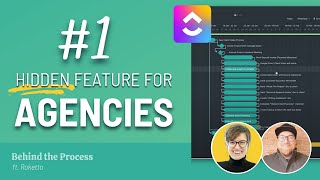
This is a YouTube video titled "ClickUp for Agencies (ClickUp Workspace Tour ft. Jeff)" created on March 18, 2022. The content features a discussion between Sam Spelsberg and Jeff, focusing on how Jeff's agency uses ClickUp to organize projects, particularly highlighting the use of templates, dependencies, and project management workflows. The video also promotes the Process Driven membership for deeper insights and additional resources related to ClickUp.
If you are an agency owner using ClickUp, odds are at one point or another you've wondered if you could just peek behind the scenes at how another agency is organizing their work. Well, that is one of. Check out the description. But in the Process Driven membership, we had Jeff, who is a member give.
Kind of thing where it's like, you know that it's not good, but you know that it's doing enough to continue moving forward. So it was a bit of a stretch to take a newer software that was considering itself to be like an omnichannel ultimate project management software and, and really still kind of in its. Do we say it was in its beta at the time? Because it was.
Oh man, it's probably close perpetually in its beta.
So we basically were like, hey, this is a really cool idea and concept. And then, you know, a little plug for you guys. Of course, as well as I was going through doing some YouTube tutorials because I had the free, the free intro license for it. And that's where we found you guys. And we decided that that would make a lot of sense for us to start taking the step. And actually I would say right now we're probably in like February or March where all of our projects will be moved off of Basecamp and all these other softwares, but that's where we're primarily coming from when we're talking about project management. We're starting to take all of them and now we're moving them over. There was some fear from some of the project managers because of course again they start to know their process so well. But everybody that's been coming over has been enjoying it a lot. So yeah, I'm happy to come in and talk about some, maybe some of the challenges that we saw early on, but mostly let's talk about what's working well for us.
Okay, so now we know who Jeff is and a little bit about Rocketto. Let's talk about what feature we're going to be highlighting today. So Jeff organized his structure in ClickUp into a folder based system. And the feature we're going to highlight today and is how he actually uses templates at the folder list and task level to organize different steps in the project. For example, they might have something like Hyper Content, which is a deliverable that they have a service that they offer like this. And when they create a project for Hyper Content, they create connections between tasks called dependencies. And once they have these dependencies, they're able to reschedule them if things change. And I'm going To pass it over to Jeff here to show you in his workspace and then we can break it down together.
Right now when I'm. When the intake process, let's just say somebody from their side got sick. How classic is that? Right? And they have. You should have somebody in place. You should always be designated somebody to be the primary leader from the other side as well. So they get sick. We push out new client intake process instead of me having to slide this bar for every single thing. And you can see here like we have a lot of steps apps in place. I mean I can go down and down and down. The scheduling with dependencies is a wonderful feature that allows us to move everything at once. The reason why you might want to change and move something different like if you'd want to do an independent is probably more on the version of shortening something. Right. So you maybe would want to take a step and say it's only going to be a couple days. The resource planning maybe was done on a previous project. So we could shrink this down. Doesn't mean necessarily we want to change the project though as far as its length. So that could just be something that we do for internal purposes. I'm sure there's a lot of variables for this but it is nice to be able to control the dependencies.
What I really like about this is both in the dependencies situation and in the due dates and assigning and the automations. I mean it all kind of relates to the fact that you're looking to get your project managers involved like really combing through, checking the details as they're going and assigning things and kind of refining things progressively. So it's not like we sit down and this is the plan. Like everything that you've talked about seems like it's very much. It's going to evolve. We have a plan but we roll with it.
It's a great point. I feel like we have talented project managers on our team. I think that maybe there's certain businesses that see this would say we have a more linear approach. Maybe the project managers don't need to be as involved. I think automations would make a lot of sense in this case Right now they're helping us develop like what it is that we're doing when we're creating process. So as an example, like the hybrid content that we have up here, this was not created by me, this was created by a project manager based on the fact that they know the process better than I do. So they were able to come in after some training and say like, yeah, I can spin this up. We did start by taking an import, just going full circle and then looking at that and then making it the version that we wanted it to be today.
It's no wonder that this was one of the most valuable features, the valuable lessons that Jeff has learned because rescheduling dependencies is absolutely invaluable. It's absolutely crucial for people who want to plan out a project in advance but also understand that life happens, external variables happen, especially in these times, and they want to be able to adjust those projects on the fly. Now this was just one of the golden nuggets of this interview. I've just got to be honest and say there was so much more good stuff in here. So if you are a member of the Process Driven Membership, login search for this tour and check out the full length interview and the Q and A or talk back with Jeff at the end. Just such good content and so informative. Now, if you are not a member of the ProcessDriven membership, I'm afraid this is where your journey with Jeff might end. So if you want to fix that, go down to the description below and check out the information about the ProcessDriven membership. You can join us to find 30 plus ClickUp templates, our entire course for how to systemize your business using ClickUp tours like this. I think we're up to four to date. We keep adding new ones each quarter, and beyond all that, you also unlock a lot of live interaction. So as much as I love chatting with you in the comments here on YouTube, there's a distance there, right? There's, there's a distance. And when it comes to the membership, we try to shrink that significantly. So when you join inside the membership, you'll have access to the forums that I'm in every single day as well as my team. You, you'll have access to our weekly live streams where myself and a co host talk about ClickUp updates and answer Q and A from the past week. You'll also unlock our monthly Mastermind where I'm working with groups of people to help them work through their specific ClickUp challenges. It really is like that fractional ClickUp consultant experience. So if you're someone who wants some help on your ClickUp or process journey, but you don't necessarily want to fork out thousands for a few hours with a consultant and this could be a really good option for you to consider. And I mean besides all that, you get to see Jeff's full tour. Now if this isn't in the cards for you. Just keep in mind we have a playlist right here with a few other clips you might find helpful, but otherwise, thanks so much for watching. Hope to see you inside. And until next time, enjoy the process. Sa.