Crafted Data Management INBOUND22 Feature Recap | HubSpot Admins HUG | September 20, 2022
Kyle, Jeff, and Kara walk through HubSpot's new data management tools from Inbound 2022. They demo custom object building, property validations, a data quality command center, and import validations to help admins keep CRM data clean.
All of you. Part of the reason I'm doing a lot of these admin hug events is because we need recorded resources. My inbound presentation was not recorded. We're going to fix that. Jeff and Kara are going to go through these products that we've released for you. We want to make it available. I will be sharing links with you afterward. Once we have this hosted somewhere, you can share it with all your friends and let them know what's happening, what's going on, and of course, please, please, please tell everyone to join the admin hug. It is at events.HubSpot.com admin hub spot admins. Wow, that was weird. And I assume most of you know that since you're here, but join the actual group so that I can send you newsletters and updates and things. And now I will just get my deck pulled up here and we will get going on this share screen, that screen and ta da. Okay, so today we are talking about Crafted Data Management presented by the HubSpot Admin Hug. Thank you all for being here during Inbound. We have a great picture here. Steph on stage talking about crafted data management. I assume some of you are wondering what that even is. So to start with a quick definition, Crafted Data management is a major investment we're making in new tools to support customer data management. At a practical level, it means HubSpot makes it easier for you to bring good data into your CRM and to clean and organize the data you already have there. A lot of the updates you've been seeing in regards to importing is under here. A lot of the new data cleanliness dashboards and tools you've been seeing are in here. I'm very excited to have Jeff and Kara here with me. Jeff is product leading, Kara's senior Product Manager. They've been both leading teams and working hard all year to get these features out the door and I've been so impressed so often we have big new features launching at Inbound that nobody knows about until Inbound. At an Inbound, the announcement is this will be available in beta November 1st, right? Mark your calendars. But we have had all of these features coming out in beta before Inbound. I've been able to announce them and spoil surprises on LinkedIn all over the place. And what we're going to get here from Jeff and Kara is the grander vision, how these things fit together, why they built them, what they do, where you can find them, how to use them, all that stuff. I think that's all I want to say. I'M going to stop sharing my screen. My job here is mostly moderator. I will be watching the chat. As you have questions, please drop them in there. Jeff and Kara are here to help. We want this to be as interactive of a session as possible. When you do a webinar, it can sometimes feel like you're just talking into the void. But we are here with the 67 of you now. We are excited to interact with you, get to know you and answer your questions. Without further ado, I will stop talking and I'll just stay on top of the chat.
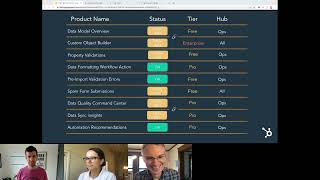
Cool. I will jump in. Kyle, thank you so much for setting this all up. And also thank you for all your awesome LinkedIn videos and all the content that you put together. I'm sure all of the 67 other people in here would say that it's like my favorite thing in the week when I see a new video come up from you, so thank you. What I want to try to do, I think I'm going to share my screen. I have a couple of slides that I want to walk through, and they're all just going to get us set up to do individual demos. So what Karen and I are going to do, we're going to go through the list which Kyle kind of showed off when you showed the next slide, which we're going to get to in a second. We're going to go through a list of some of the features that Steph from the big stage covered very quickly, and we're going to try to go through and do like a walkthrough demo of each one. And I think the idea here is, as you're watching, if you have questions, drop them into the chat and we'll either catch them if I can get my screen set up right, or Kyle will just jump in and say, there's a really good question. Let's expand on this and we'll try to handle that. Karen and I are about to do a whole bunch of live demos. You all know exactly how that goes, but we'll get through it. It'll be fine. What do I want to do? The first thing, I just wanted to add on what Kyle was saying about why we did crafted data management. Karen and I got together, if you think like a whole year ago, and there's so many cool requests that come from our admins about future features that they want to build and, like all the cool stuff they want to do with HubSpot. But every time when we dig in, what we learn is if you can't trust your data Then those cool features are kind of worthless or there's always somebody at the organization that's like, are you sure that that reporting is like good? Because the data that it's built on is kind of questionable. And so again and again we came back to this idea of if you could be more confident in the data in your CRM. The possibilities were kind of endless. So we set out and now I'm actually going to share my screen and I can figure out how to do this. I need to split these tabs. One second. We set out to work on some features window. This one. Yes. And I'm going to skip to where we are. Yes. That do basically three things. They cover like the whole life cycle of your data, from setting up your data model to keeping bad data from coming into the system either through bulk updates or through work that reps or like customer facing teams are doing and entering into the system. And then once the data gets in, are there ways that we can make it easier for you or we can use our powers of like machine learning and AI to identify properties that you might want to take action on. So again, Kara and I are going to do a whole bunch of these demos. You can think of me as doing the first two columns here and then Kara's going to do the third one and drop your questions, ideas, things into the chat. I think in each case, for mine at least, I'm going to be able to speak very quickly to where we're going next with this and we'll go from there. Cool. So I had one more slide, which is this one, and you can feel free to take a screenshot of this if you want. Or again we're recording this, but this is the current status of all of those features that were on the previous slide. What you will see is pretty much all of them are in some stage of beta or later. Most of them are in public beta. There's one spam forum submissions which we're not going to cover on this call. But it's still in private beta. But when that comes out, there'll be lots of cool content with that. I think it's a really impactful feature. And I have these little link icons that tell you that if you apply or if you opt into the public beta for one of these features like the data model overview, you get both that and the Custom Object Builder if you are eligible. This also includes which tier they're on, which for most of them is either platform or pro, or the Custom Object Builder, which is enterprise only. I haven't seen the chat, Kyle. Is there anything we should stop for before I keep going?
No, you're doing great. People are liking it. I just wanted to mention real quick that GA stands for general availability. Everyone has. It's rolled out 100%.
This is one of those cases where I took an internal slide and just shared it with you all. So sorry, there's HubSpot lingo hanging around. So the first thing I want to show off is the data model overview. And HubSpot's data model has. It's grown up a couple of years. It used to be just contacts, and then it was contacts and companies, and now it's deals and tickets and custom objects. And you all are probably thinking about or operating all the time on objects that we don't even talk about, like notes and things like that. And when people are just getting set up on HubSpot or they want to scale their data model, they want to make changes. The question is always how do I just like see what's going on in here first? So I could share it with a teammate or I can help a new admin get up to speed or whatever it is. So let me show you. We built. I'm just going to jump right into it. Apparently we built a visual tool to help you understand what your data model looks like, how those objects are connected, what properties are on them, and get a sense of what objects are available to you. Where we're going next with this one is adding some of those additional objects that I just mentioned. So there's some like sales engagement objects you might know about, like notes and meetings and things. You can't see those line items. So some of those, like objects you might be familiar with. But we need to make CRM standard. We need to make them like HubSpot canon. Those are going to come onto the screen next. So from here I can do some. Currently I can do some interaction, like turning off different objects if I don't want to see them. So this could be great for if I really want to communicate with somebody in the organization about how a couple of objects are connected. I can. Let's see, I'm going to remove everything with these, but I can show for example, how companies, contacts, deals and tickets are associated. And I can show that currently form submissions as an example, is not associated with any of these. So the next feature on the list.
Hold on real quick. Before you move on. Back when you had everything turned on and I remember you and I actually we're on the same thread in a Slack conversation about this, it's a little hard to tell what bowls is associated with. Any insights on improvements we'll make on this over time?
Yeah, I think that's. Yes, great question. So the way we rolled this out and you all are probably seeing this is it's a grid system. And so the problem with the grid system is bowls are associated to contacts, which is way down here. So there's a line that connects bowls, it goes under cars, it goes under companies and connects to context. Not the best. Luckily, you can hover over this and see that it's associated with contacts. That's nice. But I think the next thing we're going to do is break up the grid system and give you something that's a little bit more dynamic. If anyone is familiar with Org Chart Hub, that company does a great job visualizing kind of like an ecosystem of things. So we will fix that. Kyle, thank you for calling that out. I believe the next feature is Custom Object Builder, and I feel like I don't even have to explain what some of the reasoning for working on this one is, but if anyone hasn't created a custom object before, you needed to use an API endpoint to define it. So when we launched custom objects, it was like inbound 2020. I think that was how we left it in terms of creating them. And there was some good reasoning behind that in terms of scalability of the system and also wanting to learn some things about how people were going to use it. But the feedback we've heard consistently over the last couple of years is APIs are way too hard and costly to work with. We built a new tool that makes defining your custom objects really easy. And I'm going to show you from the data Model overview how quickly you can get that done. Let's say we've just had a meeting. We're adding a new drone object to our inventory and we want an object to track that. I click that button from my data Model overview. Again, I'm on my data model overview. I click Create a custom object. It's going to open a new tab for me and it opens this form and this form. I'm sorry, I'm trying to impersonate Kyle. This form is all you need to fill out in order to have a new drones custom object. So I'm just going to show you how to type in drones. I think Drone ID is probably a good one for display property. I'm going to keep this a single line text and I'll show you why in a second. But I definitely want to Check this button. Right. Require unique values for this property. This is another feature that actually snuck out and Kyle did a LinkedIn video on it before. You might already be familiar, but you can now say that for all records of this custom object for this property, drawn id, they all have to be unique, which is great for serial numbers and things like serial numbers. So I'm going to require unique values. I'm going to create. And I now have a drones custom object, which I'm on the page for drones. And a bunch of the work that we've done this year has made it so that now that the drone is created, I can actually do pretty much everything else that I need to do for that custom object from here. So I can go into associations, I can set up an association. Let's actually do that. Let's create an association between drones and deals. Sell drones on deals. So I'm gonna create that association. Great. I don't really want a pipeline, but you can now add pipelines for custom objects and of course record customization, which you're probably familiar with. But I don't need to set that up right now. And if I go back to my deal model overview. Oof, I need more water. If I go back to my data model overview, I can now see my drone object. It's right here. And if I remove all the other objects just to make this super easy, I can see that drones and deals are associated. So just like that, it reflects your underlying data model. Makes it really easy to visualize this for teammates and get them all on the same page.
Okay, lots of questions here. Let's do it. Let me. So just briefly, as you were creating the drone, as you were defining that object schema for the primary display property, the only two options were numbers and single line text. Is there any plans for that to change at endpoint? Do we expect that to be the way it is for a while?
I think that is going to change. Yeah. I think you can expect that to be a full property, have full property support at some point in the future. We did look at the breakdown of those primary display properties and found that they're almost all of either a number or a single line text. But if people have specific requests, super interested to hear it and the use case.
Cool. Then the question is it possible to have the custom object builder without the data model overview? We don't have Ops, but we do have Enterprise and would be interested in having this.
I should have clarified that up front. Thank you. That's such a great question. I'm Also seeing a bunch of my favorite customers that I've worked with in the chat and it makes me very happy. The note on Ops, if we can actually go back. Yeah, yeah, yeah, let me go back, let me go back. And I want to make sure this is really clear. So the question was, we don't have Ops Hub, so can we still have access to this feature? And I think what I should have pointed out was this is at the free tier of Opsub, which if you're a HubSpot customer, you have access to and you don't have to do anything else to get it. So we put it there so that it's a little bit clearer. Like these features are really targeted at the people who own ops, which could be an OPS team, it could be you. If you're kind of like a person that's wearing a lot of hats, you can consider it essentially a platform feature.
Yeah. So essentially everyone has the Data Model Overview and then the Custom Object Builder is an enterprise feature. It's not tied to a particular hub. If you have enterprise something, you can create custom objects, right?
Correct.
Great. Then another question. With the Data Model Overview feature, will we be able to see the association type in the overview eventually as well? For example, 1 to n, n to N. You want to talk about one to one versus one to many versus many to many associations.
Jeff, another great question for anybody who doesn't know, I spent like a year and a half of my life specifically on associations. So I think it's a little inside joke between me and Kyle to talk about associations. But yes, that like more detailed association display is going to come to the Data Model Overview. One thing we don't really support today is custom one to one associations, but I'm comfortable saying that is something we plan to explore and hopefully next year. Also looks like Gregory is having some trouble seeing the screen. Hopefully everybody else can see the screen and there's something we can do or like a button that Gregory needs to click if you can't see the screen, if you all can't see the screen, that's a real problem and hopefully you would tell us.
I'm seeing it. So hopefully.
Okay, good. Sorry Gregory, if that's your case, hopefully that's not affecting others as well. But yes, I think we are going to get to a point where you can see one to one to many, similar to the way we do it in association settings. I also saw one Kyle deleting custom objects in the UI. That one is coming to HubSpot near you very, very soon.
Stay on LinkedIn. I'll be talking about that one a lot, I'm sure. Also, Amelia is concerned that now that people can create custom objects in the ui, we will get people creating custom objects thoughtlessly and maybe bad ones that are ill defined. So I think her. Yeah, she asked explicitly what resources and recommendations do we have? That falls on me. I will be creating education around that, updating the education we have for sure. Jeff, do you want to talk a little about.
I mean that was part of the reason why it was API only from the start was to see whether that would was to stop that from happening and see what conversations customers would have with our team and also with our partners around creating custom objects. One thing we are exploring is permission around being able to create a custom object schema. And there's a whole other part of HubSpot, they're not on this call, but they are working on things like approval. So I could imagine a world, no plans here, but I could imagine a world where creating a new custom object schema requires some kind of approval of like whoever in your organization can be in charge of that kind of thing. But yeah, actual content around that. I totally trust Kyle. He already has some stuff, but maybe we can add some more to it now that it's become super easy.
Cool.
It's currently super admin only to Aaron's question.
Yes, and one last. This is sort of a feature request for you. Take a note. Stacy has a lot of custom objects and on the data modeler it'd be really great to have a select unselect all instead of having to check them one at a time.
So I don't know if Maggie's on this call. If she's not, I will use the recording of this to get Maggie is. Okay, so your feedback's taken. Maggie is the PM of my team who actually owns data model reviews, so any kudos should actually go to her and all these information improvements are being noted. So thanks y' all for sharing those ideas.
Oh, question, sorry. Over in the Q and A. Any idea in splitting out permissions by custom object? Currently it's all custom objects. Viewer edit.
Yes, that is nothing to share specifically there, but we want to do that. Stay tuned to LinkedIn near you.
We did just finally split out contact and company permission, so it is a thing that can happen.
Yeah, exactly. Just. Yeah, be aware that we totally hear that one. We will get to that soon, I hope. Okay, I'm going to keep moving because I don't want Kara to get crunched for time. So hopefully you all are seeing my screen. We just covered the data model overview and the custom object builder. The next one I want to talk about is property validations. So the concept here is you should. Well, you're already probably familiar with this, but you should be able to put rules around what's acceptable in terms of the data being input on your property. So this will apply currently to. This feature. Currently applies to reps like manual input, but in the future this will apply to API input and all imports will take these rules, that sort of thing. And we'll also expand the set of rules. That's all like the future for property validations. Let me show you one example I think where we could use this. Switching back to my portal, we just created that new drones object. If I go into my drone and I'm going to create. Actually I think I can use this drone id. This is the primary display property. Trying to think if I should use a different one. Let me see. I'm gonna set a rule around this. So let me show you the example of what you can set in terms of rules. So we already checked this one. Require unique values for this property. And there's also notes that today we Support up to 10 properties per object that can have unique properties on them or like a unique requirement on them. But now for these string like this is a single single line text property, we offer these four validation rules. Minimax for character limit, restricting to only numeric values. So that's gonna be really good for like a serial number and allowing or preventing special characters, which is also great for like a name property. Probably shouldn't have a number sign in it, although, you know, who am I to judge? But in this case we're going to have a drone id. And let's just say for the sake of argument that that's always going to be 13 characters. So I can set a min and max limit of 13 and I can say I only want numeric values. And now I shouldn't set it so high if I actually wanted to demo it. But now if we create a new drone id, it's going to require our new drone. Sorry, it's gonna. It's gonna require that we have exactly 13 numbers in that. In that field. So let's go over and do that in my drone. Whoa, whoa.
So this is the new nav Jack.
You're all getting serious inside because I didn't. I should turn. This is a navigation change that we're testing out. So either ignore it or drop your feedback on this nav and I'll pass it along to the nav team.
Also in October we're having the HubSpot admin hug is having a session on the new nav. Everyone who registers for that will get access to this nav and the ability to come and give feedback and ask questions. So if you like what you see, we. Or if you hate what you see, register for that event and we'll go deep into that in a month.
Yeah, somebody who's actually an expert on nav can give you a little bit more of the details, but yes, you're getting the super insight. I'm just going to create a drone really quick so that you all see this example.
Oh boy.
Now I'm going to have to count. So I'm expecting 13. Stop at 10. Can't do it. Requires 13. Right. So if I do 1, 2, 3 more now it's going to let me create that drone and you can imagine the experiences being pretty similar. On the record, I would say I was really proud of the fact that the team pushed to have custom errors that show based on these limits. So one thing we were worried about was reps suddenly getting stuck on these errors and being really frustrated with the experience. Like why doesn't this pass validation? And so we, that team worked pretty hard to make it so that any. Any of the validation options that you choose, if it's not passing validation, it's going to be really clear which property and also which which rule they're they're failing and how to get a passing validation. So hoping not going to slow the team down at all. It's just going to make for higher quality data on the end.
Love that. That's so errors can be awful. Those ones are super clear. I'm also a big fan. We do have some more questions for you. One from a bit ago but feels sort of relevant now. Any updates on field dependencies, please? Are we thinking about dependent fields?
We are thinking about dependent fields. One of those I can't keep. I can't give anything away. Just stay tuned to the LinkedIn near you.
And then a friend of ours who has an apostrophe in her name said us punctuation name. People just cried a little bit.
The special characters does not apply to apostrophes.
Perfect.
You are totally right. I hope. Hopefully. I use number sign as my example. You did.
You used number sign as your example.
If anybody on the call has a number sign in your name, I apologize.
Let's see.
Michelangelo just asked a great name. Also, if I mispronounce anyone's name please just let me know. How do property validations work when importing data? I also did the thing, Kyle, where you're the host, but I just jumped to the last question to ask.
Absolutely. No, that's fine.
So right now these custom property validations aren't going to do anything for imports, but give us like, I don't know, a couple of weeks, maybe a couple of months and we're going to have those new, we're going to have those new custom validation rules also affecting your imports. So pretty soon they'll affect everything for like creating and updating records. Today it's just manual importance.
Awesome. Gabor wants to know about default values for properties. So like for a number property, could you have it instead of starting out blank, just defaulting to like zero for instance?
I've heard that one before and every time I work through it and we could talk more about this offline, but every time I work through it there's some complications that we need to figure out. So no immediate plans for that one, but I hear you on that and I think calculation properties deserve some love. Maybe 2023.
Aaron wants to know if we can define what we consider special characters and allow exceptions. Aaron, just as a kindred spirit here, months ago when Jeff very first showed me, hey, we're starting to think about validations and we think it might work this way. I said regular expressions, can we just make it whatever we want? He was like, whoa, slow down, maybe someday. But let's start with some out of the box, just good basic defaults and we have that now.
So. Yep. And my direction is pretty much exactly the same. I totally hear you all that this is the group that would want the like advanced of the advance of the PRO feature with just like the open ended field. I think first we want to prove out that folks who wouldn't be joining this call but would probably love to have some basic controls will use it and then we'll figure out where we go from there.
Cool.
I got one more Kyle and I want to get it to Kara because I think that's actually going to blow some minds. Okay, so for now I'm going to move on know that I'm going to download this chat later and if there's any questions that are just lingering, we can totally follow up. So there's one more that I want to cover that wasn't covered at the Spotlight, but you might already be familiar with it because it's been out for a little bit and that's pre import validations. I am super excited about this work. Basically the idea was people were doing everything they could to help their reps put in good data, even without rules. They just had one of those amazing teams that would just try to follow the rules when they were manually putting in data, but then they weren't trusting anyone else to run imports and put together files because they knew, rightly so, that one bulk import could make a total mess of their data. And then there are so many other people that we were looking at their calendar with them and they were like, oh yeah, that's my import day. Or like, this is my import morning. I do it once a month and it's my import morning. And I was like, what the heck is an import morning? They had to put aside a bunch of time to go back and forth between HubSpot and a CSV or an Excel or whatever. Because the way that HubSpot reported errors was go into HubSpot, import the file, wait until you get the errors file, download the errors file, open it in Excel, make the changes that you needed to make in the original file, and then do it all over again. And they were doing that like 6, 7. I think our data showed up to like 200 times. 200 was notlier, but a lot. So we asked the question, like, is there some way we could get people the errors earlier and also get them, if necessary, good feelings about the value of their data. They should feel good about what's about to go in. That launched this pre import validations work. Let me show you a quick demo of how this works. This is an import file. I did the light cooking show thing. This is an import file that's already set up to go. And I'm going to call it a couple of things here first, and you might have already noticed this, but we made a bunch of changes to how the mapping step looks. And the goal was to try to surface these actions for you in the mapping step so you don't have to do it later. And you'll see this new column, this mapped column that says green when things are good, which is great. And then it shows this exclamation point in this kind of yellow, orange, ambery color when there are errors. We also started to call out unique identifiers up at the top here in this again, like sort of an orangey color. And what we're calling out for you here is emails are the unique identifier by default for your contacts. But there's another way to identify which contacts you want to update in this import, which is using contact id. You used to have to check a box which was super confusing for a lot of people in a previous step before you got to mapping. But now we actually let you choose any column from your import to be that record id. So when I choose Record ID here, it's actually going to go and look and find the records that match that record id. And it tells me great, those all exist. So those will all be updated. So that's feature number one. It also removed that error, which is great. The next one that I want to show that we did with pre imported validation is. I'm going to skip to this one actually it's date value. So we used to tell you long after you would upload your file in the errors download all those dates. We don't understand, we can't parse those dates. Well, this is a totally reasonable way to to display a date. It just happens to be day, month, year. But system couldn't do it. Let's pop open this, this side panel here and what we're looking for with the values is day, month, year. This is month, day, year. Okay, great. If I switch to day, month, year, you can see it happen in the background here, but it's a bit faded out is it went to green. So now it's reading all those dates properly. I didn't need to import, I didn't need to change anything in my original import file. I just told the system that's how I expect my days to come in. It does require that your file actually has consistent sets of dates, like the file is internally consistent. But this makes it a lot easier to know those dates are going to get imported properly and show up translated into HubSpot language the way we want them to. Then the last one, which I think is super cool, is missing enum option, like a missing dropdown property option. This represented something crazy, like 45% of the errors that people were getting during import. So let me show you how easy this one is to fix. So again I'm going to open the side panel and it says okay, there's a missing field strawberry, which is crazy again because favorite ice cream flavor is obviously strawberry Edit. I'm going to click edit that property. It opens for me the property definition right here. I can hit add a new option. I need strawberry and the thing is blocking it. But I'm going to hit save. And now we have our green check here again. This makes it super easy for me to understand. Of the columns that I'm importing, all the data is in really Good shape. The other thing we added, which I can try to demo right now, but live demos, let's see how it goes. These are all good. We also added this new post import results page rather than just taking you to that table and making you download an error file. There's no errors here because, you know, my file is amazing. But we will display all of any errors that were left over on this screen. We'll also show you, like, how many new records and updated records, any new associations, etc. So that you can really understand what just happened with the import that I ran. And I think it's really going to increase confidence in these bulk imports for people.
So, Jeff, you're mostly getting a lot of love in the chat. People love validations and things. One question from Yeppe, he said it's great, but he would like it to be more than just the first three lines.
Oh, yes. I was hoping that question was going to get asked because I'm excited to tell you we are going to 100 lines before the end of the year, which, you know, a lot of y' all are super advanced users, so maybe 100 lines still isn't enough. But I will tell you that is well over half of all imports to HubSpot, so we are about to cover a ton of full import files.
Cool. I think that's the main question. We've got a few that are collecting in the Q and A, which I think. Thank you everyone for putting them there. I'm just going to hold them there for a minute because I want to make sure Tara gets her turn.
Yes, me too. So that. That's going to conclude my part. I'm going to hang around, I'll do the chats and all that stuff, but I want to hand things over to Kara. Kara, take it away.
Awesome. Thanks, Jeff. I'm going to share my screen real quick.
Okay.
Awesome. Can you see this? Just to confirm?
Yep, I see it.
Well, hey, everyone. As Kyle mentioned, I'm a product manager on our Data Quality team within Operations Hub. Very excited to show you some of the big features that Steph announced at Inbound and get your feedback and questions. But to start, I wanted to talk about our Data Quality Command center, which is now in beta. And this is really all about how do we make a more centralized home for ops teams to more proactively monitor their data quality in HubSpot. We started with Properties, Records and Data Sync, which I'll show in just a moment, but really want to give a much easier way to actively manage issues as they come up and beyond this, we also introduced more automation into this experience. So you may have seen in Operations Starter we have these AI based recommendations for formatting and we wanted to make that even easier to manage over time as issues arise. And so we've added simple automation into this experience to take care of those before they even pile up and impact your database. Without further ado, let's dive into a demo. This is the brand new command center for data quality. We have info on property health. So whether a property has no data it's not being used by other fields in HubSpot duplicates. We also have the existing records tools so formatting issues duplicates all within the centralized place. And we recently actually added trends over time so you can get an idea. Is this an issue that's getting worse over time? Have we made meaningful strides to make our data quality better? Then we also have added an aggregated view into data Sync so apps with no active syncs or apps with sync failures to give you visibility into.
Are.
We seeing errors and how do I proactively take action on these to make sure my team has the data they need to start, I would love to dive into the process properties section. So within here we can actually dig in further for contacts and companies, still see those trends and also get more context on when was this property recently updated, what's a recent update source as well as fill rate. So how many records actually have a value for this property and then is it used in any places you can filter by objects so contacts and companies as well as potential issues. For the purposes of this I'm just going to show a specific example that I know is updated recently which is Lifecycle Stage. If you want to dig in even further to get more detail on property how it's being used, the property definition. This new property audit gives you all of that and more. So you can create a list directly from here of all properties that have a value. See that fill rate. Then we also are giving visibility into where is the data coming from that's actually updating this property. In this case we have one that's happening periodically which is an integration pipedrive. Having this visibility allows you to actually understand where's the data coming from. Did something spike over time? Did we lose data from a particular source and give more visibility into those data flows. We also have tools using this property to give you an idea of where the dependencies if I do make changes to this property, how is it being used across HubSpot and hopefully would allow you to make decisions on do I want to actually keep this property? Do I want to eventually archive it? You have that option directly from this view as well. That's the property. Insights Detail.
People are loving it. Just so you know. They're in awe. Lots of happy notes in the chat. I don't know if you're able to see it, so I just want to call out, you're making friends here. People love it.
I'm not done yet, so get excited. So we also have this Data Sync portion which builds off of the Data Sync health tools within here, instead of diving into individual Data Sync apps, we're giving an overview of status for Data Sync apps as well as if they're failing to sync, if they've had any recent activity. And within this view, hopefully the ability to prioritize more actively versus reacting to in some cases goes wrong. In this case, if mailchimp's really important to my business, I could come in and say oh, there's sync errors. Take a deeper look at those errors within this view and take action on them or, or come up with a plan to to fix some of these. So that's the, the command center. I'll pause here if there's questions on those and then I can, I'm can dive into the automation portion of this.
I haven't seen questions in the chat. Let me look in the Q and.
A.
Yeah, I think we're good. I think we're fine.
Dive into automation and then we'll pause again. This is the fixed formatting issues tool which we've had in Operations Hub Starter for a while. But we learned as customers were using this and taking suggestions on formatting issues like this contains an unexpected number and last name. We have a proposed fix for it based on AI models and then you would go through and accept and reject these one by one. We added the ability to do this in bulk, but ideally right you would prevent these as they arise and not have to manually check this tool to take action on them and keep your data clean. And so we've added this new automation function that has basic rules that are highly accepted by customers to capitalize first and last name standardize the format of email. Occasionally I see last name is imported into first name or not within separate properties and then spacing and punctuation and in this case I saw there was a few we had some unexpected punctuation the buttons hidden here. If we save those we can see two automations were turned on and from there these records will be added to clean it.
Kara, I just have to Just repeat for the folks at home, what just happened. There was a whole bunch of formatting issues that the system caught for you, and previously you would have had to go in and click Accept on all of them. What we did was we looked at which of them had a perfect record in terms of acceptance, in terms of people looking at it and saying, yes, that recommendation actually is correct. Now we've made it so you can just turn it on once and it runs like a workflow and there's a perfect audit for it and I never have to touch it again.
Yes. So we also have. Now I can see which records were just updated based on turning that automation on. So this should hopefully give you the visibility you need, but also out of sight, out of mind for some of these basic data formatting issues.
Cool.
Wraps up my demo. Nice question.
It seems like we don't have specific questions about this. Oh, Sophia wants to know, how do you navigate to this?
Yes.
So Kara is kind enough to be using the navigation you're all familiar with.
Yes, I have the current navigation and we have this new data management section of the navigation under Reports. And as long as you're enrolled in the Data and Operations Hub Preference Pro or Enterprise, it will be under Data Quality here. If you don't have the beta and you have Operations Hub Pro, you can enroll within your. Within your settings as a super admin. But let me know if you're having any trouble accessing and I'm happy to help.
And then the. The formatting issues thing is under individual index pages. Right? Like if you go to.
Yes. So if you don't have the command center of Operations Hub Starter, you can actually access the Formatting issues app through contacts and fix formatting issues. So you can access it directly through there. And that would just be the basic cleanup. If you have Pro, the automation options is released.
All cool. And then we did get one question on how to enroll in the beta. So can you just show the. The product updates thing so it's within settings?
No.
Right.
No, under your. In the top, the far, far right. Warp Digital. Right.
Okay.
So there's this product updates menu item and early access to betas is over on the left. I don't know if there's another place you were thinking of, Cara, but this is all the available public betas should theoretically be here. This is a new tool and we're still getting everything piped into it, but there are buttons here. If you're Super Admin, you can join betas from here. Some betas also get in the relevant part of HubSpot, there will be a little beta button, but here's the best place to see them all together.
There was another question. Sorry, Kyle, I'm just going to jump in on this one because I think, Kara, you can speak to this. Stacy was talking about wanting to use a feature like this, but would want more criteria or like customization around what would be flagged and which ones would not be flagged by the system. Is additional customization something we're thinking about with the these tools?
That's a really good question. So right now these are all based. They're AI. Basically we'll look at patterns for data. We do have a lot of customization available in workflows, so you can filter for certain criteria and format data that way we don't have specific plans yet to modify the criteria or filter out. But I would love to chat with you more and understand what your needs are and see how we can best solve for that.
Yeah, so Stacy, if you want to connect with Kara to share your request, that's great. If you want to just explore how existing tools might be used in that way, send me a DM on LinkedIn. I'd be happy to talk through the existing workflow features and stuff with you if you want. I love brainstorming stuff. So we have less than 10 minutes and we have five questions in the Q and A. So we'll do this lightning round style. I'll just ask the questions and neither one of you can pounce on them. If you know. So Matthew Walt asks. I missed it. When will Custom Object Builder be available?
Great question, Matthew. I should have covered that earlier. So it's currently in public beta, so you can get it right now, especially if you have an enterprise level. If you're on enterprise level in terms of GA or generally available, our target is still before end of year. You can sign up for the beta right now and it works just fine, I promise.
Send us that feedback in that same beta management thing Kara just showed you. It's in there. It's called. It's the data modeler and the Custom Object Builder together. And it's like customize and visualize your data.
Yeah, Maggie, maybe you can jump in the chat with the specific name for it so people can find it.
Yeah, she threw it in there. Manage and visualize your data model.
Look in the chat for that. Going back to property validations and stuff. What about sequential fields? Don't have reps. Creating 10,000, then 99 for those unique fields.
I think that's Me and I think I need to learn a little bit more about the use case there and how that would work because then there's a lot of other tools that that could cause problems for. So maybe that's something I can learn more about afterwards.
Yeah, I know when I did a video on enforcing unique values, a lot of people thought that meant that we would automatically generate the next sequence hire like we do for contact IDs and stuff, but it's not that.
No, I think I see the use case there. I think for most of us we're thinking about enforcing IDs that were created in another system and then replicating them in HubSpot like a customer id. But I think I understand the use case and that's something we could definitely explore.
Harold has a question here, if I'm understanding it correctly. And Harold, my good buddy, let me know if I miss paraphrasing this, but I think just like you can create custom owner properties and it's just a drop down select of users, he would like to be able to create custom properties like that that relate one object to another. So instead of like an association experience but in a property value, I think is.
Yes, no promises Harold, but I do think part of your question was does anybody else need this? And I will tell you, a lot of other people would love something very similar. I think we're still figuring out what the infrastructure would look like, but I'd like to deliver something like that in the future.
James wants to know if we can export all the values of a property.
Yes.
So I will say you can export property history and see not just the current values of properties, but their historical ones too. But, but I mean if you just go to any index page and have just one column for the property you're interested in, you can export that view and get all the current values. So James, let me know if that does or doesn't answer your question. Is it possible to export a list of records which do not have properties filled rather than those that do?
I know how I would do this. Kara. There isn't anything in the Data Quality Command center today that would let you do that, is there?
No, nothing directly, but it's a good call out.
I would do it from the index page. I think our filters have the. Does not have value.
Yeah, is unknown. You could filter a list, select is unknown and then same thing, just export that view.
Yeah, the list that we use is the opposite of that. We just say is value that's good for exporting.
Also good for, for making sure that your reps are. That's a good way to check and see all the deals that are supposed to be at this stage. They shouldn't have that value or something like that.
Our final question in the Q and A though I noticed more things are coming in the chat that I haven't had a chance to look at yet. Bulk property create any possibility for that.
Maybe? That was definitely something we discussed around Custom Object Builder because I know that that's a bit. It takes some time.
One way to get there is if you're importing a spreadsheet and it has columns for properties that don't exist in the import flow. It's pretty easy to just create those properties from that mapping page Jeff was showing. I think that's the closest thing we have right now, but I recognize that's not exactly okay, okay. The other things coming in the chat are not questions so I think we have probably answered all the questions. We have about three minutes left. I just want to do a quick punch for some other events that I have coming up, but if you have questions for Jeff or Kara, Jeff, Kara, thanks so much for being here. Thanks to the 65 of you who are still hanging out with us. This has been great. Jeff and Kara, keep an eye on the chat and I'm just going to real quick share my screen of this page. Events.HubSpot.com HubSpot admins this is a hug for HubSpot admins because I think HubSpot admins need a hug and I don't know if this is creepy or if it's funny. I think it's funny. Someday somebody designed me a real logo for the admin hug and I'll put that here instead. You are here. We just launch crafted data management recap. This has been recorded. It's still being recorded. I will soon have news about a place where all these recordings are going to live. So please please please join this hug. You'll see a join button if you're not already a member and I will send out an email with links to recordings and those of you who are here. I will send an email to you with feedback surveys so we can make sure the events here are doing what you want them to do. Starting tomorrow I'm doing a three week series. It's based on the presentation I give him inbound things. I think every HubSpot admin needs to know. Tomorrow's focus is implementing HubSpot. Next week is optimizing HubSpot and then we'll do troubleshooting HubSpot one I definitely want to call your attention to October 7th. This was going to be the first ever meeting of the hug, but then all this inbound stuff happened and we're having a bunch of stuff first. But this is where we're talking about the new navigation. Jeff accidentally teased it a little bit, but if you sign up for this hug you will be able to opt into that new navigation experience and then come talk to Anthony and he would love your feedback. He would love to share his vision. He would love to just work with you to get that navigational experience exactly right then October 14th I'm doing another quarterly roundup of HubSpot tips and tricks. That's the videos I post on LinkedIn. I have not missed a business day this entire quarter. I'm going to have my most ever videos this time around and I'm still behind. There are still features I haven't gotten to, so I definitely recommend signing up for that event. I'll help you navigate the ever going flood waters of the ever flowing floodwaters of HubSpot updates and help draw your attention to the biggest ones. But we are at time. We have less than a minute left. Thank you all so much for being here. Jeff and Kara, thanks again for joining. I will share recording and slides afterward. And yeah, that's all. Any last thoughts, Jeff or Karen?
Bye all. Thanks for coming.
Yep, thank you.
Have a great day everyone. I'm going to shut it down now.
Actually keep this property. Do I want to eventually archive it? You have that option directly from.










