CRM Customization | Admin HUG | June 27, 2023
Deanna Giloff and Amy Chamness walk through HubSpot CRM customization, covering data modeling, UI extensions, and configuration. They show how to adapt the system for different industries, including education and shipping, and share what's coming in upcoming betas.
Well, hi all. Welcome to the HubSpot admin hug. If you're just joining for the first time. Hi there. Deanna Giloff, HubSpot advocate and admin. When I'm not keeping the hug operational alongside Kyle Jepsen, I run my own HubSpot partner agency, Stratsmark, where I offer fractional HubSpot and strategy services mostly to other agencies. If you have any questions for me, feel free to reach out on LinkedIn. I'm there all the time. Today's hug is CRM Customization Deep Dive and we're joined by Amy Chamness, Product Product marketing manager at HubSpot. Amy is here to help us all make HubSpot match our business model. So Amy, go ahead and take it away.
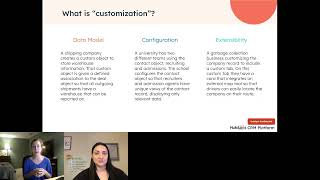
Amazing. Awesome. I'm going to pop my screen up and then do a very quick intro and then we'll dive into the meat of the presentation, what we are all here for, which is a conversation about CRM customization. Before I dive in, just a quick intro. My name is Amy Chamness. As was just noted, I am a Product Marketing manager here at HubSpot. I've been at HubSpot for just over five years. Prior to my current role I was a Customer Success Manager or a csm. If you've ever worked with our customer success team, you'll know exactly what that means. But I worked really closely with our customers of all walks of life, sizes, segments, all of that good stuff. And then in my current role, I specifically support our CRM platform product group and one of the primary focuses of that product group both last year and then this year. And you will see it front and center at events like Inbound and Beyond. The second half of this year is CRM Customization. So I wanted to get in front of this group of admins and talk about what exactly I mean by CRM customization. What has already sort of been built within the tool, what do we want to focus on and then have a conversation about what we are building next and ahead of Inbound. So I'll dive right in. I'm super excited. Definitely keep the Q and A live and fresh and stop me if something comes up. CRM customization is a particularly. It's a conversation that goes in a lot of different directions by nature of the product itself. So if there is something specific to use case you have once encountered, definitely feel free to stop me. So diving in here, what are we actually going to talk about in this presentation? I want to make sure you guys all feel like you can leave Understanding what the benefit of a customizable CRM is, even though that may seem obvious, I think there is some nuance in that conversation. I want to demonstrate what the core features are and how we categorize them within CRM customization. And then I also want to make sure you have key resources you can leverage moving forward. With that in mind, let's talk about the benefits of a customizable CRM. So why does it matter? I think these are questions that if you have engaged with HubSpot or CRMs in general for any period of time, it seems super obvious why you might need to customize a CRM. But on the other side of that coin, we also know that we want a CRM that for the most part fits our needs right out of the box. And so I want to have a conversation about where you find the balance between those two things. Why does it matter? Taking a big step back, if we look at sort of the macro landscapes that businesses, specifically SMBs, but businesses of all sizes are sort of engaging with right now, they are rapidly changing, that's always been true, but I think they're changing at a pace that we've never really seen before. So on the technological side, we have top tons of advancements, we have generative AI coming out of the woodwork in the spring that obviously changed a ton of priorities, plans, roadmaps, all of that good stuff across businesses of any industry, really. We also, on the other side, have giant macro landscape changes within the economy, within the business pressures and resource pressures being placed on businesses. And what we are seeing is essentially businesses being asked to do more with less and do more with tools that are meant to be adapted to their business models. And historically, doing all those adaptations require resources that they don't have as much access to anymore. Whether that's headcount, whether that's budget, whether that's time, all of them are being restrained in some way. These are some really interesting numbers that come from a zoom info study that just sort of put some guardrails around the business of CRM implementations. It's a multibillion dollar business. I know that's probably not going to be shocking to this group of admins who engage with CRMs on a daily basis. But the cost of an average implementation of a CRM is hundreds of thousands of dollars. And it's really, really common when you are doing an implementation for a lot of that money to go towards the customization, whether you're setting up a new CRM and you're ripping out a different CRM and you are customizing it from the ground up. Or maybe you're engaging with a partner or a developer to change something about your CRM implementation. Typically that comes with some sort of business process change so you can AI. That could be a really common sort of instigator to why you might need to change up your processes or incorporate a new technology. But it could also just be a change in your business model. Maybe there was an acquisition or something of that nature. So a lot of this money that we generally think of as CRM implementations really point towards CRM customization. So with that in mind, how does HubSpot sort of see itself within that mold? We want to make sure folks understand that HubSpot is not only a tool that is easy to use, it is also easy to adapt. We also want to make sure our product sort of backs up that messaging, which is what we are going to talk about in the in the latter half of this presentation. This is a slide that I really love. It sort of looks towards the that line. I talked about that delicate line between having a CRM or a platform that works for you out of the box and one that you can adapt to your business needs. We don't want to be a tool that you need to adapt or that you need to pour a ton of money and time and resources into to make it work. But we also want to be a CRM that if you are an upmarket customer or if you are a customer that just has a really niche or specific business need, it's not hard to adapt the tool to fit your needs. So powerful customization paired with award winning usability resulting in a tool or a solution that's easy to adapt. Okay, this is just a quote I will leave you with. Take it for what it's worth. It's a customer testimonial speaking towards the flexibility and adaptability of the HubSpot tools. And there is also a note in here about HubSpot as compared to competitors, in this case Salesforce. Specifically, 1.7 times as many HubSpot users are likely to have a customized or highly customized CRM as opposed to Salesforce. So again, a lot of our competitive tools or competitors out there, especially upmarket like Salesforce, like Dynamics, are highly customizable. But you have to think about what it takes to customize those tools. All those resources, time, money and energy that go into them often result in having a tool that isn't customized because it just takes too much time. Okay, let's define what I mean by customization because I think it's a little bit the elephant in the room and it's a really broad term. So when I talk about customization, at least for the purpose of this presentation you can. And for the purpose of the product launches we are going to talk about, I'm really honing in on three things. So the first is your model. So modeling your data within the platform, that's typically something that happens at the start of an implementation. It doesn't have to happen then, but it typically starts then. And we're talking about essentially mapping your data structure onto the HubSpot platform. The features that typically land in that space are things like custom objects, custom properties, timeline, events, associations, etc. Right. It's really just mapping your data model. The second piece is configuration. Configuration is when you configure pre built HubSpot defaults to meet your business needs. So again, we're not really talking about any high developer skillset here. We are talking about admins, folks like you who need to go into a pipeline and make a tweak to a stage or you need to go to an index page and change it so that it represents the data that a given team needs to see. This is an area that you will see we are paying a ton of attention to in 2023, in the second half of this year to improve the configuration capabilities within the platform. Then the third category is extending your data or extending your data structure. In HubSpot, this takes the form of what we call UI extensions. So extending the user interface. You probably know this if you've ever engaged with it as a custom card. If you think about a record, and I will show you this later in the presentation if you can't picture it. But just to give you a foreshadowing, if you think about a record like a contact record, you have the left sidebar, you have the right sidebar in the middle column. Historically, on that right sidebar you can have what are called custom cards. And those custom cards allow you to extend HubSpot. Right. So you can extend to other tools. You can have integrations that engage in that card. You can, you can represent data in those cards. Last year many of you might know this. At Inbound 2022 we announced this concept of bringing those cards into the middle column of a record. Well, at inbound 2023 we are drastically improving that experience, which is something we will talk about today. Okay, with that in mind, what am I not talking about? Because that's not. Those three things are not the only way in which you can adapt HubSpot for, for your business model. You can do a ton of other things, but I'm not going to talk about them right now. So I'm explicitly excluding automation. So things like workflows, custom coded actions, sequences, tons of customization within there. We're not going to talk about it. I'm not talking about reporting. I know somebody on this conversation talked about reporting. I think you guys should have all the reporting deep dives all the time. I think people can talk about reporting to the end of day, which is why I'm not talking about it right now, because we'll get a little bit sidetracked. But there's a ton of customization in there, whether it's data sets, customer journey analytics, attribution reporting and more. And then I'm also leaving out deep integrations using APIs or data sync or webhooks. Those are all very much included in part of the conversation of this extensibility piece we are going to talk about, but I'm not going to talk about them from the ground up. Okay, amazing. Let's dive into the three examples we're really talking about. So I'm going to put these into concrete use cases that we have seen just in case it's happening. Helpful. On the data model side, a specific use case that we have seen come across is a shipping company who needed to represent warehouses within HubSpot. They used a custom object called a warehouse. They defined the associations within the platform. So warehouses were associated to deals amongst other objects. And then they used association labels to define how a warehouse interacted with a specific deal, whether it was the primary warehouse, were there other warehouses involved, what was the current status of that warehouse, were products being fulfilled or shipped or procured out of that warehouse, that type of thing. Everything we just talked about there is really data model. The second example, configuration. A really common use case we see there is the education space. So if you have a university, for example, who is using HubSpot and they have multiple teams, let's say you have an admissions team and you have a recruiting team and they both need to be working off of the same record, maybe it's contacts, they represent students. In this case, what you can do is configure that contact record so that depending on what user is logged in, depending on what team they're on, the data they see and the structure of that data on the contact record is completely different and dependent on their business role. So that's a really good example of configuration. And then there's Endless examples of extensibility. I will talk about more, but one example or use case you can think about is a waste collection company or a garbage collection company who has used custom cards or extended the UI the middle column of a company record to integrate in a mapping tool that shows them the location of that company within the map. So that is just one small example. We'll talk about more here in a minute. Now I want to actually walk through a use case and show you guys within the product what you can do in terms of customizing the CRM data model and what you are going to be able to do in a few months once we get closer to inbound. I'm actually going to use that university example because I think it's pretty universally pun intended, understood and easy to relate to. But don't by any means think that this is the only example. I think the main thing I want to leave you guys all with is that this year HubSpot is going to be a tool that can be adapted to almost any. I'm not going to say any, but almost any use case and solve for many more industries than we previously have been able to solve for. But for the purpose of this conversation, we're going to talk about a school, we're going to talk about a university and that university needing to customize HubSpot to fit those different teams, right? Recruiting and admissions, just for example. So let's dive into an actual product demo rather than opening up my sandbox and showing you guys in there, which I'm happy to do if we have extra time. I actually took static screenshots or gifts because I thought it would be easier to consume and put it in a deck format. But if again, you guys want to jump into your own portals and do something similar and are curious how to do that, just let me know and we can definitely talk through it. I'm going to start with sort of the boring stuff. I hate to say boring, it's not boring in any way, but it's been around for a little bit, right? And then we're going to progress into the newer stuff that's coming out. This is a quick just note on HubSpot's beta terms. This is a group of admins, so I think you guys all know exactly what I am talking about. But just to note, I will specifically call out if there's any functionality shown on these slides that is in some sort of beta form. If you want to get in the beta and aren't already, I will talk to you about how to do that if you want to get into the beta. Just note that we do have beta terms that you are agreeing to when you get into those betas. Okay, the boring stuff out of the way. Let's dive into the actual product. Also, apologies if any of these screenshots are hard to see. One of the things when demonstrating CRM customization is you're often having to take a zoom out and show an entire record or an entire page and so things can get small pretty quickly. But I'll try to talk through it. This is a screenshot. We're going to start with the of the three categories, we're going to start with Data model. This is a example of a custom object that we've seen universities create. An application object. You'll notice beyond just having a custom object, we have custom properties. Things like current institution, extracurricular interest, applicant name worth noting. Everything I'm showing you right now required zero dev skill set. So you can create custom objects in app. You can associate and define those associations in app. You can create all your custom properties in app. If you want to do it by API. More power to you. Moving on. This is another example of a custom object we see people create quite a bit. It's a professor custom object. You'll notice it has its own specific custom properties and its own associations. A really common question I get here just specifically with this use case is why wouldn't I create professors as a contact? Why am I using a custom object? The primary reason is that I cannot associate two contacts together. So if a context representing a student and and I want to associate a student with a professor in today's world, I can't do that if the professor is also a contact. If I make the professor a custom object, that problem resolves itself. I will note on our roadmap the ability to associate two objects of the same type is very much on the roadmap for 2023. So that sort of nuance or loophole is something that folks will not have to jump through anymore. Okay, still on data model, so we haven't moved on. I want to talk about timeline events and I want to talk about custom behavioral events. So there is a recently new feature that allows you to create custom behavioral events without needing any dev skill coding. You don't need to know JavaScript any of that. It's essentially a chrome extension and behaves as such. The custom behavioral events you're seeing in this screenshot were created with that tool in the edu space. Really common examples are like needing to show When a student signs into a campus portal needing to know when they submitted their application. If you're using a tool to submit applications, that can't just be right like a HubSpot form. And so I just want to call this out. I also want to call out the fact that custom behavioral events are incredibly cool. They've seen a huge facelift in what you can do and how you can incorporate them through the rest of the platform. But you can also still create timeline events and use that API to represent your data model on the timeline if you need to. In that way, enterprise only, correct? Yes, Bill. And I also see the link to the beta for associating objects. Yes, that is in private beta. If anybody's not in that, I definitely recommend you give it a try. Associating objects at the same time is really cool. Okay, moving on. Associations. So associations are very powerful, but they are going to become mission critical. This is something I think all admins should definitely understand. In the current world, where you cannot associate two records of the same type, an association label is icing on the cake, right? Like in this case, if I have a professor custom object again and a student who's a contact object and I'm associating them, there is something even if I don't label that association that I can sort of infer, right? It's the professor to the student. Just by the nature of the names of these objects, I can infer something. If I'm in a world where I am associating two objects of the same types of the same type. I should say you need a label to define it. Otherwise your CRM is going to be incredibly confusing and hard to use. So just a note there. You'll notice I have labels for if it's the current professor, if it's a past professor, if it's the research lead or all of that good stuff. I note I'm noting information about associating bio workflow action. I just want to know that is definitely, definitely on our radar. I would recommend for the time being associate and happily group. I think people are probably going to be talking about that anyway, but that app is really great at doing exactly that. But just know that it's not something that we are unaware of on our association teams. And with same object associations we have a slew of other association improvements port planned. Okay, so that's associations. I also want to note nothing that you've seen at this point is needing any dev skill set. So you can define these associations as an admin in the UI you can create the association labels and all of that good stuff. Okay. We are moving from data model at this point into configuration. So configuring the record is what I'm really going to focus on. That's not to say you can't configure things like deal pipeline or index pages or board cards, which I'll. I'll touch on slightly. But I really want to talk about the record itself because that's where we're spending a ton of product on this. What you are currently seeing is alive, and then I will note what's in beta. So I just want to take a moment to talk about the anatomy of this record because it does have a ton of implications for what we're doing. The record is broken out into three primary sections. So you have your two sidebars and you have your middle column. On your left sidebar, we have what we call sections, and those can be configured by team or by some other property element. And those sections, as you can see in this example, like I have an administrative view and a recruiting view, and they're essentially just ways to organize property information and to float the most relevant property information up, depending on who's viewing the record. Then on the right sidebar, we don't have sections. We have what we call cards. And those cards are also configurable. So you can hide the right section, you can show the right section, you can remove cards, you can add cards, you can reorder cards. And then within the cards themselves, you'll notice I have my applications, which are my custom object associated here to the contact. I have a card there, and within that card I have a certain number of preview properties. I can configure which properties show up dependent on team. That entire right sidebar, depending on who's viewing, the record, can look and feel different as well. And then in the middle column, we have what we call tabs, and then within each tab you have a number of what we would call components. The middle column is where you're going to see a ton of a facelift this year and a ton of beta functionality. But I just want to call it that. Those sidebars often get left out in the configuration conversation. And if you are doing any configuration for an implementation or for a customer, or for your own portals and business, or you want to make sure you're also thinking about what is the most elevated and sophisticated way to present property data and association data, which is what those sidebars are typically used for. So now going back into the middle column you'll notice that we have tabs and we have components right now. In this screenshot you'll see I have three tabs in that middle column. That is because I have my Overview tab, which all portals and all plans get access to. An Overview tab. You'll see my Activities tab, which is the OG the original HubSpot tab, that's your activity timeline. And then you'll see a custom tab. The Custom tab is what came with the launch of UI extensions at Inbound last year. The Custom tab is essentially where custom cards are stored. So if you build one of these custom cards, at least in the current version of this tool, they get put and you decide to put them on the middle column. You can choose to either put them in the Overview tab or you can put them on this custom tab. Okay, let's dive into some of the to your Overview tab. So you have the data Highlights component, which is essentially a tool that allows you to highlight four properties and that can be configured by team. You can use association tables, which can be configured by team. And then you will have the recent Communications component. All of these components, if you are an admin, you can simply go into settings, find the object in question. So in this case I'm configuring the contact object. You go to the contact object, you'll see a tab for record customization. You click Customize my middle column, and then you will see that you can add those components. So if you want to add an association table, you can. If you want to add the data highlights card, you can. You will see that there are only those three cards at this point in time that you can add. Quick, before I move into what's new, I wanted to give a screenshot of what this might look like for our different teams. So you will notice if this is a user who's on the administrative team when they log in. This might be an example of what their contact record looks like. You'll notice their view on the left sidebar is specific. You'll notice their right sidebar is specific. And you'll notice in the middle column they have an overview tab. They have specific properties showing in their data highlights, and they have specific association tables. Flipping it to a different user who's maybe on the recruiting team. They're looking at the exact same contact record, but their left sidebar and right sidebars are completely different. And then in that middle column you'll notice not only are the components different, so they have a different ordering of their components and a different mix of components, but Also, the content of the component is different, meaning the properties that are showing up, the columns that are showing up are all different. Okay, this is about the time of the presentation where we stop talking about what is currently available to you if you were to log in and go to Settings and start to talk about what's in a beta stage. So just wanting to call that out, let's talk about what's in beta and what's coming. So a couple of things to call. This is a screenshot that is leaning on a couple of different betas. The first beta is a private beta that allows you to customize that middle column in a much more user friendly way. Takes out a lot of the dev heavy skillsets. You don't need to create a custom card in order to create custom tabs, which is the core component there. You'll notice I have more than three tabs at the very top. I have my Overview tab and my Activities tab which every portal and plan get. But then you'll notice I don't have this weird custom tab anymore. Now I have a tab called Thesis Recommendation and a tab called Recruiting Information. So this private beta, or actually I think if I'm more specific, it's going into private beta in the next few days. So I doubt anybody on this call has access to this right now. If you're wondering why you don't have it, it's not your fault. You probably don't have it yet. It is going into private beta in the next few days, probably after a week of rest would be my guess, which is next week. But that will allow you to have up to 5 tabs. You can rename the tabs, you can reorder the tabs, and you can do all of it without any dev experience, which is really cool. When you're creating those tabs, you can do exactly what I talked about before. You can choose which pre built components you want to add to those tabs. You can also add custom components and custom cards to those tabs, which I will talk about here in a minute. The other thing you're noticing in this screenshot is we have a new type of component. We have the report component. Before I talked about the three standard components that are on the overview tab. Today we're expanding that list by inbound. You'll see things like a report component that if you are an admin and you don't have developer experience, you'll be able to add it. It will show any single object report on that object or on that record. Here I'm Showing a bar graph, you could do pie charts, all that good stuff. There's other types of components we are planning to launch as well. I don't have screenshots of all of them because I couldn't deploy all of them myself, but a sneak preview, you'll see things like pivot tables, association label, pivot tables. If I go into a previous screenshot where you're looking at the associated professors, an association table, you're seeing the list of professors and then the association label in fine script beneath the name of the professor. We are building a new component that will allow you to sort of flip that so you have your association label as the key pivot and then you have the list of associated records listed beneath that. And then there are other components that will allow you to show property list, represent data in different ways, the report, component status bars, a bunch of other stuff that you guys will see as we move into the second half of the year. But that's not all. I feel like that's my catchphrase in this conversation. Everything we've talked about is in an admin space. I also want to talk about if you do have any dev skill set or if you have developers on hand or you just know how to deploy this stuff on your own using some of the HubSpot, custom card functionality projects and private apps and all that good stuff. The team is building what we call plug and play components. So imagine you want to add an association table. Like you want to add all associated deals and you want to put that front and center on the middle column. We are going to allow you, if you have some dev skill set to essentially code that component. So it's pre filtered or pre sorted. So maybe you don't want to show all associated deals, you just want to show all deals have closed in the past 30 days. You could pre filter that component and then deploy it onto the record. There are also going to be an expanded list of components available to you if you have a dev skill set. So keep an eye out for that too. We will have the developer documentation out there, all of that, or at least the start of it. What we have so far in terms of components like this report component is in private beta right now. So if you want to get in that private beta and play around with it, let me know via. It's not via JavaScript specifically, but it's via code as opposed to program actually. Visual programming, filtering. I don't know the answer to that. Well, I'll get the answer for you though. What I can Tell you guys all if you're interested in any of that is it's in private beta and I can make sure you guys get all the dev doc shared with you. Cool. We talked about components, the list of components coming out, the functionality behind components, all of that good stuff. We also talked about the tabs at the top, the record page editor. Now I want to talk about custom cards before I talk about custom cards. This was a bit of a tease. I'm just going to do a really quick and I'm not going to belabor this, but I do think it is really important for admins to understand the other places where we define configuration and HubSpot. It's going to give you an idea of directionally where we are going and how we are thinking about customizing the interface, board views and board cards. There are elements of configuration here where you can use deal tags, you can customize what properties show up on a card, you can customize pipelines. Obviously all of that good stuff. So here's an example of how an edu might use this where deals represent donations. You can also customize index pages. If this group isn't aware, we recently launched the ability for an admin to define what index view should show up for new users who log in. So rather than having a user have to go in here and create their own index view for the administrative view you're seeing here, an admin can pre bake those for users who sign in and then I want to talk about conditional logic, which is in if you think about it, if you take a step back. Conditional logic in the tool is a way to allow admins control over their data model. It allows you to control when viewers see data and when viewers input data. So this screenshot is showing something that is live. It allows you to conditionally require or make visible properties when a record's being created. The most common use case here is deal pipelines. I want certain deal properties to be required, but only if the deal is in the North American pipeline or in the European or Latam pipeline. Now this has been expanded beyond just making it conditional by pipeline. You can now make it conditional on the create page by any what we call enum property. Any property that has dropdown options. Let's say you're creating a contact and you say okay, if when you're creating the contact you mark the the country as Italy, then certain other properties need to become mandatory before the record can be created. Assuming that country dropdown country property is a dropdown, you could use that. Now it's worth noting that we are working to launch into a beta stage by inbound the ability to enforce conditional properties through throughout the CRM. So not just when you're creating a record, but also when you're updating, editing or interacting with a record in the CRM. So just note conditional properties on the pipeline or on the roadmap. I should say. Okay, Playbooks, and this is the last thing before we talk about custom cards because it's what I am most excited to talk about. But I want to talk about how Playbooks and the roadmap for Playbooks fit into this whole concept of CRM customization and customizing our data model. Playbooks typically live if you haven't ever engaged with them. Playbooks are a sales hub enterprise tool. You get some functionality at sales of Professional as well and Service Hub that allow you to, from a top down sort of power structure, define how reps should be engaging and logging their activities in the tool. So a Playbook could be the example in the edu space is maybe like a recruiting playbook and the recruiting team needs to use that given playbook to understand what questions they should ask, how they should log the activity, when they should log the activity, all that good stuff. So with Playbooks, Playbooks live on the right sidebar of a record and historically they just kind of live there, right? Like people can choose to use them, they cannot use them. All of that good stuff. Whether there's like a use case, maybe you're in service hub and you're a ticketing rep and you happen to see the Playbook when you're hopping on a call, you can use it as sort of an enablement resource. We are moving into a world where Playbooks are going to become a lot more opinionated and admins will have a lot more control over what that opinion is for a given portal. So the first thing you'll notice in terms of updates to Playbooks is there's now this idea of a recommended tab and it's using a tool called Advanced Recommendations. So if you're an admin and you're creating a playbook for your teams to use, rather than just relying on them finding it, you can set up essentially almost like routing instructions. So if a Playbook is, I should say if a record meets certain criteria, certain things like list criteria. So in this case, if the student is in a certain graduation year and has a certain academic course of study, then make a given Playbook recommended and if that recommendation criteria is met, the Playbook will float to the top. And have that recommended tab there that you see. With that being said, the next step in terms of the roadmap for Playbooks is to do what we are doing with CRM customization more broadly and bring it into the middle column, give it a ton more real estate, make it a lot more evident when they should be used, make them front and center and give admins the power when they're configuring a record to decide is this a record where Playbooks should be front and center? Is this a record where Playbook should live on a separate tab? Is this a record where Playbooks should just be hidden? And that will be an element available to you once Playbooks is its own component that you can play around with. Okay, this is simply an example of a Playbook, so I won't belabor it too much. Let's move into custom cards. Custom cards. This is just a screenshot. I honestly forgot I had it in here. But noting that you can configure pipelines and stages, that's not the sexiest of features, but it's cool nonetheless. Custom cards. I know this GIF will be a little bit distracting because it's doing something very cool, but I'm going to talk over it. Custom cards are something that have been around for a little bit at HubSpot Spot. So I talked about the fact that historically they were something that developers, solution partners, app partners, could build and put into the right sidebar of a record. And historically that's exactly what they were used for, primarily integrations used to like instigate a part of an integration or represent data in some way. But they weren't easy to use necessarily. They were a little bit cumbersome for teams to use. Last year, inbound 2022, we pulled those custom cards into an entirely new framework. So the actual tools and tech stack that are needed of a developer to build a custom card completely changed. It was made a lot easier, a lot more powerful, and a lot more flexible. That in and of itself were. I think we build that as like our new CRM development tools. It allowed you to put those custom cards not only on the right sidebar, but in the middle column as well. Well, and it was really great. We launched it, it went to public beta, a ton of people used it, a ton of people built cards and we were very happy. But we heard really consistent feedback that it was really cool and can we do more? Can we do more? Can we make it more powerful? Can we make it even more flexible? All of that good stuff. And so we decided, yes, we will do that. One of the things that we had to do in order to accomplish that goal was to shift the tech stack that the cards were built on. In the old world, which is still kind of the current world, but in the old world, they were built on JSON, those cards. So you need to know JSON to put them out there. The new cards or the new, I should say tech stack. Same cards, new tech stack that they're being built on is react. If you know what that is, if you know how to use React, great. We know a lot of people and we got a lot of feedback from developers that that was sort of the preferred tooling that they wanted to use build these cards. The other reason that we decided to make that shift is that using React gives those cards a ton more power. You can engage with them a ton more and they can engage with internal and external data in a much more powerful way. So with that said, here are some examples of cards built on the new tech stack. This is a card. So imagine these cards live on the middle column in those tabs, right? This is a very silly card. I don't know why anybody would specifically build it, but it represents and demonstrates a ton of the cool things that you can now build with these React powered extensions. This is a card that is using public API data from a restaurant. It's pulling in a menu from a restaurant, a local restaurant. In this case, it's a salad bar company. It's pulling it in. It's allowing you to engage, you'll notice with the buttons. It has form inputs, it has a data input. So if you went further in this demo, which I'm not showing you, it allows you to type into a field that shows you a cart. It allows you to check out the. There's a couple of things I really want to call attention to. One is it looks and feels exactly like HubSpot. I know that seems obvious, but really think about it. When the developer built this card, we didn't ask them encode it so that it looks and feels exactly like HubSpot. It just does it. You don't have to know how to do just does it. I know that sounds overly simple, but that's how we built it. It's how our team and the product team develop it. So that when you are in HubSpot, let's say you're on a record and you're a rep and you are like, I'm going to order a meal and I'm going to send it to my customer and you go and you engage with this card. You as the rep will have no idea. Is this native to HubSpot or was it customized for HubSpot? Because it looks and feels exactly like HubSpot, which is really cool. The other piece is that it can actually act upon something. You put it in there. So when you get to the checkout and the shopping cart and you say I want to order this meal and you hit the button to order the meal, it will actually then do that. It'll extend the power of HubSpot beyond HubSpot's interface itself. So it'll actually send that meal order into the restaurant. It will pipe in the relevant company address from the CRM record so it knows where to deliver the meal. Here is another example of a custom card built in the React world. Another sort of silly example. In this case it's just literally allowing you to create a duplicate contact. But I think again, silly example, but demonstrates a lot of the flexibility and power of these new customers cards. So you'll notice that it allows you, in this case you can actually see in the demo what it looks like to have a form input. So you can imagine a world in which you build a card that is simply like a form input where you're asking reps to input data, hit a button and then something happens. Whether that's creating a pricing schedule, creating line items to add to the deal, creating a quote for you. There's a ton of CPQ examples that you could imagine where you're creating quotes or line items, or you're representing pricing schedules, all that good stuff. In this case, when you hit the button to create a duplicate contact, what happens is it creates a contact. So it's using HubSpot's public APIs to interact with the CRM itself. Whether that's updating data in the CRM, whether it's creating records in the CRM, all of that good stuff. Another thing I'm going to call out here, and I know I am a broken record, but it looks and feels just like HubSpot, which I think is just incredibly cool. You'll notice that the progress bar looks and feels like HubSpot. All the warning messaging and banners is completely the look and feel of HubSpot. So it's just something really cool to note that I'm going to give there. I already gave a couple of other examples of use cases we've seen here. The ones you've actually seen demoed right now are a little bit sort of silly though I think are powerful in what they are showing really common use cases are like the CPQ space. So if you are again generating quotes, needing to pull custom pricing into HubSpot, needing to reference the general like inventory of a given warehouse or space or proprietary system and then source that into a deal for some reason, all of that is theoretically possible. And I think. Let me move on here. I want to talk about sort of timelines and what's next on our roadmap, but the other thing I will note in terms of custom cards is we have heard loud and clear from folks that it's really cool. Can you show us more? What other things have people built? What other cool things are possible? We hear you, we are aware of the request and we are working on specific resources that we can present to you that walk through demonstrations of what other industries have built and all of that good stuff. Just to note that we hear you, it's coming within the next few months you should have more information on what other folks have built. We also have documentation coming. You'll notice that I Sorry, I did not call this out, but you'll notice this is in private beta. So these React based UI extensions are in private beta. If you have interest to get into that private beta, reach out to your csm, your sales rep, whoever your point of contact is at HubSpot. If you don't have one, reach out to me and we can get you both sort of signed onto the beta in the beta terms and give you all of the documentation we have. Okay, so let's talk about what's next. Just a quick sort of legalese note on forward facing statements. I'm sure you guys have seen this slide before. Just to note you kind of can't hold my toes to any of these timelines, but know that they're pretty well baked and very much what we're working for. So let's talk about the configuration side. We showed you a lot of this. So the ability to add those tabs in the middle column, to reorder them, to relabel them, all of that good stuff will be in a public beta state by inbound and will be in a private beta state in the next few weeks. Also the ability to add more components. Again, admins having the power to add more of those components to those cards. I'm sorry, to those tabs. Things like the report component. We are aiming also for a public beta by inbound. On the data model side we talked about conditional properties. We are aiming for a public beta by inbound and for same object associations and association improvements. More generally we will probably be in a private beta by inbound. We're in the private beta right now and we'll probably still be in a private beta stage aiming for a public beta shortly after inbound in Q4 and then going into the extensibility stuff. Most of this is aiming for a public beta by inbound as well. We're currently in private beta so those react based UI extensions currently in private beta aiming for public beta also just expanding the number of components that devs can sort of play with and build that we talked about. So like being able to pre filter association table components as an example. Most of that is in private beta with some still being built and then the lion's share of it will be in a public beta stage by inbound as well. I have a quick just thank you slide and we ended with a buffer of 10 minutes so I don't know if there's any Q and A we want to do. Deanna, I'll leave that to you but I do want to just note like genuinely thank you. I know I was talking really fast and for almost a solid hour so if you are still here and listening I really appreciate it.
I was trying to give you as much of the space as possible because I know you had a lot to get through. So we very much appreciate. I will speak on behalf of the scrolling chat that thank you for sharing all of the awesomeness that's coming up. There are some people that wouldn't even be mad if you went for another hour. So there you go. I just put in the survey for today's hug. If you guys could go ahead and take a moment and fill that out. I do share that with the speaker so Amy will get a copy of whatever you share with us. So if you have something that you were like yes, please add me to that. Go ahead and put your information in there and I will pass that over. But let us know how what you thought of the event. If you wanted more more, more more or less less less let us know. So Q and A. Let me get over to that tab. Hopefully everybody gave it some rankings on some items here because they started flowing in pretty quick. Let's see, not too many rankings so I'll just start at the top. Our custom. Whoa, everything's moving. Sorry. With Playbooks is there going to be the possibility that when it is set up as a customer call it would not duplicate the activity in the activity section?
Oh yes, I know exactly what they are talking about. That is something that's. It's not specific to what we talked about, I. E. Having a Playbook component and bringing playbooks more front and center. But it is something that more generally speaking, the CRM and the sales enablement product teams are aware of and attempting to resolve. I don't actually have a specific timeline on that, but I can say that it's sort of like a little nuance that we are aware causes a ton of annoyance. So it's on the roadmap. Perfect.
Are custom cards also coming to the mobile app? I know you're not part of the mobile app team, but do you know, are they going over there too?
Did you say playbooks? Was that the first bit?
Custom cards.
Custom cards, yeah. That is something that. It's definitely on the roadmap. Very. It's not going to come out in 2023, I can tell you that. It's probably something we'll revisit as well. We move into 2024 and beyond. What I will say is if you were to pull up HubSpot on like your. On, not in the mobile app, but just on your phone, the custom card is going to display the interactivity and the reactivity of. It's probably going to be really poor, so I wouldn't recommend it. And then the app itself, they're not going to show up yet because we haven't quite figured out how to do that in a way that is actually engaging and, again, reactive and all of that good stuff. That being said, it's not something we're not talking about. So the product team is aware once they sort of like button up all of the pieces that they need to button up for inbound this year and then make all the needed improvements thereafter, it's definitely on the roadmap.
Perfect. What is the number one thing that excites you most about the path forward?
Oh, my goodness, what a great question. Custom cards are really exciting, but they're just the first step in this world of UI extensibility. So everything we've talked about today is extensibility. Extending the middle column primarily, though I know we have the right column as well of the record, but you can imagine there's a ton of other sort of touch points within the interface and within the CRM that we can extend. Some of the other things that our team is actively thinking about are things like action extensibility. So if you are on a record, for example, and let's say you're looking at an associated object and there's a button next to it that says preview, that's an action that you're taking from our user interface and we are talking about the ability to extend and configure those actions. If you're a developer, what if there is for example, library or a list of other actions that you can swap out there and have more control over the actual interactivity that reps are having with a record? Then just your brain can go wild in terms of where else within the preview sidebar on index pages, where else can we extend, extend and configure and customize HubSpot? So I think I'm really excited for custom cards and for specifically all of the many use cases that people will be able to solve for. But then longer term, I'm just excited to see extensibility percolated elsewhere throughout the tool.
Yeah, that sounds awesome. Can you filter associations by labels for the middle pane?
Yeah, well, there is a filter like baked in to the association table for association label. Assuming there's an association label for that associated object, how many times can I say associated? So the short answer is yes. If you are asking can I pre filter by an association label? My tentative answer is I assume yes. My more realistic answer is I've never actually attempted to do that, so I'm not entirely sure on that front. But there is minimally like a manual filter. Filter by association label right there.
Gotcha. What other languages do you plan to support? React narrows it down to a community.
Good question. At this point in time I'm only aware of React. Our folks on our developer team and on our product team would probably be better to answer that question so I can pass it back to them and let you know what they say. But what I can tell you for now is I am at least only aware of reaction. That's good. That's fair.
Are the reporting components in the middle pane pre filter for that? So you kind of just answered that they are.
That question comes up a lot like is the report only showing data relevant to the to the record it's on? And the answer to that is yes. That is why for the time being we can only do it for single object reports because it's only looking at objects associated to the record that the component is displaying on.
Are there plans to allow for more customization of the quotes and product organization? So I know that's not necessarily under you, but what do you know? What do you know?
Yeah, no, it's a good question. I don't know a ton, but I know that it's a hot topic. Like I know internally it's something that is talked about a ton. We have a product team that is entirely dedicated to quotes and the product library and line items and all that good stuff. What I will say is with our focus on commerce and some of the commerce objects and commerce data, it's definitely come up and floated to the top is something that needs to be done. Are there plans for enhancements of quoting and product library? Yes. Do I know exactly what they are? No. I will put in the bug that a lot of it can with custom cards, a lot of the deeply sophisticated CPQ needs or quoting needs are often a really good use case for why people are using custom cards. But the native functionality is also not being forgotten in any way. Perfect.
As conditional rules expand, will that apply to dependent pick lists?
Yes, it will. I don't know if it will at the exact same time meaning like I don't think that'll be in public beta inbound, but it's going to follow in a very short period of time. It's. It's actively being worked on now. So the idea of like if one given property is X then pre filter the dropdown options in a different property is the way we are thinking about that at least. And yes, that's on the short term roadmap. Perfect.
So I'm going to try to get at least one more question in but if we don't get them all I will share them with Amy and see what we can get answered over maybe on the community to get some of these questions answered, but I want to be respectful of everyone's time. So let's see. Are there any plans to modify the mobile app to be more friendly for the admin users for when so this is a mobile app question. I'm going to go ahead and skip that. Do deal cards allow you to show a feel like next step and link it to the next activity date?
I'm understanding the question correctly, which very fair that I might not be. But if I'm understanding correctly you could have a card whether that's like a component that shows property information, whether it's the data highlights component which is already there or the new property list components which are in private beta that would allow you to on a deal surface next activity date front and center on the middle column and have that source and the actual value of the property. Yes. In that use case I would probably recommend just using the data highlights component if you haven't already. If I'm thinking about the right way, then the answer is yes.
Awesome. Then I'm going to take the last one and it's a pretty easy one. Is there anywhere we can find a list of what is in private beta? So many amazing things today. I'm going to end on that one that is actually in your HubSpot portal. You can go into your profile and then go to what's new and then it's right there. You can see beta is on the bottom right. If you have any questions, reach out to your HubSpot representative. They can get you on any of these additional private betas. Amy, thank you so much. If any anybody wants to connect with you, email LinkedIn. What's the best way that people can connect with you?
Yeah, you could definitely find me on LinkedIn under my exact name and if you want to shoot me an email, that's also fine. I don't know if my email is on this invite or anything like that Deanna, but if it's not, it's HM this app HubSpot.com so whatever is easier. I can't promise to have the answers but if I have them, I am happy to chat.
Appreciate it. And then. Yeah, definitely. Guys, if you have any other questions, reach out to the community. We've got amazing admins here who know all about what's going on that's already out and they've probably seen some peaks even in addition to what Amy shared with us. So reach out on the community. And Amy, thank you. I very much appreciate all of the awesomeness that you shared and the even a little bit of forward think, forward looking items and we appreciate you having having you here.
Yeah, thank you for having me. It was a good time.
See you soon. Enjoy your time off.
Awesome. Thanks guys. Bye. Bye.










