Deal Management | HubSpot Admin HUG | September 19, 2023
Yudi Baptiste and Bridget from HubSpot walk through deal management and forecasting tools, including new features like deal tags, activity tracking, and AI-driven forecasting. The session covers reporting enhancements and the product roadmap for sales pipeline management.
There it goes. Welcome to this session of the HubSpot admins hug. Super excited to talk about deal management today. We have Yudi and Bridget here with us. Yuri, go ahead and take it away. Or Bridget, whoever's going first.
Thanks, Kyle. Hey, I'm Yudi Baptiste. I'm a PM at HubSpot. Been here for three years. I've been lucky to be on deal management and forecasting my entire time here. So I've seen the evolution of the tool. I know quite a lot about what sales teams need and we know quite a lot about what we're going to build. To help sales teams execute deals and bring revenue for the business, I have my brilliant manager here at Director of Product, Bridget. So what's on cue today? Today it's going to be less formal. I don't have slides. That's not my style. More of a storyteller. More of you ask me questions. I try to do my best to answer those questions. So we'll go in and we'll do mostly demoing. We'll demo the recent updates we've made this year. We'll also kind of sprinkle on some opinion on how to best leverage these solutions to manage and execute deals. And then we'll talk a little bit about the roadmap going forward. I'll pass it on to Bridget to talk about our plans for the next year and then we'll open for Q and A to answer some of your brilliant questions. How does that sound?
I think it sounds great.
Vamos. I know. Also a special shout out to. I am some old colleagues on the call who are not admins at other organizations. Shout out to them. Yeah, so we're gonna have fun. Let's get into it before we start demoing. Like any good product manager, let's start with our customers. What do they need? What are customers? Who are customers? What do they need from a sales CRM? Right. We're obviously talking about sales teams, sales organizations who need to close revenue and help supply that critical blood the business needs to keep the lights running. Right. What do sales teams need from a sales pipeline management tool? First, they need data centralization. They need a single place to see all relevant information, a place they can collaborate effectively by sharing information, updates and notes. Right? Right. They also need a central tool that gives them visibility into the sales pipeline. They need to track deals at different stages, identify bottlenecks, and then report on the funnel to understand how they're to understand performance and how they can perform better and be the best sales professional possible. They Also need to be able to prioritize and progress deals. That is probably the most important need of a sales organization. It's getting those deals through the funnel, right? And then executing on those deals, prioritizing the right opportunities and taking the most effective actions. But we know that it's becoming increasing, increasingly complex to do these things, right? Selling is getting harder, right? Increase deal of complexity, higher deal volume, ever evolving, evolving selling motions and methodologies just make it just mean it's harder for the sales rep to prioritize and progress deals. Right? On the forecasting side, I know that this talk is called deal management, but we're also talking about forecasting here because at HubSpot it's inclusive of deal management. On the forecasting side, sales teams need to predict future sales. But predicting future sales is inherently difficult. Right? The future by definition is unknown. Right. But there are ways that we can more objectively allow sales teams to do that versus what they are generally doing today, which is just going like this. I think I'm going to do X amount of revenue. They also need to be able to be accurate, right? They need to not only just predict revenue, but you need to predict revenue accurately because that visibility and that accuracy is what is going to allow you to effectively run the business and make plans based on where you're going to land in terms of revenue. So our strategy this year for solving the needs of our customers was to deliver intelligent this year and going into next year was to deliver intelligent deal management and intelligent forecasting. Intelligent deal management is a centralized experience that intelligently prioritizes deals, provides all the relevant insights that sales reps need to execute deals, and leverages AI to empower them to take the most effective action. Similarly, on the forecasting side, we're interjecting insights, often AI driven to help orgs forecast more accurately. So pretty high level. That's what we want to do. That's our mission, that's our strategy and I'm going to show you some of the solutions we've built on that road. Yeah, Sound good? Okay, so let's start off with deal management. Let me share my screen. I do want to say, preface this with saying that I'm literally fresh off of Holiday. So if some of these demos are going to be a bit scrappy but or manage, let's go into.
We're used to things moving on Sud. It's okay. We're used to things going another and us adapting.
Adaptability. That's a good word. Okay, can you see my screen?
Yes.
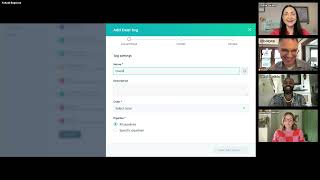
Voila. Okay, so we're starting off in the deals tool. The deals tool is where effectively the homepage for sales reps. It's where they execute deals. It's where they can they get a visualization of the sales process. And you can see deals at different stages of the process. The deals tool has two important views. It has the board view which are reps love and can't get enough of. And then there is the table view which same data, different treatment allows you to see things in a list format back into the board view. Let's start off with what is probably one of my favorite features we built this year which is deal tags. You can see on the board these colored labels that are marked high value green deal for example. And these tags are semi automatic prioritization capabilities. A semi automatic prioritization capability we built to help customers categorize and prioritize deals based on important information about your sales process. Show you how you set these up. Let's navigate the settings pipelines. Then we're going to go ahead and customize deal tags. I think I have too many and how about I delete this one? Then I'll be able to create a new one. When you go ahead and add tags, you will see that there are presets that are available to you to help you kind of set the team up for success. We have overdue urgent ad contact and sell. These are based on kind of analysis we've done on what sort of tags customers are defining and are finding useful. We also have next activity soon, but let's go create a one from scratch. We want to define a tag that's going to automatically label any deal that is over, let's say $10,000. And that is missing next steps. Right? High value deal, but missing critical next steps. That's something that's really important for our sales process. So let's go ahead and automatically tag deals that meet this criteria. What do we want to call it? Kyle? Give me a, give me a name for this tag.
I don't know. Overdue. That sounds good.
All right, so we'll give it a description. We'll say deal value over it would be say 10k. But next steps are missing. We'll give it red will make it apply to specific pipelines. This is a really nice affordance. You can just configure this per pipeline. Then we'll go ahead and define the filter criteria if deal amount. We do have some recommended properties here to help you kind of define tags based on information that we've seen as important for customers. So we'll go ahead and select amount. If amount is greater than 10k, voila. And next steps unknown. Voila. Now we've defined a tag that applies to specific pipelines and we can go ahead and save it. So now we have a new tag called overdue that is automatically applied to any deal that meets that criteria. And this will be reflected in many places in the application to help those sales reps prioritize deals based on the criteria you've just set. You see, I can see overdue now in my. Actually I have many tags labeled overdue. But you can see that the overdue tags are automatically applied to records on Board View. They are also supported on Table View, which means that I can configure my column to pull in the deal tag, configure my columns to pull in deal tag to also prioritize using deal tags on this view. We also support deal tags on the forecast view, which is probably one of my favorite things. So if you go for those using the Forecast app, if you go to the web view, let's go ahead and select some data. You can see that deal tags are also supported on ForecastView. So in the Deals app and in the Forecast app, the tools you primarily use to execute deals and to project revenue, you have these new labels that help you categorize and prioritize. Super helpful and super, yeah, super helpful. So that's it on deal tags and.
Hold on, some questions for you. One is someone's wondering if it'll ever be possible to base deal tag criteria specifically on line items. I think probably cross object filtering in general is a question here. Is that something your team is thinking about?
Yeah. So that's a very, very good question. We do support defining deal tags on associated object data. So I show you you can define a deal tag based on associated contact data. We're not ready for line items yet. I can look into that with the team, the PM who's driving that directly. But I show you that you can do. Let's go to settings, objects, deals, pipelines. Let's go ahead and edit this filtering on this portal doesn't have access to it, but if I had access, you could change this to say, contact information and you'd be able to define deal tags based on information on the associated contact. We. I don't think I will have to confirm this. I don't think we support line items just yet, but I am certain that's on the roadmap. Cool.
And then lots of people talking about this 10 tag limit and I mentioned because you and I have had conversations about this already about how if you have more than 10, it just. You get a lot of visual clutter and it can be. It dilutes the value of them. The pushback I'm getting, which is why I love this group, very smart people, is that if you have a lot of pipelines, the 10 limit is across all pipelines and so the limit for each pipeline might actually end up just being a handful. It sounds like 10 is a reasonable limit to avoid visual clutter. If I'm misrepresenting this, anyone speak up in the chat, But I think it sounds like people would prefer it to be 10 per pipeline rather than 10 total, full stop.
Yeah, that's. I guess that's kind of above my pay grade, but I can, I can, I can say something on this. The average customer HubSpot has two pipel and we did the analysis. We realized that 10 was enough. Given how customers are using pipelines, we. I do think it's worth evaluating having capacity pack for additional tags for those customers who have were managing more than two pipelines. That's good feedback which I can take back to the team. But the average customer 10 is a good amount.
Yeah. John, a regular attendee here, just piped up with we have 15 pipelines. 10, 10 tags does not stretch very far for a customer like that.
This group isn't the regular customer.
Great. I think those are the main things that have come up.
There was one about APIs that I think could be easily answered. Can deal tags be set by API?
That's a good question. I don't know. I can follow up on that.
One thing I will point out is deal tags are also deal properties. So you can filter and automate and do all the things you do with properties using deal tag. So I assume the deal tag property can be updated by API the same as any other property.
I haven't tested it. It's kind of a special case property. But usually if something is a property, it can be updated via ourselves a public sales API. But this is like a special case property, so I have to confirm that you can update it via the public API. Cool. All right, yeah. Let's go on and talk about what we're doing on the activity side to help customers better prioritize. We know that deal execution is all about sales activity. It's about understanding what's the activity on a deal, getting quick context into deal activity, and executing and doing the most effective activity on a deal. But it HubSpot can be sometimes challenging to get this visibility into deal activity. And so we did a number of things, some of them last year, most of them this year. First and foremost, we added next and last activity on the board so you can quickly, for a record or for a deal, see what happened last and what happened next. We also created these two new cards within the deals tool that allows you to see recent activity. So in the recent activity card you can see up to five of the most recent activity on the deal. So I don't have to go ahead and navigate to the record to kind of get a sense of what's happening and what's up with this deal. We also created a new card called PIN Activity which allows you to get a quick look into some of the activity that's most important on a deal. I created a note just before the session and that note says that the customer is keen but needs to pull in the primary decision maker. Before you had to kind of sift through the record to get that context. But right now it's right at your fingertips. We also made it easier to execute activity right from the deals board. You can select multiple records, you can create a task, for example, bulk assign a task to these records. For example, I'm going to go ahead and create a task to schedule up a follow up call tomorrow in three business days in voila. So I have gotten the visibility I need into a deal and been able to execute the next activity right from the deals board. Again, this is trying to give customers that single place to work to both understand what's happening and execute deals.
Yeah. So earlier on, in the very early part of your when you were first talking about deal tags and you came to this view, a couple people mentioned that the deal board is problematic because reps have to jump in and out of records and end up opening records in a bunch of tabs. I'm curious from the people who are saying those things, is, is this helpful? What UD is showing you the preview, the way to interact with it without entering the individual records. Oh, someone's also asking about your collapse stages.
Oh yeah. Okay. Yeah, you guys want to get super granular. We did a couple cool things on the board to make it more usable, more easier for customers to customize. Really configure this board as they will the end user specifically. So I'll show you a few things we did. First we added customizable columns. Some pipelines have five, six, seven, eight, nine, 10 stages. Right. Some of them are more important than others. And we've heard feedback that I want to be able to kind of manage the view so that I just see those stages that are important for me. And this is what we did. We a lot. We supported collapsible columns. We also did something called edit board currency formatting, which allows you to designate how many significant numbers show up at on board aggregations. And you can also view the board in your preferred currency. So let's say that your account works out. Works is a multinational. You're working out of a multinational organization and you work in Canadian dollars, Euros, Fiji dollars and US Dollars. The end rep can say, okay, all of my deals are denominated in Euros, so please show me board aggregations in euros. What we do is we take the exchange rate that's configured in the account and we use that to convert from home currency to preferred currency for that user. So these are a few of the affordances, the small UX enhancers we made it, we implemented to make it easier for the end user to manage to view this view.
Cool. I think people like it.
Love it. Love it. All right, let's go to talk about what is. I can't say everything is my favorite feature. It's kind of like calling all your kids, every one of your kids your favorite kid. That's a lie. It's not. That's. My parents used to say that it's not a true. I'm the favorite. I'm the favorite. They used to say. All right, so let's talk about embedded insights. So we got deal tags. We talked about some of the UX affordances that make it easier for the end user to manage this view. We also talked about the things we're doing on the activity side to surface more context in the board view and allow customers to execute deals from the board view. Let's talk about embedded insights. So these features are specifically more targeted for the manager. But this, what we know about this tool is that the sales manager, sales leaders, they pull up this tool when they are having either team calls, right, weekly team calls, or having these critical one on ones between rep and manager. And they're using this to kind of guide and coach reps on what deals to focus on what's changing in the pipeline. And so what we did is we added embedded insights on pipeline health to help those to help managers carry out those critical conversations between rep and manager. So we have important information about total deal amount, weighted deal amount, which is a quick hit into your forecast. This is your weighted pipeline forecast, Open deal amount, close one and then new deal amount, which tells you how many new Deal New deals have been created in the week and this critical deal velocity metric which tells you what your average deal age is. And so the idea here is that in these weekly one on ones, the manager is opening these up and trying to get a sense of how things have changed in the pipeline week over week to help guide reps in prioritization and progression. Of course, these insights can be shown hidden at any time and we do have a setting in deal settings to allow you to turn off the insights entirely. They are what do we put this setting right? Voila. You have control to enable these or disable this and then the end user can elect to show and hide at any time.
I did not know that could be turned off. Yeah, but judging by the chat, I think most people would not want to turn off. Seems like people really like deal insights.
They're really helpful. Tell us more about how they're helpful. The more you can tell us about how they're helpful, the better we can make these things for you.
So yeah, we'd love to know more about what folks would be looking to see from deal insights in the future. And if you'd want that to be customizable, what insights would you put at the top of these views? So feel free to share in the chat if you'd like to be customizable. What would you want to see there instead of the data that you're seeing and any other things we should know about insights?
One specific comment that came in earlier, Caitlin said, finally, deal age. So I gather that deal age is a hard thing to find before the advent of insights.
Hey Sebastian, Sebastian is my old colleague. He just said customizable. Shout out to Sebastian. It would be great to include some velocity type numbers and stay tuned for the roadmap. We have a lot more coming. This is just the tip of the iceberg in terms of showing deal velocity information contextually throughout the experience.
Sounds like some of the admins have heard from their end users that they didn't know how to hide the insights. I think being able to hide them is really good for a lot of sales people, but maybe people aren't finding that that option.
Awesome. All right, so let's talk a little bit about reporting. Yeah. Okay. So reporting, reporting. Reporting. Sales analytics is our curated reporting sales reporting experience. It includes both reports about lead management, but most. About 80% of the reports here are specific to deal management and forecasting. A big initiative for us this year and going into next year is to make this experience a lot better from customers. Introducing better breadth, depth in terms of the insights we provide. But we showed some of that work this year. First of all, we revamped funnel reporting, which is probably, which was probably one of the bigger sources of pain for our customers. And so what we did here, I have to make sure I don't have rubbish data. This would work. Okay, so first let's start with the Deal Journey view. So the deal journey view is the traditional all funnel report. We used to call it all funnel report and now it's been rebranded to Deal Journey. And this shows you conversion across the funnel. But it requires that a deal go through every step of the process in order to show up. So if a deal skips move forward, for example, it won't show here. So this view tells you conversion further deals that have gone through every stage of the process. What we've done here is we added high level metrics about total conversion, primitive conversion and next step conversion, in addition to some deal velocity metrics that help you tell that tell you how quickly things are moving through the funnel. This is nice. But what has been one of the bigger challenges was that what if idea doesn't go through every stage of the funnel. Right. And we know that for many reasons, one being that sales reps aren't the best at updating deals as they move through the funnel. But we know for many reasons that deals don't always go through every stage. And so what you get is conversion or a funnel report that is incomplete, that's missing a lot of the data and a lot of the deals that are in your system. So what we did is in the any stage view, which is now rebranded as Deal Stage, we show you conversion numbers including account of skip stages, so you can effectively for each stage get conversion even though a deal didn't go through every step of the funnel. So this is one of the new improvements on the reporting side. Any questions? Yeah.
Yeah.
That's huge. Yeah. It is so valuable. Yep. Absolutely. Yeah. This is my favorite. This is probably really, really, really, really, really my favorite update. Okay, let's show you another report we built. We built a deal velocity report or something. Sales velocity report. So sales velocity is probably the easiest sales North Star metric that you have. Every organization should be looking at this number and effectively it tells you how much money you make in a given period. It might be how much money you make on a daily basis, how much money you make on a weekly basis or a monthly basis. And it's easier way to gauge the health of your sales process. Right. You can compare over time how off how much money you make, you're making each quarter, how much money you're making each week. And you can identify trends in your sales velocity. We show you the inputs, your sales velocity, which is average deal amount, your conversion rate and average days to close. And so you can use this report to compare sales velocity across time, across individual reps, and then you can identify things that are bottlenecks with things that are kind of preventing you or reducing your sales velocity. For example, over time you can see that your conversion rate is going down. And drill down deeper to inspect why conversion is decreasing. Average days to close might be an input that's reducing your sales velocity. So you can start to inspect why is your average days to close, why is it taking you longer to close deals? And then of course correct that over time. So this is another important report we've built. Obviously it's in its first iteration, but the goal here is to allow you to see this important metric and its inputs, compare it over time and across users. Any questions on this?
The chat is bumping. We have a question around how sales velocity is calculated, but most people are still more call outs people, people really want more around line items. Ud.
Absolutely.
Let's have some questions about whether or not that's coming for forecasting. Do you want to share a little bit more, Edie?
Yeah, perfect. Segue into the forecasting bit. Yeah, let's go. Okay, so we talked about deals, we talked about sales reporting, deal reporting. Let's talk about forecasting, which is maybe the final leg in the deal management stool. Let's talk about our forecast module, forecast app. I don't work for Salesforce. Salesforce uses the word module. Okay, so I stopped sharing. I share again. This is our forecast app, right? So forecasting for those who don't know is effectively predicting the future, predicting future sales or revenue. And you can imagine that this is incredibly important for managing your business, right? Having visibility into how much sales you're going to make allows you to better staff teams, allows you to kind of make sure that the fulfillment delivery teams are well equipped and well prepared to handle those sales, right? Understanding where you're going to land in terms of revenue gives you, allows you to guide the street if you're a public company. So there's so many benefits to forecasting. In theory, every sales organization, every organization should be forecasting. But again, it's hard. It's hard. So HubSpot allows you to use the open opportunities in your system, right? The open deals. You have to project future sales and soon future revenue so what we do here is on each individual deal you can create or you can set a probability of close on that individual deal. So I just opened a deal. The deal is with my mate Kyle. I think the probability of closing is quite high because if he doesn't close with me, I'm no longer his mate. So I might set the probability of that at 9. The system takes the probability of each deal multiplied by the deal amount to spit out an expected value. And this is what is called your programmatic forecast or in other terms your weighted pipeline forecast. Right. We support forecast categories which allow you to effectively exclude certain stages from the forecast. Gives you a little bit more flexibility. Deal stage view considers all of the deals in the pipeline where forecast category is a layer of flexibility that allows you to include and exclude certain stages inside of your forecast. High level, that's HubSpot forecasting. Let's talk about what we did this year. First and foremost, we similar to deals, we added embedded insights to help you better forecast and better understand where you are in terms of meeting your goals and bringing in revenue for the organization. Let's go to a pipeline that has data so you can see what I'm talking about. This data well is net new. We're calling it the forecast Insights data. Well, you can see your goal for your all teams. You can see how much you've closed one for the forecast period, you can see your gap, you can see the team's call that is the forecast manual submission and you get some important metrics about the pipeline. I talk about these in a bit. For each of these important metrics, you can see and track on a weekly basis how they're changing and they're trending. For example, my close one has increased by 113% in the last week. Way to go team. We're closing which means My gap has decreased 17 and this team is really, really bullish. They've increased their forecast submission from $40 to roughly $240,000. So we can easily track how things are trending in this data well, we're bringing in information and context into the pipeline within the forecast tool. You can see this is your open pipeline value, which tells you the pool of opportunity you have to meet your goals. And we give you your pipeline coverage, which is this number as a percentage of your goal, which tells you how much pipeline you have relative to your goal and generally you want to be it. Depending on where you are in the forecast period, that number should be somewhere different. But generally at the beginning of the period you want to be between 2 to 3x, right? If you have 2 to 3x pipeline relative to your goal, you should feel confident that you might land or you might meet your goal. But of course, this highly depends on your conversion rate, that is your close rate, your win rate. Right. If you historically win about half of those half of your deals, your pipeline coverage target is going to be different. Right. So this is what we added on the main page of the forecast app. We also included or recently shipped Forecast accuracy tracking. So you're forecasting, but what's the point? The point is to be accurate. And so now we allow you to. For historical forecast periods, let's go to a team that, let's go to Tridon and the Dream team. And so if you open the submission panel, you see this new card called Forecast Accuracy. And if you navigate to previous periods, you can see how good the team was. The, the team, the user, the individual rep was at making a forecast call. I wasn't good at all. I'm at 3%. That's terrible. I'm firing this guy Yuri, he's getting fired. Joking. But you can see that for every forecast submission. So ideally once a week the rep is making a submission for where they think they're going to land. A manual submission for where do they think they're going to land at the end of the forecast period. So in week one, I think I'm going to make a submission for where I think I'm going to land at the end of August. And week two, I'm going to make a submission for where I think I'm going to land. Given another week of working deals, I'm going to make an update that submission to just tell, to tell my manager where I think I'm going to land at the end of August. And then week three goes by, same story. And here for every individual submission I can track that accuracy, which is really the delta between what you've actually closed in that period and what the submission was for that period. So you can use this information to one, monitor and measure performance. Is the individual rep good at forecasting? Are they sandbagger, are they over committing or over forecasting? Is there a trend here? And can you can use this information to kind of course correct and override their individual forecast submissions. This is the first iteration of that. You can imagine all of the flavors that this solution can get in terms of reporting and giving customers insights into who's good and who's bad at forecasting. So that's forecast accuracy tracking. Any questions here? This rep Is a legend. Amazing. I love, I love the positive feedback. It makes me feel good about that. We're building stuff that is valuable. So the forecast is only monthly. Will there be a. Yeah, we do support quarterly submissions. So most customers forecast on a monthly cadence. But obviously how you forecast depends on your sales process. Right. If you're working longer deals, it takes you four to five to six weeks to close deals accordingly. Cadence is better. But if you're working, if it on average takes you two weeks to close a deal, monthly forecasting is better. Depends on your process. But we do support both.
A great question in there about auto calculating and suggesting forecasting. You want to take that one.
Auto calculating based on past customer data. Okay, this is a nice segue into the next thing I want to demo, which is AI forecasting. And that's basically exactly what we're doing here. So let's talk about AI forecasting. So, voila. Can you guys see the screen? Okay, forecasting again, predicting the future. Those who do it well, those who are accurate. And you want to be general rule is you want to be 90 plus, depending on the level, right? If you're a sales manager, sales leader, you want to be 95 plus. That's the North Star. That's the ideal. There's fluctuations in variability, obviously, but you want to be 90 plus. Those who hit that milestone, who hit that target, usually look at multiple lenses, multiple forecasters, to calibrate, to calibrate a number. And this is what we're trying to show you here in this experience, in this analyze experience. So you have your weighted pipeline value, which is basically your basic forecast. It takes the expected value of all of the deals in your pipeline and spits out where we think you're going to land. You have your commit forecast and commit. Here is a property you set on each individual deal when you think the deal is extremely likely to close, more than 90 likely. So this is kind of a conservative forecast that just looks at those deals that are extremely likely to close. Then you have your manual forecast submission or the team's call. Right. So what is the team calling? This is the third lens. And then we've added a fourth lens, AI driven lens that looks at your historical sales data to help you predict future sales. Right? This is what is shown in this data. Well, so we've trained a model and this is what the model does. The model waits. Every month, the model waits for you to close data first week of the month, it waits for you to close data, close deals, and then it takes that information Trains the model and tries to extrapolate based on your close patterns and how much you've closed and how quickly in the velocity of closing tries to project. At the end of the month, if you continue this pattern, if you continue to strength, what will you land? And we give you a range 80% confidence interval. Right. Where most likely is the midpoint of that range and the upper and lower are the bands of that range. Right. This AI forecast is updated every week after we've realized another week of data. Right. So this is what's being shown at the bottom. When we collapse, we train the model, it's your projection. Another week elapsed, we train the model again. So based on two weeks, we give you an updated projection. And then a third week goes by again, same story. We retrain the model, update the projection. And this accuracy over timetable is an attempt to show you exactly that the accuracy, our accuracy, how good were we were how good we are at projecting where you're going to land based on yourselves. And obviously this is like a demo account, so I wouldn't anchor too much on the numbers you see, but for a healthy subset of our customers between 5 and 10%, they get very good accuracy numbers, about 95%. So what we're doing in this experience here is we're giving you the different lenses that you ought to look at when you're forecasting your basic forecast, your commit forecast, what the team is calling and now this net new AI driven forecast to help you caliber calibrate where you're going to land for the organization that's AI forecasting. Is this in public beta? No, it's in an alpha. But we are working really, really, really hard to open it to public beta. We'll have some updates on that soon, so be on the lookout for that. But it is not yet available for the general public. Alpha, come on you. Soon. Soon. Rome wasn't built in a day.
I told you. You guys like a sneak peek about what's coming and so here you go. Sneak peek.
All right. Okay, let's talk about what's coming. I pass it to Bridget. Bridget, tell us what's coming.
Awesome. Thanks, Yudi. Please folks, keep the chats rolling in and we'll definitely make sure we pause in a little bit to answer a couple more questions. So Yudi talked a lot about our mission for deal management at HubSpot and really what we want to try to bring to you all over the year. We've really just started scratching the surface here though we've done a lot as you walked us through. There's still so much more to be done. And you know, what we're really, really focused on in the next, say, six to 12 months is that layer of intelligence to our deal management capabilities. So you're starting to see that a little bit with kind of some of this, like semi automation around deal tags. You're seeing this with AI forecasting, certainly, but we know that there's a lot more that we can do to really help reps prioritize, focus on the right deals and take the right actions on the right deal. So that's really kind of the direction that we're heading in the near and long term, of course, since it's a long road ahead. But we have some really exciting stuff coming out in the next couple months. We're also really focused on providing a centralized experience for reps. So we're hearing your feedback about kind of the deal board having some limited capabilities there and it not exactly being the right setup for reps. We know that it's really important to give reps kind of a centralized single pane of glass that they can use to focus on the right deals, take the right actions, take the right next steps. So that's really a key focus for us in the coming months. We also know that prioritizing and focusing on the right deals is a huge challenge. So deal tags are a great step forward in that. But one of the things that we're really focused on delivering in the next few months here is actually a predictive deal health score. So just as you see us starting to inject AI into forecasting, as UDI just displayed, we think it's really important to bring that power into deal prioritization. So being able to look at a multitude of different factors like deal activity, rep activity, contact engagement, and provide a predictive deal score that helps reps focus on the right deals, help them take action, and then really not only just know that score at any given moment, but see that trend over time. So is there a lack of activity that's causing an important deal to drop in their score? Is there a boost in contact engagement that's actually causing a deal score to go up and make a deal a bigger priority or a stronger likelihood of closing? So how can reps kind of focus that time and make sure that they're intelligently kind of prioritizing their deal? So that deal health score is on the horizon, and it's definitely something that we're looking forward to getting feedback from, y'. All. There's a lot of different factors that will go into that score. We want to make it really easy to understand what those factors are and how reps can make a change so that they can influence that score and make those deals more likely to close. Another There was a great comment from John in the chat earlier about a cheat sheet idea for you, Kyle, that is actually wrapped up into some of the things that we're thinking about for sales managers in particular, which is when should sales managers be using what analytics reports for what? For when? What should they be looking at before they go into a coaching session? So we know that, you know, just as important as having a centralized experience for reps, it's really important for us to give managers a starting point like how do they understand the general health of their pipeline? How do they understand what's going on with any of their given deals where deals are at risk, where they need to help and intervene with their reps? Is there a particular part in the pipeline where a rep is getting stuck? Are there different stages where deal velocity is low? How can they kind of interject and intervene to help improve the performance of their team? So giving managers again that centralized experience, a single pane of glass is a jumping off point for them to go on these kind of deeper investigations to uncover performance problems and opportunities to coach within their team is a really big focus for us this year. So sales leader insights and really kind of understanding what insights we can bring to the sales manager, to the sales leader to help them prioritize their time as well as to the rep. Those are huge focuses for us for this this year. So we're really excited to learn a little bit more from y' all and maybe we could open up the chat on this and open up the Q and A is as you think about the sales rep experience giving them an experience to prioritize and action on deals as well as the sales manager and sales leader experience giving them a jumping off point, a place to find insights, a place to kind of drill down and go further for coaching sessions for managing their pipeline for dealing with at risk deals. We'd love to hear more about hoping for in the space.
Awesome. I do want to add one thing that we had a question about this earlier about using the Forecast app in multi currency. We are that is something that's also on the horizon. Supporting preferred currency, allowing the end user to effectively toggle the UI similarly to what you can do on the deal board to what I demoed and see and use the entire app in preferred currency versus the account's home currency Cool.
Well, should we jump into the Q and A?
Yeah.
For those of you who have attended these sessions previously, we used to rely very heavily on a handy little function where you could upvote other people's questions and we would take the most popular ones first. That feature has apparently been deprecated. It does not exist anymore. And so it's kind of the wild west over here in the Q and A. We have more than 30 questions and we have nine minutes.
Rapid fire shooting.
We'll just go top to bottom and hope that works. We'll go as fast as possible. Yuri, Bridget, this is sort of a lightning round here. So here we go. Actually though, before I jump in, everybody respond to the the feedback survey. Dan is dropping in the chat just so we can get feedback on the session and know what you want to see in the future. Udi, Bridget, we're not going to get through all these questions. If people want to connect with you, do you have a preferred social or way for them to do that?
Oh, go ahead, Judy, you're the expert here.
I was just gonna say they kicked me off of all the social platforms, but that's a terrible joke. Yeah, I think the best way is to maybe give f. I mean to give folks my email. I mean I love talking to customers. What I do, I talk to like between 10 to 20 customers a week. Oh wow. Yeah, it's hectic sometimes, but I love that. And so like reach out to me. My calendar is always open book some time and I show you especially there's a lot of love on the deal scoring side. We're hungry, hungry for feedback and so if you want to see what we're planning on building and how you can kind of leverage this AI driven capability in your sales process, let's put some time on my calendar and I'm more than happy to meet with you. So Cal, how can you send the folks my email?
You asked for it. Your chat is. Your email is now.
Yeah, that's my email. Yeah.
So there you go. Okay, so now with eight minutes, seven minutes ago, I'll just start top to bottom here. Lucilla asks, can you choose which users get to see the tags, labels you create? Let's say only certain managers. So I just checked field level permissions do work with deal tags. That is I believe an enterprise feature. Ud Bridget, do you have a recommendation other than that?
I also. That's right, that's probably the best bet at the moment. But I also know that the team is working on doing deal tags per team, using team as an axis. Let's take a note of that. And we can kind of update the folks on what the ETA is on that. But I know that we're working on that.
Yeah. Can we add tags to contacts and companies? I should mention when you were showing the deal board and deal tags, people were saying we need tags for contacts and companies. We need a board view for like life cycle stages. That is. That is not your domain. I know, but maybe, maybe for tickets.
You can add tags for tickets. Contact companies above my pe, above my pay grade. Yeah.
Anyway, people love what you've built and other product teams should build the same thing. I think is the lesson there. No, not possible currently to give you a straight answer there. And I don't know whether that's a thing that's being built or not. Can you report against this by just using the overdue tags or do you need to apply those filters against the report? I think that was probably a contextual question. 11:18am what were you talking about? UDI.
This is when you're setting the filtering for a tag, do you have to then reset those filters for a report or can you just use the presence of the tag?
Yes, absolutely. In our Was it custom object? What's the custom report builder? Customer Report builder. You can create reports on tags. You can see how many tags have been defined, how many deals have tags on them. Yes. You can build reports based on the tags themselves and you don't have to use the underlying criteria.
Amazing. And then you tried to demo creating deal tags based off of contact properties. Richmond says these cross object filters aren't available in my portal either. But we have enterprise. Is it coming soon?
Soon. So yeah, I'm 100 sure we built this. I don't know if it's out yet. It's a big, big world. A lot of features. I don't always have the best overview of where we are in terms of rolling out these individual pieces, but I can. I know we built it. I don't know where it is in the rollout process. Can follow up on that.
Okay. But yeah, if you don't have it now, you will get it. It will exist most certainly. Let's see. Okay, so further refinement of the API question with deal tags. I realized after I answered it deal tags are just set automatically. You wouldn't at any point update that property manually.
Follow up on that.
Okay. But yeah, if you don't have it now, you will get it. It will exist. Let's see. Okay, so further refinement of the API question With deal tags. I realized after I answered it deal tags are just set automatically. You wouldn't at any point update that property manually, either in the UI or through an API. So Chris clarifies. I'm thinking more of setting the deal tag logic itself via API. So is there an API endpoint that would let you define a deal tag?
Oh, I don't know. That's even harder. I don't know. That's hard. I don't know. I don't know. But I can see what the team is thinking about.
Yeah, I would, I would guess maybe not right now, but. No, but is there any plan to improve the mandatory properties for deal stages? The UI gets really tricky and it would be amazing if you could say, make this property mandatory for this stage and all following stages.
Yeah, that's. We. It's managed by another team in another group in another part of the HubSpot universe. But I know that something top of mind, you're talking about required stage properties so you can set entry and exit criteria on each stage for a deal. The UI I can, I don't have time to demo, but the UI for that is a little bit clunky. But it's a big initiative undertaking. But these folks in the CRM data management team are certainly working on that. So maybe, maybe we can drop in like Jeff Finson's email and they can reach out to Jeff Vincent if they're interested on that front.
Cool. Yeah. What about multi currency in the forecasting tab?
Yeah, yeah, we're working, we're working. As I said, we're working on supporting preferred currency in the forecast module. So you'll be able to, similar to what you can do on the deal board, toggle and select which currency in your account you want to view and use the forecast. Interesting.
Cool. Let's see. Are dependent properties on CRM records coming out soon as a beta. I saw them demoed at inbound. I was probably the person you saw demo them at inbound. Yes, those. We, we are really hopeful that they will come out in September, October at the latest. They are. They're coming. How is forecasted amount different than weighted amount?
How is forecasted amount different than. Ah, that's a good question. Okay. Forecasted amount is driven by this legacy property called forecasts. Weighted forecast probability. It's effectively the same thing as weighted amount where we, we've been kind of kicking the can down the road, but we ultimately want to deprecate the fork weighted forecast category because we like replaced it with the weighted probability property. So they're the same, they kind of stick to properties, do the same thing. But our suggestion is you should be using weighted probability instead of forecast probability. They do the same thing.
Great. Kim, I'm not sure if this is about the deal insights area, but could we have a zoom on speed to lead metrics and how to measure them? I think that's a request for.
Anyway.
We got two minutes. I've got to just power on. What do you guys do with inactive deals that are sort of on hold so it's not completely dead, but it's still a long shot? Do you move to a different pipeline? Do you close, lose deal and create a new deal when the timing is right?
That's a good question. We long talk thought about having an archive feature for those that are like, you know, kind of not necessarily dead, but not necessarily moving through the pipeline. I don't know where if we've ever like there was a lot of technical complexity with that. I don't know if we have like the best opinion on how to, how to manage these sort of deals, but what I've seen customers do, which I don't know if it's the best thing but to put them in like a stale stage in the pipeline. I don't think this is why you have so many pipelines. I don't encourage moving into a new pipeline, but maybe the best thing to do is to probably put them in a stale stage within the existing pipeline.
Yeah, a lot of folks are doing in the chat, but definitely a lot of love for an archived.
I mean I started HubSpot in the support team for the brand new CRM when it was brand new and we told people close loss a new deal later. And when tasks came around we were like close loss and then a deal task to check in in six months. The thing I worry about with adding stages and things is then your forecast and reporting can get your pipeline metrics can get thrown off because you just have this stage where deals sit for months.
That's a good listen to Kyle, don't listen to me on that one.
Okay, I think with 15 seconds left we better just call it here. Everyone, I'm sorry we didn't get through all the questions we wanted to but you have Yudi's email address now, so good luck to Yuri. Yuri, Bridget, seriously, thank you so much for being here. Any last thoughts you want to say before we shut it down?
No, it's just. Thank you all. I feel very good about this session. I feel like we're moving in the right directions I love the love that we got and I love the feedback. And again, just looking forward to getting to know a lot of you and speaking to you guys on a one, on one basis. Gracias. Muchas gracias.
You have a great contact in UDI with that email address he gave. My email will be unattended in the coming weeks as I go out of maternity leave, so LinkedIn is a great place to reach me. If folks have any other follow up, happy to connect there, but won't be checking my inbox. Come sometime in October.
That's Sarah Bridget's inbox. Having just come back from leave. I know how flattered it can get.
But thank you everyone for the feedback. Really appreciate it.
Great. Well, thanks everyone for being here. We are going to shut it down. And by shut it down, I mean I'm just going to turn my camera off and walk away. You all are encouraged to leave the webinar. We're going to keep it running just so we can capture some of these chats and questions and things. But for all intents and purposes, that's the end. We're leaving. See you all later and have a great day.
Bye, guys.










