A walkthrough of Deep Neurals, a predictive lead scoring app for HubSpot. The demo shows how it scores leads based on behavior and intent, walks through setup and training, and shows how to view predictions.
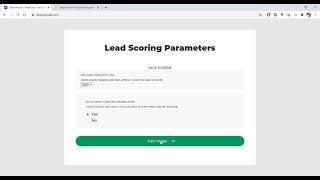
Welcome to this walkthrough of a predictive lead scoring application called Deep Neurals. This app will simply allow you to score incoming leads on your website and identify high or low intent leads under the hood. It uses HubSpot parameters for a particular lead. For instance, what pages did the lead visit or how many emails did they open? Everything contributes to the scores of your leads. This application is not generic as it develops a model separately for every account, allowing the model to learn parameters that are more relevant to your business. So let's go ahead and see how this works and what you can get out of it. Right. So to get started, you can either use the Connect to HubSpot button directly from the website or go to the HubSpot page and connect that. I'll just go ahead and click this button. This will lead me to a HubSpot page that will ask me which account do I want to link this application with. So this will lead to an integration step. Once this is done, this will lead us back to the website application page. Here we need to configure a couple of parameters, the first first one being how many contacts to use. So let's say you have just 3000 contacts, so you can just go ahead with 2500 in that case. Or let's say we'll take a larger number, 3,500. Do you want to include offline leads? So that is the second parameter which is basically asking if you also want to include the manually added leads into the training scenario. This is majorly not recommended if as these offline leads do not show the behavior or the intent shown by online leads. If you do not have a lot of conversions through online leads, you can go ahead and choose yes, which is a case in our scenario as well. So in that case I'll choose yes and we'll just go ahead and click Trade model. So so this is where the process, the long process of 11 hour has begun. So you can go ahead and keep clicking Refresh to check the status. So as you can see, it has started to import contact properties and it it is. It takes a total of seven steps which will eventually lead us to an hour of training. So it's recommended we keep this tab open and once all of this is done you can click on refresh and it will lead us back to the application page. So now we have the final model ready. As you can see, a green box appears that says you have model ready and we can click on View results. Note that once we click on view results, it will take another two minutes because it fetches 200 recent leads and does the prediction for them. And so let's go ahead and click on this. And finally you can see we have been redirected to a page that shows predictions of each and every lead that were recently added to our HubSpot CRM. So we can actually navigate throughout the entire predictions. We can also sort it to see very low intent leads as marked in red. So this is basically the application what it can do. Thank you.