Fostering a Creative Mindset for Extraordinary Solutions | HubSpot Admin HUG | May 16, 2023
Christine Ramiro and Deanna walk through creative problem-solving for HubSpot admins. They cover scoping requests, repurposing existing tools, researching integrations, and using no-code platforms like Make and Zapier to build extraordinary solutions.
Hi all.
Welcome to the HubSpot Admin Hug. Today's hug is fostering a creative mindset for extraordinary solutions with Christine Ramiro, Revops Solutions lead and HubSpot mad scientist from Oxygen. Today, Christine is going to help us learn how to tackle complex challenges and redefine the limits of what is possible in HubSpot. As a HubSpot mad scientist, Christine has discovered how to embrace challenges with curiosity, curiosity and determination and think outside of the box to create a lasting impact impact on an organization. This session will dive into practical strategies and examples to help you develop innovative HubSpot solutions with your existing knowledge and resources. So Christine, take it away.
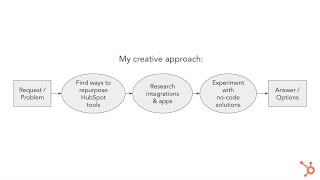
All right. Hi everyone. Thank you so much for attending. So yeah, just a little bit of an intro about myself. As Deanna has mentioned, I am the Revops solutions lead at OX Oxygen. So. Oxygen is a HubSpot diamond partner agency based in Hong Kong. We also have offices in China. So the services we provide mostly HubSpot onboarding nowadays, but we also do a lot of website design and yeah, just getting people onto the HubSpot CRM TMS system. And apart from that, we also do China marketing since we have a China office and stuff. A Few Things About Me Random Things about Me I am a Filipino Hong Konger. Both of my parents are Filipino and I was born and raised here in Hong Kong. It is currently 11pm but most of the HubSpot parties are popping at this time so I am usually awake at this time just attending events and just learning HubSpot. Other than that, I'm also a regular on the online role playing game Final Fantasy 14. It's like World of Warcraft except Final Fantasy. That cat girl on the bottom left is my character in game. And yeah, I am also a theme park and retro gaming enthusiast. I spend a lot of time just watching theme park engineering and ride design videos and retro gaming videos. So actually these are some pictures I took at Hong Kong Disneyland during Star Wars Day. I specifically went to Hong Kong Disneyland just to ride Hyperspace Mountain for Star Wars Day. Alrighty, so let's get into the actual presentation. So what we're covering today, I'd like to basically introduce my creative process when it comes to solving solutions on HubSpot and also just kind of like talking about the benefits of doing it, even if it is a little bit more effort than what most people are used to. And then we'll dive into the nitty gritty details of like the different steps within that creative process. So scoping the requests, repurposing HubSpot tools and features, using the app marketplace and using no code solutions. And then we'll have a Q and A. But honestly, this is just an open conversation, so just drop any questions whenever and Deanna will just like share it whenever, if it's relevant to whatever I'm talking about. And also, yeah, if Deanna, if you have any experiences or examples you'd like to share, I'd love to hear them as well, since you have a lot more experience with like, HubSpot projects than I do. You got it. All righty, so let's get into the creative process. So something that I actually noticed with a lot of people who are new to being a HubSpot admin, or when they haven't developed the kind of confidence in their own problem solving skills yet, how they approach solutions development is so, you know, somebody comes to them with maybe a request or a problem, it's like, hey, can you build me this workflow? Okay, I'll build you that workflow. And that's it. You just build the workflow. You don't really question it or anything like that. Or if you're a little bit more experienced, you might kind of dive a little bit deeper into the requests or the problem. And then you'll just kind of like go through maybe the HubSpot features list. You'll check out HubSpot Academy, you'll check the knowledge base, maybe contact HubSpot support, and then you'll just take whatever answer they give you and be like, okay, yeah, it's not available on professional. We gotta get enterprise in order to get this feature. So how I like to approach Problem solving on HubSpot is more like this. So when I get a request or a problem, I will really dig down into what it is the person actually needs. So not just like, you know, if they ask me to build a workflow, I'll be like, okay, but why? Why a workflow? Or why, why do you need a reminder like where? Like, why do you need it in Slack? Why do you need in HubSpot? Like, I will keep asking questions until I get kind of a general idea of what I need to solve. So once I get that, then I go into these three bubbles over here. I know it looks linear, but actually I just kind of like go in wherever direction my curiosity brings me, essentially. But these are like the three major things that I do when I'm coming up with solutions. So first of all is finding ways to repurpose different HubSpot tools. This requires an understanding of the fundamentals of HubSpot, so what is actually within your CRM and then trying to figure out how to change that into something else. Then the second thing I like doing is actually researching the integrations and apps. I don't just limit myself to the App Marketplace. I will also look at things outside of that because it's possible for you to create your own custom integrations whenever. If the Zapier, for example, provides that to you, then. The third thing which I enjoy the most out of all of this is experimenting with no code solutions. Essentially, when there's nothing in the App Marketplace or you can't build anything within HubSpot itself, I will try to build it myself through an ipass platform like make.com and Zapier. So we'll kind of like explain that a little bit further. And then once I kind of go into these three different bubbles, I'll have my. Either I'll have a one answer or I'll have a few options. I usually like coming up with a few options because people have preferences and I, I know I'm not always right. So. So, yeah, so that is a general overview of my creative approach. It is a lot more time and a lot more effort. So one thing that I've kind of learned throughout the process of doing this is like I have to give myself a limit or try to specify how impactful putting more effort into this process is. But yeah, that's just something to keep in mind when like, going for this approach. So the benefits of taking this more creative approach of like, find going into all these avenues to find different solutions, first of all is like making the most of every dollar that you're spending on HubSpot or whatever in your tech stack, right? So by trying to find more solutions, you might actually find that you don't need to subscribe to OpsHub and or get an enterprise subscription. Those are really pricey and it's hard to ask for budget for those kinds of things. Especially if you just need one feature, right? You might actually be able to build it yourself or you could find it in the app Marketplace. Second, it's like, you know, choosing the wrong solution might actually add more work. So for example, you have two different solutions. One is cheaper and has less features, and then the other is a little bit more expensive, but has more features. But because, you know, you're kind of, you're worried about money, you go for the cheaper option. So you have to build all these different workarounds, maybe create workflows, build like custom dashboards just to get it to work and then later on you find that it breaks or none of these workflows actually does everything you need, right? So essentially what ends up happening is you buy the more expensive one, but you've already wasted so much time building this other, building around this other thing, and now you have to migrate to this new one. So you're doubling, tripling the effort that you're spending just to make that one thing work in your, in your portal. Then third is like, you could miss out on alternatives with better value. An example of this is. Yeah, so we were using a WhatsApp integration for the longest time and we, we never really questioned it until we got a lot more leads who were asking for WhatsApp integration. So I was like, okay, you know, I'll look into all the different options out there. I find out that there are actually cheaper options out there with the same features or an even better like customer support essentially. And we could have been saving US$40 a month. That is a lot of money. Could be, you know, treating your, treating your staff members to like nice food. You could be like subscribing to a new tech stack and stuff like that. So yeah. All right. And then the second big benefit to this creative process is increasing Everybody's Trust in HubSpot. So as HubSpot admins, we know that it's not just about the tech all the time, right? There's also the people aspect of it. And what happens when, you know, imagine you are asking somebody, hey, can HubSpot do this? Hey, can HubSpot do that? Can we build this? Can we do that? And the answer is no most of the time. So then people start questioning why is it we're paying for HubSpot in the first place? Then like, I thought this was like the all in, one source of truth for everything and everything will be connected, right? So when you kind of like widen your net and just find different ways to solve things, you're more likely to say yes to these people when they ask for stuff, right? So in that sense, the more you say yes, the more you build people's confidence not only in the CRM, but in your abilities as a HubSpot admin. So the more trust you have, the easier it is to get better buy in. And then also, so it's just, it's just better for any long term initiatives that you have for, you know, your company. Do you have anything to add, Diana, with your experiences with like trust and buy in?
No, I think you kind of, you're hitting it right on the head. You know, sometimes you just. You've. You've got to just get people to believe what you're saying. And by getting them to believe what you're saying, you have to give them reasons to do it. And by not throwing their dollars away, that's. That's pretty easy to get their trust that way sometimes.
Yeah. Especially with the sales team and anyone who's, like, very budget conscious. Alrighty, enough about the definitions and the whys. Let's get into the actual details of this process. Let's start with the request and problem phase. How do you effectively scope a request? I'm going to just preface this, that HubSpot admin Hug actually had an event about this several months ago. It was done by Connor, who is much more experienced than I am. Like, I learned so much from him during the Rev Ops bootcamp. So if you have the time, please do watch the recording of that session because he really goes into the details of how to actually scope and define the different problems and find the solutions to them. But anyway, so today I'm just going to go over just a brief version of that in my own words, essentially. So, first of all, understanding the problem. So with understanding the problem, my first three questions. My first three questions are, what is currently happening? How does it impact the team and the organization? And what is the expected behavior and outcome? So with the first question, with what is currently happening, I like receipts, please give me receipts. Because people will always think that. Some people, they'll come to me with problems. They'll be like, yeah, this is why it's not working. And then I look into the record and I'm like, no, actually it's not a workflow that's breaking it. It's a HubSpot setting. So, like, you can't just take people what people say at face value, right? And especially because they might have emotions about the system, they're very frustrated and they'll just jump to conclusions on, like, what the solution is. So I'll ask them for examples. I'll also try to ask as many people as I can about what the actual experience is. So what is actually happening? When you click here, what is the behavior and stuff like that? You just have a clear definition of what you're actually trying to solve. Then the second question is, how does it impact the team and the organization? With that, it helps me identify if I need to talk to anyone else on the team. So, for example, if there's some sort of handover process that has to happen between sales, project management, and the finance team, Sales might be complaining that the project management team doesn't know what's happening. But at the end of the day, I can't just take what sales is suggesting and just give that to the project management team. Right. I have to actually talk to the project management team, ask them how they want to like get these notifications or this information and stuff like that. Apart from that, this question is also really good for just prioritizing. As a HubSpot admin, you're probably, you probably have like a million requests on your plate at any given time. So you need to know how it's actually impacting the organization. Is it just somebody getting frustrated at HubSpot because they're not, it's not functioning a certain way or is it actually affecting the bottom line like throughout the entire process? Right. The third question is what is the expected behavior or outcome? So I know this is an open ended question. Some people are really good with open ended questions, especially if they're ideas type of people. But for some people you might have to come up with like specific questions of what you think the solution might look like. So do you think a view might work instead? Do you think a workflow would work instead? How about a task? How about a, a slack message and stuff like that and have them kind of talk through the pros and cons of certain things and help them discover their preferences. So with people who are ideas, people ask what is the expected behavior outcome? If they're very technical and they know what they want, they'll give you exactly what they want. Not to say that you have to follow exactly what, what they say, but at least it gives you some kind of guiding star of like what you're trying to achieve. But in some cases if somebody doesn't really know what they want, you have to try to get them out there. All right, so after I've kind of like understood what I'm trying to solve, I go into a root cause analysis. So my favorite way of doing this is through the five whys framework. So you have a problem stated at the very top. I ran through a red light. Why did you do that? Because I was late for work. Why? Because I woke up late. Why? Because the alarm didn't work. Why? Because I exhausted the battery. Why? I forgot to check it. So. So I forgot to check it is the root cause. So you should probably develop a system for you to make sure that your batteries are charged or replaced. Right. So a more HubSpot related example. So recently I've created a Custom integration where when a Panda doc gets updated, a status field on HubSpot gets updated with the PandaDoc status of completed, drafted, edited and stuff like that. And I recently found that it wasn't getting updated on the HubSpot deals. So my problem statement is PandaDoc status is not getting updated on HubSpot deals. Why? Because the metadata from PandaDoc is missing a HubSpot deal. Why? Our HubSpot deals do not have a PandaDoc link to them. Why the sales reps are forgetting to link the Panda document with the deals. Why they are not receiving reminders. No one is checking why we don't have any automation set up. People don't understand the process. So, you know, I've, I've had to come up with workflows to remind people and I've also had meetings with them to like, tell them what they should be doing to update these things. So with the five whys framework, it is just, it is just a framework. You don't have to go through all the five whys to find your root problem, your root cause. Sometimes you might find your root cause within the second why or the third Y, and that's completely fine. Sometimes you might find multiple whys and you might like, go into like all these branches of like, what? There's multiple root causes and I have to fix essentially three different things and it's overwhelming. But at the very least you have like a list of things that you should be fixing. Other than that, I've also found that even if you do fill out the five whys, sometimes the fourth and the fifth why are things that you cannot change. Because it's just a process thing. It's something that you can't change because it is inherently part of how the system works. So you might end up having to just solve the second or the third why instead. Yes, tell me why. That's how I normally go through defining the problem and defining the root cause. Let's get to the three bubbles of me just trying to figure out what solution to show people. The first one is to find ways to repurpose HubSpot tools. I call this MacGyvering Existing HubSpot Tool Tools and features. So I'm sure many of you know who MacGyver is. For those of you who unfortunately have not had the privilege of like, watching MacGyver. So MacGyver is a show from the 80s, before I was born. Where is this guy MacGyver? He is like, he's always put in these dangerous situations and he uses the most mundane things to get him out of, like, different binds that he's in, essentially, right? So, for example, he creates a welder out of car batteries, a radio antenna, and jumper cables, right? So essentially what he does is he looks at the core elements of the objects in front of him, and then he just almost like remixes them to create something new to help him out of his situation, right? So essentially that's what we are trying to do with HubSpot. And it reminds me of this quote from Pablo Picasso. I'm not sure if he actually said this, but like, this. This is what the Internet says. And, you know, the Internet doesn't lie. So learn the rules like a pro so you can break them like, like an artist. So, you know, to MacGyver, a paperclip isn't a paperclip. It is a piece of metal that is flexible and it's thin. So using those, like, thinking about those properties, it's like, okay, you know, if it is the right kind of metal, then it might be magnetic. I could use that. It's also like heat conductive. It's thin and flexible. Might be able to use that to pick a lock or something like that. So when it comes to HubSpot, learning the fundamentals is important to trying to figure out how to break HubSpot and create all these different hacks, right? So my favorite way of learning HubSpot fundamentals is really just exploring the CRM as much as possible. So, you know, you're on the contact record. There are all these different fields here. Can I edit these? Can I edit that? Can I edit this? Can I make all of these show up? What's in here? What happens when I filter the activity? What do these things do? What are those? What are those? Just go through the entire platform. Don't skim over the little checkboxes and the little tiny bits of text and stuff. It is time consuming. But the more familiar you are with HubSpot, the easier this gets and you don't have to really catch up with everything, essentially. So go into contacts, go into deals, go into the inbox. Just go. Go everywhere, essentially, right? And then apart from that, I like thinking about the superpowers of every single object on HubSpot. So. So they might all look the same, but they're not the same, right? So, for example, deals, their superpower is reporting on revenue. So if you're looking to create something that's related to money and reporting, you definitely have to stick with deals. If you go into tickets to create a solution out of that, you're going to find a lot of limitations. Now, with tickets, tickets represent support requests, right? So with tickets, their superpower is that they're connected to the inbox. You can use forms to create tickets. You can also set SLA so you can track whether or not a ticket is being closed on time. So maybe you can repurpose a ticket pipeline to be like a project management system, because the table, it has like a table view and a list view, which is similar to like a Kanban board and like a list of tasks, right? And then you can create custom properties and stuff like that. So that's kind of like how I think about all the different objects. So a great resource for learning the fundamentals of HubSpot, obviously, is the HubSpot Help Center. You have the community there, the Knowledge Base Academy, the developer documentation blog, and stuff like that. And you know, this week is World Certification Week, so great chance to get some fundamentals in, right? So in terms of learning the fundamentals, I highly recommend the courses on all of the Hubs. You might think that, like, I don't have a subscription to Service Hub, so it's kind of pointless to take the service. Just take it anyway. Just take it anyway. Because even the free, the free version of Service Hub, you can do a lot of things with it, even, especially with the APIs and stuff, right? So take all, take all the Hub software certifications. Yes, thank you for the, thank you for the links, Diana. All the certs. Yes, grab all the inserts. Apart from that, I also really like the Knowledge Base, right? So one, like how I like to use the Knowledge Base, I don't just use it to like figure out what, how to use different features. I also use it to figure out what features are available in the different tiers. Because if you try to look at HubSpot's feature list for different tools, yes, they do list it out, but it is kind of difficult to just scroll through everything and just try to find what you're looking for. What I find what, how I usually do it is I'll Google whatever feature or function I want, or I'm kind of like questioning whether it's part of a subscription. And then I'll just make sure that I'm searching for Knowledge Base articles and I'll open up the Knowledge Base article and then I'll check this little box over here and I'm like, okay, so it's part of professional and enterprise. Might scroll down a little bit just to double check that, you know, cert, because they'll say like certain features are enterprise and some features are professional within the same article itself. But yeah, this is my shortcut for figuring out what is available in a subscription. Other than that you also have like the HubSpot community, lots of forum posts in there. You also have sprocketeer community where you can ask people and if you're part of the rev, the different boot camps and stuff, you'll also have access to the Lions Slack channel where you can ask ask all your questions. All right, so the second bubble of things I like doing research integration. So the App Marketplace is your friend. So why use HubSpot apps? Yeah, so a lot of them are just out of the box solutions built by HubSpot themselves or third party vendors. So most of the time the apps that are in in the App Marketplace are a response to many people requesting the same thing over and over again. So in that sense a lot of them have basic functions for most needs. If you need something more complex, some of them can do that. But I find oftentimes because clients or just different use cases will have very specific needs, you might end up having to use a mix of getting an integration from the App Marketplace and creating something custom yourself. But in any case, if you look into the HubSpot App Marketplace, you can find a bunch of free integrations in there. The good thing with using HubSpot apps as well is I mean you can build custom apps yourself, you can use Zapier, you can use make to create some of these customizations. But the thing is, can you actually maintain them in the long run because things break, APIs change and there is a cost to maintaining things. Sometimes even if you can build it yourself, it's actually better to just outsource that to the app developers to make sure that things are running all the time. In terms of choosing the right apps, obviously check the features, pricing and the reviews carefully. A lot of them also have free trials and demos. Some of them might have the free trial right then and there. Some of them you might have to contact a person and then sometimes they'll have like actual reps demo and like essentially like sell you on the platform. So make use of those because you do learn quite a lot even if you don't end up using these applications. So yeah, I mean even if you don't buy any of the integrations from the App Marketplace, it can serve to give you ideas on how you can build your own version of the app. So it's also a great idea to just like go through the demos and stuff. So yeah, be wary of the subscription lock ins because some of them will say monthly and then it's actually like, okay, you're locked into 12 months, 24 months or something like that. And there might be additional fees, so some of them might charge you extra for a HubSpot integration, for example, or syncing contact details and stuff. So with choosing the right apps as well, you have to consider local data hosting requirements. So some of these apps are developed in countries outside of yours, but if you're in a sensitive kind of industry, like, you know, healthcare, insurance, or even if you're in a certain region, so in Asia, China, you might have like certain data restrictions of like how data goes through different places. So do consider like where the data will be hosted and what kind of data you can and can't pass through. Check your data privacy, your data privacy documentation, and also double check with your clients. Right. Another good thing about the HubSpot App Marketplace is if you scroll down to the very bottom, there will be a section called Share. This shared data section will essentially tell you which fields and objects will get synced over between your different tech apps and which way the data flows. From here you can just distinguish which apps are actually best for your use case. But I think a caveat to this is just because one app shows you that it can do all of these different things doesn't mean that you should buy it immediately. Because for example, in this case, with the QuickBooks automation, I was setting this up for a client and then we realized that if we went for this solution over here, they would have to rethink the entire way they were using QuickBooks because the way they were using QuickBooks it wouldn't sync process properly with HubSpot. So just because it has a longer list of things and it checks all the boxes, it doesn't mean that you should not go for the demos or check the free trials. Just check the free trials and just keep testing things out. A great course to take to Understand integrations on HubSpot is the data integration certification. This was an amazing course that kind of like breaks down the process of defining your solutions and trying to figure out which integrations would be best for your use case. All right, so the third bubble, and my favorite bubble, is experimenting with no code solutions. Make it happen or it's zap in time integration platform as a service. That's make and zapier. For those of you who don't know what no code is, it's essentially app development without the use of code, essentially These platforms, traditionally if you are a developer, you would have to write a bunch of code to get things to communicate with each other. These platforms like make and Zapier have already pre made these codes for you. You just have to fill in the blanks with what values and what properties you want to update or what data you have to grab. So it's kind of like they give you the Lego bricks and you just have to put the Lego bricks together. So just an example of something I had to build on Make. So we use ClickUp for our project management. And Huswat did announce a ClickUp integrate integration a couple months ago, right? They, I mean they've had the integration for a really long time, but they said that they updated it so there's more functionality. But when I looked into the functionality, it actually didn't work for us because the two way syncing was not completely there. There's just like, there's just weird things that happen with like the relationships between the HubSpot deals and the ClickUp tasks. So essentially what I had to do was I had to create an app within make itself where when deals are updated, it will look at all the deal info and then kind of like reference who the owner is and get the pipeline stages and stuff like that. And if the deal doesn't have a ClickUp task yet, it will create the task. If it already has a task, then it will just edit the task. That's our use case with Make. And make is what I use for my closed one disco lesson. No, I use IFTTT for that. That's another solution. But I also used make for a smart clock that showed the revenue statistics as well. There's like tons of different things you can do. And I mean if you really want to go crazy with make, some people have started doing art with the modules so they'll put it in like specific positions. So not only is it functional, but it also looks very nice. So yeah, so with IPASS platforms, just to just talk about some of the pros and cons with it. So the pros of IPASS platforms is that it's no code, right? And then because it's no code, then people who are not tech savvy, like very techie, basically can quickly just set Create apps themselves. So there, there is a bit of a learning curve to it because you have to start understanding APIs. You'll have to start thinking logically about how code works, how things connect. But once the more you play around with it, at some point it will just click. I Can't explain it, but I spent so much time confused on the platform and then one day just started making sense. So it's just, you just have to spend more time with it and be resilient in the face of the challenges and the confusion. I'm also going to go over some of the learning resources. Don't worry everyone. Yeah, I know how difficult it is. So another pro about the IPASS platform is you can also quickly prototype things. So you might still decide that you want to go to a developer to create a custom app, maybe. But with make or Zapier, you can at least start coming up with ways the different apps can interact with each other. It's a good way to test whether your hypotheses of how things will connect will work and how you're going to communicate this to a developer. Yeah, it has most of the key integrations built in, so that means a developer doesn't have to sift through a large API document to figure out how to authenticate their connection to the API and just make things work, essentially. But the cons of using an IPASS platform is, you know, it is another point of failure for data security, because essentially, instead of having the two applications just directly communicate with each other, you have this third party in the middle, and if that third party or any one of these things break, then your workflow essentially doesn't work. With make, it has been pretty. It's been okay for me, and I wouldn't say that things have really broken or anything, but it is a risk that you are taking by having another piece of tech in between everything. Another con is, yeah, if the API changes, so the tech changes all the time. HubSpot's coming up with new features, so they might change how different apps connect with each other. And if the IPAAS platform isn't up to date with these kinds of things, then some modules will not work. So we had this issue with make. Actually recently I was talking to somebody in the sprocketeer community. I'm like, hey, you can use the Associations module on make to create these associations on your own. And then he tried it out. It didn't work because it was using version one of the Associations API, not the latest version. So I had to send in a ticket to make so they could update it. And they recently just updated the entire HubSpot, like all the HubSpot modules on their platform. And. And because of that update, we've had to update all of our previous make workflows. It's not that the make workflows broke. It's just that if we wanted to just ensure the longevity of those workflows within make, it'd be good for us to just switch over to the latest version. Another thing that I didn't actually put in this is again, you have to think about the whole where is the data stored? Kind of thing. So MAKE does allow you to choose whether you want to host it in a European server or a US server. So if you're worried about gdpr, Europe usually is like you just keep the data within Europe itself. Some people like they might be in other countries, they do prefer to put it in Europe just because they they trust the GDPR regulations. So just something to think about. Again, it's just like this is another application you're adding where the data is passing through. So just think about your data, your rules for your data and what sensitive information should and shouldn't go through these these different apps. So in terms of learning how to use these platforms, Zapier does have a university. I don't know when they launched this, but I just found it recently actually make has just recently launched their Make Academy and they actually do offer certifications for complet their courses. It's not part of the certification week, but it's, it's like a good way to learn the fundamentals of APIs and creating your own little integrations within the MAKE platform. Otherwise, within the HubSpot Academy itself, you also have the data integrations certification again. So the great thing with the data integration certification is that it introduces you to a lot of fundamentals of integrations that you can transfer over to this whole whole no code solutions building thing. Otherwise they've also introduced their new course on HubSpot architecture data models and APIs. I haven't taken it yet. Maybe something I have to complete this week during certification week, but I assume that it would go through a lot of the fundamentals you'd need for these no code integrations. Great resource as well is the HubSpot Developer API documentation. I know it seems very techy and overwhelming and I did spend a lot of time confused just reading through all of this. But as I said, the more you expose yourself to just creating things on MAKE and exposing yourself to these kinds of documents, the more likely it is it's going to start clicking for you. Yeah, and the great thing with the HubSpot documentation is that it's probably the easiest API documentation I have encountered so far. It's so easy to read through, everything is explained. You can search through things so so it is a great introduction to developer documents in general because once I start going to QuickBooks, Intuit and all these other platforms where their documentation isn't as great, it's hard to navigate when you haven't really gotten used to the fundamentals of developer documents from HubSpot. All right, so just to recap what we talked about today, so my creative approach request, when I get a request or a problem from somebody, I will dig deep into understanding the problem, getting receipts, asking as many questions as possible. And after that, we'll go into the, the, the five whys framework of asking, like, what is the root problem that we're trying to solve? Solve? And then once we've defined that problem, we go into these three bubbles of just exploration of the different solutions. MacGyvering different HubSpot tools. Understanding the fundamentals helps you creatively break the boundaries of HubSpot. So make sure that you get your fundamentals down through HubSpot Academy and all those different resources that they provide. Secondly, research into the different integrations go into the app Marketplace. But like I said, don't just limit yourself to the app marketplace. Look in other places as well. Because even if you can't find something within the app marketplace, you might be able to connect them using the no code solutions. And then the third thing that I really like is experimenting with no code solutions with make and zapier. And yeah, like, as difficult as it may seem, as someone who's like, who's not so techy and hasn't touched code before, I think it's really worth the effort of learning it. So just push through the challenges. Eventually it will click. So, yeah.
Awesome. Christine, thank you so much for all of that information. I know I've been using HubSpot for over, like, every time I talk with you, I learned something. Like, I didn't really think about going to the knowledge base and figuring out that's where you can see if this tool is actually going to do the thing that I wanted to do.
That's.
I mean, it's little tiny things like that that build on to other things. And I really appreciate you sharing your creative approach with everybody.
Oh, you're muted. Deanna, you're muted. Deanna, you're muted.
Okay, let me say that.
Start all over. Start all over again.
I put the survey in the chat. You know, if, if it wasn't technology, you know, that's okay. I put the survey in the chat, let us know how awesome Christine did. I'm very appreciative of her being Here and sharing all that amazing knowledge in, in the head there.
That's Rev Ops.
Goblin Head. Like I said, I was saying that there's always something every time we have a conversation. There's something that I learned from you where it's like, oh, I didn't even think about going to the knowledge base article to see what plan does this functionality and feature. So all of those little things definitely build up to helping you be a better admin and, you know, time, time and effort and getting your fingers and hands dirty into the system. So if you all wouldn't mind, make sure you share all of those awesome things and happiness and everything that you enjoyed about this talk with Christine so that we can make sure that Christine gets all of that information and feedback. We get it. We try to give you more of these details and more of these events in the future. There are a couple questions. Let me get you a couple, because some of them were kind of fun and maybe we can have you come back and share a little bit of these with us. Have you combined Disney and HubSpot or Final Fantasy and HubSpot into any creative solutions?
I love that. I'll have to think about it because I feel like Disney might be fun. We could do a little Star wars thing. I'll have to come up with something. If anyone has any ideas, feel free to drop it in the chat. I'll see if I can do it. The story with the closed one, Disco lights. I don't know if anyone has actually read my guide on my, on my website, but essentially how that came about was so we bought a gong for the office, like an actual gong. Because, you know, we we live, we live in China essentially, and we can just buy things for super cheap. So we bought an actual gong. So whenever we, whenever we get, whenever we close a deal, we actually ring the gong in the office. So I was like, there must be a way to, to automate this, right? And then I remembered this video I watched on YouTube of this like, teenager. Every time he would get a kill in Call of Duty, it would just, he would, it would start a rave in his, in his, in his room. It's just like we're talking like flashing disco lights, like techno music, and he's just banging his head the entire time. It was just like, I should do that. But like HubSpot. But HubSpot. Yeah, exactly. So, you know, if you have any ideas of like, how to integrate Star wars and HubSpot, you know, just, just, just drop, drop them in the chat or, you know, Connect with me on LinkedIn.
I want to see that. I definitely want to see that. I know we've got people that want to see you build something in real time with make. So maybe that's another conversation we have, you know, in the upcoming months. So definitely put that in the survey. If you would not mind Clarina or question.
I think if I could get back.
Over there and do you have any workarounds for some properties client on Pro and only have five. So maybe that's something, another event we can talk about as well. How to get around. How to get around those HubSpot limitations, because there are tons of them.
Yeah, well I can answer that immediately right now either if you have OpsHub you can custom code it, but that would require you to actually learn code. Like I said, if you don't really want to tinker with actual code yourself, make and Zapier would be your best bet. How make and Zapier work is essentially maybe if something. If a contact updates or something, you can grab all the fields that you want to calculate together and then you can create calculations within make or zapier and then have another module put that back into HubSpot. And it's not just like calculating things, it's also because like what is it? The calculated properties on HubSpot you can do sum, min, max, average and all that other stuff. You can also do that through zapier and Make. If you want to find the latest value of something, you can also do that through Make. Essentially all the functionality of calculations, you can do that.
I put the survey link in there again, definitely provide that feedback. If you have something you want Christine.
To build also open to any questions you can ask any HubSpot related questions you want.
That's perfectly fine. We got a couple more minutes. I know some people hopped off trying to get a couple more minutes back in their day. Have you ever tried to integrate with Monday?
I haven't, but I have tried to integrate with ClickUp, which is sort of similar to Monday. I'm guessing the architecture is a little bit different, but I mean the use case is sort of similar. I guess the main thing to consider first is like this, does the HAP Marketplace have a Monday integration and are there any limitations to it that you. You're not liking or is it enough for you?
It does, it doesn't do much.
Yeah. So essentially like you. You just have to like build it through make or zapier. I'd say maybe zapier might be a little bit easier just because it's a little bit more focused than make. But in the long run, I feel like make is better than Zapier because it's cheaper and it's a little bit more visual than Zapier is. Have you run into the best way to track mrr? I mean, it depends on like what you mean by best way to track MRR. HubSpot has monthly recurring revenue in the enterprise, I think sales enterprise. But you can create a workaround for that by using workflows that create deals automatically for you. That's a great point.
What tools do you suggest for two HubSpot instance mergers?
Two HubSpot instance mergers.
That's a challenge.
Putting two HubSpot. It's like power of two HubSpots. I guess it depends on what kind of merge you're looking to do. I mean, firstly, I feel like you'd probably have to map out like which, which data you would want to keep between the two platforms. Are there records that will overwrite each other and then it's also deciding which HubSpot account you're gonna choose.
Eli had a good point. Well, why, why are you trying to merge the two HubSpot instances?
Yeah, that too. Let's see. And also like, you know, you go into the problems of the merge, right? So one is like, I don't know which contacts need to go where. Why, why, why, why? I don't know which portal we're going to keep. Why, why, why, why? That's a good point. Yeah, Data warehouse as well. You could do that. But I mean it would still be the same problem where like you, you still have to like make the high level decision of what is going where and what are you going to keep. Who is going to clean all this up?
I'm going to let our chana come on and talk with you since you know, we got a couple more minutes if you, if you're up for that.
Yeah, sure.
Yeah, I learned that the hard way.
Hi.
Hi, Dana. So we actually two of our companies have been merged. So we had two tools. Two HubSpot instances. One for let's say company A and another for company B. So as both the companies are merged and becoming one company now. So we want to keep one HubSpot instance. We want to keep the B HubSpot instance as we have the website website built on that HubSpot instance itself. And another one, I don't have website website on HubSpot. Instead we have spot outside the sorry website house outside the HubSpot. But we use the knowledge base article there so we will go with the. And we want to keep all the assets. We want to transfer all the assets which are available in the other company. And here the contacts might be duplicate because both the businesses are almost similar.
Yeah. Okay. So I think the biggest challenge would just be transferring the assets. I haven't had any experience with, like, the data warehouses. So if anyone in the chat could, like, talk about, like, data warehouses, can you actually store some of the CMS templates in there or the knowledge base articles?
That might be.
Yeah.
Yeah, that might be a good conversation offline.
Maybe.
Maybe we. Maybe our archana Arcana. I'm sorry, you know, all I'm horrible with memes. Maybe you can reach out to Christine on LinkedIn and have that conversation and that's absolutely something that we can put out to the community. You know, go into the. The admin hug LinkedIn and say, hey, does anybody have a solution for this? Because we've got a ton of great brains out there and you might as well use them as a resource.
For sure. I think we should crowdsource this one, definitely. For sure. Sure. Yeah.
Thank you.
Thank you for coming on. I'm going to go ahead and wrap it up just to be like, like Christine might want a little bit of sleep today. I don't know. Coming out, I'm going to grab all of the last questions that came in last minute. I will shoot those over on the document that I share with Christine. And there we go.
We got the.
The China hug. Definitely. If you want to get more time with Christine, don't. Don't feel free. Don't feel like you have to stay over here. Like the hugs are. We're like a family. We. We like to share. So definitely go over there and check out some of those events, too.
Yeah, we're having one on AI where my. Where our CEO is just going to geek out about AI and talk about AI in China specifically as well. So it's going to be at a weird time for y' all in America and in probably. But you will get the recordings afterwards, so feel free to sign up and yeah, you can also connect with me on LinkedIn.
Awesome. Thank you so much, Christine. Your brain. Thank you, everyone Resource. I appreciate everyone coming. Don't forget to sign up for next week's event and maybe we'll convince Christine to come back and share a little bit more of what's going on in there. I appreciate it, everyone. Have a great afternoon, great morning, great evening, and some sleep for you, Christine.
Good night. All right, good night, everyone. Bye. Guys.










