How to Create Exceptional Documentation | HubSpot Admins HUG | November 15, 2022
Nicole Pereira, CEO of Remotish, walks through how to build documentation that actually gets used. She covers keeping docs current and human-friendly, assigning clear ownership, and mixing text with video so people find what they need.
And we're live. All right, so welcome everybody to this session with Nicole from Remotish talking about documentation here at the HubSpot Admins. Hug. I'm still sick. My voice is not going to last very long. But that's okay. I'm going to let Nicole do most of talking. Nicole, you suggested that we would want this to be conversational. We're now up to 65 people in the room. I don't actually know at what point the system breaks, but if. If anyone wants to talk in real time with me and Nicole, Nicole has put that invitation out there. So just say in the chat, hey, Kyle, unmute me and I'll give you the ability to come on stage with us. And we'd love to just chat, but I'll be monitoring the chat here also. And yeah, Nicole, I'll just let you take it away.
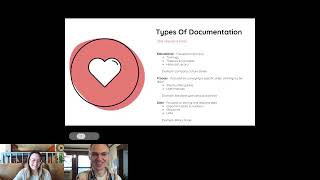
Yeah, I'll just. I'll run through and then you can randomly just start adding people to the conversation. I think it's great to have a conversation. I. I work really well. More impromptu, more like two way with people. I was always the person who avoided like pre prepared presentations. I did prepare a presentation for you all because you're all very, very special, but I'd love to talk to you versus talk at you if. If that makes sense. So I am all for anyone who would like to come in and occasionally be tagged to maybe share some thoughts as I run along. That works for me. All right, so let's test this out because I have not tested presentation mode on here before. Let's see if this works. Hi there. I'm Nicole Pereira and I am the CEO at RemoteTish. This picture is me, you know, so when you look at people on their driver's license and they look nothing like their photo, I. I can demo live for you all. Today we are going to talk about documentation. I do think it could be fun. And so I think today I just wanted to kind of motivate you all to get started with your documentation and not make it seem like this big, daunting, excuse me, scary, like worky type of thing for you to be doing and sort of maybe make it fun. So Wikipedia says that documentation is any communicable material that is used to describe, explain or instruct. I believe them because they are probably the ultimate in documentation on the planet. You know, they. They've built a system of being able to crowdsource knowledge and information and share it and double check it and verify it and have a structure and make it easy to learn if you're anything like me, you go to Google and you search Wikipedia and the subject because you want to get the most authoritative pieces of information on that subject. So I, I'm good with this documentation definition here. I don't know if anybody else has, oh, it's contagious. Hey, that's what they say, right? It could get passed on. I think knowledge should be contagious, right? We should all seek it. Okay, next item is starting documentation with one sentence. I, I think a lot of people feel that to start documentation you kind of have to do all sorts of planning. You need to have outlines, you have to have your goal in mind, you have all this stuff going on. And true, you could, you could do all that. But that level of preference prep for documentation usually is what's daunting and it stops people from moving forward. So for me I feel like documentation really starts with one sentence. Info on topic coming soon. Whether that's the title of an article or a section in a pre existing documentation. Letting people know what you're planning on writing about in itself is the first step of creating great documentation and it, it gives a level of transparency and sort of like real time planning to the people who are going to eventually absorb your documentation. So I feel like if you ever plan to be writing on something, if something's in the works, just let people know. There's no need to hide it, there's no need to pretend it doesn't exist. And boom, everyone's happy because they know what's coming up in sort of your documentation engine. Everybody's talking about contagious. That's lovely. So next I want to talk about the types of documentation because I think everyone thinks it's all the same type. I think today, especially individuals who work in the HubSpot world, documentation is like the HubSpot knowledge base or documentation is like a technical user guide. And that's, that's all it is. You have to be very technical. You need to know how everything works play by play. You have to be Kyle, right, and be able to explain everything in great detail and high energy. You know, you don't need to do all that because there's actually different types of documentation. So you need to know its purpose. I've made these up. I didn't look them up anywhere. These are the categories I feel that they more or less fit into. So number one, I think there's educational documentation sort of built for someone to learn and digest. It's not like something that's going to be immediately used it's not like something that is going to necessarily be referenced right away. It's just sort of to build the building blocks of education that can be trainings, that can be passing on theories and concepts that could be like just a historical record. Right. How did we come to being, you know, what is the history of our company? Why is this product built this way? Just knowledge that we're trying to share. Is there any way to make us the slide a little bit bigger? Let me see. Tell me if this does anything good for you.
That is making it bigger. Yeah, that's.
Oh, it does. Okay. So let's. Let's see if that works. I'm losing some of my real estate on my screen. You can all see it now. Better.
Yeah.
Okay.
Sounds like it.
Good. So that's good to know that on this platform, the size of the screen on my window actually affects the size for you all, which is not true.
For like, that is so. Yeah, I feel like some engineer must have worked very hard to make that the case. And I'm not sure why they thought it was worth it.
Yeah, I'm not sure either. I'm glad you all can see it now. All right, so the next item. Oh, and an example here is like the company culture code. The Cup Spot has a wonderful culture document. It's educational. Not. Not much action is happening from it. It's just absorbing information. Who we are, why we do it, what's important to us. Like, that's a great example of educational documentation. Next is like processes so focused on conveying a specific order of things to be done. So step by step guides, user manuals. An example are standard operating procedures. Like, the goal of this is most likely to be used immediately and to follow these steps.
Right.
Because these steps are what helps you adhere to some sort of compliance or some sort of standard. So just learning how it all works is not important necessarily. Doing it exactly as it describes is what is important. A lot of times with process documents, you may have to reference this document multiple times till you memorize it, or you use it as a checklist that helps you make sure you're still going through your process. And then the next one is data. So this is focused on storing and relaying data. This could be important dates and numbers. This can be a glossary of terms. This could be a listing of links. And an example of that is like for us, our salary scale. So our job levels and what they pay are all listed in our wiki. And it's basically just to relay that information. There's no process to happen. They're not necessarily getting educated. It's just a database reference for them to, you know, look at and use any other types of documentation that people can think of that you feel is very important that I. That I might have missed that you want to make sure that the people of this webinar are aware of. Just go ahead and type it in the chat and I will, I will make special mention of it.
While people are thinking. Sort of an off topic question. The dog that keeps featuring in this deck, is that your dog or that's not this.
The one so far is not mine. It's one of our team members. But you will see my. My puppos coming on a little later.
So Kathy mentions historical with a question mark. So I assume that would be documentation recording things that have happened, maybe notes from meetings or previous employees. I'm trying to think of examples, but yeah, I can imagine that being.
And I have that historical record. I do have it under educational. I do think that would be like meeting notes. It could be for us, like we say, hey, here's our past goals. This was last year's goals. Here's this year's goals. Right, we're maybe referencing the history. No, Kathy, that's great. That's a great one. I think in business that's actually quite important. Not just to be teaching people of what they need to do today or what they need to plan for tomorrow, but when. Yeah, back when the slide was tiny. I'm sorry, when no one but an aunt could read my words. I apologize. Next time, next presentation, it's going to be one slide per word whole time. So yes, historical is very good. Personal. We'll actually talk a little bit about that. About, you know, what, what is appropriate, what's not appropriate in terms of documentation. Let's see here. In the past, I've also had team members document tribal knowledge, which is information they know that isn't yet documented, including in processes. Tribal knowledge. That's a cool. It's a cool term. I like that. So let's see here. We try to keep documentation during project rollout specifically to show what was done if we need a pullback when things go wrong. That's a good one. That sounds like maybe a process document company mythology, the lore of all our companies. It's important, I think for any company who's finds culture building important. Knowing the past helps everyone understand why we do everything today in the present. And I think knowing the historical, mythical, lore, tribal, everything that's important in the past allows People who are new to feel like they're still a part of this company even if they weren't there when this occurred.
Minecraft videos so Aurora asked previously, what is the difference between the step by step guide versus the trainings? How do you differentiate the two?
Yeah, so for me trainings are to teach you how you could do something or to give you a foundation to make your own decisions around how you do something. Whereas a step by step guide is don't veer from this path at all. So for example, a HubSpot knowledge based article might say you might be able to. Or you could do it this way. Right here is you're going to click here and you're going to go here and this is how you can set up a campaign. But that's not the only way and that might not be the way your company wants you to do it to fit your standards. So the process focus ones or the step by step guides are meant for you to adhere to these exact steps. Could they be the same thing? Could they get combined? Could we be training you on step by step guides? Yes, but for me I tried to segment them into categories. That at least helps you make sense of how we're trying to relay information in the documentation. And there's an important reason why. Because if you mix your documentation too much, if you're throwing all this into like one article, it actually gets quite confusing. If you're trying to educate them on the theory of creating a campaign and then delivering a step by step process with data all at the same time, it can get confusing. Right? So if you're trying to get somebody to just follow a process and they just need to do the process undistracted, you might want to separate your documentation. Here's the process. Oh, by the way, at the bottom you might link off to, here's some important stats based on if you follow this process that you can look at in the future or hey, let's talk a little bit more about how this process was created and let's head off to the documentation or the educational documentation. Mixing it too much just makes it hard. You want someone to be able to walk away like quickly and easily learning what they need to learn or doing what they need to do. And when you, when you mix that all up, people have a difficult like learning moment when it comes to documentation.
I think it's really interesting you mentioned HubSpot's knowledge base and like I work at HubSpot Academy, right? I make things like the HubSpot Sales Software certification where Honestly, my goal is to teach you everything you might ever maybe want to do with Sales Hub, which for a lot of teams is like an okay introductory point, but, like, that's not what they want their salespeople to understand. They want to understand. We actually don't use the Playbooks tool. We use this thing over here and we use it this way. And here are the steps. And like, yes, HubSpot can do all these things. Here is how we use HubSpot for our specific team and our specific vertical. And I think that is an area where admins, a lot of time kind of stand in the middle. They look at HubSpot's documentation like, here's all the billions of things you can do with HubSpot. Great. We're going to filter that out and get rid of the noise and just tell our salespeople, here are the steps for creating a deal according to us for our own business practices. Here are the steps for creating a new contact or whatever the case may be tied, not just the software, but like, tied to your business case and strategy and needs.
Nope, I agree. I agree. All right, so we're going to move on. So these are the types of documentation I like to categorize. I feel like I saw some conversations. Internal, external, confidential. Feel like these are modifiers to this. Right. So could it be educational, but it's confidential and it's only internal? Yes. So I think those are more modifiers. But I wanted to give people sort of like a type, like how to write it. Whether you choose it to be confidential or not doesn't necessarily change what you're writing about. Knowing your audience always matters when you're writing, but very much, like focused on learning styles. Like, if someone is, to your point, learning how they could possibly do all things at the same time, being told exactly to do it one way, it's distracting. Am I learning how to do everything or are you telling me just to follow this way and not be distracted with this other thing right now? One or the other is my opinion. So, all right, let's move on. So, living documentation. So oftentimes I feel like people think that documentation is very static or it happens in batches. But I think you can keep documentation alive in a few ways. Number one, you can keep it fresh. You want to focus on constant, iterative micro updates as things are learned, as things are changed in the moment. You go and you update your documentation. You don't wait till so much has changed that then you go and update it. Trying to do a big macro overhaul. Of your documentation. Number one, make sure that it's not current and fresh. And number two can be so daunting it ends up becoming this like project for you all the time. And that's where I feel like people avoid documentation because in their mind they think like, oh, it's going to take me away from doing the work. Documenting the work is going to take me away from doing the work. But if you were doing it iteratively all the time, every time you run that process again, or every time you have new data, or every time you know you want to teach something to somebody, you go and just quickly update your documentation. You're going to find that you become a person with a habit of documentation versus a person who sort of like avoids these massive documentation projects. Next own that shiz. So assign owners of documentation categories or individual articles. You can't be the only person running a multi hundred article documentation system. Like even a full time individual doing that. That starts to become like very cumbersome. And you're also expecting one human to know everything about everything and that at that point like they're an encyclopedia, it's just not, it's not possible. So assigning sort of knowledge owners who go in. The person who's responsible for the process now has to document the process and keep it up to date. The person who's responsible for holding that historical lore right is the one who has to sort of carry that tribal knowledge over and make sure that it's documented in the system. It distributes the weight, it builds a culture of documentation within whatever group is referencing that documentation. And it also makes everyone value the system. They know how it works, they know how often it's updated. And so the documentation actually gets used more. If everyone is a contributor to actually writing it, which is pretty cool. Be all knowing. So use a system with a change log or a date of last editing. Just sort of relaying the freshness of these articles or this information is very, very helpful. If you, if you go and you see dated information consistently, you're not going to trust what's there. So if you have a mechanism so people know that there's a, there's a change log where you can see what was updated or the, the last time it was updated. It allows you to have a little bit more trust in the information and then proclaim your message. So announce updates to documentation in other channels of communication. So expecting people to take time out of their day or their week to remember to go and scan the documentation engine for all changes that may have occurred is like, it's ridiculous. Nobody's going to do that. They're just going to jump in there and realize everything changed and not have enough time to regroup and look at it and then do what they need to do. Whether it's Slack or a company newsletter or a team meeting or whatever, whatever channel you use to normally relay sort of more synchronous real time information, that's where you make the announcement. Possibly like in all the channels. Hey, just a reminder, this is the documentation that has changed this week. If it's relevant to you, go read up on that. That's where that change log portion becomes really helpful. Because I think one of the most frustrating things is when document changes and you're looking at a really long article but you don't know what exactly changed. If you don't have a mechanism to say this is what changed so that you could go reference that, it could quite get quite frustrating. I Wish and Hope HubSpot one day allows you to do that. Similar to the, the staging tool where you stage items and you put a little note like why are we staging this? Or what have we done? HubSpot, please, if you're watching this video, give us a change log for the knowledge base where we could just put a little note of what changed and save everybody the time and energy and effort of having to figure out what changed. Change log and everything. Yes, love change logs. All right. When not to document. So I think when you build a culture of documentation, it can be very tempting now to just like write everything down. All the things get written down and that's great, we want you to get close to that. But there are some things you may not want to document, especially if you're doing something for clients or if you're doing something for a different team. There's certain pieces of information that you need to kind of keep out of this system. So the first one is actually information that's changing like rapidly. So if dated or misinformation could actually be harmful to the person reading it, right. If they follow the wrong practice or if they do the wrong thing, it actually could hurt the company or whatever situation you're documenting. Then at this point your documentation may just be directing them to a knowledge holder. Could be a process that's being tested currently and it's just not defined yet. It could be, you know, systems billing. So I have here like billing systems are changing, so handing out the wrong number for ACH could be detrimental to the organization. So just sending someone to the knowledge holder will Be helpful and also just noting freshness of the information that's there. That way, if it's very old, someone might be hesitant to reference it, or they might go ask and say, hey, is this. Is this current? Because this information is very old. But I don't think a lot of people realize, like, you can't document everything unless it's a little bit more solid. Like, if it's on shaky ground, you probably shouldn't document it, or you should document around it, like acknowledge its existence, and then send people to where they can get the most reliable piece of information. The next item is personal or sensitive information. So databases with customer or employee information should be secured. You know, snippets of this and tossing it into a knowledge system as an example might not be wise. You might want to make like Kyle, like you do. You make a lot of dummy instances and you put a lot of dummy stuff out there, because showing a real live system is hairy like that. That would not be a very good idea. So you can link to the systems with, you know, that needed information. You can note who has permission and access, because knowing that there's an HR database with people's sort of disciplinary records exists and actually seeing it are two totally different things. Right. So making sure that when you do note or document that there is existence of this information that people are very clear on who has the appropriate access to get to it. Any. Any other things that you all think we shouldn't document, any major categories that you think that that should be on this list for everybody that's watching. Oh, now you're in the Q and A section doing Q and A stuff, huh?
Yeah, well, yeah, yeah. I think the Q and A questions are mostly. A lot of them are like, are you going to get to. Are you going to cover? And so I'm kind of saving them till the end. Because if the answer is yes, you're going to cover it, then you'll cover it. And if not, then we. You can just answer the questions. But, yeah, I think we're doing good.
Okay, let's go next. So keep documentation. Human. Our furry friends can't read, so we're not writing it for our furry friends. These are my two doggos. This is Mocha in the top left and Flynn in the bottom right. We have a little obsession with our pets, our pet employees at my company. But thanks, Joss. But we want to. We want to limit jargon or define it with a glossary. Even when you're in the space, when you're Talking about the MVPs, is it most valuable player? Is it most viable product? Is it, you know, what, what, what are we trying to convey here? We also have to, to assume that there's going to be people with varying levels of knowledge. That's why they're in the documentation, to try to get knowledge. And if we get a little too jargony, we're not being very accessible. We're not being friendly to our ESL coworkers, we're not being friendly to people who come from different backgrounds. We're not considering the fact that when you have a bunch of acronyms, it's hard to process it all. So limiting your jargon is helpful. Or like I said, if you have to use it because it's industry standard, accompany it with a definition or a glossary. Just know that this is what we define this as. Even when we know what, you know, the term means, it might have more context, different from one, you know, company to the next. So making sure that you add maybe some layers of, like, how do we define this term? Is really, really helpful. Next, don't be too technical. I think this is a. This is what we tend to do when we're documenting software or we're documenting, you know, products. I did a recent presentation where I was talking about APIs and GETs and pulls and pushes and all this stuff, and I organized it in layman's terms. And I had several developers, HubSpot developers, come to me going, wow, this was so simple. Finally, someone used, like, human language to tell me how this all works. Because technical documentation, you know, can be missing this whole story. It could be missing the intended goal. It could be missing, hey, when you combine all these things together, this is the result you get. When you're getting so technical, into the weeds and you're not using human language, even the most technical people might find themselves lost. So I would always default to more simplistic ways of delivering that information.
If I can just hop in on that. HubSpot internally is pretty notorious for acronyms. For whatever reason, HubSpot. I don't know if every company does this, but HubSpot has a real culture around acronyms and things change and it's just, it's hard to keep up with. But as a person who's been at HubSpot a while now, like, I've gotten numb to it. I don't realize how often it's. And I don't realize I'm doing it myself, right? I used to, when I first joined, I used to be like, we gotta stop the acronym thing. And now I've caught it. You know, like, and something we started doing in our team meetings at HubSpot Academy is we at the beginning of the meeting would assign one person to be in charge of defining jargon as it came up and they would just be in there in the zoom chat. And like, if someone dropped an acronym, they just dropped the definition in there real quick. Or. And it just opened up the ability, it made it a friendlier place for people to ask questions, but made me realize I think of myself as someone who speaks in a very accessible way. And I don't always in certain audiences with certain topics. And so I'm sure similarly with, with documentation, it might be helpful to have like some novice, the newest person on your team, read it right? And like, can they get through it? Do they understand what you meant? Because even when you're being careful, it can be an easy thing to get wrong.
I don't know if any of you all remember, but in school when you learned to write essays, if you introduce an acronym, they force you to first put like a parentheses around it and define it. Once you've defined it in the piece, then you can reuse the acronym. Moving forward, use this high school writing guidelines. Define it first and then use it as much as you'd like as long as you're in the same train of thought. So that's where the glossaries are helpful and things like that. I think if you're in the Rev Ops world or Even in the HubSpot world, data dictionaries are really popular and the glossary of terms is just your data dictionary. It's just letting you know how do we define it? Because to your point, like, it could have a different meaning in two different organizations. So let's see here, if we MVP, the KPIs and the QPR will be okay. Love it. Yeah. All right, next item. Avoid complicated writing. So difficult sentence structure, a hard sort of language to process when you're being very verbose and trying to use very smart words. Sometimes it can backfire. So simplistic language is better. I used to work at local newspaper doing their online ads and they were saying that the newspaper is written for 8th grade language like that is the max because they want it to be as accessible as possible for people to understand the words, the structure. If it's too complicated, if you're writing a Ph.D. sort of like abstract, no one is going to be able to understand this information. So you have to make sure that it's not complicated and then you want to have structured formatting. Now, this is a rule that I'm borrowing from emails, from social posts, from pretty much anywhere where you want to make content skimmable, easily readable, and you don't want fatigue. You can get really fatigued when you're looking at something that is sort of really like heavy writing. So here's an example. The documentation that I did earlier for you on the types of documentation, we could lift this up and literally put it in a wiki and we would be good, right? Someone can gather knowledge from this. They have headlines and examples. We have bulleted points. You can skim this in a, you know, near 30 seconds and walk away with the knowledge that you need versus the same information written on the right. If you are trying to present this information on the right, no one's going to read your documentation. No one's going to enjoy your documentation. It's not going to sort of like be visually appealing. Like, you want them to kind of like dance over the content with their eyes, grab the parts that are important to them, be able to feel like they got some knowledge and they can walk away. But when you're using, you know, we have, on the right, we have some jargon. Look at, we got L and D systems with SOPs and the CRM and the ERP. It's like, okay, what are these terms? We have complicated sentences. We use some heavy, heavier words like voluminous, finite. We have really chunky paragraphs. It's just not beautiful to look at and it's not intriguing to dive into deeper. What I could also do is put lots of links so people can go off and explore some more. We were talking about historical record. We might click on historical record and talk about, you know, hey, how do we define historical record in our company? Why historical records important. The different terms we use, the lore, the mythology, the tribal knowledge, all those things. You can allow someone to kind of like pick their own adventure versus the stuff on the right. Like, no one wants to read that baloney. Like they will just walk away and make guesses on their own. That's it. That's it for me. 36 minutes. I guess I'm a fast talker. I thought we'd have more, more interaction, more chat. I think I'm going to go to the Q and A and I'll answ some items there, but thank you. I'm Nicole, this is me. And I'm on LinkedIn a lot, so you can connect me. I don't necessarily always answer my DMs very fast because we get like hundreds a week. But you can always ping me there, you can always tag me there, you can harass me there. That's probably the easiest and fastest way to do it. And I'd love to talk more documentation or anything else with everyone. I'm going to stop presenting now so I can open up my screen a little more and start to answer some of these questions.
Now we've got a lot of good questions in here while you're to give you a minute to skim those. Everyone, while you're here. I'm just dropping a link to a survey into the chat. Would love any feedback you have. It's just two questions. One to rate this session on a scale out of 10 and one just a free text box. You can tell me whatever you want to tell me about this session or sessions in general, things you'd like to see. Just looking for feedback on how to make this better. But yeah, Nicole, lots of great questions here.
Yeah. So Josh asked, are we going to go show examples of how to lay it out? And I think I covered that. So I think we covered that one. See here. Taylor asks, do you have any thoughts around the balance of text to video links within process documentation? I'm very visual person, so video feels more helpful to me than a chunk of text. No, makes sense. I think nobody wants a chunk of text. Hopefully you saw my method of formatting. That makes it actually quite easy for our less attentive ADH people like me or people who want to learn in different ways. I do believe video, I do believe images. I honestly believe you need all. You kind of need all three because everyone learns differently. And so like you say you're a visual learner, but are you an audio visual learner? Meaning if someone just literally walks you through it with a video, it's going to be better than if you saw a bunch of pictures, which is going to be better than if you saw it with a bunch of text. If you actually have the same documentation in multiple formats, not just sort of like aiding each other, but like they could be all on their own. What is necessary, then I think you're good to go. So for us, like when we would do videos, I would say do a video of the whole area. So someone can choose either the video or they can choose the written form or they can watch the video and then in the future reference the written form because they've remembered the video the first time. Sometimes certain formats are great for like your first time learning. And I'm sure I'M not the expert. Kyle is actually the learning expert here and so interrupt me. But this is what I've learned that people need to to learn better.
It's interesting. So at HubSpot, for better or worse, the knowledge docs are created by a different team than the HubSpot Academy videos, which is interesting, but we, and we have over the years really struggled to figure out where that dividing line is between this should be written documentation versus this should be a video. Most things are in the middle. You can do either one and it kind of depends on where you're going to put it and who your audience is and how much time they have. But in general, we have found it is basically impossible to make a really engaging video about something that is essentially a list. Right. Like we have a knowledge doc article called the contact properties that come standard in HubSpot. Right. You could get Morgan Freeman to read that list and it would still be awful. Right? Like at a certain point that just needs to be a list of bullet points. Someone can control f their way through. They can skim, they can scroll, they can look at the lines they want to read and skip the ones they don't. On the other hand, there are things like if I'm going to demonstrate to you a process in HubSpot that takes a lot of clicks, I can do that in a 10 second video that would take paragraphs of text to try to describe. In the top left corner on the right side of that quadrant, the third button down if you open, it just gets very hard to describe without a visual component. A lot of times some combination of the two works great. But if it starts to feel awkward for you as the person who's creating the documentation, chances are. But it's time to move to a different format.
Yeah, there's even tools out there that integrate with HubSpot that allow you to turn it on and then you just click through things and it will produce a picture and text based training guide, like a technical usage guide. If you're doing it for software, there's actually tools that can make it very easy and it will also record a video of you going through the process. So. So even if you're like, well, it's daunting, I just want to do my process. You know, it's like you actually can. And you can output video, images and text for you in very clear language to make it easy.
Ooh, I like Jen's insight that video is harder to edit. One sentence here and there. Still possible though. Video editing maintenance cost on HubSpot Academy videos are rough. Like, honestly, I will tell you all Transparently, I love LinkedIn is I put videos there and then they disappear into the ether. It's very hard for you to find the video I published six months ago. Right. It's hard for me to find it. And that's great because then I don't have to worry about it being up to date. Right. The stuff we put in a HubSpot Academy, man, if the color of a button changes or if the name of a menu item changes, sometimes we can sort of cleverly edit it in post, but most times we just have to completely rerecord the video if we want it to be accurate, and that is rough. Whereas written documentation, it is so easy to change a word here, change phrase there. Maintenance cost there is much lower.
Yep. So the tool that I know of, and they use HubSpot too, it's called IO Rad. But I know there's other kinds. But what's really cool about Irad is you can connect it to a knowledge base article or a web page so it'll automatically spit it out and create an article for you in your knowledge base. Yeah. Integration partners are pretty darn cool things. Train Yield is a good one too. Yeah. All right, let's keep going through these Q and A's.
I.
Okay, Aurora, I know one of my issues is I try to get into a lot of detail with my training and process documentation. Do you have any good methods to use when deciding on how much content to add? This is that sort of that iterative process. We have articles that we've been editing for two years. When it started, it was a sentence, and now it's like it had to get split into 14 new articles because it became a whole table of contents and a whole section. And so making sure that you just are constantly editing it is better than to say how much detail or how little detail it's give enough detail to do the work, and as more detail comes for you, it won't feel overwhelming for the people who are learning it alongside you as it grows. That's my best advice. I don't think it's a matter of deciding how much or how little content, because if you're documenting at the inception of something coming into being, then you actually don't have a whole outline or you don't have a whole ton of stuff. You're just starting from scratch. You're starting with something simple. That's my best recommendation because what I'm trying to do is make sure that people Document it all and make it as simple and easy and possibly enjoyable behavior to do something that you do every day versus something that you do once a year or once a month or some big moment in time. Hopefully that answers your question, Aurora. All right, let me mark that one off. Are you using Notion or other tools? I don't use that, but I know that's a wonderful one. I We're all in on HubSpot so we use HubSpot's knowledge base extensively. Could it be improved? Yes. So I'm dropping all sorts of things in here so that they could, they can improve it. Changelog, please. But I think assigning ownership would be great inside of HubSpot, like legitimately saying, hey, this person owns it. We actually have a wiki article that says who owns the sections of wiki articles. So you can see documentation on who's in charge of documentation in our our database. But I know Notion is very visually appealing. Very, very nice. And somebody mentioned Tranial, I think in here and then I think Google, Google Docs is pushing its way to try to be a better, more valuable tool in these instances for those who are sort of on a budget. You know, it's better to do it than to avoid it. Use the tools that you got. Let's see here. Docs are awesome with new hook updates with hooks. Yep, that's what I was saying. I think docs are starting to find find their way. Let's see here, Claudia. How to keep track on internal documentation when processes change, even employees. So that's where I was talking about. If something is really rapidly changing, just knowing that it's changing could be the documentation and then you send someone off to the knowledge holder. When you're saying when employees change, who should own that? There should be a process in your offboarding where when someone's leaving the ownership of the things they own, documentation included, gets passed, someone else assumes ownership or it rolls up to their manager to figure out who needs to maintain that moving forward. Having orphaned documents everywhere is not ideal, so somebody needs to keep maintaining it. This is the one sort of backfire situation of documentation is if you get too good at documenting and not good at updating, you start to have a real problem where people can't rely on your documentation. So make sure you're only making enough that you can actually maintain ongoing. You could always remove things or sunset items in your documentation that they're saying, hey, this is obsolete or no longer maintained. Go to this person or go to this place. Ideally, your most used processes, your most Important information, the things that you reference, often those are always updated. Those exist. But documenting every little thing, like how you know, what position do you put your shoes when you walk in the door, like, may not be, like a necessity.
Right.
Somebody just learns it on their first day of work, and they're good to go. So just making sure that you're sort of honoring your ability to maintain your documentation engine is important because you don't want to be too ambitious. And then it actually backfires on your organization. All right, questions keep coming. All right, let's see here. Wendy, I tend to be a saver. Is there any reason to save expired documents, data documents from a previous year, like holiday or pay period dates? So that's that historical situation. You could link off to that stuff, saying this is what it was last year and the year before. If that historical reference is helpful, maybe you do want to know, you know, the pay periods in the past, because you have to reference it. What's nice about something like that is once you've written it, you actually don't have to maintain it anymore. It happened in the past, so it could behoove you to do that. If that information is important for us, we say, hey, here is our goals from last year, and then here's our goals for this year. We changed our mission, vision, values. We said, well, here's what they used to be. Because you might see reference of it. You might hear about it in the lore, right? You might want to know where we came from, where our roots were, and then here's what it is today. And it just references it as a historical thing. So being a saver is not a bad thing, as long as it's. It's more for historical reference or that that change log provides value to know how this situation has grown. But don't become a hoarder where you're just saving it because it's fun to save it and have a collection, then. Then keep it for yourself. You don't need to impose that upon anybody else. I may like rocks, but not everybody wants to see my rock collection. All right, let's see here. Clayton. So for owners of the documentation, keep. Keep those to leaders and managers or let individuals be owner. We let individuals be owners. There's certain people who have knowledge about something. We like to distribute the weight of knowledge. We think it's a great training mechanism. Like when you have to tell somebody how to do something, you actually become more knowledgeable about it yourself by distributing the weight of this across everybody in some form, small or large. Some people might just have one loan article, the one article that they just need to make sure is up to date and then they can expand and, and in our company, the career paths actually have people moving up where they're owning like knowledge and process or how work is done. And so then they might own a whole section because that is a part of their job. They have a promotion, they have a title that says they're a program lead, they run this program, they define the program. And so distributing it I think is fair. There are organizations where sole individuals like that is their full time job. And if you can afford that, that's great. But at the same time they're still going to have to run around and harass people who have the knowledge. They may be the writer, but they're just like ghostwriting for others. So everyone I think should be a participant in some way to make sure their knowledge is documented. If you are a business owner, if you're someone who's thinking of building something that is going to give you freedom of time and energy, if you don't document it, no one can do the work for you. If you're going to sell your business, you're not selling, usually the people you're not selling, you know, necessarily the product per se, you're selling the way it's all done, the way the product's made, you know, the way people behave, how everything's going. And you can't sell your business unless you have all that. So it's like there's all these reasons why you know you can't do it. If you think about this, you want to get a promotion, but no one can do the job that you're vacating. You're going to have a hard time moving to the next job. Do you want to sit there for three months waiting on your promotion while you train someone who might not be as like fast as you to get the job done. Or can you just ship them off to your documentation and be like, reference this, call me when you need me, I'm going to go promote. So there's all these things like, you know, you want to take a vacation, like a real vacation and vacate from your role so someone can back you up for a week. Like, and you don't want to wait for all this stuff to come crashing down on you when you come back from your vacation or, or be contacted while at vacation because there's emergencies and someone doesn't know what to do. Documentation. I don't think people realize that just documenting what you do Is freedom in many ways right for ownership. It's freedom of your time in the business. And you know, if you're not an owner or if you're a manager, if you're just a, you know, a person just in over here doing something very basic, but like you want freedom to be able to know that you could just follow this process or someone else can take over for you so you can go take care of your sick kid and not worry about your employment. Like that's the worst thing, like when you're dealing with life, but you're worried about the employment that pays for life. Like free yourself up. Just be an advocate. And if you are a documenter of one, if no one else does it, well, guess what? You're going to be the one person with all the freedom because you can hand it off to somebody when you go on a vacation or take care of your family or do the things you need to do. And that's on them than if they don't want to be a participant in the documentation system. So hopefully that answered that. Clayton, Sarah, do you add who, what, where, when to certain documents to make it easier on those individuals searching through the documents or make it easier when sharing documents, especially for when newbies come on board. I. E. Here are all the documents, but these ones are specific to your job. That's actually a great idea. We had that feedback and we started making like a table of contents. Like here's all the things related to sales, here's the things related to this, and even like here's all the things related to trying to achieve this macro objective for this role. We have sections. So we're like, oh, this section's for sales and the sections for client services. And this is for operations, internal and operations for the rest of the people. And here's HR related items. So we have major categories, but even under there we have table of contents or things like, hey, here's, here's article one. Go here first, you know, here's article two, then go here second. Because the building of the knowledge on top of each other is important. So your documentation can be documentation of your documentation. It's very inception like going on here. So no one, you know, you don't realize your table of contents is documentation of an order of information. Or you can build, you know, little guides within your documentation where you say, hey, all these articles related will help you achieve this result. Kyle, you might be excited to know we have documentation on our suggested certifications and the order that it should be taken for each role in our company, in our wiki.
Nice, I do love that.
One last question. I'm jamming through. Okay, we're almost there. Clayton actually asked us 33 minutes ago who hopefully we covered it a little bit. But not to jump the gun, but will we discuss the best way to get information the team used to create these types of documents? Examples, PDF, Word, PowerPoint. So I think we covered this a little bit on using sort of a wiki based documentation system preferred. Why? Because it has the change logs and it shows, you know when things were done and it allows you to have categories. There's sort of like, it's kind of like the difference between putting a bunch of files online and then that's your website because they're just in a directory. HTML files in a directory using an acronym and I don't know how to define it versus using a content management system, a CMS like HubSpot. It's like it has containers, it has a mechanism. You can see the version control, all that stuff. So if you use a documentation system built for that, you're probably better off. PDFs or Word. It looks like Word's getting a little bit better. But they're, they're there for documenting but they're not necessarily the best documentation engine. Right. Where like a collection of information comes together in a really easy way. Thank you, Daniel. We'll pin you in the documentation of this event.
Thanks, Nicole. That was a big pile of questions you, you worked through. I really appreciate you, you being here and answering all the questions. Again, everyone, if you have any feedback for, for me about this hug in general or this session or Nicole, I'm dropping this survey into the chat. Feel free to fill that out. Nicole, thanks again for being here. I guess you already said if people want to connect with you, LinkedIn is the, is the, is the spot. Is that, Is that right?
LinkedIn's the place. I mean if you're in San Diego, you could just come knock on my door. I'm not one of those weird people that needs you to call first. So you could just come over. We could play.
If you're in San Diego and happen to know where Nicole lives, I'm putting her physical address into the chat right now. I actually don't know it, but thanks again so much for being here. This has been great. Thanks everyone for coming and I guess we have like four minutes but I'm happy to let you all go and not be late to your next meetings. How about that?
Awesome. We, we love and respect time around here. So let's give, let's gift everybody four minutes back in their life, all right?
I've.










