How To Get The Most From HubSpot Ads | Admin HUG | July 25, 2023
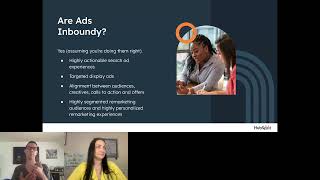
Ryan Durling from HubSpot walks through how to set up and run ads in HubSpot, covering campaign organization, personalization, tracking, and reporting. Learn best practices for connecting ad networks and automating your campaigns to get better results.
So hi all, welcome to the HubSpot admin. You could join us today. I am your HubSpot Hug Group co host Deanna Giloff. I'm your HubSpot admin and advocate when I'm not sending out reminder emails with horrible puns and keeping the hug operational. Alongside Kyle Jepson, I run my own HubSpot Solutions partner agency Stratsmark, offering fractional HubSpot admin and strategy services. Today's hug is how to get the most from HubSpot Ads with Ryan Durling. He's an inbound consultant at HubSpot. It's going to help us demystify the HubSpot Ads tool and use it to keep growing with HubSpot and leverage those features to maximize paid media ROI. So Ryan, go ahead and take it away.
Thanks Deanna. I have to comment on the Bevy self help instructions. It's basically just take out the cartridge and blow in it or unplug and plug it back in like we all did with video games 30 years ago. I love that that's really all they can give you for a platform that is not unused to not working when wants it to anyway. That's my $0.02 team. I'm going to quickly just hide myself view from myself because I don't want to look at myself. I already know what I look like and we can get into things. Just a couple things to level set before we get started. I have a handful of slides here that I'll run through. I'm going to go through them pretty quickly because what I'm most interested in in this conversation is being able to answer questions that you all may have about how to make the best use of HubSpot to support what you're doing on the paid media side. So if I'm going too fast I apologize. Just know that it's well intentioned and if you need me to double back on anything, of course I'm happy to do that as time permits. So hi, good morning, good afternoon, good evening, good night, wherever you may be. Thanks for joining. Glad to have everybody here. Some of you may recognize me. I was here a few months ago to do a webinar on lead scoring. This one is actually more kind of in the wheelhouse that I had. I lived in a past life prior to joining HubSpot. I led the digital advertising team at HubSpot partner Raka based in Portsmouth, New Hampshire. I am originally from upstate New York. I'm in New Hampshire. I am a reader, I'm a runner. I'm a hiker, big Boston sports fan, and yes, I do advocate for pineapple on pizza. I think it's delicious. And if you would like to argue with me in the comments, I'm happy to do so. Or you can also email me if you want to do that. But I'm excited to be here and without further ado, we will jump into it. Deanna's already recording, so you can jump right over this one agenda for today. So first we're going to talk about our ads inboundy. This is a very quick conversation, but it's an important one to have. We're going to talk about what networks HubSpot, what ad networks HubSpot works with best practices for ads, kind of broadly, not necessarily confined to HubSpot and then how to maximize what you're getting from HubSpot and ads. So we will jump in here are ads in Boundy if you were a part of the HubSpot ecosystem, even as recently as probably five years ago, you might have been inclined to answer this with A no. But HubSpot has sort of changed their stance on how ads work and how the role that ads play as part of the journey. For a very long time, you know, HubSpot kind of, you know, had a HubSpot and ads were sort of like this didn't really play well together. You know, we didn't consider ads to be a part of the journey because they were, they were a very push, very kind of aggressive tactic. They were not inbound in the sense that they helped people in their buyers journeys. But the way that ads look and feel and behave have changed a lot over the past five, ten years, and especially the past few years. And so now not only a subspot, you come to kind of embrace ads as a part of the journey. But I think they're widely seen as a marketing tactic that can be really valuable in helping to create affinities among your audience. So are ads in boundy? If you're doing them right, yes. If you're not doing them right and you're just carpet bombing your audience with really poor display ads, those aren't really inbound Y if you're doing that, happy to have a conversation offline about how to sort of tweak your strategy, but I would definitely encourage you to rethink if the things you're doing with ads don't feel inboundy. So what are inbound ads experiences? They're highly actionable search ad experiences. So we're talking about search ads that answer a question that give users Opportunities to find their own way via site links and via other extensions. And also that have really strong alignment between the keyword, the ad copy, the call to action, and ultimately the offer on the landing page. That's an inbound research ad experience. Targeted display ads. So display ads can be used to carpet bomb. They can be used to fill the top of the funnel with no discretion at all. Where display ads are most valuable and most intelligently deployed are as part of some sort of remarketing effort. Yes, you can use them in social tools to spread awareness of your brand for folks that have no idea who you are. But where you're going to really start to get value from display ads and where your audience especially is going to get value from display ads is if you're using them to target someone who's already been to your site, who's already familiar with your, your brand, to create a more personalized experience for those users as they continue on their buyer's journey with you. I mentioned this a second ago, but really strong alignment between audiences, creatives, calls to action and offers. So audiences look a little different depending on what network you're advertising in. And in search channels, the audience is really just the people who are searching. So the audience is the keywords essentially in display channels. And I include social as a display channel. The audience is something that you actually define using any number of presets. You can use a look like audience, you can use a remarketing audience, but having a really strong alignment between who is searching and what they're looking for, or who's browsing, who's scrolling and what they're looking for. The imagery that's both in the ad and also on the landing page, the call to action that's in the ad and on the landing page and the offer that's on the landing page. Having those things lined up is really, really important. Important to create a strong inbound experience. Last but not least, and I kind of mentioned this a second ago too, highly segmented remarketing audiences. So remarketing, you know, using that first party data in HubSpot, so identifying, you know, who do we, who are we targeting and, and sort of what are their goals? What are their, what are their challenges, what are their pain points? If we can use that in our ad strategy, then we can make the ads experience very inbounding. And if we can, you know, if we can remarket to folks who've been to the site, who've taken specific actions, we can continue to stay, you know, stay alongside those potential, you know prospects or those potential customers every step of the way through their journey. So really strong segmentation, really smart use of audiences is very, very important to have a successful inbound ehas experience. Deanna, I don't have the chat open, so if at any point someone asks a question that needs to be kind of, you know, bumped in in real time, please feel free to do so.
You got it. Just. Just a comment to tell Google to play nice with HubSpot and allow for Performance Max ad data to come in via API.
Yeah, so Performance Max is, is something that I don't even think Google has full control over yet. I have a couple customers that are using Performance Max campaigns and the feedback that I've gotten from them broadly is that they're just kind of a bull in a china shop. There's, there's some wrangling that needs to be done across the board. I would expect that at some point down the road that data will become available on HubSpot. I have no inside information about that. I just assume it's, you know, it's a new campaign type in Google, so it stands to reason that it would eventually be available inside of HubSpot. But yes, I would love to see that data there too, and I will make sure product knows that. We're, we've got people asking about that. So this next slide I don't think anyone really needs, but I wanted to throw it in anyway. What networks does HubSpot ads integrate with? Google, LinkedIn, Facebook. This is not an order of personal preference, although if it were listed in order of personal preference, it would definitely stay in the same order. I think Google is my favorite ad network because it has the most ability to do different things and to target people in different ways. At the end of the day, with LinkedIn and Facebook, you're targeting an audience when they're in platform. If you're using Facebook or LinkedIn's Audience Network, odds are you're getting very low, if any, returns at all from those investments. You're probably also not spending much there, which is nice. But Google has the ability to target people in more and in different ways. And so I think that's really, really important. The limitation that Google has is that it doesn't have the audience data that Facebook and LinkedIn have necessarily. But with HubSpot, you can, you can allay that. So these are the channels that HubSpot integrates with. Are there more coming? Probably. Are they coming imminently? Probably not, but these are the ones that we'll be talking the most about as we go through the rest of this presentation. So best practices for organizing ads. Number one, keep it simple. Don't overthink how you organize your ads. I say this to virtually every customer I work with. Campaigns in your ad platform should align with campaigns and HubSpot. If you aren't using campaigns on HubSpot, that's another conversation entirely. But at the very least, campaigns and your ads, channels, campaigns and HubSpot should be named the same way. And your ads should be grouped in those, in those campaigns inside HubSpot as well. So just, it's tough not to overthink it, but try really hard not to overthink it. Keep it manageable. So ad campaigns essentially are buckets, right? They're. They're ways to group different assets, messages and offers and audiences. What I too often see customers doing is treating those buckets as if they're bottomless. So resist the urge to put 100 keywords into an ad, into a campaign. Excuse me? Resist the urge to put 24 different creatives or different ads into a campaign. You know, resist the urge to have 30 different AD groups in a campaign, because these things create bloat. Bloat creates friction. Friction winds up costing you more money. And when you're spending more money, you're likely not bidding as efficiently, which winds up, you know, kind of doubly increasing your costs to acquire because you have this bloat and you have this friction. And also you're not being as efficient. So making sure that you have tight management of campaigns is really, really important. And again, making sure that those messages align with the audience and align with the offer is very, very important as well. Keep it consistent. So I just mentioned this, but make sure that the offer, the audience, the messaging is all consistent. Most people miss that. It's conceptually, it's easy to think about, it's a little bit harder to execute on, but it's very, very important. The more consistent your message, the more consistent your offer, the easier it is to identify areas where you need to optimize, if you need to optimize at all. Because a really well optimized campaign is going to run really well on its own. But if it's not well optimized, having a clean setup is going to be really important because it's going to enable you to move efficiently to make the changes you need to make. Last one here is use your whole toolkit. I don't need to tell any HubSpot admin how powerful AI is. I think you've all been Beaten over the head with AI over the past three months, six months, nine months, you know, whatever the very short term here. But AI has been powering ads for a long time. HubSpot or Google has had the opportunity to use AI to write your search ads for years now, or at least to let AI arrange the copy you have for your search ads. Facebook and LinkedIn a little more recently, but they've had the ability to kind of do the same thing there. So if you're using chat spot to write your ad copy, fine, but maybe you don't even need to take that step. Maybe you can just have Google via Performance Max campaign write the ad copy for you. Maybe you can just have Facebook sort of pull copy, pull content from your landing pages and put together the copy for you. So that's something to just be mindful of. Performance Max is an interesting topic to talk more broadly about because if you're doing search advertising, you're creating new search ads in Google, you really only have the option of leveraging AI at this point to write or assemble those ads. So just be mindful of that. You know, that's a tool. It's important. Make sure you're leveraging it as intelligently as you can. Next one is delivering an exceptional ads experience. So the first thing here is to focus on the need. This is really closely tied to buyer Personas, right? We talked about ads being inbound. Obviously the central tenet of the inbound philosophy is that whatever content you're creating should address your audience's needs, should help them on their buyer's journey. So if that's true of blog posts and social posts and email marketing as, you know, as sort of pillar, it's also true of ads to go back to the last bullet point from the last slide. Use the tools that you have to create really strong experiences and to address the need. So those of you that are using HubSpot sales tools and especially calling tools, if you have the ability and the time to go through, call transcripts and call out common themes that sales reps are addressing with folks, or even service reps are addressing with existing customers, find ways to include messaging about those sorts of concepts in your ad copy. Because now you're speaking directly to customer need or you're speaking directly to pain points, and that sort of thing is going to help people move further along in their buyer's journey much more quickly. So, you know, be mindful of those tools as well. But really just make sure that you have your, your finger on the button of what your audience needs and you know audience needs are going to vary from campaign to campaign. So that may need to look different from different for different campaigns, may need to look different for different networks depending on who you're targeting. Creating an amazing experience is probably the most important thing you can do. This is an umbrella, right? So yes, you want to create an amazing experience. When I'm talking about an amazing experience, as far as ads go, it's consistency between audience, message and offer. But it's also making sure that wherever your audience is interacting with your brand, that that experience is seamless. If your landing pages take 5 seconds to load, that is not an amazing user experience. If your landing pages take three seconds to load, that's still not an amazing user experience. If your landing pages are great on desktop they load like that, but on mobile devices they take an extra couple seconds. That's something you really have to be wary of because most traffic these days comes from mobile devices. So making sure that you're taking the necessary technical steps to have strong performing pages compressing images, not having too much JavaScript on pages, things that cause pages to take a long time to load, address that and then on top of it, build that consistency between messaging or audience messaging and offer. I should mention too, another part of an amazing experience is making sure that whatever asset you're pointing to from your ads is conversion optimized. Don't send folks to your homepage. Do not do it. Whatever you do, don't have ads point to homepage. Ads should point to a landing page. A landing page should only have one opportunity for a prospect action, and that should be a form. Whatever the form looks like is up to you. But don't have your header and footer on your landing page. Don't have all kinds of links. Don't link out to a YouTube video. You can have a YouTube video if you want to embed it, that's okay. But don't give people an opportunity to leave the landing page without taking the desired action. Next, personalize until you can't anymore. This is all part of that really creating a buyer's journey where the buyer builds trust and knows that you're going to be with them along the way. So use smart content. Use the new calls to action tools. Make sure that you're using lists and UTM tags and all the other things that are available to you inside of HubSpot to create highly customized experiences for your users. But but also to create more scalability when it comes to personalizing the next step for your marketing team as well, the last one is test, test, test, test. You're spending money on the stuff. You don't want to just start lighting it on fire. You want to make sure that you're getting the most return from what you're doing. And these ad networks change all the time. Audience behavior, audience interests change all the time. So make sure you're staying out ahead of that. Test offers, test images, test colors, test landing pages, test calls to action, test until you run out of things to test and then start the process all over again. Tracking performance so this is kind of the linchpin to operationalizing your ads. And a lot of this ties to HubSpot too, right? UTM codes are really important. I assume that anybody who's here in a Webinar talking about HubSpot and ADS understands what UTM codes are, so I'm not going to go into that. But all of your paid URLs should leverage UTM codes. You can build them however you want. HubSpot has a UTM builder inside the campaigns tool and also inside the Settings tool. Google has a, you know, has one on, you know, it's out there. I don't remember where it is, but it's out there. You can just, you know, search for URL builder. It's always the first thing that pops up. I actually historically have built them in an Excel Doc or a Google Sheet with just an obnoxious concatenate formula because I like to see everything at a glance, and I just think that's the easiest way to do it. So however you choose to do it is fine. Just do it. Make sure you're using UTM code so you can understand the source, the medium, the campaign, the origin of traffic, so that you can create more personalized experiences for your audience at scale. Another benefit here is having really well managed UTM Tagging is going to make data in HubSpot and platforms like Google Analytics line up much more closely. So that's another benefit that you get from that approach, too. Landing pages are obviously a really important part of what you're doing. So without a landing page, it doesn't really matter how much advertising you're doing, because you, you have no way of capturing, you know, the intent or the interest of the folks who are seeing your ads. So make sure that the tracking codes make sure that landing pages have UTM codes in their URLs, but also make sure that landing pages have relevant tracking codes. That's the HubSpot tracking code, the Google Analytics code. Google Ads code is kind of run through Google Analytics. If you're using any other tools, if you're using a hot jar for example, to track sort of heat mapping, make sure those tracking codes are on all the landing pages so that you can make sure that you understand what user behavior looks like on these pages. Google has a kind of specific thing I think Facebook and LinkedIn to do as well, although it's been longer since I've looked at them where you can actually put a different tracking code on a thank you page. So put the different tracking code on the thank you page so you can make sure that you're counting conversions as necessary in these platforms. If you have the ability, use Google Tag Manager to serve these tracking codes. Because not only does Google Tag Manager help to decrease the amount of JavaScript on these pages and therefore improve load time, it also allows you as marketers or your marketing teams to manage the code that's deployed on these pages without the help of a developer. So strongly recommend Google Tag Manager if you have the ability and resources to do it. Next one is forms. I talked about this a little bit already. If you can't use HubSpot forms, we get it. I don't love it. We get it. Make sure that you have non hubs platforms turned on. Make sure you're tracking conversions in your ad platforms or we just want to be able to understand what the behaviors look like from platform to platform. Make sure that your conversions that are set up in the ads platforms match with form fills or other custom behavioral events inside of HubSpot so that you have the most accurate kind of view through reporting across platforms because that's really, really important for the love of absolutely everything. Also make sure that you're redirecting folks to a thank you page after they fill out a form HubSpot form and not just having an inline message display. Redirecting to a thank you page does a lot of things. One it allows you the opportunity to put those specific tracking snippets that I just mentioned a minute ago onto those pages so you can accurately report conversions back to the ads platforms. It also helps to create that experience and helps to improve retention for users. Because while a landing page should not have any links or external assets, it a thank you page can have your most recent blog posts or it can have some personalized content. If you know who these contacts are already, it can create a much stronger experience for folks to keep them on the site after they've taken the desired action. So make sure that you're using thank you pages when you have People fill out forms. The last one here is follow up. I don't think I need to explain to anyone how important it is to follow up with leads that come in. This is as true of leads that come from organic search or social media or anywhere else as it is of leads that come come from ads. But it's very important to confirm that your prospect took an action and to validate their interest in your brand. So send an automated email out when a form is submitted confirming that you've received their interest and maybe even outline next steps. Someone from our sales team will be in touch in 48 hours. Someone from our service team will be in touch as soon as they're available. You know, someone from whoever, wherever will be in touch whenever based upon whatever the nature of the inquiry or the offer is. So make sure that follow up is set up and you know, wherever possible, automate as much of it as you possibly can before I move to the next piece. Any questions? Deanna that need a response?
Sorry Bevy, would not let me unmute. Yes. So thoughts on using Hubs lifecycle stages as conversion events?
So I love using changes in Lifecycle stage as a conversion event to send back to ads platforms to better help Google, Facebook, LinkedIn understand how the money you're spending with them is actually driving results for your business. The important thing to consider in that is how those lifecycle changes are changing. If someone comes to the site from an ad, fills out a specific form and because they filled out that specific form, their lifecycle stage changes from lead or even unknown contact to marketing qualified lead. That's great. You want to make sure that HubSpot tells Google about that. If someone's just been in the database for a year and a half and because you have lead scoring set up, lead scoring changes their lifecycle stage to, you know, from X to Y. That's not something that we necessarily need to pass back. So it's just important to make sure that you have the proper sorts of filters and visibility in place there because you know, Google, Facebook, LinkedIn are not people. You can't say, hey, this context is important. You can only say I'm going to give you this and you know and do with it what you will. So I'm a big fan of it. It just has to be, you know, deployed really strategically. And as with anything else in HubSpot, it if you're talking about life cycle stages which really are going to be, you know, they're going to impact marketing and sales, just making sure you have alignment for marketing and sales before you start passing that information back to Google. Because the last thing you want to do is say, well, marketing said that we, you know, we had 25 marketing qualified leads created from ads forms fills this week. So we're going to send those back to Google to give them a better idea of the types of actions we're looking for. But actually when sales reached out to those 25 leads, not one of them was ready for conversation. So that sort of thing is important. But yes, totally here for it. Just make sure you have the proper accounting guardrails in place. Perfect.
Is it possible to submit HubSpot conversions to GA4 Marketplace either?
That is a great question. I do not know the answer. As y' all are aware, GA4 is now, what, like 25 days old and, you know, maybe hasn't even fully rolled out to everyone. So I don't have enough experience to say one way or the other. I, I don't believe that it was possible to, to export HubSpot conversion events to GA3 or Universal analytics, at least not without, you know, custom events set up on the Google Analytics side. So I'd say you'd probably have to do the same thing. I just don't know really anything about Google Analytics or about setting up those events in GA4, so I can't say intelligently one way or the other. I can definitely look into it. It's something that I've been meaning to learn more about GA4, so I can try to do some, some research and follow up and, you know, post back to the group in the thread that contains this recording. If there's anything that I find.
Awesome. I made a note for you. Thank you. Do you have any tips on following revenue generated and numbers of leads generated in HubSpot campaigns on the Pro account? So no attribution reporting available.
Yeah, so it's, you know, this is one of those places where, you know, UTM tags can be really important because you can use a UTM tag to identify the, you know, the campaign that a contact came in from. And, you know, tactically there's a couple extra steps involved. You may need to have a workflow that stamps a different property on that on a context record to say, you know, like, so it's now a permanent record of that UTM campaign instead of just a temporary one which changes every time a contact comes back to the site, you know, with a new UTM tag URL. But if you could do that, then you could build a reporting that basically says, you know, any contact who has UTM campaign equals X and is associated with the closed one deal, then you could spit back the amount from that deal and try to attribute that a little bit to what was going on. On the ad side. You can use line item budgets and campaigns to, you know, to kind of help to distill that number or, you know, kind of drill down on that number even more. So you have the amount from the deal, the contacts associated, you have the line item spend from their marketing campaign. In HubSpot, you could potentially do some quick math, you know, using the new Formula Fields tool. If you've, if you have, you have experience with that, great. And if not, strongly encouraged to opt into that beta and play with it, because I think you'd have the ability to calculate, you know, amount of total deal divided by, you know, the line item on the, the campaign budget and that could give you a pretty good view through on what ROI looks like. There are still some limitations to that Formula Fields piece of the report tool because it is in beta, so that full functionality may not be there yet, but it's definitely something that's coming if it isn't available. And I think that's something that I would explore if you have line item budget setup and campaigns and you have the ability to map contacts to deals that have specific UTM code. So happy to spend more time talking about that and follow up because I know there's a lot of moving parts there, but I do think it's doable, you know, with Marketing Pro.
Awesome. I think the others. Until.
Cool. The next few things here are really, really kind of tactical. So I'll just, I'll breeze through these. So maximizing HubSpot and ads. Before I even read a word from any of these slides or comment on any of these slides, I just want to share a metaphor that I really love from our ads Project manager, Product Manager. She said that if, if the, the ads platforms, you know, Google, Facebook, LinkedIn, if they themselves are a car, the HubSpot ads tool is, is akin to windshield washer fluid. It is not the engine, it is not the transmission, it's not even a seat belt, which I would say is probably equally, if not as important as windshield washer fluid. It is something that, that helps create a clearer line of sight into what's going on, but it does not answer all the questions and it certainly cannot do all the things that you can do in platform. By extension, when, when customers come to me and say, hey, I'm trying to do X, Y and Z in, you know, inside of my Ads tools. You know, should I do it in Google or should I do it inside of HubSpot? I always say just do it in Google, do it in Facebook, do it in LinkedIn. You have greater ability to manage budgets, to organize assets, to bid strategically in the platforms themselves than you do in HubSpot. HubSpot is a great way to tie things together and get a fuller picture of the buyer's journey, but it doesn't enable you to optimize for efficiency and effectiveness in the way that you can inside the platforms themselves. So everything we're going to talk about in these next few slides is just kind of windshield wiper fluid. So think of it like that doesn't mean it's not important because something like segmentation is very important. You can build audiences that are segmented by folks who have engaged with specific ads ad groups or campaigns and also by when those interactions occurred so that you can create more personalized post ad experiences. I've already talked about this a bunch, I'm not going to belabor it. But this is a really good way to use HubSpot to keep folks warm or to make warm folks even hotter leads without really a whole lot of work because you can automate virtually all of these processes. So segmentation using the ad specific data is really, really important. And there's a lot of potential value both for your operational sides of the house as well as for the contacts who are engaging with your ads reporting. I don't think I need to really say much about reporting. HubSpot offers different customer reporting data sources to actually evaluate ads. One is the ads performance metrics, which is much closer to what you see in like a table view inside of Facebook or Google Ads or LinkedIn. And then it'll show impressions, it'll show clicks, it'll show, you know, I think it can do click through, rate, you know, things like that. So you can get that data. But just like in Google Ads or Facebook or LinkedIn, it's hashed. So it's not user specific. It can't be tied back to a specific contact. The ads interactions by contact can be mapped to HubSpot objects. So specifically contacts, companies and deals. So if you needed to see the volume of impressions needed for, and this is just a for example, and it's a bad one. Walk with me. The number of impressions that are needed to generate a closed one deal. You know, you could build a report that says okay, like you know, I have 3.2 billion impressions over the past six months and I, you know, I've generated, you know, three. I put myself in a bad way with 3.2 billion, but I have 32, you know, actual closed deals. And that's, you know, we're dealing with, you know, fractions of a percentage point, you know, and kind of figuring out what that looks like. But you have the ability to use the ads interaction by contact data to get a bit more intelligent with that mapping. So be mindful of those two things. Also, you know, don't forget that you can embed reports from Facebook, Google, LinkedIn directly into HubSpot dashboards. So if you have something that you really like in those tools and you want to just pull it into HubSpot Dashboard, you can do that. And so that's, that's an important piece. Another thing here too is that a contact can only do, can only take or B can only have specific actions attributed to it to them one time. So you may need multiple properties or multiple custom events in order to paint a fuller picture of how that contact is engaging with what you're doing on the ad side. So we'll talk more about that in a couple slides. But that's something to be mindful of too is there are just limitations with the way that HubSpot processes data. So you may need to look at multiple properties or even custom objects to store some of that ads data.
Is some of that limitation why the performance metrics can't be tied back to the contacts.
So the reason that the performance metrics can't be tied back to contacts specifically is a privacy concern because, because HubSpot has a lot of personally identifiable information, it is a violation of all sorts of laws, as I understand it, to be able to report on those specific contacts behaviors in third party tools and third party platforms, for example, the Google search ecosystem. Maybe a better example of that is those of you who've maybe been privy to the world of digital marketing or maybe even working on the marketing side yourself for 15 years now, probably recall a time where Google Analytics used to be able to report back on all the organic keywords that were searched that drove people to specific pages on the site. And then I don't even remember when exactly it was. I feel like it was around 2010, 11 started to phase that out. And the reason for that essentially was that it's a privacy concern because if you can map a specific user's search history back to that specific user, then you as a brand, as an entity just know way too much about that person and there are privacy concerns there. The subtext, all that was Google wanted people to be logged into their Chrome browser when they were searching, and so they didn't return data for anyone who wasn't logged into Chrome. And now they just don't return data from anyone because of those privacy concerns. So it's a much bigger conversation. I'm not going to pretend that I know the first thing about privacy law, but it is definitely something that's out of our hands as marketers and operations professionals.
Sure. Kaylin wants to know, can't we see individual performance metrics per contact in the ads dashboard?
So you can track, you can map individual ad clicks and add. I think you can do impressions, but definitely clicks and engagements and conversions from ads for individual users inside of the dashboard. That is only true, though, for known contacts. So someone who has consented to give their email address to you, basically the subtext there is that they're consenting to also be tracked. If they were to not allow cookies on a specific site that they happen to visit, then you probably wouldn't get some of that information. So it's kind of a wild ride between known contacts versus unknown contacts versus folks who have cookies allowed and folks who don't have cookies allowed. If someone has given you their email address and they've consented to have cookies placed on their browser when they're on your site, you can basically get a full view of what that contact's doing in terms of engaging with your ads. However, if HubSpot doesn't know who they are, doesn't recognize their email address, or if they've not consented to have cookies served when they're on your site, you're going to notice a lot more limitations there. The technical pieces of that are kind of beyond me and certainly beyond anything we could cover here in the next 20 minutes, but it's really kind of tied to user preferences and what a specific user has acknowledged or accepted to share with brands. And I feel like that's a real non answer. So I'm sorry.
No, we appreciate you diving into it a little deeper. Go ahead.
Cool. Lead ad integration. So if you're using lead ads in Google, Facebook or LinkedIn, make sure that your ad networks are integrated with HubSpot, but also make sure that those forms are connected to HubSpot too. That way HubSpot can get smarter about which you know which forms contacts are filling out when they're becoming a lead, and can also share that data back to the platforms themselves. So that, as in the cases that we Talked about before, HubSpot can say, hey, this is Working, hey, this isn't working. You know, a lead form fill is not a lifecycle stage change necessarily. But if HubSpot can get that information back to a platform and say hey, like more of these users please, that's going to, that's going to drive benefit for you in the long run. I also don't think I need to talk about automations. I kind of teased this out a couple slides ago because you can use ads interactions and filter by campaign or filter by network placement, even the type of interaction when the interaction occurred again to create custom experiences for your ads audience. So layering something like the ad campaign name with when the interaction occurred with perhaps even the format they filled out can help you to send a really customized follow up to keep that contact interested and engaged while their interest is already peaked. Nurture flows again, kind of the same thing. But contacts that come in from ads are typically going to be they're going to have a different profile than someone who comes in from organic search, certainly on someone who comes in from email that you already know. So you shouldn't treat them like these folks. You should treat them differently. And that's a way of saying that having nurture flows that addressed folks based on kind of where they came into your site from ads. So was it a top of funnel campaign? Was it a middle of the funnel campaign? A bottom of the funnel? Was it re engagement? Was it from Facebook? Was it from Google? Like you can differentiate on these things will help to continue to create those personalized experiences but also give you an opportunity to leverage lead scoring to help identify when those contacts are really ready for the next step. Not a lot of contacts who come to the site from an ad for the first time and fill out a form are ready for a sales conversation. But if you can Capture somebody who's 30% of the way there and you can nurture them until they're 80% of the way there and then they're a good candidate for at least an SDR or a BDR to reach out to. There's a lot of value in that. So keep in mind that automation to create a very quick follow up and quick personalization is great. Automation to tell a more comprehensive brand story and continue to kind of sink your teeth into these new prospects is equally if not more important. So those things should both, you know, should both run kind of in tandem instead of, you know, in opposition to one another. The last one is ads ads events optimization. So I talked about this a while back when the question was asked, but you can Sync lifecycle stage changes as conversion events and you can also use custom behavioral events to better understand what your ads audience is doing when they come to your site. The custom behavioral events piece I can't emphasize enough because it's custom. You can say to, to Google, you can say to HubSpot, you can say to Facebook, LinkedIn, you know, hey, like these are the five most important actions someone can take on our site. It doesn't need to be a form fill. It doesn't need to be a lifecycle stage change. It could be someone who watches 75% of a testimonial video. You know, someone who views the pricing page for X number of seconds. You know, these are more behavioral, stronger behavioral indicators of intent and these are the things that you really want to optimize for. So make sure you're using custom behavioral events to, you know, to drive those results and then communicate that back to the ads platform so they know to go looking for more contacts like the ones that are taking those actions on the site. That is it in terms of the meat and potatoes of what I have did this last time, but just a really, you know, kind of, kind of plug here. Our inbound consulting team is available to get more into the weeds with you on things like advertising strategy and making sure that your assets are optimized for, for peak performance and all that. So if you want to learn more about what we're doing, what we do and how we can help, there's a link here. Feel free to share that or feel free to hit that or you can email me. I think that I don't know if I actually put my email address anywhere in here, but I will do that. Deanna, before I send this over so that it's included and if anybody has the need to just reach out and ask a one off question or two, you're always welcome to do that. That is my piece team. So any questions that we've missed, I'm happy to take on. Sorry about that.
Bevy kicked me out. Real quick. I am back. Get my camera on.
Here we go.
Thank you, Ryan. I will share that out as soon as you shoot it over to me. I'll send it with the recording and I will post it on out. If you could all just complete today's survey and let us know your thoughts, your questions, your concerns, your feedback, we will love that. I will also share that with Ryan and the team. Let's see this questions that I did push off a little bit. So let's go over there. So will there be a Bing account integration so I can track everything like in for the Google Ads.
Yeah, it's a really good question. We did have a Bing ads integration on the radar at some point. I think work started on it at some point last year. I'm not sure exactly what the delay has been, but I believe it's still something that we're intending to do. We know that there are a lot of folks that are advertising in big ads, so it makes sense for that integration to exist. I think of all the integrations that could be coming on the outside, that is definitely the next one. I just can't say when, when it's actually coming.
Yeah, definitely put that on the feedback so that you can take it back to the team. Let's see. What's your view on automated bidding strategies and the lack of controls?
It's. It's dangerous. You know, there's, there's a lot of, you know, a lot of different benefits to automated bidding strategies. There's a lot of different drawbacks. And you know, because these networks don't always do a great job of understanding what, you know, what our ideal action or result from an ads engagement is, it can be tough to really trust that a campaign that has maximized conversions as the goal, for example, is actually going to maximize for quality conversions. I think that's the big thing. You can use automated bidding to do a lot of the work for you and certainly it's easier than managing manual CPCS for every keyword or every audience or every ad. But you do have to be willing to part with some control and understand that. Especially if you're launching a new campaign, the first 60 to 90 days may be hairy. While the platform's going to figure it out, I think that custom behavioral events and syncing those with the ads networks can go a long way to shortening that window where things are kind of hairy. But it's still going to be there because these platforms are leveraging AI a lot. When I say AI, I'm talking about the actual artificial intelligence, not the limited language models or language learning models like we talked so much about with chat Spot lately. You know, because they're, you know, they're really using AI so they need a lot of data to be able to evaluate what is and isn't working. And the other piece of automated bidding, and I say this to anyone when we talk, we really get into it is, you know, it's like Google Ads and Facebook ads and LinkedIn ads. They are products that are sold. It is behind those products to make as much money from them as they possibly can for their companies. And when you give those companies or those platforms control of your bidding strategies, you are saying to them, I trust that you're going to make the best decisions for my business, but I know you might make the best decisions for yours over mine. And so that's just something you have to be mindful of. Do I recommend manual, manual bid management? No, absolutely not. No one has time for that. So you have to do some level of automation. You just have to be mindful of what you know, where the performance is. And if you can do anything to kind of guide those platforms to the right direction, like using custom behavioral events or even the Lifecycle stage sync, I would definitely encourage you to do that.
So to kind of retweak Charlene's question, based on what you just said, is there a specific amount of ad spend to help better utilize AI?
It's, it's really tough to say. I mean, there is no easy answer to that question, Charlene. It's, you know, because there are so many factors that play into it. You know, how, how big is your audience, how diverse is your keyword set, or, you know, your, how many creatives do you have? So there are a lot of things that you need to consider before you can really maximize that budget that you're spending. With automated bidding, I typically tell customers if you're not spending more than a few hundred bucks a day, it could be tricky. That's a few hundred bucks a day all in. But ideally it's a few hundred bucks a day in specific platforms because Google especially, I think more than Facebook and LinkedIn, needs a lot of data to be able to optimize for what you're doing and to maximize your budget. So there's no easy answer. I would just say spend what you're comfortable spending. And if you're not getting the returns that you want or you feel like the automated bidding isn't doing what you want it to do, control what you can control. So focus on your creatives, focus on your offer, your calls to action, your texts, the keywords that you're bidding on. And don't be afraid to pause things for a little while if you need to sort of reorient if things aren't going the way that you want. It's another kind of non answer. I think the important thing with automated bidding is to control the controllables and let the platforms do what they do. And once they figure it out, they're usually pretty good. Then that gives you an opportunity to just get more aggressive with your testing.
So since you said testing, do you have any additional tips on testing?
I mean, how long do you have? I think it's, you know, there's so many different ways you can test things, right? So HubSpot has, you know, the ability to ab test landing pages. So do that, you know, like, use, use the tools that are there. Like I said early on, because there's a real opportunity to create efficiencies by using the testing that's there. You know, try. Try out different forms. You know, try. And the forms don't need to be totally different. They can have, you know, one for one. One form can have five properties and one form can have five plus one more property. You know, test different colors on the submit buttons. Like, don't, don't go crazy. But also like, don't be afraid to try different things and see what works. Just whenever you are testing, you know, don't test three variables at the same time. Don't test a different image, a different form, and you know, different, different offer at the same time. You know, you can test different assets at the same time. So if you wanted to change some copy and change a form, that's fine. But if you're going to start changing offers, you should never test anything else. If you're testing, testing a different offer, if you're changing, you know, the copy in the text, you should never test any, excuse me, the copy in the ads themselves. You should never test anything else because at that point you're testing for alignment and you want to make sure that the experience is, you know, one of the two tested experiences are stronger. So you want to make sure that, that, you know, that actually drives results. I think one of the biggest things when you're testing too, depending on how many folks are in your organization, is, you know, is having a central log somewhere of what the testing plan is. That central log can be a Google sheet. It doesn't need to be something super robust. I mean, if you're using Asana or, you know, Smartsheet or Trello or, you know, one of those project management tools, you could put something in there too. But just someplace where everyone knows to look to see what is being tested currently and kind of what the run on that test is. And then you can use that sort of area, whether it's Asana or Google Sheets or whatever. Just have some communication while the test is running. Okay, what do we do next? What do we prioritize next? Does anyone have ideas for something we should bump up and that way you can just ensure more visibility and more visibility means more transparency. More transparency means a greater understanding of what the results mean and that means that it's easier to action on what those results are. So you know, be, be mindful of what you're testing. Is one and make sure you're being transparent about it. Is two.
That's a great, that's a great way to look at it. Karen, I'm going to assume you were talking about the GTM codes. She said is this necessary? We have the original source, so if you want to clarify a little bit then maybe we'll, Ryan can answer that question for us. Let's see. HubSpot events can be conveyed into GA4 via custom events according to Lauren. So great looking into that. Let's see, Nicholas says is there a possibility for a deal triggered HubSpot event for Google Ads? Conversion tracking says lifecycle stage only triggers once multiple deals over a period of time for one contact aren't tracked.
So not that I'm aware of. Nicholas, I do love that idea. However, I'm a big advocate of customers and I'm talking about kind of Google Ads customers more than HubSpot customers necessarily, but customers being able to convey sales performance to these platforms as well. Because yes, you can sync a lifecycle stage to change to opportunities. So now we can say okay, well this contact has become associated with a deal sync that to the platforms. This contact has associated with a closed one deal. So now they're a customer sync that to the platforms. But depending on your business and your sales cycle, there's a lot that can happen between opportunity and customer. And I don't just mean all the different touch points and all the different engagements. I mean, you know, it could be three months, it could be nine months, it could be 30 months depending on what you're selling and to whom. So yeah, I would, I would love to double click on that with you if you're comfortable doing so. Just shoot me an email with just, I mean honestly what you just threw in the chat is fine and then I can kind of talk to you, kind of get a bit more understanding of your use case for that and you get that recommendation in front of a product team because that would be awesome.
Awesome. And I threw the survey in there so you're welcome to put your contact information in there as well. Nicholas and I can pass that on too. So just making sure we have multiple avenues of contact here. Let's see, Sean says this is a bit more of a specific question, but we've been running a lead form ad for a healthcare services provider and aren't seeing any leads despite a budget of 80 plus a day. This is a very, very specific question. Do you want to take that one offline, Ryan? That way you can speak to Sean directly.
Yeah, Sean, given the time that we have, I'm sure I could vamp on that one for much more than two minutes. So. Yeah, I just added my email address. I think it was in the chat, not the Q and A. But, yeah. So feel free to grab that and just shoot me a note with the specific questions that you're looking to have answered, or we can get into the weeds on whatever you're working on.
Awesome, Ryan. Thank you so much. That was a ton of information and very well presented, so I very much appreciate it. And I know everyone here that stuck it out and shared all of their questions are happy they did. So I got a lot of requests for the recording, so I'm sure there'll be some additional questions coming your way as well. So make sure you guys fill out that survey, and I will see you at next week's event. Thanks, Ryan.
Cool. Thanks, Deanna. Thanks.
Y' all have a good one. Bye, guys.
Bye. Bye.










